Forums

Articles
Create
cancel
Showing results for 
Search instead for 
Did you mean: 

Growing our investment in a faster, cleaner Jira

Announcing expanded limits, guardrails, and data management tools

Hello, Atlassian Community!

We know that as Jira sites grow in size and complexity, they become increasingly difficult to optimize. That’s why we’re excited to continue our investment in improving how you work in Jira, Jira Service Management, and Jira Product Discovery at scale, with:

  • New limits: Starting September 2026, the Jira Cloud family of apps will enforce hard limits on several data types, listed below.

  • New guardrails: You asked, we listened, and more guardrails are here to help you understand best practices and recommended thresholds for data volume and configuration.

  • Enhanced data management tools: We are rolling out improved data cleanup tools available to all customers to help you find and easily manage unused or outdated data.

These limits will not block migrating cloud customers; all migrating customers will have 6 months from the date of their migration to adhere to Jira Cloud limits.

We are now also rolling out enforcement on previously announced limits.

Limits vs guardrails: What’s the difference?

  • Limits are software-enforced ceilings for data usage. If you reach a limit, the Jira apps will prevent further actions until you are below the limit threshold.

  • Guardrails are recommended best-practice thresholds that, if exceeded, are likely to impact performance. These are not enforced, but we strongly advise staying within them for optimal performance.

New limits

In September 2026, we will begin to enforce the following limits:

  • Field options per field: 20,000

  • Issue security levels per space: 50

  • Grants per permission: 50

  • Versions per space: 15,000

  • Workflows per space: 150

  • Statuses per workflow: 200

  • Components per space: 10,000

  • Priorities per space: 100

For the full list of limits in the Jira Cloud Family of apps, see our documentation.

What happens when a limit is reached?

As a reminder, if a site or project exceeds a limit, you’ll see an in-product message describing the limit. The Jira Cloud family of apps will block only actions that would exceed that limit (for example, adding more fields to a project that has already reached its field limit).

End-user actions continue to work as expected. Users can still perform functions like creating issues, spaces, and projects. All actions that do not require adding entities beyond the limit will work as expected.

Admins can still manage other projects and entities that are under the limits. You’ll also get proactive notifications as you approach limits, and usage is visible in Jira admin.

New guardrails

We are also excited to share two new guardrails to help you better understand how your site performs at scale. Remember, guardrails are recommended best practices, and will not be enforced:

  • Space role actors per space: 5,000

  • Space roles per user in a site: 2,000

These focus on areas where very high configuration complexity has the greatest impact on performance, usability, and admin overhead.

New data management tools in Jira admin

Customers on the enterprise and premium plans can easily view their data usage and clean up unused entities using Site Optimizer. Additionally, to help all customers stay within limits and keep Jira environments clean, we’re introducing the following new admin cleanup tools that make it easier to find and remove unused configuration items in bulk

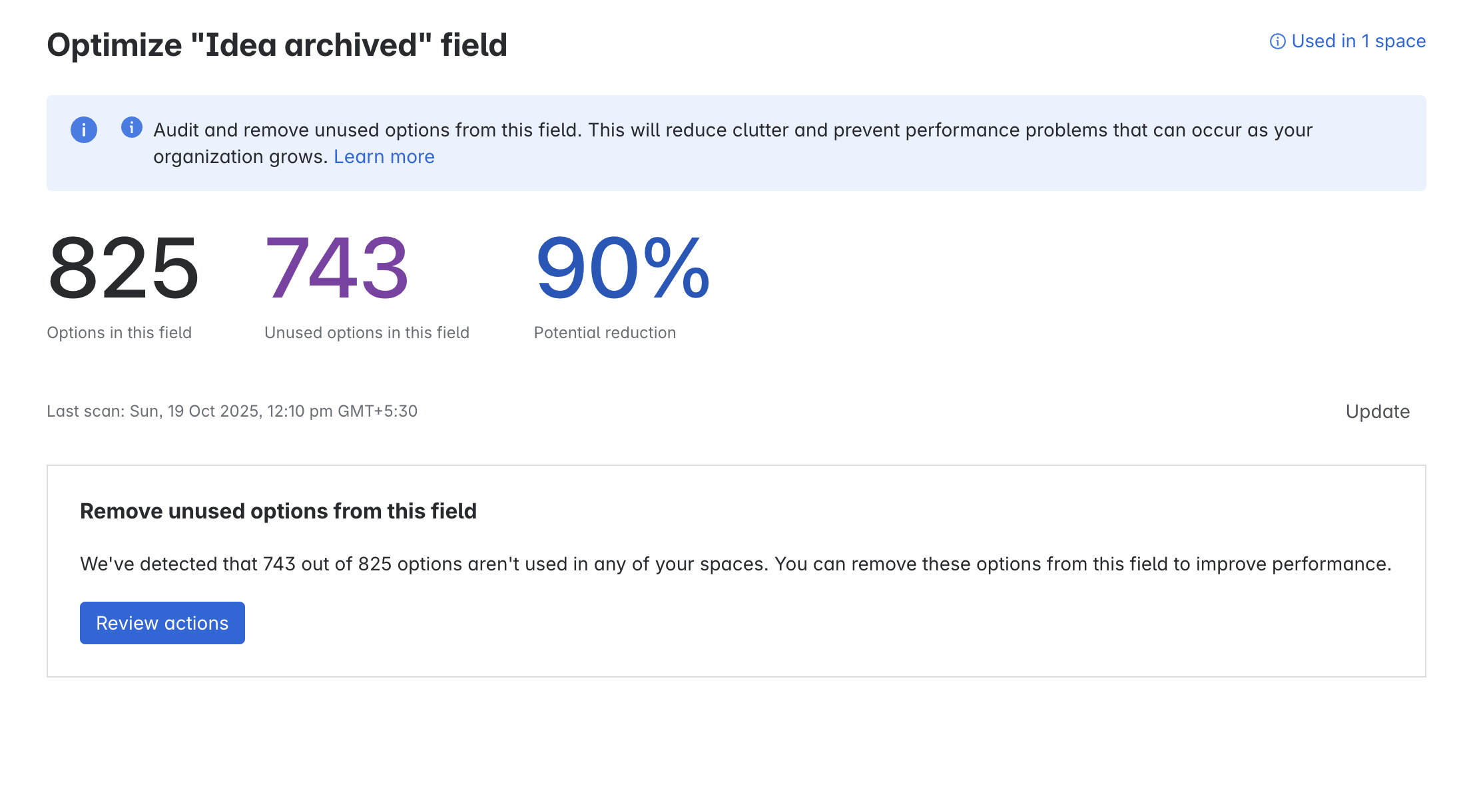
1. Remove unused custom field options: Identify field options not used in any issues or workflows and bulk-disable those options to reduce clutter
ss1.png

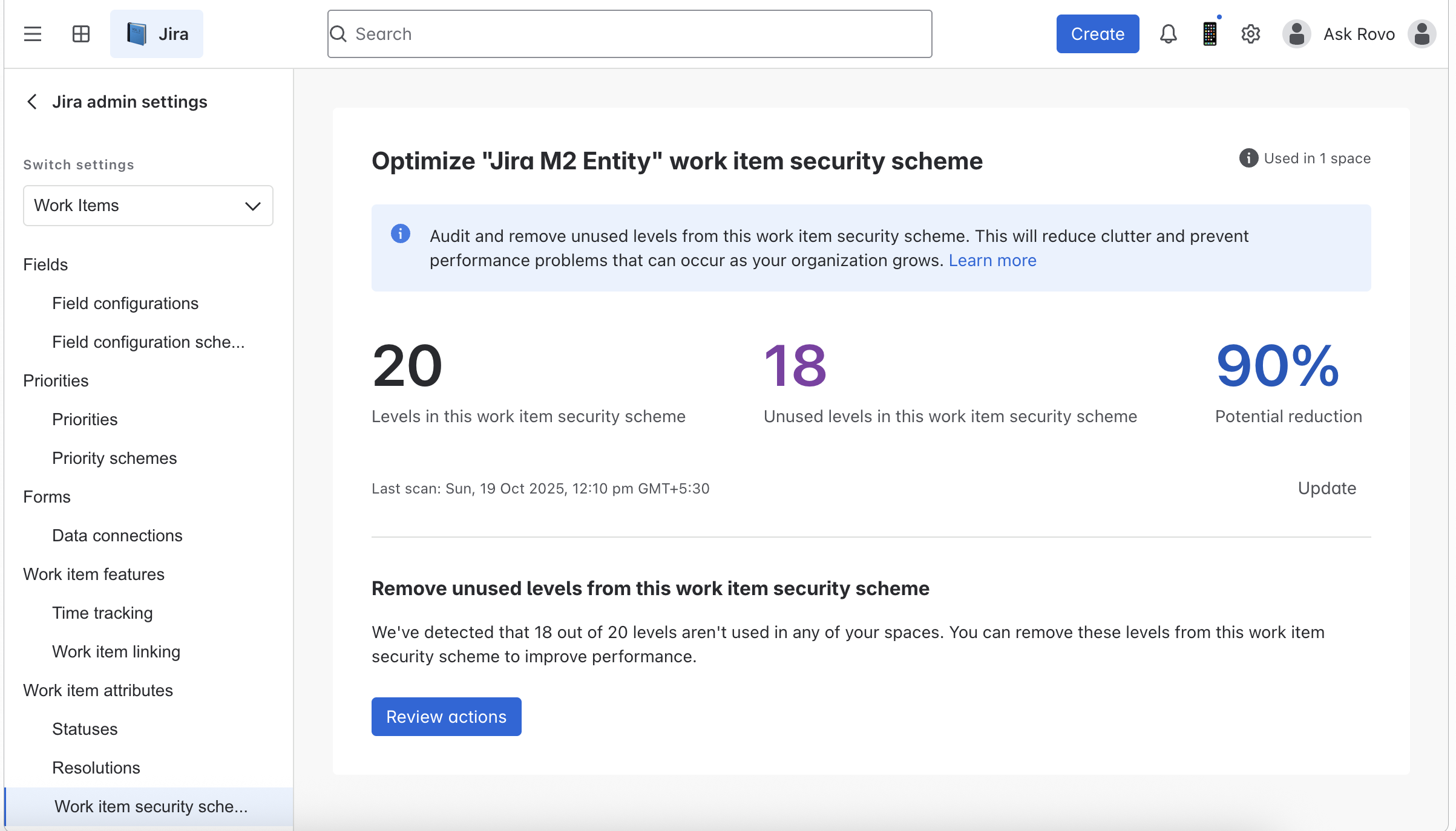
2. Remove unused issue security levels: Find issue security levels not used by any issues and bulk-remove those unused levels
ss2.png

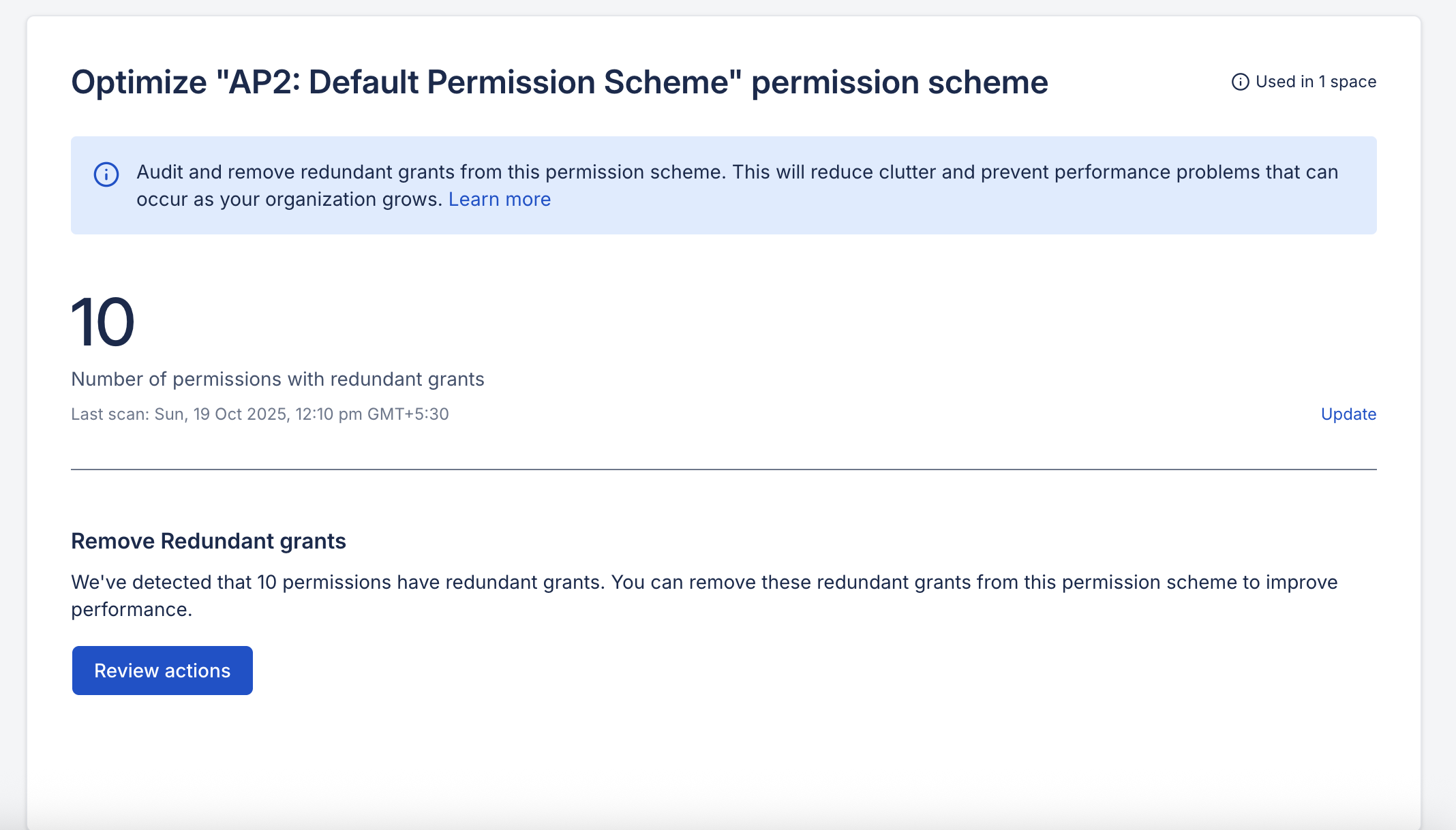
3. Coming soon! Remove unused groups or a single user from a grant: Supports bulk deletion of unused groups or single users from permission grants when:

  • A single user’s access is suspended, or

  • A group has no members, or all members have suspended access
ss3.png

Limits and guardrails work together to keep your Jira sites scalable, user‑friendly, and performant as you grow. We recommend all admins review the updated documentation, get a clear picture of your current data shape, and start tidying up your sites ahead of September’s limit enforcement.

Thank you for partnering with us to make the Jira Cloud family of apps even better. We’re here to help you scale with confidence and keep your teams moving fast!

22 comments

Dave LIAO
Community Champion
March 11, 2026

@Mel Policicchio - looking forward to these guardrails and helpful tools!

FYI, this article's title has a hanging "m", and the screenshots in the article aren't working...

Dave LIAO
Community Champion
March 11, 2026

p.s. I hope to never see a workflow with over 100 statuses in it. 🫠

Like # people like this
Chadd
I'm New Here
I'm New Here
Those new to the Atlassian Community have posted less than three times. Give them a warm welcome!
March 11, 2026

It's great that Atlassian is spending on time on things like this I suppose.  But when is Atlassian going to fix the real bugs that impact users daily? And implement quality of life feature requests that would improve using Jira. There are bugs that have been around for years that continue to go unfixed. And open feature requests from years ago with tens of thousands of votes. It feels like Atlassian doesn’t care about those types of issues. I love Atlassian products, but Atlassian is making it hard to continue to love the products. 

Like # people like this
Tim Eddelbüttel
Rising Star
Rising Star
Rising Stars are recognized for providing high-quality answers to other users. Rising Stars receive a certificate of achievement and are on the path to becoming Community Champions.
March 11, 2026

These limits will not block migrating cloud customers; all migrating customers will have 6 months from the date of their migration to adhere to Jira Cloud limits.

From the documentation page:

Fields: Maximum 700 fields per space
Calculated based on fields included in the field configuration schemes associated with the spaces.

Out of curiosity, so that means, as within Jira Data Center all fields are technically part the the field configuration. The migration will preserve these. Afterwards the customer has 6 month to go trough all field configurations and remove the fields that are not needed?

Like # people like this
Piotr Smialek
Contributor
March 12, 2026

Using the Marketplace app Dynamic Forms for Jira, you can avoid hitting the limit by replacing multiple fields into a single Bundled Field slot. It lets you display a group of sub-fields within one Jira field and use custom separators or sections to organize the layout, which greatly improves the UX of filling out work items.

You can test it on a free trial here: deviniti 

Like # people like this
Mel Policicchio
Atlassian Team
Atlassian Team members are employees working across the company in a wide variety of roles.
March 12, 2026

Thanks @Dave LIAO should be fixed now!

Like Dave LIAO likes this
Dave LIAO
Community Champion
March 12, 2026

@Mel Policicchio - confirmed! ✅ 

Like Mel Policicchio likes this
Dave Meyer
Atlassian Team
Atlassian Team members are employees working across the company in a wide variety of roles.
March 13, 2026

@Tim Eddelbüttel you said

as within Jira Data Center all fields are technically part the the field configuration. The migration will preserve these. Afterwards the customer has 6 month to go trough all field configurations and remove the fields that are not needed?

This is technically correct, but in practice we are working on building checks directly into our migration assistants as well as working hands-on with our large migrators who might be in this position to help clean up configuration as part of the migration process.

Like # people like this
Evie Z_
Community Manager
Community Managers are Atlassian Team members who specifically run and moderate Atlassian communities. Feel free to say hello!
March 19, 2026

@Piotr Smialek 

Thanks for your comment!

We’ve removed the external links from your post, per our Community Rules of Engagement, external links that may be promotional aren’t allowed in forum posts.

Like # people like this
Phelan_ Miranda
March 25, 2026

Hi Mel,

I have a question about "Issue security levels per space: 50"

I have an issue security scheme which has 140 security levels. This scheme is currently shared by 790 projects. However, most projects only use one of the security levels on their issues. Some projects use more than one level but never more than ten. Will the new limit have any impact in my organization? I think not, but just want to confirm.

Thanks,

Miranda

Mel Policicchio
Atlassian Team
Atlassian Team members are employees working across the company in a wide variety of roles.
March 25, 2026

Hey @Phelan_ Miranda great question I have shared with the product team and someone will get back to you shortly!

Előd
I'm New Here
I'm New Here
Those new to the Atlassian Community have posted less than three times. Give them a warm welcome!
March 25, 2026

Hi, just to clarify, do JSM customers count towards the “Space role actors per space” (5,000) limit, or is it only internal users assigned to space roles?

Mathew Lederman
Rising Star
Rising Star
Rising Stars are recognized for providing high-quality answers to other users. Rising Stars receive a certificate of achievement and are on the path to becoming Community Champions.
March 25, 2026

@Phelan_ Miranda if security schemes work like every other scheme in Jira, yes, absolutely. Actual usage doesn't matter, the scheme count is what's being blocked.

For the existing data limits and guardrails it doesn't matter if you're only using 50 fields in a field configuration, if the configuration itself has more than 700 fields, you're blocked from adding anything until you get below the threshold.

Hopefully I'm wrong, but I'm guessing you'll need to break things down into at least 3 separate schemes.

Prashanth M
Atlassian Team
Atlassian Team members are employees working across the company in a wide variety of roles.
March 25, 2026

Hey @Phelan_ Miranda 

The maximum number of security levels that could you have in any work item security schemes is 50 irrespective of number of spaces associated. We suggest the following remediation actions -

1. Remove unused security levels from your scheme using the optimisation tool. Read more
2. Split existing work item security scheme with 140 levels to smaller schemes and associate it to the relevant spaces

Like # people like this
Christof Hurst
Contributor
March 25, 2026

These limits are far from a good architectured instance. So no one should ever come in touch with these. 

I hope I will never see an installation with nearly facing these limits. 

Like # people like this
Prashanth M
Atlassian Team
Atlassian Team members are employees working across the company in a wide variety of roles.
March 26, 2026

Hey Elod, 

JSM customers are not factored in towards the Space role actors limit.

Like # people like this
Gregory Kneller
March 26, 2026

While these limits provide important technical boundaries, from an architectural perspective they still represent a level of configuration complexity that would be considered significantly over-engineered in most environments.

Like # people like this
Dave LIAO
Community Champion
March 26, 2026

@Phelan_ Miranda - 👋 I'd love to see the Issue Security Scheme you mentioned and how it's configured.

Curious if there are Automations that are working to shift security levels based on specific situations, and what the positives are on having so many levels defined in a single scheme...

A future Community article (with any sensitive names/details redacted) on the scheme would be amazing. 😄

Carlos Faddul
Rising Star
Rising Star
Rising Stars are recognized for providing high-quality answers to other users. Rising Stars receive a certificate of achievement and are on the path to becoming Community Champions.
March 27, 2026

@Mel Policicchio 

What is the roadmap for handling fields and statuses from legacy Team-Managed projects? These elements are cluttering our instances and drastically increasing the total custom field count.

Even after projects are deleted or archived, these legacy attributes often persist and remain accessible via REST API, creating significant technical debt. For lean admin teams, the manual cleanup or migration of these items is an operational nightmare and simply not scalable.

Are these 'ghost' fields being factored into the upcoming cleanup tools to help us maintain a leaner, more performant instance?


Like Dave LIAO likes this
Lutz Limburg
I'm New Here
I'm New Here
Those new to the Atlassian Community have posted less than three times. Give them a warm welcome!
March 30, 2026

@Mel Policicchio @Prashanth M   

15,000 versions per space is a rather unusual limit and poses a challenge for us, as we are continuously delivering new versions in a CI/CD manner. This cannot be an issue unique to us — having at least one Jira project per service or product is quite common, and such projects naturally accumulate thousands of versions over time.

Could you please comment on your plans regarding this limitation and advise how CI/CD‑driven companies should best mitigate it?

Could you also please clarify: Does this count include archived versions or are only unarchived versions counted?

Like # people like this
John Dunkelberg
Contributor
March 30, 2026

@Mel Policicchio and @Prashanth M : Related to @Lutz Limburg's feedback we would like to see an Atlassian recommended solution for enterprise-scale versioning.  We currently have a home-built solution to synchronize versions across hundreds of projects (ahem, "spaces") which may work together to produce a release to our customers.  As we move to increasingly rapid delivery, we are challenged to see how this will scale.  I'm not immediately worried about 15k per space, compared to getting to daily delivery (that'd be decades work of versions), but the overall system is concerning.  If there's a whitepaper or other guidance on this, I'd greatly appreciate a pointer.

Like Dave LIAO likes this
Viraj Nalawade
Atlassian Team
Atlassian Team members are employees working across the company in a wide variety of roles.
March 30, 2026

Hello @Carlos Faddul ,

Thanks for raising this – we know legacy team‑managed project fields and statuses can create exactly the kind of “ghost” configuration and technical debt you’re describing.As per our Jira limits & clean‑up tools plan:

  • For statuses per workflow, we’re introducing limits and better visibility, but we don’t yet have dedicated clean‑up tools planned for statuses at the project level.
  • For custom fields, we do provide clean‑up and optimisation via Site Optimiser, which helps identify and remove unused fields for both company‑managed and team‑managed projects.

We really appreciate this feedback – it’s helpful input as we continue to evolve our limits and clean‑up tooling.

Like Dave LIAO likes this

Comment

Log in or Sign up to comment
TAGS
AUG Leaders

Atlassian Community Events