The Atlassian Community Forums are currently in read-only mode. We will be relaunching on a new platform on September 22 (read more here). We apologize for the extended downtime. For concerns or questions, please email communitymanagers@atlassian.com. See you on the other side, on the new Atlassian Community Forums! :)
× Create
Turn on suggestions
Auto-suggest helps you quickly narrow down your search results by suggesting possible matches as you type.
Showing results for
Community resources
Community resources
Community resources
- Community
- Q&A
- Confluence
- Questions
- 冻结首行


1 answer
Comments for this post are closed
Community moderators have prevented the ability to post new answers.


Katerina Kovriga _Stiltsoft_
Rising Star 
Rising Star
Rising Stars are recognized for providing high-quality answers to other users. Rising Stars receive a certificate of achievement and are on the path to becoming Community Champions.
January 17, 2021 edited
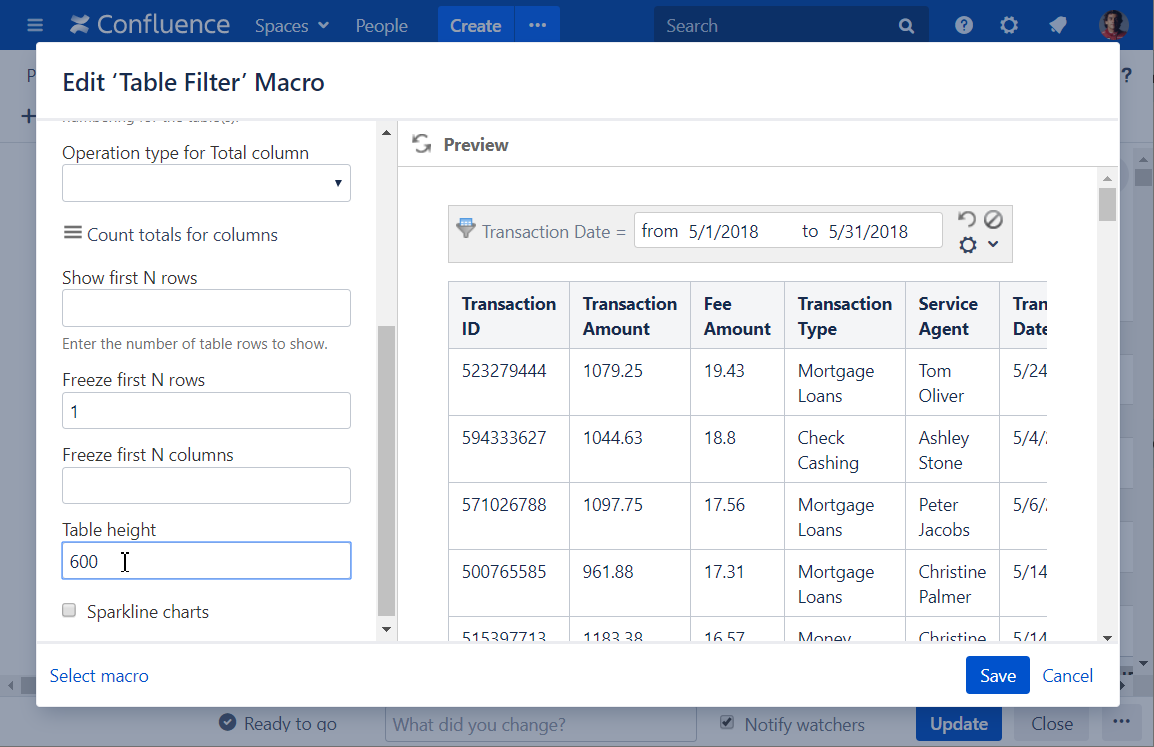
@政 蔡, you could really use the Table Filter macro from the Table Filter and Charts for Confluence app that you were recommended in the previous answer to freeze rows and columns.
Go to the macro settings -> Table View tab -> Freeze first N rows/Freeze first N columns fields and type in the required number:
You must be a registered user to add a comment. If you've already registered, sign in. Otherwise, register and sign in.

Was this helpful?
Thanks!
Copyright © 2026 Atlassian
You must be a registered user to add a comment. If you've already registered, sign in. Otherwise, register and sign in.