Community resources
Community resources
Community resources
Real Integration Challenges in 2024-2025: Key Insights from Customer Conversations

At Exalate, we recently published research based on extensive customer conversations about integration challenges.
The patterns are striking: 82% are fighting manual copy-paste workflows, 70% consider their integrations mission-critical, and cross-company collaboration has exploded.
Here are the key takeaways and how you can apply these insights to your own integration strategy.
Why This Matters for Your Atlassian Stack
If you're managing Jira or Jira Service Management in your organization, chances are you've faced (or are facing) the integration challenge: How do you connect your Atlassian tools with the rest of your tech stack without creating a maintenance nightmare?
Our team recently analyzed customer conversations about integration experiences. We looked at what's working, what's breaking, and most importantly, what patterns separate successful integrations from failed ones.
The findings are eye-opening, and I wanted to share the most actionable insights here because 82% of teams are still fighting the same manual copy-paste battles, and many don't realize there are proven patterns to escape them.
This is a condensed version. For the complete analysis, check out our full report.
The Numbers That Tell the Story
The research revealed compelling statistics about the most common integration drivers.
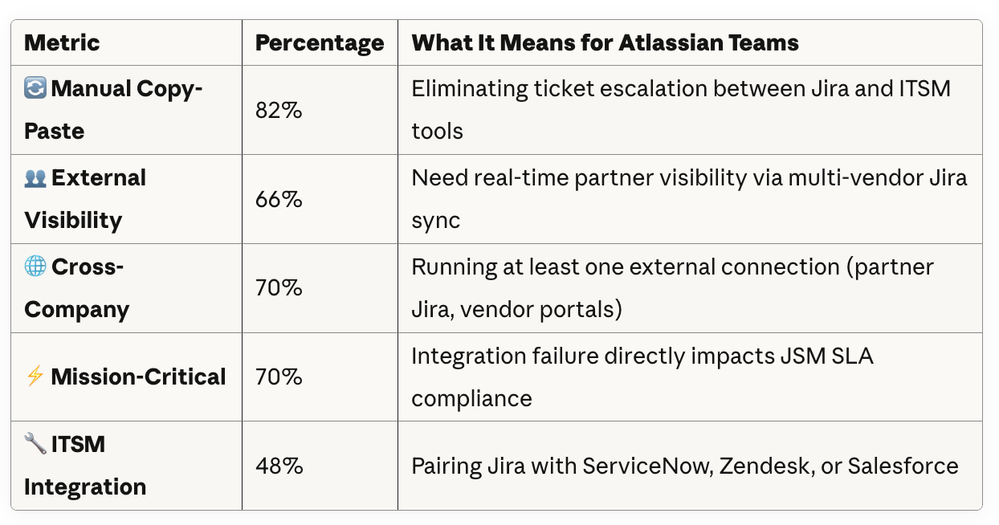
The Top 4 Integration Drivers for Users
1. Escaping Manual Copy-Paste Hell
82% cite this as their primary driver.
Your team is probably doing this right now:
- Support agents manually copying Zendesk tickets into Jira Software issues
- Service desk teams screenshotting JSM requests to send to vendors
- Project managers duplicating Jira stories into Salesforce for executive visibility
- DevOps engineers copy-pasting between Jira and Azure DevOps
Real Impact: Teams save up to 15 hours per week when they automate this.
Solutions:
- Jira Software ↔ JSM: Auto-escalate service requests to dev teams
- ServiceNow ↔ Jira Software: Orchestrate service workflows, end-to-end
- Jira ↔ Salesforce: Sales-to-engineering pipeline automation
- Jira ↔ Zendesk: Support ticket escalation with full history
2. Post-Merger Consolidation Chaos
After M&A, you suddenly have:
- 3 different Jira Cloud instances
- 2 Jira Data Center instances
- ServiceNow in one division, JSM in another
- No idea which system holds the source of truth
The Mistake: Rushing to consolidate everything immediately.
The Better Approach:
- First: Integrate instances so data flows freely
- Then: Gradually migrate once you understand the workflows
- Result: Reduced risk + smoother user adoption
Keep instances synchronized during migration. This lets you:
- Migrate user groups gradually
- Maintain business continuity
- Roll back if something breaks
- Validate data before decommissioning old instances
3. External Partner Visibility (Without Licensing Chaos)
66% need this, but IT won't approve:
- Extra Jira licenses for external contractors
- VPN access for vendor developers
- Full system access for partner QA teams
Common Scenarios:
- Multi-vendor projects: Each partner has their own Jira, but you need unified visibility
- Client-facing projects: Customers want ticket status without Jira access
- Outsourced development: Offshore teams need issue visibility, not full board access
The Solution: Selective synchronization where YOU control:
- Which fields cross organizational boundaries
- What partners can see vs. what stays internal
- Real-time updates without security risks
4. Migration and Coexistence
Moving from Jira Data Center to Cloud?
Maybe, this is your reality: "We thought the migration was hard. Turns out, keeping both systems in sync during the transition was harder."
Why Coexistence Matters:
- You can't migrate 500 Jira projects altogether in one go
- Users need time to adapt to Cloud differences
- Some workflows need Cloud features, others need DC plugins
- Testing requires both environments to stay synchronized
Best Practice for :
- Set up bidirectional sync before migration starts
- Live migrate projects in phases (10-20 at a time)
- Keep both environments running in parallel for 2-3 months
- Validate data integrity at each phase
- Decommission DC only when everyone's comfortable
This same pattern works for:
- Jira Cloud multi-instance consolidation
- JSM sandbox ↔ production synchronization
- ServiceNow dev/test/prod environment management
The 5 Most Common Integration Patterns
Based on the research, here are the integration workflows Atlassian users implement the most.
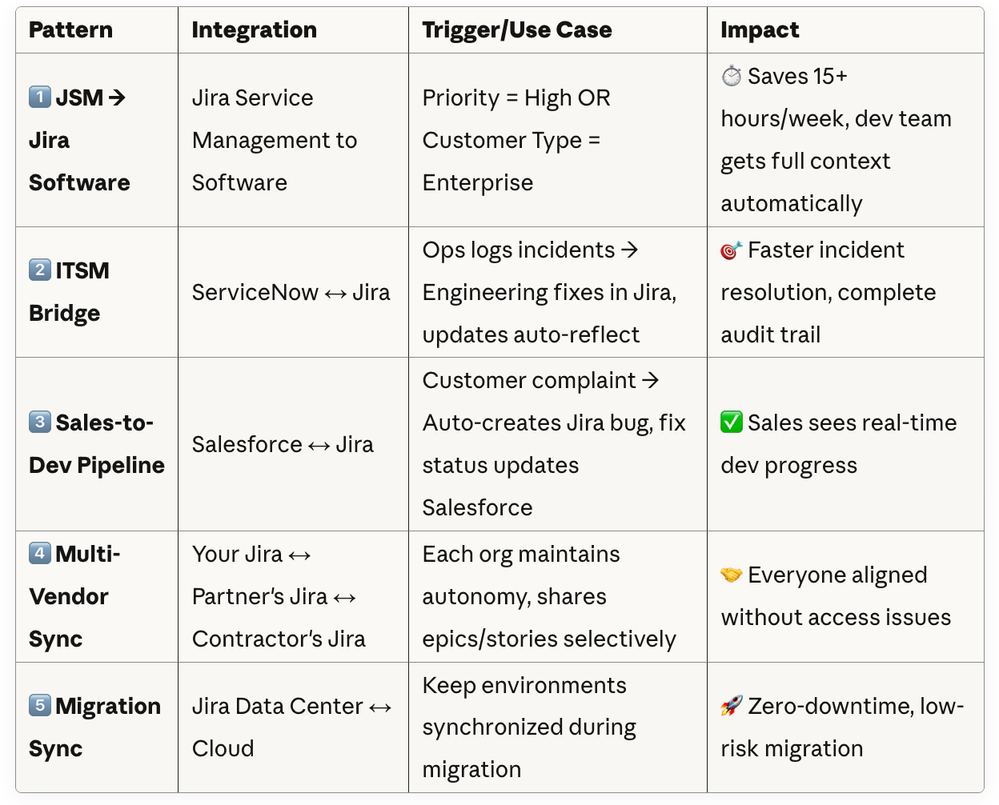
JSM to Jira Escalation
The Problem: Service desk agents manually create dev tickets for complex issues, copying all context, attachments, and customer comments. This takes 15-20 minutes per escalation.
The Automated Workflow:
- Customer reports critical bug in JSM
- Agent changes status to "Escalate to Engineering"
- Integration automatically:
- Creates Jira Software work item in correct project
- Copies description, attachments, priority
- Links JSM request to Jira work item
- Sets up bidirectional comment sync with comment impersonation and filtering, if required
- Developer fixes issue, updates Jira
- Agent sees updates in JSM automatically
- Agent updates customer without switching tools
Real-World Example: Multi-Vendor Project Management
The Scenario: You're building a product with 3 external development partners. Each partner refuses to use your Jira instance (they have their own processes).
The Integration Pattern:
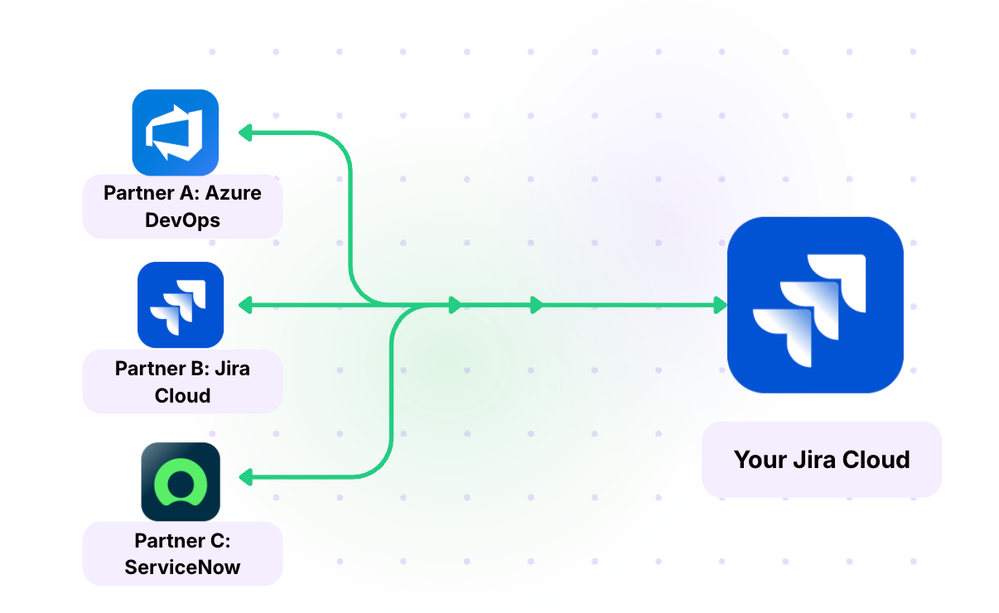
What gets synchronized:
- Epics and Stories (selective fields only)
- Incidents based on specific assignment groups
- Status updates (bidirectional)
- Priority changes
- Key comments (not internal discussions)
- Attachments (only customer-facing docs)
What Stays Private:
- Time tracking
- Internal comments
- Estimated hours
- Cost-related fields
- Each partner's internal workflow
Result: Everyone works in their preferred tool, but project managers have unified visibility across all vendors.
When Integration Becomes Mission-Critical for Teams
The research revealed that 70%+ of organizations now consider their integrations mission-critical.
If Your Integration Stops for One Day:
- 3-4 additional hours of manual work per agent
- Direct SLA breaches (penalties written into contracts)
- Customers complaining about lack of updates
- Lost visibility into engineering progress
- Incidents pile up with no Jira tickets
- Manual CSV exports and screenshot sharing chaos
- Incomplete audit trails across systems
- Manual reconciliation of ticket histories
- Potential regulatory compliance failures
One operations director quantified it:
"A day of integration outage means manual CSV exports, screenshots, and lost SLA time. Several hours per user per day."
The “Prove It” Strategy
Some teams deliberately allowed minor failures to demonstrate the risk to stakeholders.
If 70% of organizations consider their integrations mission-critical, yours probably is too.
What Teams Value in Integration Solutions
Based on the research, here's what matters most:
- Control & Flexibility - Not being dependent on a central hub that becomes a single point of failure
- Scripting Freedom - Deciding exactly what to sync, line by line
- Bidirectional, Any-to-Any - Connecting multiple tools in both directions
- Real-Time, Granular Automation - Conditional triggers that work immediately
- Stability at Scale - Expanding from one connection to dozens without re-architecting
The Bottom Line
The research makes one thing crystal clear: integration has graduated from "nice automation" to "can't-break infrastructure."
As one customer beautifully put it: "Integration doesn't just connect our systems, it connects our teams, our processes, and our ability to deliver on promises to our clients."
Read the full field report with detailed analysis. Have questions? Drop a comment or reach out, happy to help!