As Jira Administrators and Service Desk Managers, you’ve all been there: a "Low Priority" ticket that involves a high-complexity integration sits in the queue, while a "High Priority" ticket that only requires a password reset gets instant attention.
If your Service Level Agreements (SLAs) are built solely on a single "Priority" field, you aren't just measuring your team, you might be mismanaging them. Treating every ticket with the same broad brush strokes leads to skewed metrics, team burnout, and a disconnect between what the business needs and what IT delivers.
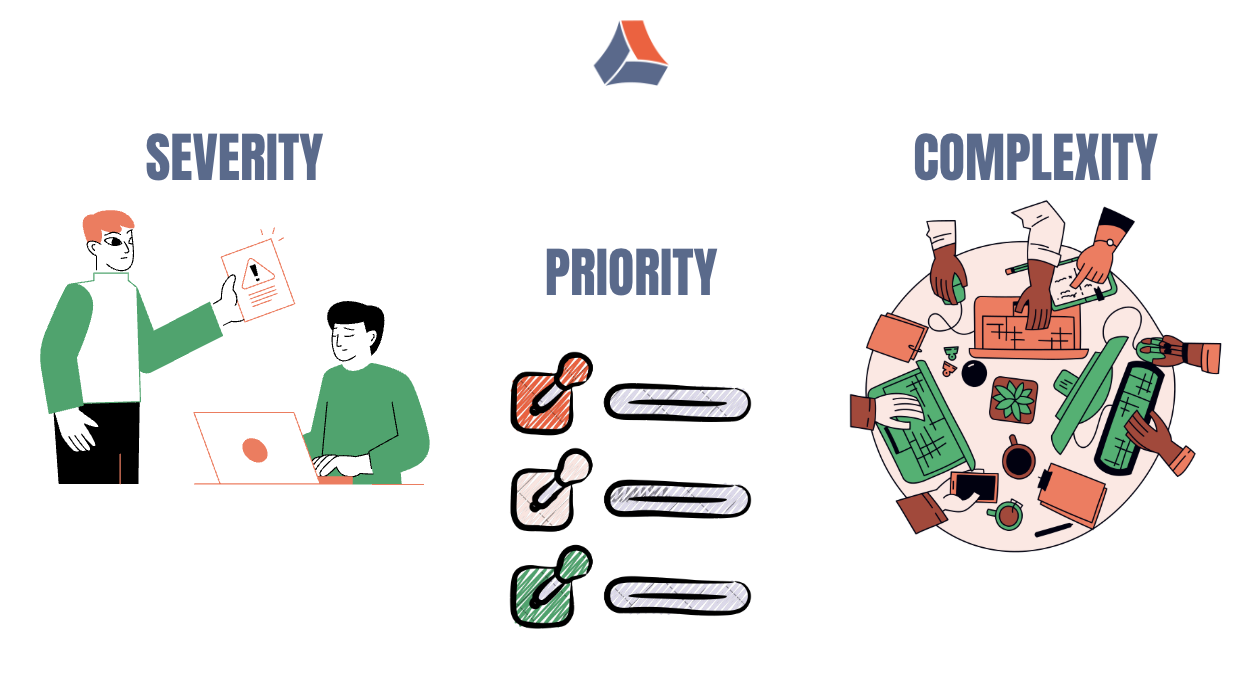
In this article, we’ll explore why it’s time to move beyond "one-size-fits-all" SLAs and how a multi-dimensional approach using Severity, Priority, and Complexity can transform your delivery.
Why Uniform SLAs Create Problems
Uniform SLAs are attractive because they are easy to configure and easy to explain. One target, one clock, and one report feels manageable for administrators and managers alike.
However, this simplicity comes at a cost. When all tickets share the same SLA expectations, performance metrics quickly lose meaning. A developer who spends several days resolving a high-complexity issue may appear to be underperforming, while another team member who closes multiple simple requests looks highly efficient. From a reporting perspective, this creates the illusion that the team is failing, even when critical and valuable work is being completed.
Over time, teams react rationally to this setup. They start favoring tasks that are “safe” from an SLA perspective and postponing difficult or risky work that is more likely to breach the clock. This behavior is rarely intentional, but it is a predictable outcome of how the SLAs are designed.
To correct this, SLAs must distinguish between business impact, work urgency, and implementation effort. These are not the same thing, and they should not be measured the same way.
The Three Dimensions of Meaningful SLA Rules
Severity: Measuring Business Impact
Severity describes the impact an issue has on the business or users if it remains unresolved. It answers the question: How serious is this problem right now?
For example, a production outage affecting all customers represents a high-severity issue, even if the root cause is unknown. A cosmetic UI issue on an internal page, on the other hand, has low severity regardless of how quickly someone expects it to be fixed.
In practice, severity is most useful for defining response-time SLAs. High-severity issues should be acknowledged and investigated immediately, even if the actual resolution will take time.
If you want a deeper, step-by-step breakdown, you may also find useful my article on how to configure and manage SLA severity in Jira.
Priority: Determining the Order of Work
Priority answers a different question: What should the team work on first?
While severity reflects impact, priority reflects decision-making. It often combines severity with urgency, contractual obligations, customer importance, or business deadlines. A medium-severity issue blocking a release may take precedence over a higher-severity issue that already has a workaround.
Priority works best as a signal for sequencing work rather than as the sole driver of SLA targets. When SLAs rely only on priority, they tend to mix urgency with effort, which leads to inconsistent and confusing results.
Complexity: Accounting for Effort and Risk
Complexity is frequently overlooked in SLA design, but it plays a crucial role in fairness and accuracy. Complexity reflects how difficult an issue is to resolve, how many steps are involved, and how much uncertainty the team faces.
A high-priority task may be trivial, such as resetting credentials or updating a configuration value. Another task with the same priority might require a deep architectural change, coordination across teams, or a lengthy investigation. Treating both with the same resolution SLA almost guarantees misleading outcomes.
Complexity is therefore essential for time-to-resolution SLAs, ensuring that teams are not penalized simply for working on harder problems.
I also cover this topic in more detail in my article on configuring SLA complexity, with practical examples from real Jira setups.
Practical Jira Examples
To understand how severity, priority, and complexity should influence SLA rules, it helps to look at realistic scenarios that teams encounter in Jira every day. The key is that the same priority does not always mean the same SLA, and the same impact does not always require the same resolution time.
Below are three common cases from Service Management, Development, and Delivery workflows, showing how teams can align SLA expectations with real work.
🟡 Case A: Visible, Urgent, but Simple
A senior stakeholder reports that they cannot log in. The ticket is escalated quickly due to visibility, but the issue itself is easy to resolve.
Severity is low because only one user is affected. Priority is high to ensure fast handling. Complexity is low, as the solution is known and repeatable.
The SLA should focus on a very fast response and a short resolution time that reflects the simplicity of the task.
🟢 Case B: Low Visibility, High Risk
A reporting API returns slightly incorrect data. There is no outage and only limited user impact, but the issue introduces a serious data integrity risk.
Severity is high due to business impact. Priority is medium, since the system is still running. Complexity is high because investigation and validation are required.
The SLA should ensure a fast response, while allowing a longer, realistic resolution time to avoid rushed fixes.
🔴 Case C: High Priority, High Complexity delivery blocker
An integration issue blocks an upcoming release. Production users are not affected yet, but resolving the problem requires coordination across multiple teams.
Severity is medium, priority is high, and complexity is high due to dependencies and handoffs.
The SLA should ensure quick ownership and track active work time across statuses, making delays visible without penalizing complex delivery work.
SLA configuration summary
|
Case
|
Severity
|
Priority
|
Complexity
|
Response SLA
|
Resolution SLA
|
Typical Use
|
|
A
|
Low
|
High
|
Low
|
Very fast
|
Short
|
Simple, visible requests
|
|
B
|
High
|
Medium
|
High
|
Fast
|
Long, realistic
|
Risky but non-urgent issues
|
|
C
|
Medium
|
High
|
High
|
Fast
|
Extended
|
Cross-team delivery blockers
|
Applicability
These scenarios are applicable to both Jira Service Management and Jira Software. In Jira Software, the same logic is often used as internal SLA or time-based delivery expectations rather than formal customer-facing SLAs.
Why this matters
By separating impact, urgency, and effort, teams avoid misleading SLA breaches and create reports that reflect real work. This leads to fairer metrics, better prioritization, and stronger trust across teams.
Why native Jira SLAs often reach their limits
Jira’s built-in SLA functionality works well for straightforward scenarios. However, it becomes difficult to manage when teams need to combine multiple fields, track work across handoffs, or explain SLA outcomes in a meaningful way.
Administrators often end up maintaining long lists of SLA goals with complex JQL conditions. Reports show breaches, but not the reasons behind them. For Delivery Managers, this makes it hard to understand where time is actually spent and where process improvements are needed.
At this stage, many teams look for ways to extend Jira’s SLA capabilities without rebuilding their workflows from scratch.
This is where SLA Time and Report for Jira is commonly used as a practical extension to Jira’s native features.
Configuring flexible SLA Conditions
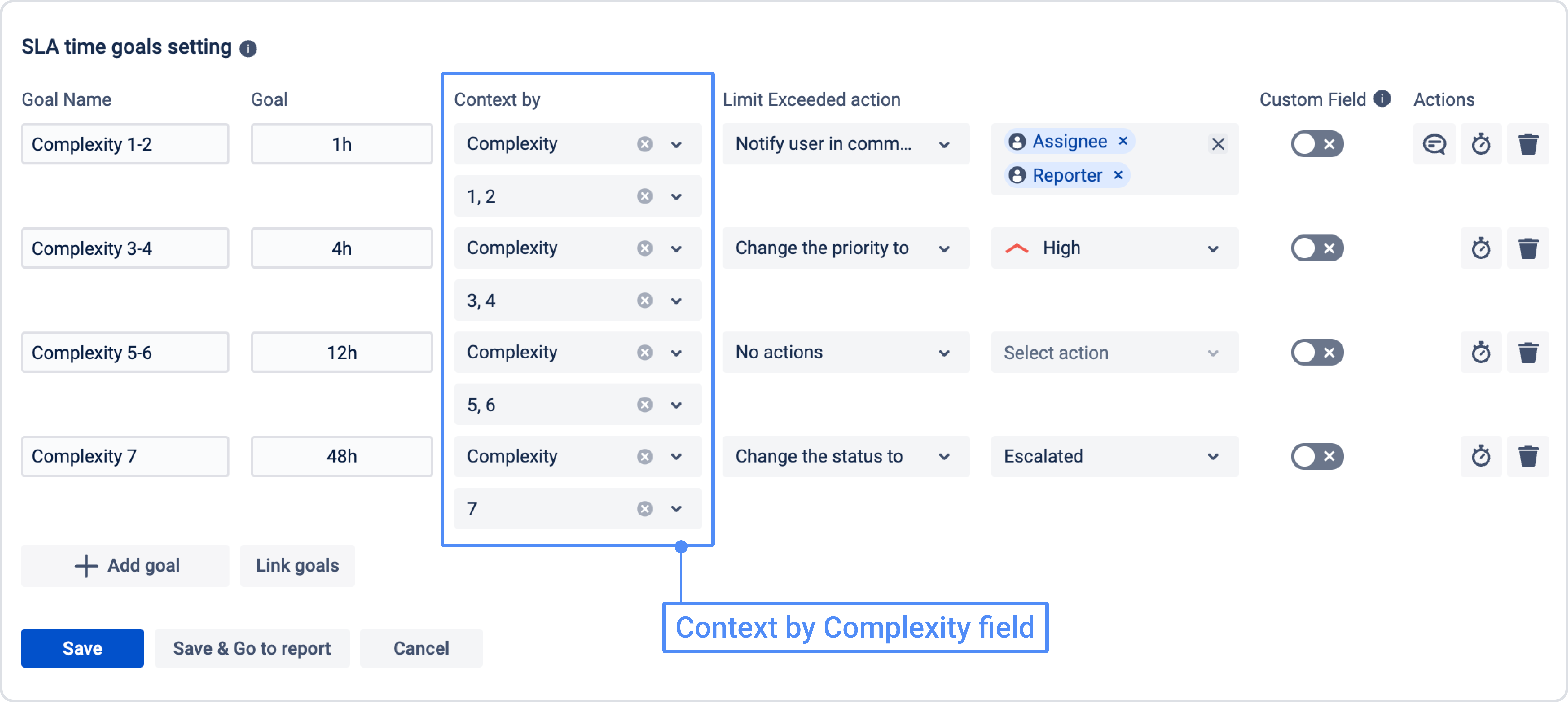
The app allows teams to define SLA goals based on combinations of fields such as severity, priority, complexity, or custom. Instead of duplicating dozens of SLA rules, administrators can express clear conditions that reflect real-world logic.
For example, one SLA can measure response time only for high-severity issues, while another tracks resolution time exclusively for high-complexity tickets. This keeps configurations readable and easier to maintain. 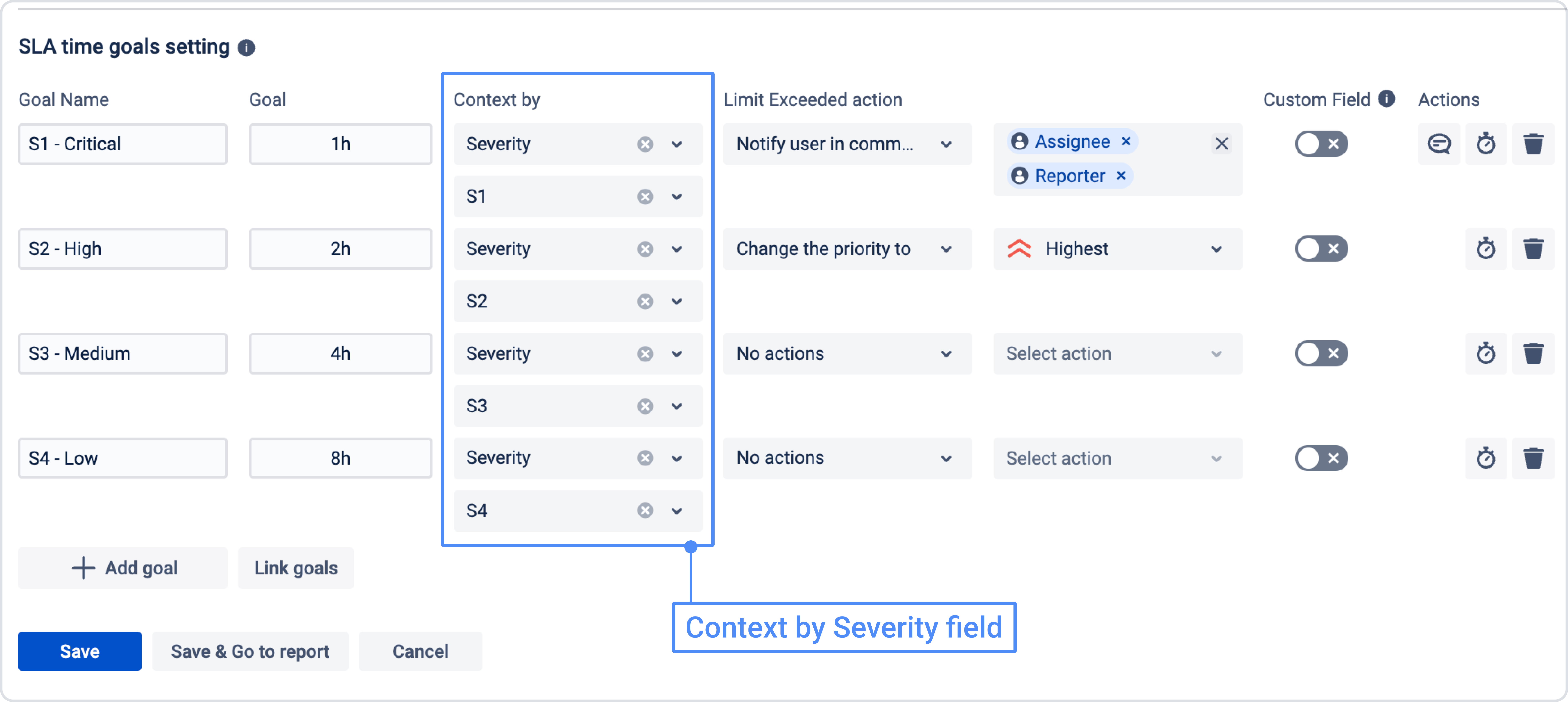
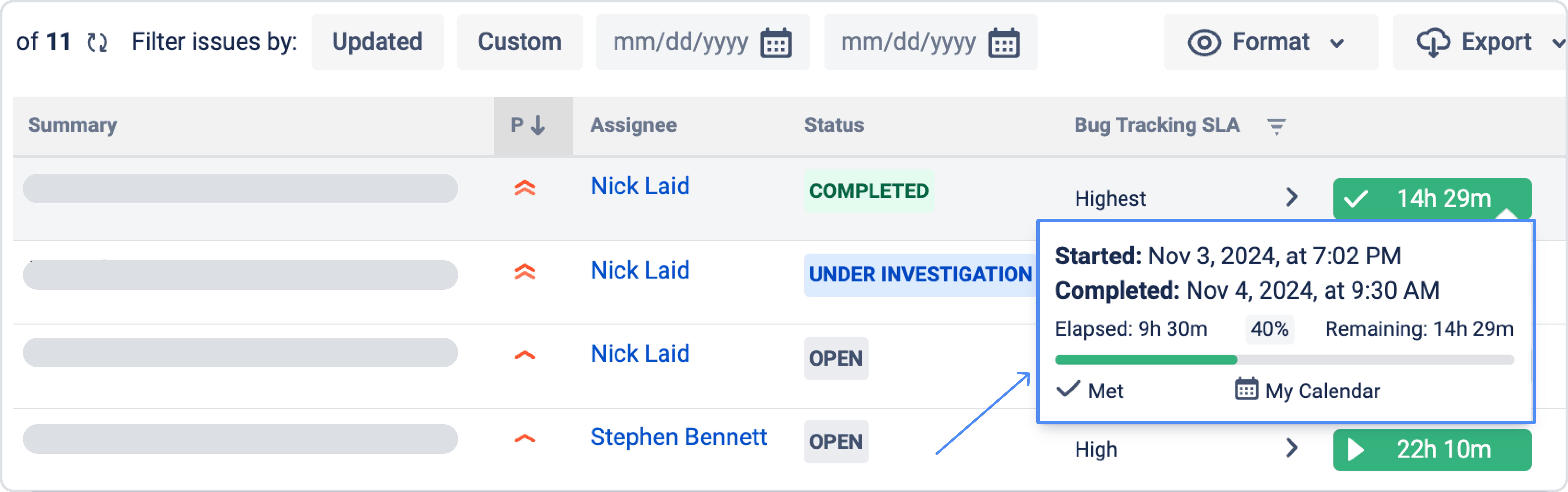
Tracking SLA Time across handoffs
In many organizations, work passes through several teams before completion. Tickets move from Support to Development, then to QA, and sometimes back again. Native SLAs often lose visibility during these transitions.
The app tracks SLA time across statuses, assignees, and other fields. This makes it easier to understand whether delays come from waiting, investigation, or execution, and helps Delivery Managers identify real bottlenecks instead of guessing.
Reporting that builds trust
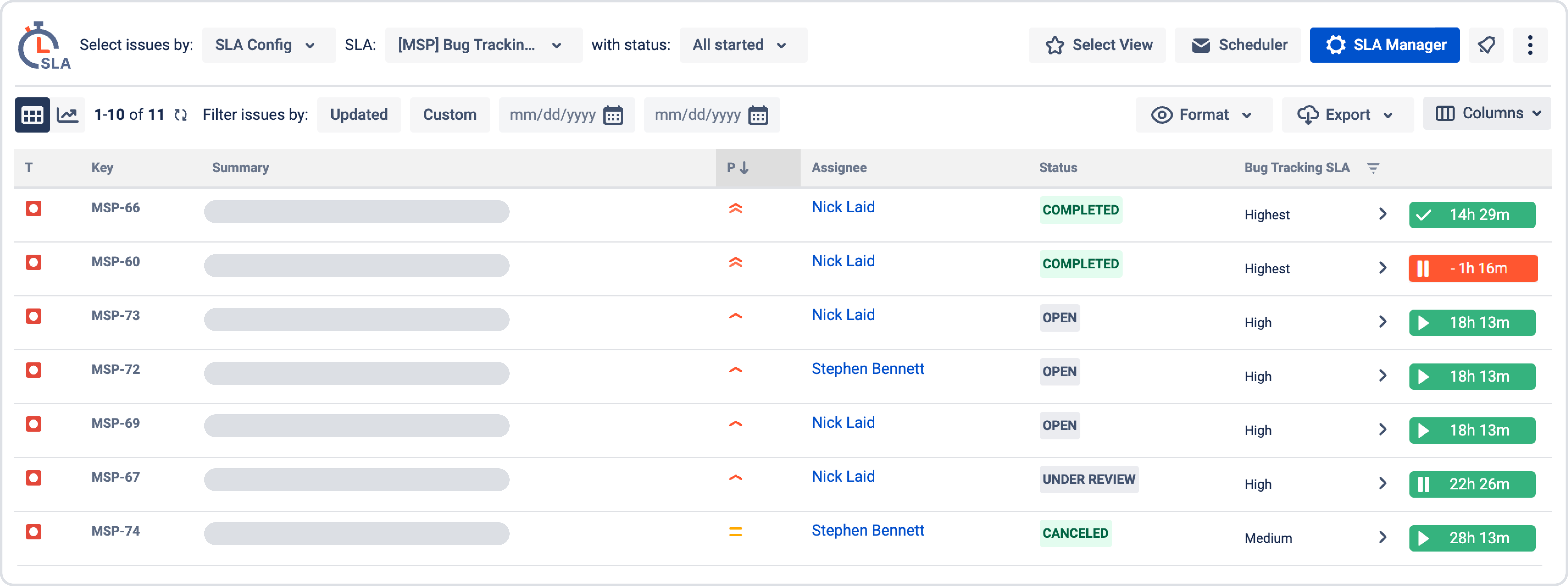
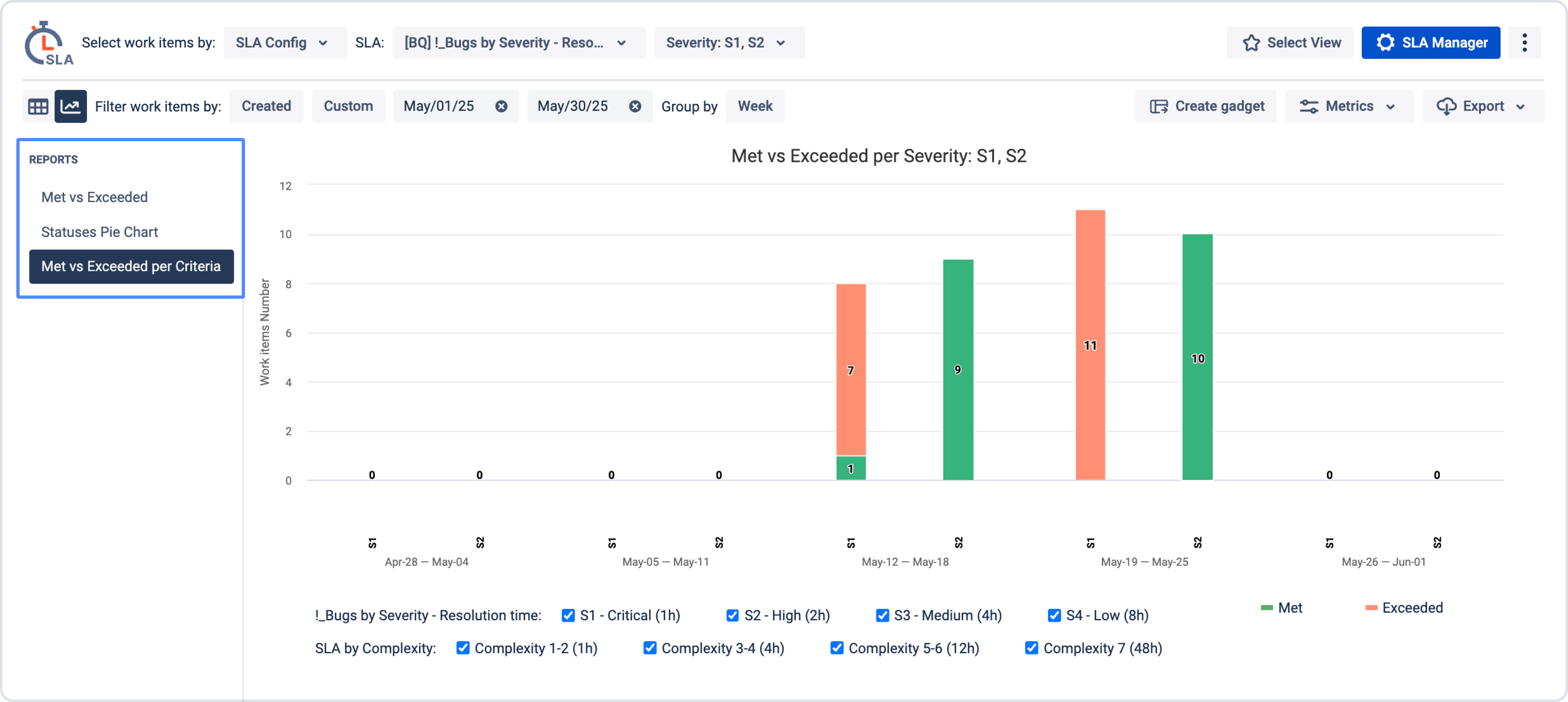
Reporting is where fair SLA design truly pays off. Instead of a single breached or met indicator, teams can analyze SLA performance by severity, priority, or complexity.
Managers can clearly see that high-complexity work takes longer but still meets its defined targets. Teams feel that their effort is measured realistically, and stakeholders gain confidence in the numbers they see.
Conclusion: Better SLAs create better outcomes
When all tickets are treated the same, SLAs quickly lose credibility. Teams feel pressured, reports feel unfair, and managers struggle to make informed decisions.
By designing SLAs around severity, priority, and complexity, organizations align expectations with reality. Response times reflect impact, resolution times reflect effort, and reports tell a story that makes sense.
Whether you rely on Jira’s native capabilities or extend them with tools like SLA Time and Report for Jira, the principle remains the same: fair measurement leads to better behavior, stronger trust, and more predictable delivery.
If you found something useful in the SLA Time and Report app but are not sure whether it fully fits your workflow, you can book a 1:1 demo call with our Product Manager. During the call, they will walk you through how to configure the app specifically for your process, what you can measure, and how to set it up to match your exact needs.
