In today’s fast-moving digital world, teams are juggling an ever-growing number of tasks, projects, and deadlines. Yet no matter how much work is completed, real value is only delivered at the moment of release to production. Until then, all achievements remain “on disk” — invisible and unusable for end users.
This reality has pushed the industry toward continuous delivery, a practice focused on delivering value as quickly and reliably as possible, in the smallest viable increments. Architectural shifts support this change as well: instead of large monolithic applications, modern systems are increasingly composed of independently deployable, asynchronously distributed components. This allows teams to release features separately, safely, and more often.
As a result, release frequency has become one of the most important performance metrics in modern software delivery. Along with lead time and release cycle time, it was popularized by the DevOps Research and Assessment (DORA) team at Google as a key indicator of high-performing engineering organizations.
Frequent releases bring several critical advantages:
- Reduced risk: Smaller releases contain fewer changes, making them easier to test and less likely to introduce unexpected issues. Large releases, by contrast, tend to accumulate changes like a snowball, increasing both complexity and risk.
- Faster recovery: When something goes wrong, smaller releases are significantly easier to roll back or fix. This directly improves another key DORA metric — Mean Time to Recover (MTTR). It would also help to decrease the Mean Time to Identification (MTTI) and address potential issues faster.
- Shorter time to market: Releasing more often enables faster feedback loops, quicker validation of ideas, and ultimately a better return on investment by delivering value to users sooner.
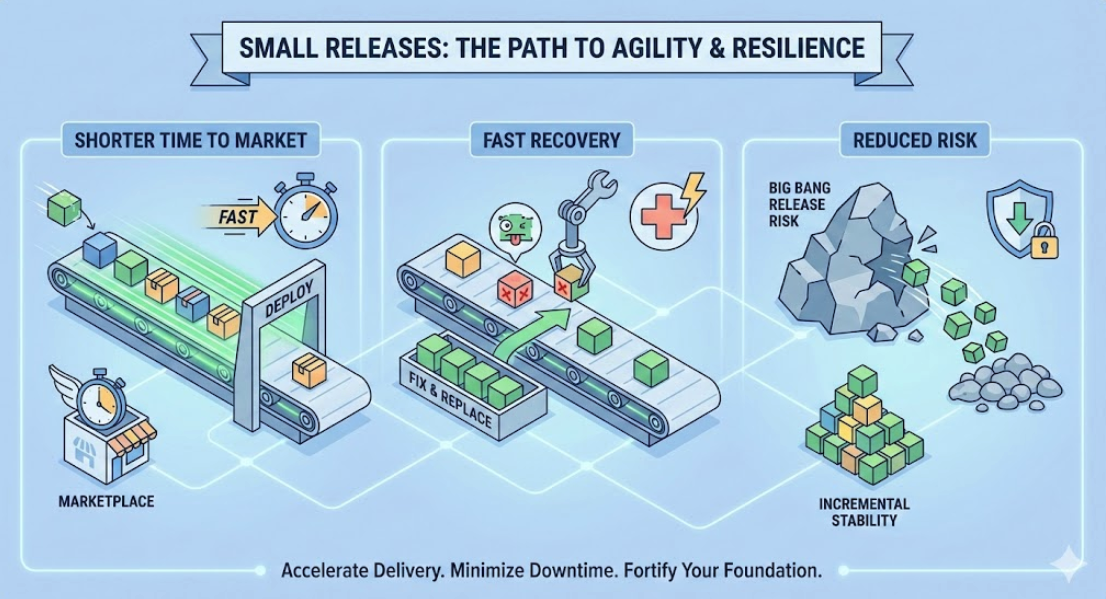
Well, how can we track it?
Out of the box
Keeping all these advantages in mind, an obvious question arises: how can release frequency be tracked in Jira?
The uncomfortable truth is that Jira does not provide a built-in report for tracking release frequency. While Jira offers many useful delivery and progress reports, release frequency is not one of the metrics available out of the box.
There is a way to view individual releases using the Releases view, where you can see version names, release dates, and their current status. However, this view is purely descriptive — it does not aggregate data, show trends over time, or provide insights into how often releases actually occur.
To turn release data into a meaningful metric, additional analysis or tooling is required. In the next sections, we’ll look at practical approaches to extracting this information from Jira and building a proper release frequency report.
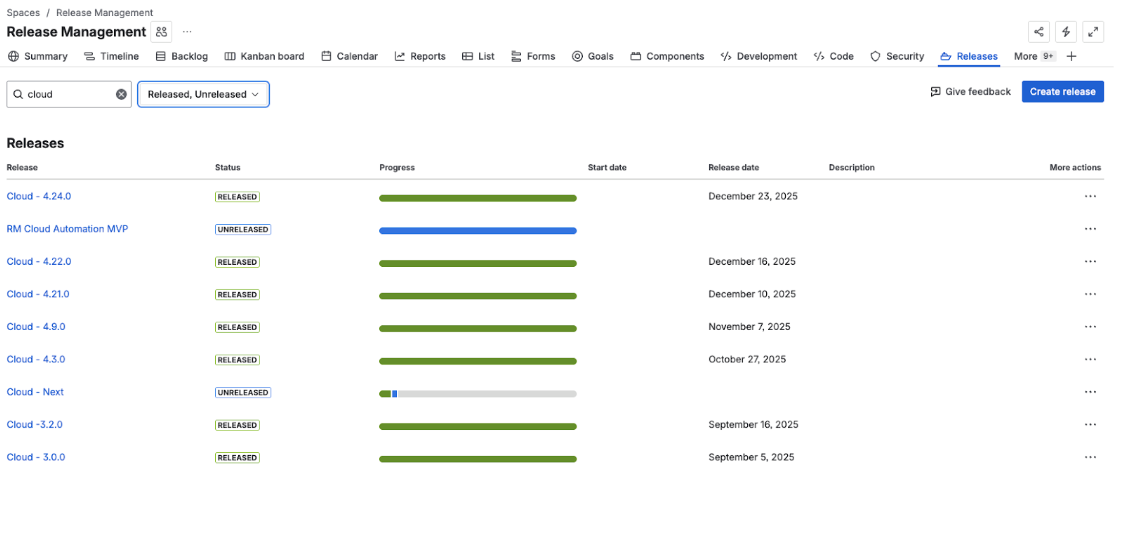
Alternatively, you can explore releases in the Deployments view and ask Rovo to calculate deployment frequency. While this may provide a quick, high-level answer, it still comes with important limitations.

All of these views can help you access release-related details, but they are not suitable for trend visualization or long-term analysis. They focus on individual releases rather than patterns over time.
Quick gain
The good news is that Jira’s functionality can be extended through Marketplace apps, which effectively close this gap.
Some of the most powerful solutions in this area are developed by Release Management Apps Partner. In particular, two applications can fully cover these needs.
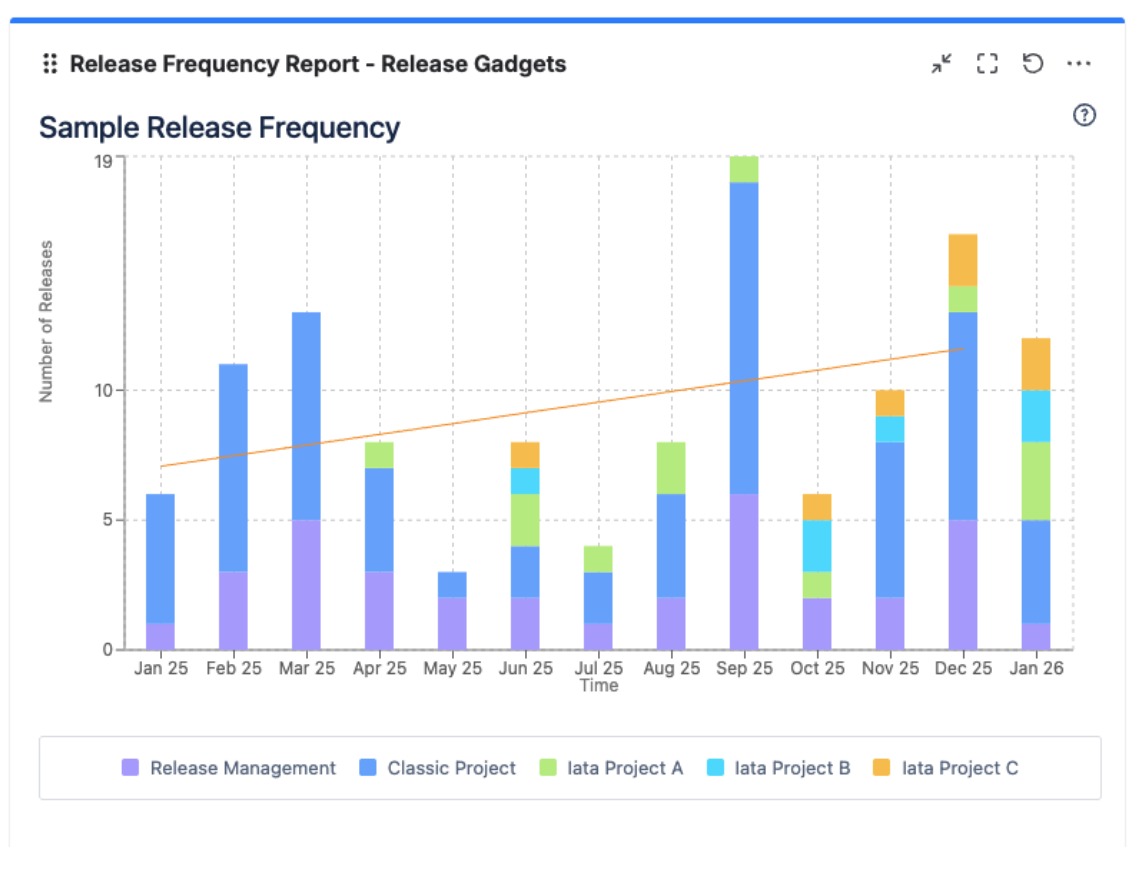
The simplest approach is to use release gadgets, which can display aggregated release frequency reports across one or multiple projects. You can even include entire project categories in the gadget’s scope.
These gadgets support flexible filtering options, such as: Released, Unreleased or Archived versions. You can also configure the reporting period and aggregation interval (for example, daily, weekly, or monthly) to match the level of detail you need.
For more advanced use cases, the ability to group data by different criteria enables stacked reports. You can group releases by:
- Project
- Project category
- Release status (Released vs. not released)
This makes it easy to see not only how frequently releases happen, but also whether all planned releases within a given interval were actually delivered on time.
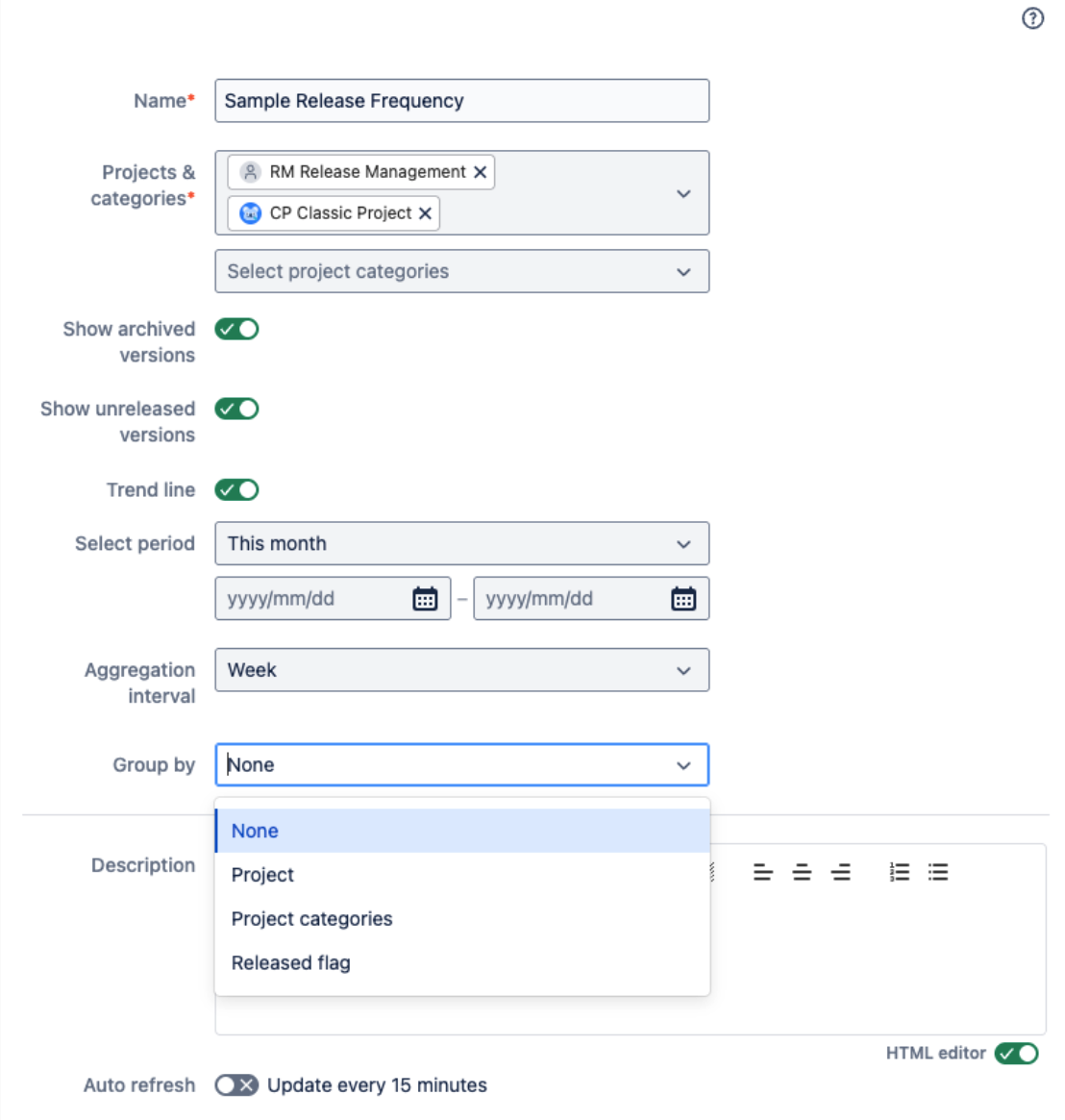
To better understand long-term behavior and identify patterns over time, a trendline can be applied to the report.
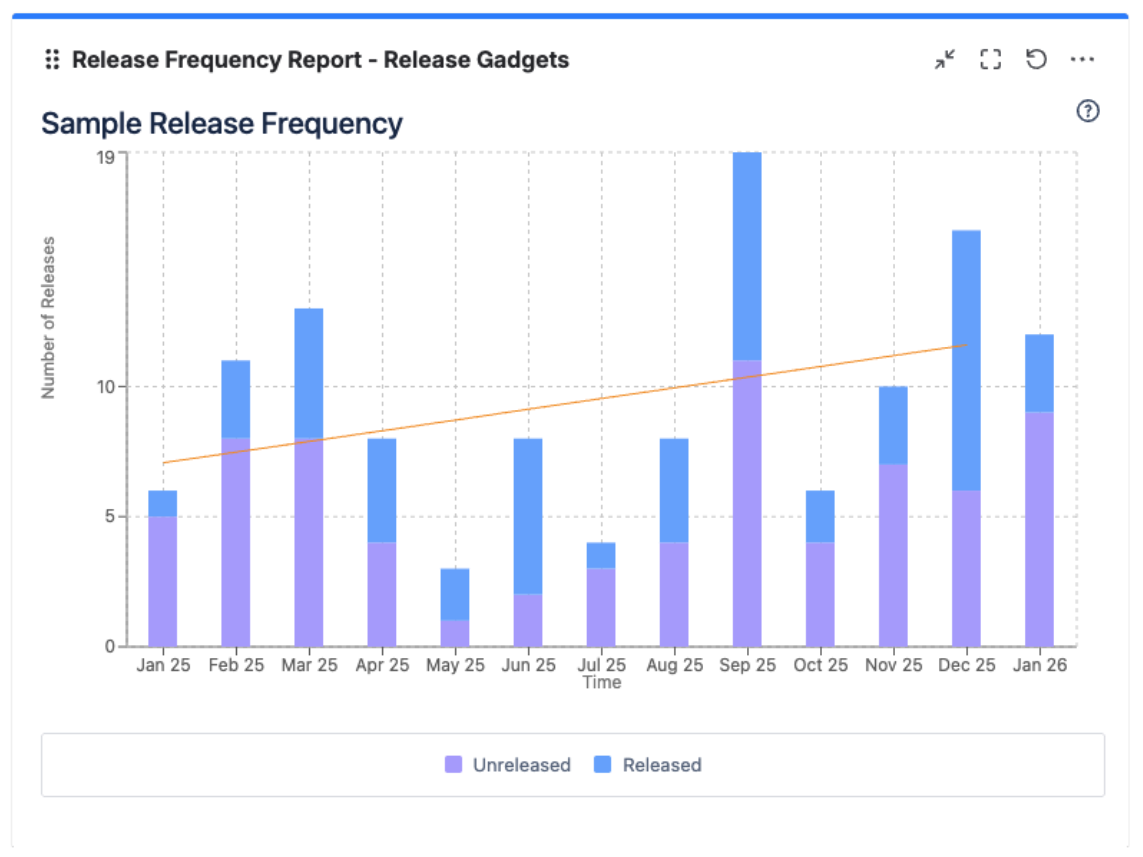
Advanced solution
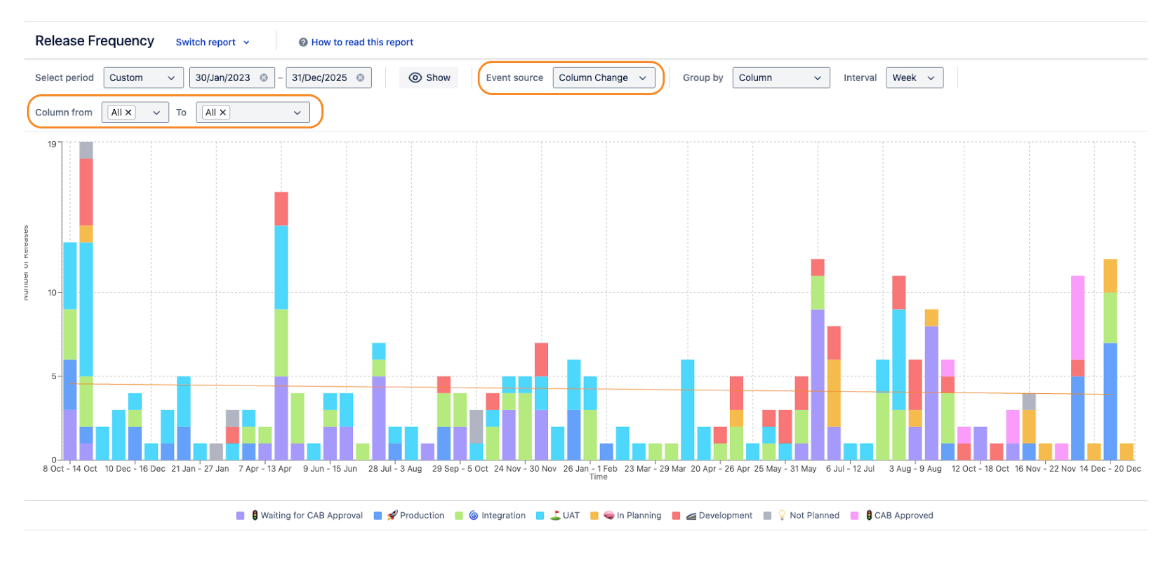
This approach addresses the core needs, but it can be taken even further by creating a release frequency report based on changes in release status, rather than relying solely on release dates.
Tracking status changes allows you to measure release frequency in a more meaningful way — for example, by counting how often a release reaches a specific environment such as Staging or Production. This is especially useful when a release is promoted through multiple environments or when the “release date” alone does not reflect real delivery activity.
But here’s the catch: Jira does not support workflows for releases. Out of the box, there is no way to track when a release status changes or when a release moves to a specific stage in its lifecycle.
However, once you start using Marketplace apps, this limitation can be removed.
The Release Management for Jira app allows you to define a release workflow, track status transitions, and store the full history of release changes. This workflow and historical data can then be used across all reports, including advanced release frequency reports.
Below is an example of a release board, where each card represents a release and its current status in the delivery pipeline:
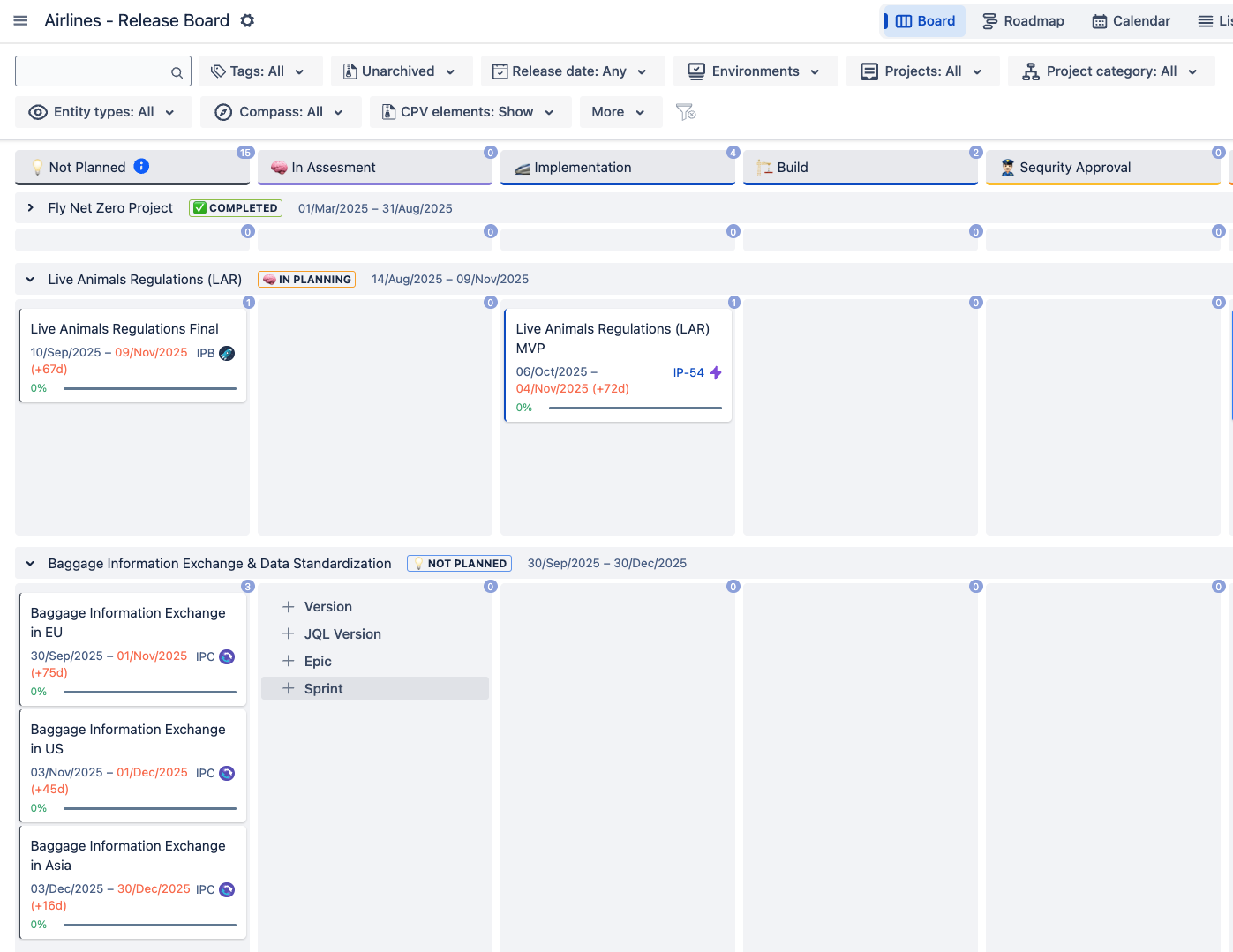
This approach opens up many new possibilities. In addition to reporting based on the release date, you can now build release frequency reports based on status changes and freely filter the data to match your needs.
For example, you can measure how often releases:
- Enter a specific status — for instance, how many releases moved into “Waiting for CAB approval” and how many of them were eventually approved
- If deployed to specific environments, such as Integration, Staging, or Production
- Result in rollbacks, helping you identify the number of rolled back releases and unsuccessful deployments.
With full control over filtering and aggregation, release frequency becomes a flexible and precise metric, rather than a static number based only on the planned release date. This approach allows teams to align reporting with real delivery events, gain deeper insight into how releases actually flow through the pipeline, identify bottlenecks, and systematically eliminate them.
Summary
Frequent releases have become the de facto standard for modern, highly distributed systems operating in today’s competitive landscape. Monitoring release frequency should be one of the key metrics every engineering organization focuses on. With the applications discussed above, this monitoring can be easily and effectively organized directly in Jira.
Thank you for taking the time to read this article. I hope it was helpful, and I’ll be happy to answer any questions or continue the discussion in the comments. In particular, I would be interested in the alternative solutions you use for tracking release frequency.
