Most tools claim to save you time. This one helps you build trust with clients right from your very first meeting.
You know the meeting. The client wants "something in Jira," maybe a better way to track cross-team requests or a dashboard that gives leadership the visibility they keep asking for. You ask clarifying questions, but their answers go in circles. The brief is three paragraphs long and still says nothing you can act on.
You go back to the office and write up what you think they meant. You build a proposal. Two weeks later, you’re in the next meeting and find out the stakeholders changed their minds, or even worse, they approved something that doesn’t really match what they needed.
This is the main frustration in Atlassian consulting: the gap between what a client says they need and what they actually need becomes clear only when they see something real. Words on a slide or in a requirements document don’t trigger the "wait, that's not right" moment. A working prototype does.
AI Apps Builder, a secure app-building platform, was created to close that gap. The consultants who get the most out of it use it at every stage of the client journey, from the first conversation to a long-term partnership.
Here's an example of how it works.
A Story Consultants Will Recognize
A consultant at an Atlassian partner agency gets a new lead: a fast-growing SaaS company, about 200 people, and Jira is their main tool. The project manager on the client side sends over a brief request that sounds something like this:
"We need a better view of what our engineering and product teams are working on. Right now, leadership is asking questions we can't answer without jumping into five different boards. We want something more centralized."
That's it. No wireframe. No list of fields. No clear definition of "centralized."
The old approach: spend a week writing a discovery document, schedule another meeting, maybe build a Figma mockup, send it over, wait. Three weeks in, you're still not sure if you're solving the right problem.
The new approach: before the next discovery call, the consultant opens AI Apps Builder and types a prompt describing what they heard. In under 15 minutes, there is a working Jira app, a custom dashboard showing cross-team workload, status breakdowns, and priority filters, deployed and running in Jira.
They bring it to the next meeting (not a slide or a PDF, but a live Jira app) and open it in the browser, inside the client's familiar Jira environment.
The reaction is immediate. The VP of Engineering clicks around for thirty seconds and says, "This is close, but we'd actually want to filter by product area, not by team. And we need to show blocked tickets separately." That sentence, just that one, is worth more than three weeks of back-and-forth requirements gathering.
💡 The prototype didn't just save time. It changed the dynamic of the entire engagement.
The Real Cost of Starting From Scratch
Before we dive into the full playbook, let's be clear about why this is important financially as well as strategically. Here’s what building a custom Forge app the traditional way usually involves:
|
The old way
|
With AI Apps Builder
|
|
3–6 months to learn Forge basics
|
Describe your idea in plain language
|
|
30–50 hours per app at $20–$50/hr
|
App generated in ~10 minutes
|
|
ReactJS knowledge required
|
Deployed to Jira in 5–7 minutes
|
|
Costly before you know if it works
|
Zero code, zero JS, zero barrier
|
This isn’t a criticism of developers. It just shows how complex the Forge environment can be to learn and use. The barrier is real, especially for consultants who need to prove value to clients before getting a development budget approved.
AI Apps Builder gets rid of that barrier completely. One solution consultant put it like this: the whole experience was seamless, turning plain language into a working MVP without getting stuck in YAML. The app was ready for production and followed Forge best practices right away.
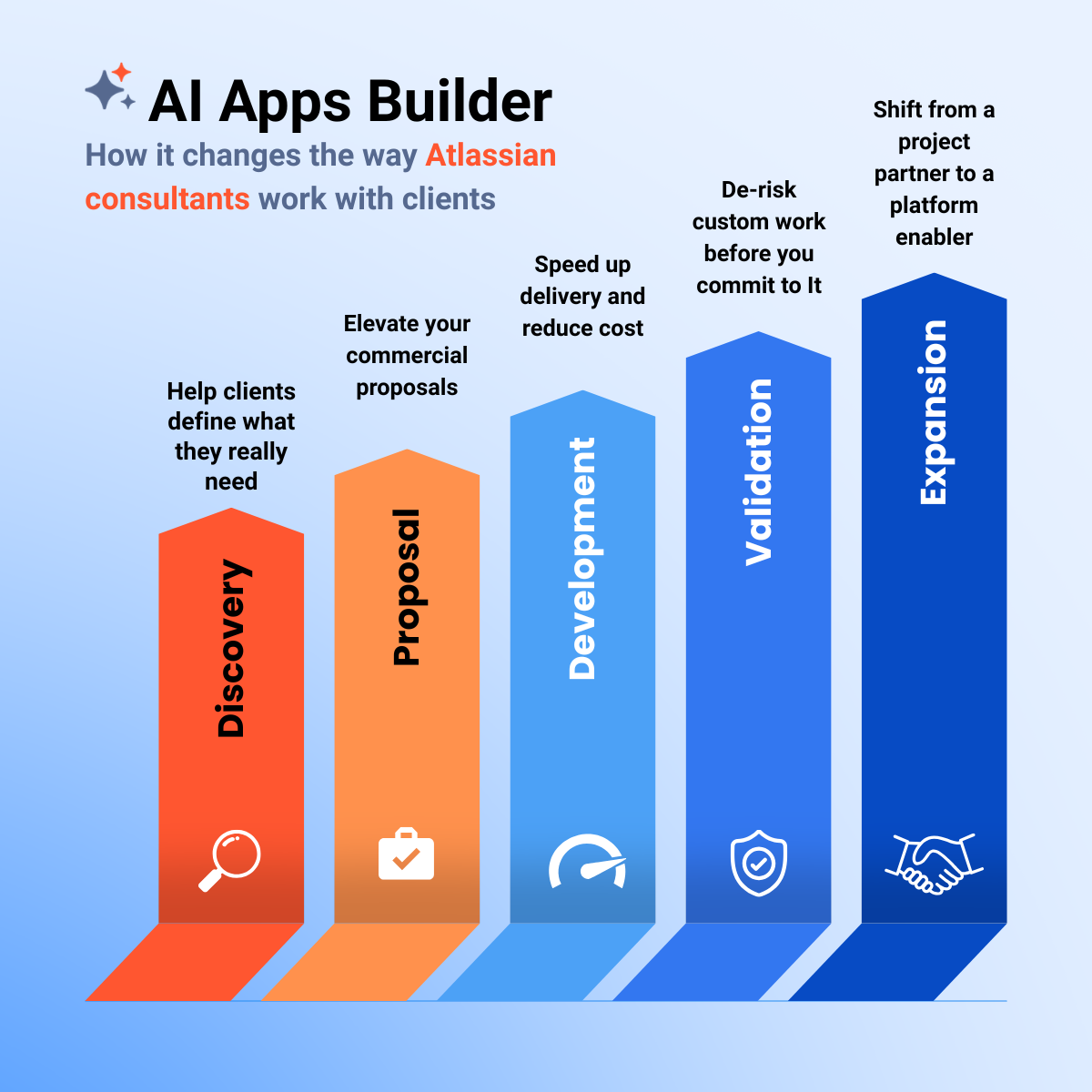
Five Ways to Use AI Apps Builder Across the Client Journey
Consultants who get the most out of AI Apps Builder see it as more than just a no-code apps generator. They use it as a communication tool that helps them show clients what matters most: working software. Here’s how you can use it at every stage of your client engagement.
Stage 1 — Discovery: Help Clients Define What They Really Need
The problem is that clients often struggle to explain what they really need. They talk about symptoms instead of solutions. They use words like "visibility," "flexibility," and "something more automated," which can mean almost anything.
What you should do is capture their vague request, ask some clarifying questions, and then use AI Apps Builder to turn what you heard into a working prototype before your next meeting.
What changes is that instead of showing a document that describes a possible Jira solution, you present the actual solution. The client can react to something real, and their feedback becomes clear, specific, and useful.
The questions that surface in this meeting are the ones you actually need:
👉 Less guessing. More accuracy in delivering the right solution, starting from the first meeting.
Stage 2 — Proposal: Elevate Your Commercial Proposals
You’re getting ready to propose a solution to an enterprise client. You have their requirements written down and a good idea of what the solution should do. But now you face a common challenge: how do you convince a group of stakeholders that your solution is the right choice when all they have is a document to review?
What you do: turn their use case into a real Jira app with AI Apps Builder before the proposal meeting. Bring the prototype into the room.
What changes is that instead of asking stakeholders to imagine the solution, you show it to them. They can try it out, and see how it works. Their objections become specific and easier to address, instead of being vague and hard to solve.
👉 Clients say yes faster when they can see and try the solution, not just read about it.
Stage 3 — Development: Speed Up Delivery and Reduce Cost
Once a project is approved, the focus turns to delivery. Every hour of development counts, and any delay is noticeable. Starting a Forge app from scratch, even for experienced developers, can mean days of setup before any features are working.
What you do is generate a working base app with AI Apps Builder, then decide your next steps. You can keep improving it with AI, or download the clean Forge code and give it to a developer, who can start from a working foundation instead of a blank file.
What changes is that developers spend their time improving the solution, not building the basic structure. Projects move faster, your margins get better, and clients see progress sooner.
👉 Deliver faster, reduce development effort, and increase the value of your service.
Stage 4 — Validation: De-Risk Custom Work Before You Commit to It
Custom Jira development can be costly. If requirements aren’t fully validated, you risk building something that needs major rework, which can cost you money or damage your client relationship.
What you do: before committing to the final development scope, generate a working app and deploy it in the client's actual environment. Let their team use it for a week. Observe. Identify what needs to change.
What changes is that you start final development with real usage data instead of assumptions. Edge cases show up early, and scope changes happen before they become expensive.
👉 Reduce risk and avoid rework. Give clients confidence that they are investing in the right solution.
Stage 5 — Expansion: Sell AI Apps Builder as Part of Your Service
After a successful delivery, clients often ask, "What else can Jira do for us?" Most consultants respond by scheduling another discovery session, but there’s a better way.
What you do is offer AI Apps Builder directly to your client as a platform where their team, product managers, operations leads, and team leads can turn their ideas into working Jira tools with AI and human support. You position yourself as the expert advisor behind this capability.
This creates a lasting engagement model. You’re no longer just a project-based vendor. You become the team that drives their internal Jira innovation, available when they need developer-level help, but also enabling them to work independently for simpler needs.
👉 Extend your services. Build long-term engagement. Shift from being a project partner to a platform enabler.
Answers to the Questions Consultants Ask
"Will the generated code be good enough for production?"
The generated code uses Forge best practices and is usually ready for production. If you want a more detailed review or extra customization, you can download the full source code and share it with a developer. It’s like coding with helpful guidelines, but you can always dig deeper if you want.
"Am I replacing my developers?"
No, you’re just taking away the tasks that don’t need your developers’ skills. Your developers can start with a working solution and focus on the logic, integrations, and improvements that need their expertise. This helps you move faster and keeps everyone involved.
"Is this only for technical consultants?"
No. The main goal of AI Apps Builder is to let any Jira user, no matter their technical background, turn an idea into a working Jira app. If you can explain what you need in simple words, you can build it.
AI Apps Builder Onboarding Plan
If you're new to AI Apps Builder, here's the fastest path from installation to using it confidently in front of clients.
|
Step 1
|
Exploration & Familiarization
Install AI Apps Builder, explore templates, build 2–3 apps from prompts, and read best practices for effective AI prompting.
|
|
Step 2
|
Advanced Experimentation
Build dashboards, reports, multi-step logic, and conditional UI. Refine outputs with iterative prompts.
|
|
Step 3
|
Real Use Case Simulation
Recreate 1–2 real client scenarios you already know. Validate usability. Start forming reusable solution patterns.
|
|
Step 4
|
Delivery Readiness
Finalize one working solution for a real client. Get your first live proof point. Optionally export code for developer review.
|
Recommended resources for Step 1:
-
Read "How to Write Effective AI Prompts: Best Practices and Practical Examples". The quality of what you build is directly connected to the quality of how you describe it.
-
Watch the video to see AI Apps Builder in action:
"What Happens to Our Jira Data?" The Security Question Every Enterprise Client Asks
If you work with enterprise clients, you know this moment. The project is moving forward. The prototype impressed the stakeholders. Then someone from IT or legal asks, "Before we go further, what does this AI tool actually do with our data?"
It's a fair question. For most AI tools, it's not easy to answer. AI Apps Builder is different. As a consultant, having a clear and confident answer is one of the most valuable things you can bring to a meeting.
Here’s what you can say.
Data Security: Built on Atlassian Forge
AI Apps Builder is built and deployed entirely on Atlassian Forge, which is Atlassian's secure application platform. This means:
-
The app runs entirely within Atlassian Cloud, so your client's data never leaves the Atlassian infrastructure.
-
Jira data is processed and stored only within Atlassian's systems, following Atlassian's security and compliance standards.
-
Data access is governed by standard Jira permissions and approved scopes, using the same controls already in place for the rest of their Jira environment.
-
No data is sent to external servers, third-party services, or AI systems.
-
Site administrators have full transparency and control over what the app can access.
For clients who want to go deeper, the full Atlassian Forge security model is documented in Atlassian's official documentation.
How AI Actually Works in AI Apps Builder
This part surprises most people, and it’s the clearest answer to the "what does the AI see?" question.
The AI in AI Apps Builder does not access, read, or analyze any Jira data. It never connects to Jira or uses Jira APIs. Its only job is to generate Forge app code based on your text prompt and public Forge documentation. Your Jira data is only involved after the app is deployed. At that point, it operates entirely within Atlassian Cloud, under standard Forge permissions. The AI is no longer part of the process.
🔒 The AI generates the code. Atlassian Forge runs it. Your data stays within Atlassian's infrastructure at every step.
How AI Apps Builder Compares to Rovo Studio
Clients who already know Atlassian's AI ecosystem often ask how AI Apps Builder compares to Rovo Studio. It helps to be ready to answer this directly.
|
|
AI Apps Builder
|
Rovo Studio
|
|
AI access to Jira
|
AI generates code but cannot access Jira data.
Offers a web version, so you don't need to install the AI tool in Jira.
|
An admin must enable Atlassian Intelligence
|
Both tools are useful in the Atlassian ecosystem. But for consultants working with clients who have strict security, compliance, or data governance needs, such as financial services, healthcare, or enterprise tech, AI Apps Builder's design offers a more flexible setup.
The Shift Worth Making
The consultants who will succeed in the next round of Atlassian projects may not be those with the most Forge expertise or the biggest teams. Instead, it will be those who can quickly turn a client's rough idea into a working solution, faster than anyone expects.
AI Apps Builder does more than speed up development. It transforms how you talk with clients, shape your proposals, manage delivery risks, and structure your engagements. When you use it throughout the client journey, you become the consultant who demonstrates results instead of just talking about them.
This gives you a new kind of competitive advantage, and you can get it right now on the Atlassian Marketplace. Install AI Apps Builder on the Atlassian Marketplace.
