Duplicate issues quietly drain productivity in Jira. For example, two engineers might work on the same bug under slightly different titles, or someone might create a ticket that already exists in another project. Sometimes, a sprint fills up with overlapping tasks. Soon, the backlog becomes harder to trust and even harder to prioritize.
This article looks at two ways to tackle this problem. First, you can use Jira's built-in tools for manual cleanup. Second, you can build a custom Duplicate Detector app with AI Apps Builder for Jira, which does not require any coding.
Why Duplicate Tasks Matter for Jira Teams
Duplicates do more than take up space. They create real workflow problems, such as:
-
Different team members might pick up the same work twice
-
Stakeholders may follow the wrong issue and miss important updates
-
The backlog gets bigger, but not more valuable
-
Sprint planning becomes less reliable when the same work appears in multiple tickets.
The bigger problem is that Jira does not have a built-in duplicate scanner. Finding duplicates is mostly a manual task, and manual tasks often do not get done consistently.
Option 1: Finding and Closing Duplicates With Native Jira Tools
Here's a step-by-step process for cleaning up duplicates in Jira manually.
Step 1: Search for Similar Issues Using JQL
Use the issue navigator with JQL queries to surface potentially duplicated work before it gets assigned or acted on.
|
Purpose
|
JQL Example
|
|---|
|
Search by keyword in summary
|
summary ~ "login bug" ORDER BY created DESC
|
|
Find issues already marked as duplicate
|
resolution = Duplicate
|
|
Search within a specific project
|
project = DEV AND summary ~ "bug" ORDER BY created DESC
|
This works, but it requires knowing what to search for. It won't catch duplicates with different wording — "user can't log in" and "login authentication failure" won't match on keywords alone.
Step 2: Decide Which Issue to Keep
Once you've found a pair, pick the issue that has:
-
More comments, attachments, or logged work
-
Active watchers or assigned stakeholders
-
More context in the description.
The other issue becomes the one to close.
Step 3: Link the Duplicate to the Original
Open the issue you're closing. Use Link issue → link type duplicates → enter the key of the original (e.g. DEV-1234). This creates a two-way link so anyone landing on either ticket can see the relationship.
Step 4: Transfer Any Unique Information
Before closing, check whether the duplicate contains anything worth keeping:
-
Copy relevant comments to the original
-
Re-attach any files that only exist on the duplicate
-
Move sub-tasks to the original issue if applicable.
Step 5: Resolve the Duplicate
Transition the issue to Done or Closed, set Resolution to Duplicate, and add a comment: "Closing as duplicate of DEV-1234."
Step 6: Notify Stakeholders
If the duplicate had a different assignee or watchers, mention them in a comment on the original so they can follow the correct ticket going forward.
The limitation of this approach: it relies on someone remembering to do it, knowing what to search for, and having the time to go through pairs one by one. For active teams or large backlogs, that's rarely realistic.
Option 2: Build a Custom Duplicate Detector App in Jira Without Coding
The more scalable solution is an app that does the scanning automatically. Here's a real example of a Duplicate Detector built with AI Apps Builder for Jira — a no-code, secure platform that generates custom Forge apps from plain-language descriptions.
What the Duplicate Detector Does
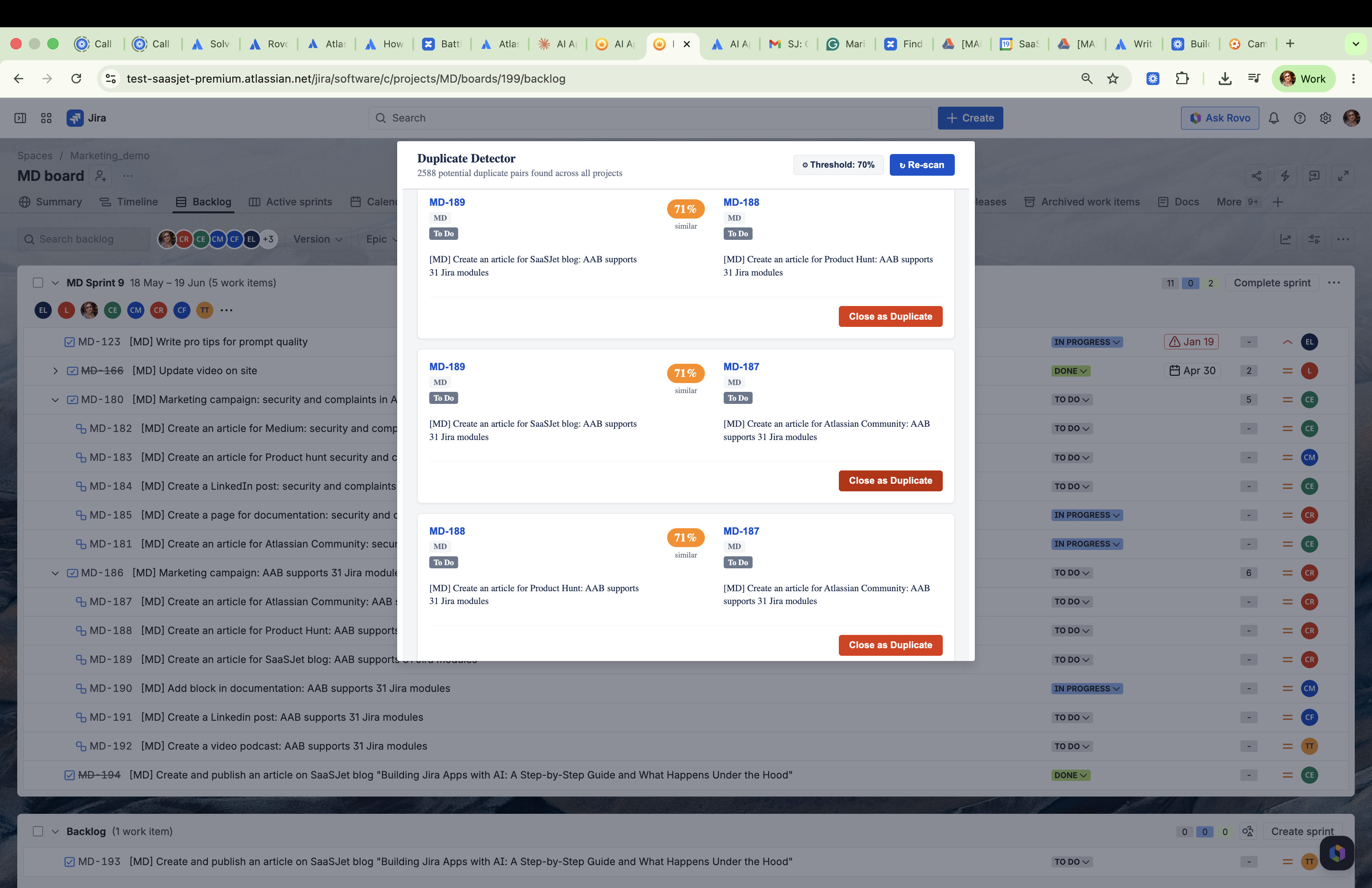
The Duplicate Detector adds a new option to the Jira backlog menu (the three-dot "more actions" menu on the backlog view). When a user clicks it, a window opens and scans all non-Done issues across your projects, comparing their summaries with a text similarity algorithm.
The app displays pairs of possible duplicate issues, ranked by how similar they are. Each pair appears side by side, showing the issue key, summary, status, project, and a color-coded badge with the similarity percentage, such as 84%.
For each pair, you can click Close as Duplicate, pick which issue is the original, confirm your choice, and the app takes care of the rest:
-
Transition the duplicate to Done
-
Adds a standardized comment: "Closed as duplicate of KEY."
-
The app then removes the pair from the list and shows a confirmation that the action was successful.
You can adjust the similarity threshold, from 50% to 95%, in the settings panel. After cleaning up a batch, you can re-scan whenever you like.
Why This Matters for Your Team
|
Manual approach
|
Duplicate Detector app
|
|---|
|
Requires knowing what to search for
|
Scans all issues automatically
|
|
Takes significant manual time
|
Identifies and resolves pairs in seconds
|
|
Admin or PM does the cleanup alone
|
Any user with backlog access can use it
|
|
No audit trail unless added manually
|
Automatically adds a comment linking to the original
|
Who Can Use It
No admin role is required. Any Jira user with backlog access can run the scan and close duplicates. Standard Jira permission filtering still applies — users only see issues they already have access to.
How This App Was Built With AI Apps Builder
The entire Duplicate Detector was built using AI Apps Builder for Jira — starting from a single plain-language prompt.
Step 1: Start With a Simple Prompt
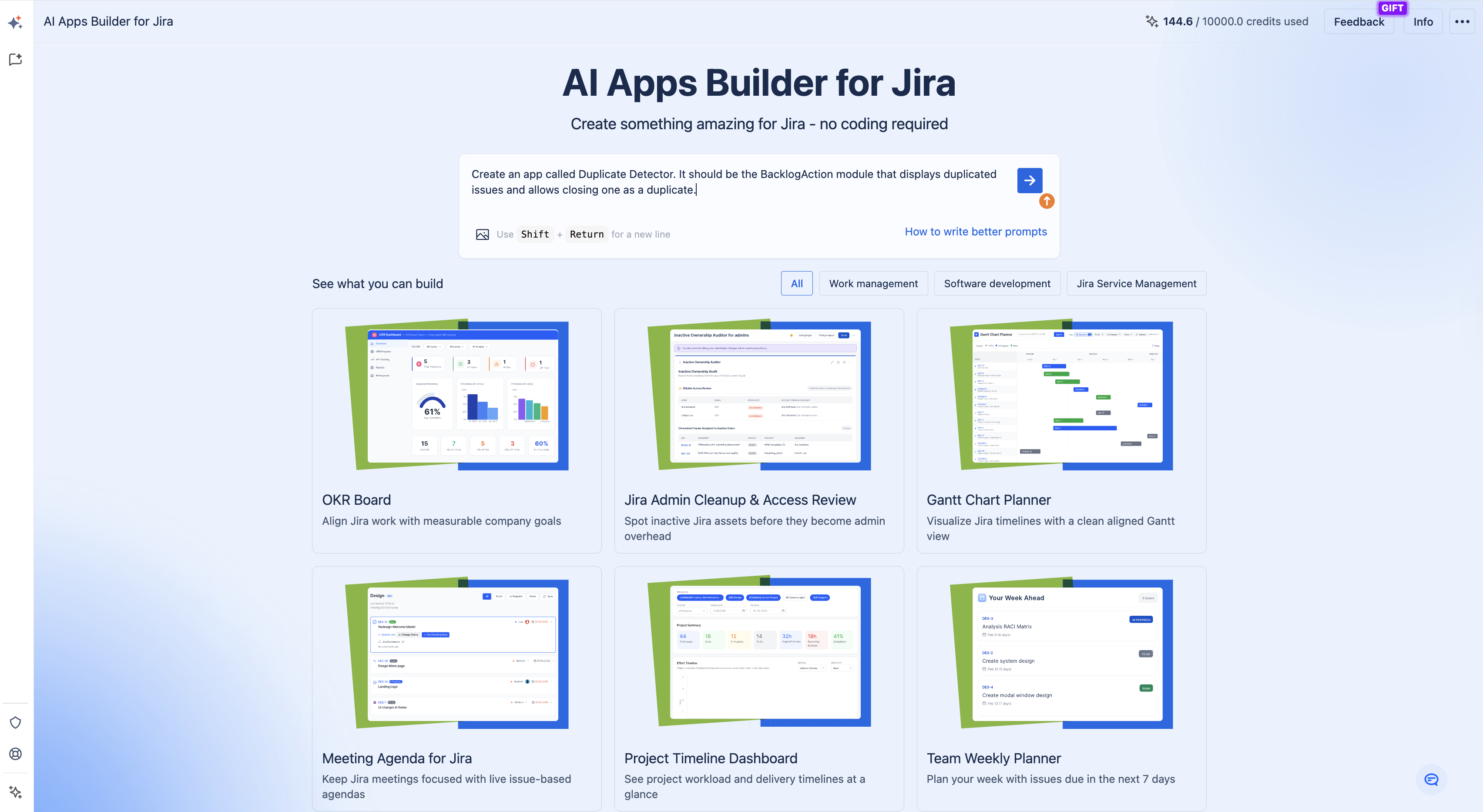
The initial prompt was deliberately minimal:
"Create an app called Duplicate Detector. It should be the BacklogAction module that displays duplicated issues and allows closing one as a duplicate."
Step 2: Answer Clarifying Questions
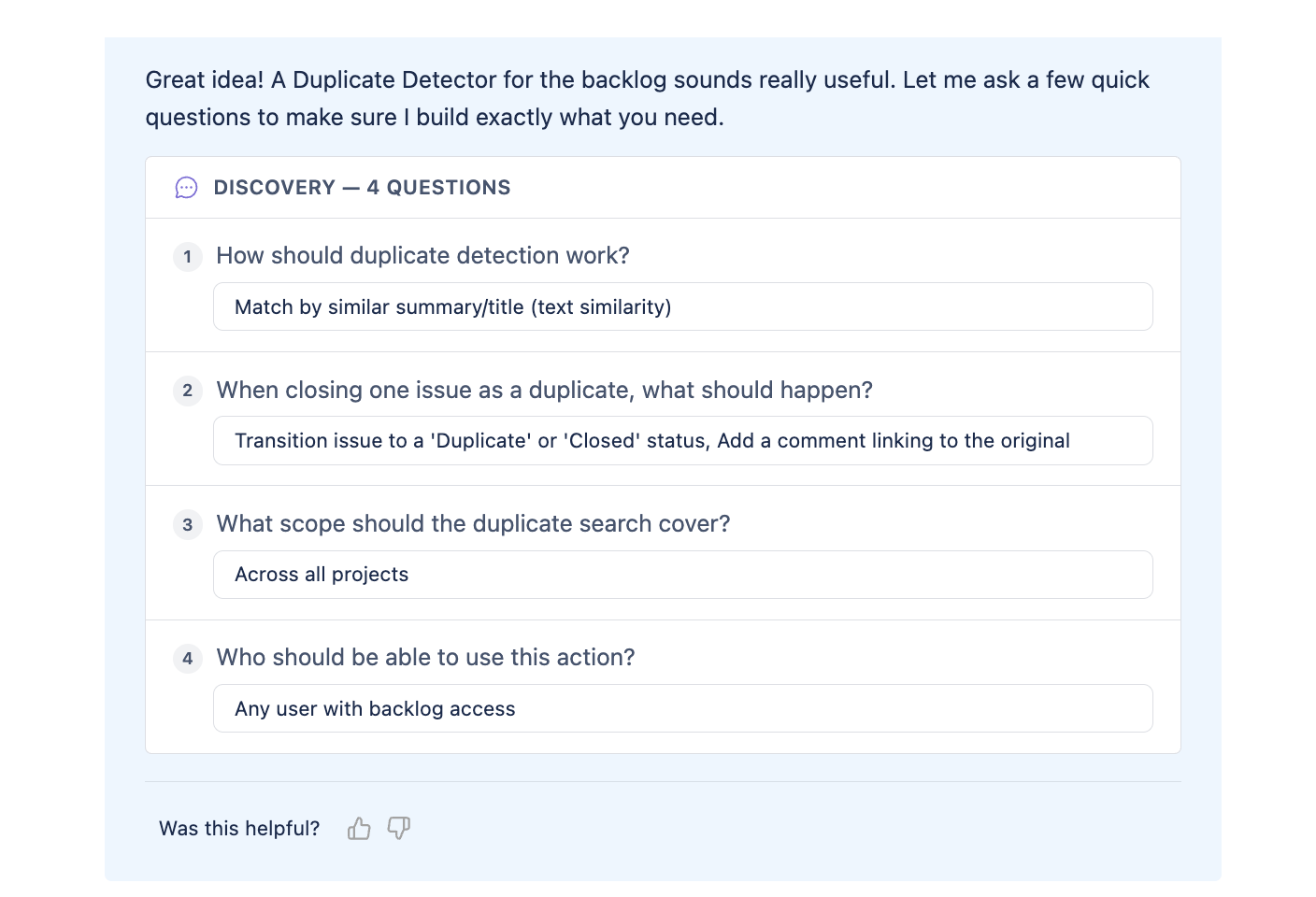
AI Apps Builder asked a few follow-up questions to define the workflow:
-
How should duplicate detection work? → Match by similar summary/title
-
What should happen when closing a duplicate? → Transition to Closed and add a comment linking to the original
-
What scope should the search cover? → Across all projects
-
Who should be able to use this action? → Any user with backlog access.
Step 3: Review the App Specification
With those answers, AI Apps Builder created a full app specification, including the module type, UI components, backend logic, and Jira API calls. You can review and edit the specification before building begins.
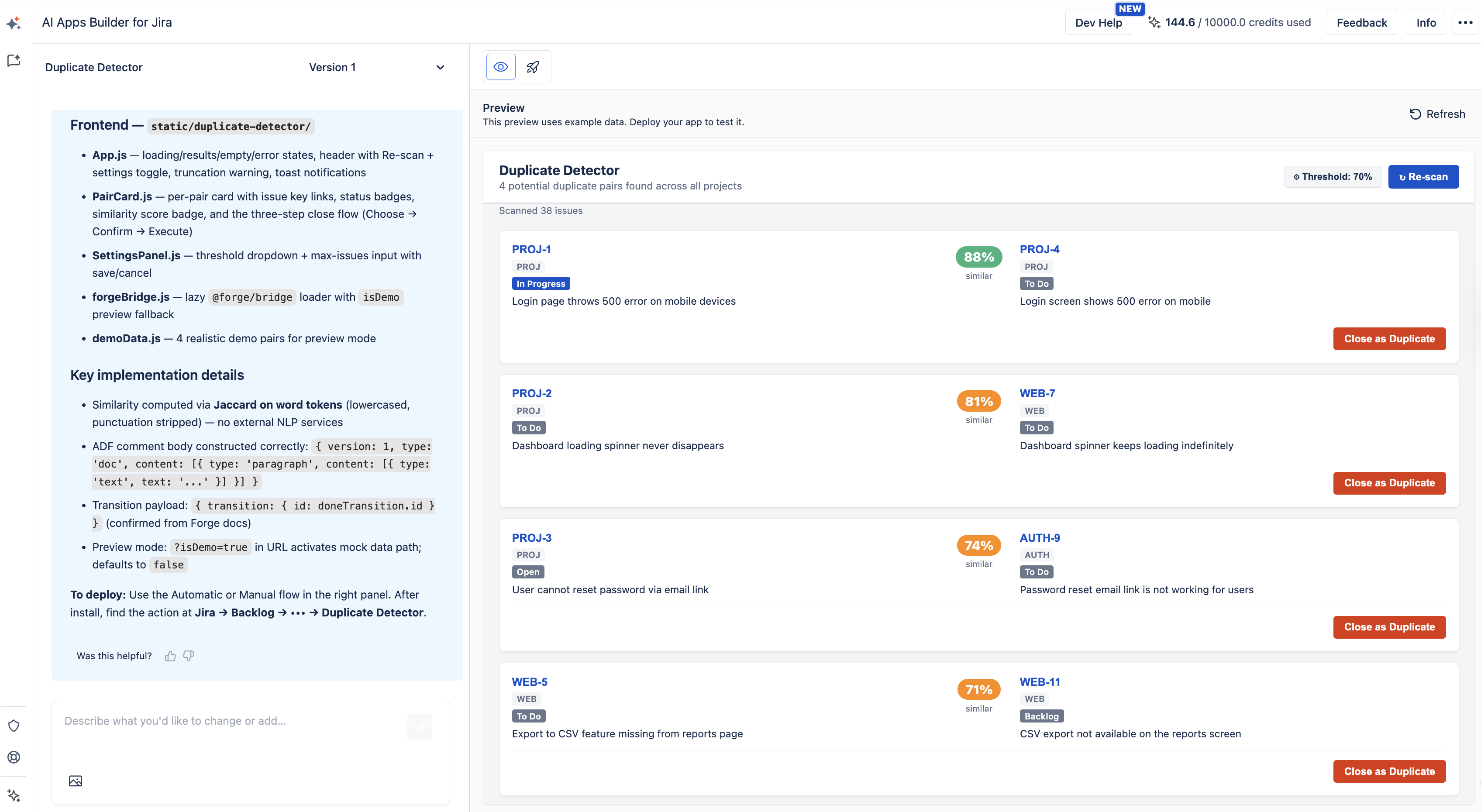
Step 4: Preview and Deploy
Once the layout was previewed and the features confirmed, the app was deployed straight to Jira. There was no need for extra infrastructure, developer help, or any setup beyond what was discussed. The entire process took a few minutes.
What AI Apps Builder Actually Supports
AI Apps Builder creates full Forge apps, including the UI, backend logic, module setup, and permissions. It works with 31 Jira modules across Jira Core, Jira Service Management, and trigger-based automation. This covers backlog actions, dashboard gadgets, issue panels, admin pages, project pages, portals, and more.
So, you can use the same workflow that built the Duplicate Detector for almost any Jira customization need:
-
A sprint health dashboard for a PM
-
An SLA breach tracker for a support engineer
-
A permission audit app for an admin
-
An OKR board for a product owner
-
A custom checklist on issue creation for a team lead.
Anyone, not just developers, can describe a problem and get a working Forge app.
Summary
Duplicate tasks may seem minor at first, but they can add up fast. If not managed, they clutter your backlog, distract your team, and make the board less reliable.
Jira's built-in tools, such as JQL search and manual linking, work for occasional cleanups if your team stays on top of things. But for bigger backlogs or teams working across several projects, an app that finds and fixes duplicates automatically is a better long-term solution.
The Duplicate Detector example shows what you can do when you describe a Jira problem in simple terms and get a working Forge app in minutes, without writing code.
Build Your Own Jira App
If your team often deals with duplicate tickets, you have two choices: clean them up by hand using the steps above, or quickly build the Duplicate Detector app yourself with AI Apps Builder for Jira.
You can find AI Apps Builder on the Atlassian Marketplace. Just install it, explain what you need, and deploy a working Forge app straight to your Jira.
