The Atlassian Community Forums are currently in read-only mode. We will be relaunching on a new platform on September 22 (read more here). We apologize for the extended downtime. For concerns or questions, please email communitymanagers@atlassian.com. See you on the other side, on the new Atlassian Community Forums! :)
× Create
Turn on suggestions
Auto-suggest helps you quickly narrow down your search results by suggesting possible matches as you type.
Showing results for
Community resources
Community resources
Community resources
Feedback app for Product Intake: Framing Evidence Over Counting Requests
July 9, 2026 edited
Many feedback systems do not work well because they simply count solutions instead of capturing the real problems. For example, when a customer asks for a "bulk export button," they are pointing out a symptom, not the root workflow issue. If you only track upvotes or feature requests, your product team may end up building what users ask for instead of using their own judgment to deliver what users truly need.
A good feedback system does two main things: it gives product teams detailed, direct customer feedback to help them make smart decisions, and it keeps customer-facing teams involved in the process.
Smart Forms for Jira acts as a key layer of Jira Product Discovery (JPD) feedback collection and Jira Software or JSM as well. It captures clear evidence, supports your internal product structure, makes it easy to collect feedback, and helps close the feedback loop consistently.

1. Context Over Counting: Capturing Verbatim Customer Context
Upvote portals often remove the important details that make feedback useful. To avoid data overload and excessive custom fields, you need a system that records user problems directly on your main dashboard.
- The Description Mapping Engine lets you map several form fields at once into Jira’s main Description field, so you do not need to create a new custom field for every question.
- Preserving the Raw Signal: Submissions are added as a clear text block in the format [Label]: [Response].
- Mandatory Field Enforcement: Make sure fields like "Steps to Reproduce" or "Problem Definitions" must be filled out before submission. Add advanced input validation(Regex) to reinforce it even more.
2. Taxonomy First: Enforcing Structure Before Collection
Feedback channels do not work if data just ends up in a general place with no one responsible. Before you collect any feedback, your system should match your company’s structure using a clear framework.
Intranet / Slack Portal ──> [ Smart Form Layer ] ──> [ Jira Data Model ]
│ │
├── Dynamic Pre-fill ├── Searchable Fields (MECE)
└── Hidden Routing Tags └── Mapped Context Block
- Live Jira Synchronization: Instead of making users guess your internal categories, use the "Pre-fill options from issue field" setting on choice fields. Dropdowns will automatically show live values from Jira or JPD fields, like Components, Active Sprints, or Product Areas.
- Enforcing MECE Boundaries: Submitters choose from organized, up-to-date categories, so every piece of feedback is linked to the right product area.
- Silent Routing via Hidden Metadata: To keep forms short for users, you can add hidden text fields with preset values, like dept:Sales or source:Notion-Brief. These values are added as Jira Labels or any other field when the form is submitted, so Jira Automation can tag, assign, and send work items to the right team automatically.

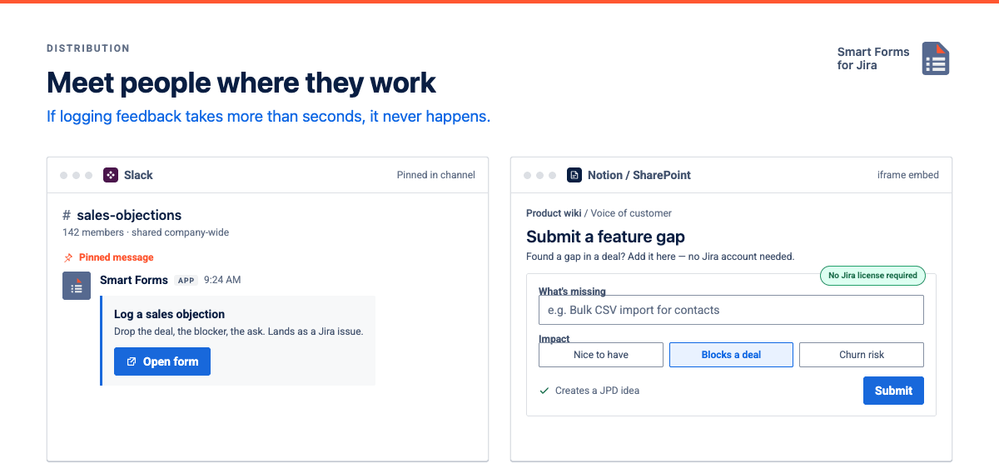
3.Meeting People Where They Already Work
If it takes more than a few seconds to log an objection or feature gap, people will not do it. To make sure valuable feedback does not stay in your customer success or sales teams’ heads, your intake system should work with the tools they already use every day.
- Slack and Microsoft Teams Channels: Create secure public links and pin them in channels like #sales-objections or #support-escalations. Teams can quickly add their insights directly into the form without any setup hassle.
- SharePoint and Notion Page Embeds: You can use standard iframes to add Smart Forms right into your project wikis or SharePoint pages. This lets people submit Jira issues or JPD ideas without needing a Jira license, which saves on costs and creates a single entry point for everyone.
4. Building System Trust with Automation
The feedback loop is only complete when stakeholders can see that their input led to real, actionable changes. When you close this loop, your data process becomes open and builds trust across the company.
- Triggered Workflow Shifts: You can set up Smart Forms to automatically change a work item’s status, like a bug from "Triaged" to "Ready for Dev," as soon as the form is submitted.
- Automated Release Context Delivery: When a work item is marked as "Released" or "Resolved" in Jira, you can use Jira Automation with the Smart Forms property token (saasjet.forms.formsSharedUrls).
- Direct Notification Loop: The automation system pulls the unique URL for a post-release scorecard or CSAT form and emails it to the original reporter. Their responses go straight into custom priority metrics on the main ticket, showing stakeholders that their feedback influenced the final solution.
|
Capability
|
Native Jira Forms
|
Smart Forms for Jira Intake Layer
|
Product Strategy Impact
|
|
Data Collection Focus
|
Basic issue intake | Detailed, narrative user context |
Captures problems instead of counting solution requests.
|
|
External Submission Scope
|
One-shot issue creation only | Deeply unauthenticated (Web, Notion, SharePoint embeds) | Lowers submission friction for teams outside Jira without license costs. |
|
Schema Governance
|
Every question requires a separate custom field |
Flexible mapping modes (Multi-field to Single Description block), bundled fields, doesnt require you to create custom fields
|
Controls global custom field sprawl and keeps instance boundaries lean. |
|
Field Logic & Rules
|
Static layouts only | Dynamic "When-Then" conditional fields | Keeps context extraction highly relevant and user-friendly. |
|
Workflow Event Integration
|
Standard comment updates | Post-submission automated status shifts and rule executions | Ensures form completion acts as a mandatory workflow step. |
Now that your intake system is separate from your database structure, which department’s messy data channel—like Sales deal objections, Support escalation loops, or Confluence planning pages—creates the most manual cleanup work for your product management team today?
Step-by-Step System Configuration Blueprint
Phase 1: Design an Intelligent, Responsive Idea Intake Form
A sustainable feedback ecosystem starts with a form structured around your precise prioritization model rather than open-ended text fields.
- Enforce Crucial Context Fields: Drag and drop fields like Single-line text for the Idea Title, a multi-line Text Area for the Problem Statement, and dedicated fields for Expected Outcome and Evidence Links.
- Inject Smart Conditional Logic: Keep forms highly responsive and lightweight. Use field-level "When-Then" rules to adapt the layout based on the responder. For instance, if the Feedback Source is "Customer," reveal fields for Account Name and ARR impact; if "Support," conditionally display fields for Ticket Links and workaround viability.
- Capture Visual Evidence Instantly: Include an Attachment field natively on the form. Unlike native Jira public forms that completely block file uploads for unauthenticated or anonymous submitters, Smart Forms lets users upload screenshots of broken workflows, logs, or interface mockups directly at the moment of submission.
Phase 2: Bridge Intake to JPD & Control Custom Field Sprawl
A massive pitfall in Jira administration is "field explosion"—creating global custom fields for every minor form question, which degrades site governance and hits Atlassian’s practical limits. Smart Forms resolves this by decoupling the form layer from the database schema.
- Strategic Field Mapping vs. Fallback Collection: Enable the "Create a New Work Item" setting under form actions, targeting your designated Jira Product Discovery project and selecting the "Idea" work item type. Map queryable metrics (e.g., Summary, Category, Strategic Goal) directly to JPD fields.
- Deploy Description Block Mapping: For narrative, open-ended context that does not require direct JQL filtering, map multiple form fields simultaneously into a single target Jira field: the built-in Description field. Responses are cleanly aggregated into a structured block formatted as [Label]: [Response], maintaining perfect readability without cluttering your global schema.
- Populate Options with Live Jira Taxonomy: To prevent manual classification errors, use the "Populate options from issue field" feature on choice selectors. This dynamically pulls live values (such as JPD Components, request types, or Versions) directly into the form's dropdown menus.

Phase 3: Silent Metadata Routing & URL Parameter Pre-Filling
Shorter forms achieve significantly higher completion rates. You can pass background data seamlessly without fatiguing the submitter by combining hidden fields and URL injection.
- Establish Hidden Tracking Parameters: Add text elements to the form builder, set default tracking responses (e.g., Source = Community or Stage = New), and select the eye icon to hide them completely from the end-user. Map these hidden variables to the Jira Labels field to silently categorize incoming tickets for automated routing queues.
- Leverage Dynamic URL Parameter Injection: Smart Forms fully supports text-based URL parameter pre-filling. When generating links dynamically via your external portals, append query arguments matching your field keys (such as &campaign=Q4Launch&team=HR). The app instantly reads these keys, pre-populating or silently preserving the context within the created JPD idea.
Phase 4: Distribute and Share Anywhere Feedback Happens
Once published, the form generates a secure, standalone external URL that completely bypasses Jira access restrictions and licensing boundaries.
- Confluence and Website Embedding : Copy the shareable link and place it directly inside a standard HTML iframe or the Confluence iframe macro. This turns your documentation pages or public help centers into a polished "Idea Hub" portal where non-licensed users can fill out requests inline.
- Cross-Tool Workspace Projections: Drop the secure link into third-party execution tools like Slack, Microsoft Teams, Asana, or ClickUp. Stakeholders log requests inside their native productivity environment, and Smart Forms auto-generates the corresponding JPD record back in Jira.
- Jira Sidebar Shortcuts: Pin the intake form URL as a shortcut directly within the Jira project navigation menu. Internal customer success or sales agents can launch the form in one click without wading through full configuration panels.
Phase 5: Implement Automated Priority or RICE Scoring Formulas
To mitigate cognitive bias and the "who shouts loudest" priority trap, you can enforce standardized metric evaluation on the form layer.
- Add numeric form elements to capture critical prioritization indicators on a simple 1–10 or 1–5 scale (such as Submitter Impact, Customer Reach, or Confidence).
- Map these quantitative fields straight to your corresponding custom numerical JPD fields.
- Utilize form-level entries alongside Jira fields to establish consistent tracking rules, preparing a data-driven prioritization baseline before triage ever starts.
Phase 6: Execute Intelligent Evidence Enrichment via Atlassian Rovo
Once the form launches your structured idea into JPD, pair it with the intelligence of Atlassian Rovo to cross-reference your historical archives.
- Establish a Jira Automation rule triggered by the creation of a new JPD Idea via Smart Forms.
- Direct the automation rule to hand the work item fields to a custom-configured Rovo Agent.
- Instruct the Rovo Agent to crawl connected Atlassian resources—scanning closed JSM tickets, legacy Confluence research briefs, or prior product feedback submissions.
- The agent then aggregates duplicate patterns, identifies existing workarounds, and posts a clean evidence package directly back to a JPD comment or a designated Confluence database page, equipping product managers with rich contextual background before scheduling refinement reviews.
Lifecycle Continuity: Form Portability & Cross-Project Reuse
A major structural failure point when deploying native Jira Service Management portal tools is the complete loss of context during cross-project handoffs. Moving or cloning an issue leaves native form properties completely detached from the destination ticket.
Smart Forms alters this lifecycle entirely:
- Absolute Form Portability: When a ticket is copied, moved, or cloned across diverse boards (such as transitioning from a JSM triage queue to a Jira Software delivery board or a JPD discovery workspace), the attached form and all completed metadata travel seamlessly alongside the issue. Submitted records clone as read-only historical assets, preventing data erasure.
- Collaborative Draft Continuity: If a form resides in a "Draft" state, the unfinished response remains fully attached during cross-project transitions. This enables seamless inter-departmental handoffs: an intake owner fills in client-facing parameters, the issue is moved, and a technical engineering contact provides scoping details in the exact same form session.
- Universal Project Scope: Form templates are globally reusable across your entire instance. You can create a single master onboarding or product feedback checklist, configure it once, and auto-attach it conditionally based on workflow milestones across JSW, JSM, and JPD simultaneously.
By deploying Smart Forms for Jira as an active intake layer, you convert fragmented input channels into an automated, standardized pipeline. Requesters retain a clean, frictionless interface, while your product delivery teams get structured, evidence-rich data natively inside Jira Product Discovery.
Was this helpful?
Thanks!

Olha Yevdokymova_SaaSJet
Atlassian Partner
TAGS
Atlassian Community Events
Copyright © 2026 Atlassian
0 comments