Like many teams in the Atlassian ecosystem, we've been watching the rise of AI with a mixed bag of emotions. Every week seems to bring a new AI assistant, AI-powered feature, or bold prediction about the future of work. Meanwhile, Jira admins and project managers are still dealing with the same everyday challenges: overloaded team members, shifting priorities, delayed Jira issues, and project plans that rarely survive contact with reality.
So when Atlassian introduced Atlassian Rovo and opened the door to building custom agents with Rovo Studio, we didn't want to create AI for the sake of AI. We wanted to solve a real problem.
The question we couldn't answer with rules alone
At Planyway (which is our cross-team planning app), we spend a lot of time helping teams plan work, balance workloads, and understand whether their delivery plans are actually realistic. And there was one dilemma we noticed our customers had to mull over again and again — and that dilemma is "How can I understand which tasks are likely to miss their deadlines without manually reviewing plans, workloads, and estimates?"
Surprisingly (but is it really?), the answer isn't sitting in one Jira field.
You have to compare timelines, estimates, workloads, vacations, working calendars, sprint commitments, and remaining capacity. Experienced project managers do this mentally. Everyone else spends hours jumping between Jira boards, timelines, and spreadsheets.
Atlassian's Rovo can retrieve and summarize this information, but one critical piece is still missing: actual delivery capacity.
That's exactly what we built our Delivery Risk Agent to do.
At first, it seems like something you could solve with a few automation rules. But the reality is rarely that simple. We've seen people who look overloaded on paper and still deliver everything on time. We've also seen tasks with large estimates that nobody is worried about because there's still plenty of time left.
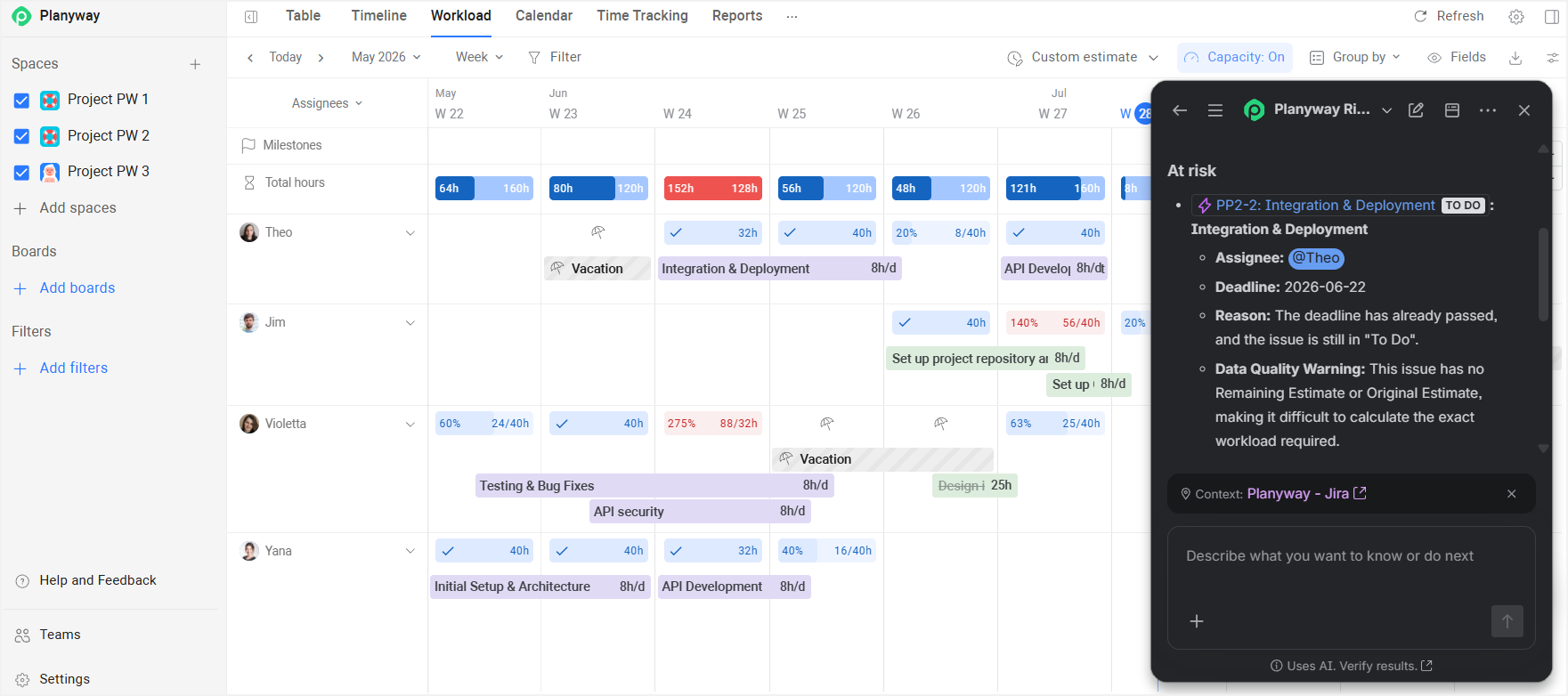
When project managers assess risk, they're not following a checklist. They're looking at the bigger picture, connecting different signals, and using their judgment. That's what made us realize we didn't need another report or another rule. We needed something that could help interpret the situation, something that wouldn't just replicate a workflow, but replicate the reasoning behind it. That's when we decided to build our own Rovo agent: The Planyway Risk Agent.
Okay, but what is Atlassian Rovo? (in case you didn't know)
If you've been following recent Atlassian announcements, you've probably noticed that AI and AI agents are showing up everywhere.

Atlassian Intelligence was the beginning. Then came Atlassian AI features across Jira and Confluence. Now, Atlassian Rovo is becoming the central AI solution across the Atlassian tools suite.
Rovo consists of three main pieces:
-
Rovo Search helps you find information.
-
Rovo Chat helps you interact with information.
-
Rovo Agents help you do something with that information.
To fully leverage all of the AI features of the Atlassian suite and Rovo, including search, chat, agents, and studio, an Atlassian Cloud Premium or Enterprise cloud plan is required.
The interesting part isn't the chat interface itself. Plenty of tools have chat. The interesting part is that Rovo works across your existing Atlassian products and connected tools. Unlike other LLMs, it can pull context from the following knowledge sources:
-
Jira issues and Jira backlogs
-
Jira Confluence pages and knowledge bases
-
Jira Service Management projects
-
Google Drive documents
-
Microsoft SharePoint files
-
Microsoft Teams conversations
-
And many other third-party applications and connected apps
Instead of hunting through ten browser tabs and three different systems, you can ask a question in a chat window and get instant answers from multiple sources at once. At least, that’s the promise.
Now you might think: why would an agent like ours make sense at all if you have Rovo?
The thing is that Rovo provides the foundation: it helps teams find information, interact with their Atlassian data, and get answers using existing context. But identifying delivery risk requires a different level of analysis. It is not just about finding a Jira issue or summarizing project information — it requires connecting multiple project planning signals and understanding what they mean together.
As a cross-team planning tool, Planyway has access to the missing piece: the capacity context behind the work. Planyway understands not only what tasks exist and when they are due, but also who is expected to work on them, how much capacity they actually have, what other commitments they are balancing, and whether the plan is realistic based on available resources.
Why did we build our delivery risk agent on Atlassian Rovo? The architecture
Planyway built the Risk Agent on Atlassian Rovo for a pretty practical reason: it puts the intelligence directly inside the environment where Jira teams already make decisions, instead of asking them to switch tools or interpret yet another dashboard.
The core problem Planyway is solving is not just “calculating risk,” but surfacing it at the exact moment when it matters — inside Jira workflows, alongside issues, sprints, and planning decisions. Rovo gives them a native execution layer for that.

A few key reasons this architecture makes sense:
-
First, distribution and context are already solved. Inside Jira (via Rovo), the agent automatically has access to the right workspace context — issues, assignees, sprints, and project structure — without building and maintaining a separate UI or data sync layer. That’s important for a product like Planyway, which already depends heavily on Jira data.
-
Second, it cleanly separates “calculation” from “reasoning.” The backend does the deterministic work: pulling Jira issues, computing remaining work, and calculating capacity using Planyway workload rules (working hours, holidays, vacations). Rovo then lets the LLM take over the non-deterministic part — interpreting whether the situation is actually risky, borderline, or just unclear due to missing data. That avoids hard-coded heuristics that quickly become brittle in real-world planning.
-
Third, it enables capacity-aware intelligence, not just due-date tracking. Most Jira risk tools stop at “is the estimate bigger than remaining time.” This agent goes further by incorporating Planyway’s workload model — actual availability per assignee until the deadline — which is where the signal becomes much more realistic.
-
Finally, it’s about embedding insight into workflow, not reporting it after the fact. By running as a Rovo agent, the output can be surfaced directly where planners already triage work (Sprint view, issue view, planning sessions), rather than living in a separate analytics layer that people check occasionally but don’t act on.
What building a Rovo agent taught us
Building Risk Agent turned out to be less about prompt engineering and more about understanding where AI actually adds value in project management. Here are a few lessons we learned along the way.
Lesson 1: Search is easy. Reasoning is hard.
One of our first realizations was that finding information wasn't actually the difficult part.
Rovo already does an excellent job of surfacing relevant context from Jira, Confluence, Jira Service Management, and connected tools. If you want to know an issue's estimate, assignee, sprint, or due date, you can simply ask.
The hard part starts after you've gathered all the facts.
As we said, delivery risk isn't stored anywhere as a Jira field. It's something project managers infer by combining multiple planning signals and asking questions like:
-
Does this person actually have enough capacity before the deadline?
-
Are they already overloaded on other projects?
-
Is there enough time left after accounting for vacations and public holidays?
-
Does the remaining estimate still look realistic?
Those are reasoning problems, which is why our goal wasn't to teach the agent how to find this information. Rovo already does that well. Our goal was to teach it how to reason about the information once it had been gathered.
Lesson 2: Don't ask an LLM to do math
Early on, we realized we didn't want the model calculating project data itself. Capacity planning should be deterministic. If two users ask the same question against the same project, they should receive the same underlying calculations every time.
That's why Risk Agent separates calculations from reasoning.
As we've mentioned, the backend gathers Jira and Planyway data, computes remaining work, calculates available capacity using working calendars, vacations, holidays, and existing workload, and packages those facts into structured evidence.
Only then does the LLM step in to interpret what those numbers actually mean.
Lesson 3: Capacity is everything
This was probably our biggest product insight. Most project management AI features look at dates and estimates. But a task's real risk depends on whether the assigned person actually has enough capacity to complete it. Two issues with the same deadline and estimate can have completely different outcomes depending on workload, availability, vacations, holidays, and working schedules.
That's why our Risk Agent doesn't just retrieve Jira data. When assessing delivery risk, the agent combines multiple signals rather than relying on a single rule. Besides due dates, workload, and available capacity, it also considers:
-
the issue description (which the LLM uses to understand the complexity of the work)
-
developer estimates
-
historical time tracking (including meetings, previous tasks, reviews, and other commitments),
-
retrospective delivery data such as lead time, cycle time,
-
and how similar work has been completed in the past.
This allows Risk Agent to detect risks that are invisible from issue dates alone. For example, a task may appear on track, but the assigned team member may not have enough working hours left before the deadline due to vacation or competing work.
Instead of simply flagging a potential delay, the agent explains what is causing the risk — helping teams take action before delivery is affected.
Lesson 4: Natural language is a flexible alternative to dashboards
A dashboard is static. You look at it, you get what you get, and if you have a follow-up question, you have to switch contexts, filter data, or build a new report. With a Rovo agent + our agent, the conversation is dynamic, and you can zoom in on AI driven insights.
You can ask: “Which sprint issues are most likely to slip?” The agent gives you a list. Then you instantly follow up with: “Why is that specific issue at risk?”, and the agent drills down, showing you that the assignee has only 4 working days of capacity before the deadline because of a company holiday and a parallel project. This back-and-forth mimics a real conversation with a senior delivery manager, not a static PDF report.
Lesson 5: Garbage in, garbage out — and that's actually a feature
We learned pretty quickly that an LLM can't magically fix bad data hygiene. If estimates are missing, due dates are outdated, or issues aren't assigned, even the smartest AI will struggle to give you a meaningful answer.

But here's the twist: we turned this limitation into a strength.
Instead of pretending the data is perfect, the Risk Agent explicitly calls out data quality warnings. It will tell you: "This issue appears to be at risk, but the estimate is missing, so I can't calculate remaining capacity reliably." Or: "This task has no assignee, so I can't check workload — please assign it to get a proper risk assessment."
Lesson 6: Context is automatic — if you let the platform handle it
One of the subtle but powerful lessons we learned is that a well-designed agent shouldn't force users to repeat themselves. If you're already inside a specific project, sprint, or board, the agent should know that — without you having to spell it out every time.
With Rovo, Risk Agent can use the current Jira context automatically. For example, when a user opens the agent from a specific project, they can simply ask "What are the risks?" and the agent will analyze the relevant issues from that project without requiring additional filters.
This makes risk analysis faster and more natural: users can focus on the question they want answered instead of manually defining the data set first.
Lesson 7: Don't build for Q&A — build for decisions
One of the biggest lessons we learned is that an AI agent shouldn't just answer questions. Its real value comes from helping users make better decisions faster.
Dashboards provide information: workload, deadlines, statuses, and estimates. But users still need to connect the dots and decide what to do next.
A good agent goes one step further. It combines relevant signals, explains why something matters, and helps identify the next action.
For example, instead of simply saying “John is at 120% allocation,” Risk Agent can explain that John’s overloaded workload puts a specific issue at risk and suggest possible ways to rebalance work.
When designing Risk Agent, we focused not on the questions users might ask, but on the decisions they need to make:
-
Which tasks need attention first?
-
Which team members are overloaded?
-
What puts the release at risk?
-
What should we fix before the sprint ends?
This led us to focus on a handful of high-impact use cases:
-
Identifying overloaded team members — not as a report, but as an early warning system before someone burns out or misses a deadline.
-
Detecting projects at risk — not just flagging them, but explaining why and suggesting what to do about it.
-
Reviewing sprint health — before the sprint ends, so there's still time to adjust scope or rebalance work.
-
Preparing for status meetings — giving managers a clear, concise summary they can present without spending an hour building slides.
-
Performing regular health checks — turning a manual, time-consuming task into a 30-second conversation.
-
Understanding why delivery is at risk — because knowing that something is late isn't useful unless you know why it's late.
-
Identifying workload bottlenecks — before they cause delays across the whole project.
In every case, the agent is doing more than retrieving information. It's reducing the time between noticing a problem and doing something about it.
What AI agents mean for the future of project management
For project and product teams, the biggest challenge has never been a lack of data. Jira already contains issues, estimates, deadlines, assignees, and project history. Planning tools add another layer with workload, availability, and capacity information.
The hard part is making sense of all these signals at the right moment.
This is where AI agents can change the way teams work. Instead of adding another dashboard or another reporting layer, they can bring analysis directly into existing workflows — helping teams understand what needs attention and why. Also, the most valuable AI agents will be the ones that understand context, apply domain-specific logic, and help teams move from identifying a problem to taking action.
Bottom line, the future of AI in project management is not about replacing project managers' judgment. It's about reducing the manual work behind that judgment — so teams can spend less time collecting information and more time making decisions.
Have you experimented with Rovo yet? If you've built agents, we'd love to hear what use cases you're exploring.
P.S. If you're interested in checking out our risk agent inside our cross-team planning tool, we'd love to hear what you think.


