The real error with Synchrony is the error "Could not initialize class org.xerial.snappy.Snappy", reported as DEBUG within Synchrony logs. See the end of this question.
This happens due to "/tmp" is mounted with the "noexec" option for security purposes. This issue is not related to proxies at all and have to be considered generic.
Solution: Just set a custom "/tmp" directory: https://confluence.atlassian.com/confkb/editor-fails-to-load-in-confluence-6-x-due-to-could-not-initialize-class-org-xerial-snappy-snappy-error-859462192.html
Atlassian: Why is Hercules not covering this???
----------------------------------------
I just finishing a fresh install (Linux x64 installer) of Confluence 6.7.2. It is an nginx proxy setup.
The server.xml looks like this:
<Server port="7313" shutdown="SHUTDOWN" debug="0">
 <Service name="Tomcat-Standalone">
  <Connector port="7314" connectionTimeout="20000" redirectPort="8443"
   maxThreads="48" minSpareThreads="10"
   enableLookups="false" acceptCount="10" debug="0" URIEncoding="UTF-8"
   protocol="org.apache.coyote.http11.Http11NioProtocol"
   proxyName="example.com"
   proxyPort="80" />
  <Connector port="7315" connectionTimeout="20000" redirectPort="8443"
   maxThreads="48" minSpareThreads="10"
   enableLookups="false" acceptCount="10" debug="0" URIEncoding="UTF-8"
   protocol="org.apache.coyote.http11.Http11NioProtocol"
   proxyName="example.com"
   proxyPort="443"
   scheme="https"
   secure="true"
   sslProtocol="TLS"
   SSLEnabled="true"
   clientAuth="false"
   keyAlias="localhost"
   keystoreFile="/opt/atlassian/cacerts"
   keystorePass="changeit"
   keystoreType="JKS" />
  <Engine name="Standalone" defaultHost="localhost" debug="0">
   <Host name="127.0.0.1" debug="0" appBase="webapps" unpackWARs="true" autoDeploy="false" startStopThreads="4">
    <Context path="/confluence" docBase="../confluence" debug="0" reloadable="false" useHttpOnly="true">
     <Manager pathname="" />
     <Valve className="org.apache.catalina.valves.StuckThreadDetectionValve" threshold="60" />
    </Context>
    <Context path="${confluence.context.path}/synchrony-proxy" docBase="../synchrony-proxy" debug="0" reloadable="false" useHttpOnly="true">
     <Valve className="org.apache.catalina.valves.StuckThreadDetectionValve" threshold="60" />
    </Context>
   </Host>
  </Engine>
 </Service>
</Server>
The nginx configuration looks like this:
server {
 listen 80 ;
 listen [::]:80 ;
 listen 443 ssl http2;
 listen [::]:443 ssl http2;

 if ($scheme = "http") {
  return 301 https://example.com$request_uri;
 }

 location /confluence {
  proxy_set_header X-Forwarded-Proto $scheme;
  proxy_set_header X-Forwarded-Host $host;
  proxy_set_header X-Forwarded-Server $host;
  proxy_set_header X-Forwarded-For $proxy_add_x_forwarded_for;
  proxy_read_timeout 600s;
  proxy_pass https://127.0.0.1:7315/confluence;
  client_max_body_size 25M;
 }

 location /synchrony {
  proxy_set_header X-Forwarded-Proto $scheme;
  proxy_set_header X-Forwarded-Host $host;
  proxy_set_header X-Forwarded-Server $host;
  proxy_set_header X-Forwarded-For $proxy_add_x_forwarded_for;
  proxy_read_timeout 600s;
  proxy_pass http://127.0.0.1:8091/synchrony;
  proxy_http_version 1.1;
  proxy_set_header Upgrade $http_upgrade;
  proxy_set_header Connection "Upgrade";
  client_max_body_size 25M;
 }
}When I try to access "https://example.com/confluence", I can access Confluence as usual.
When I try to edit a page, I get the following error:
This page is taking longer to load than usual. Give it a few moments, then try refreshing. Still having issues? Contact your Confluence admin.
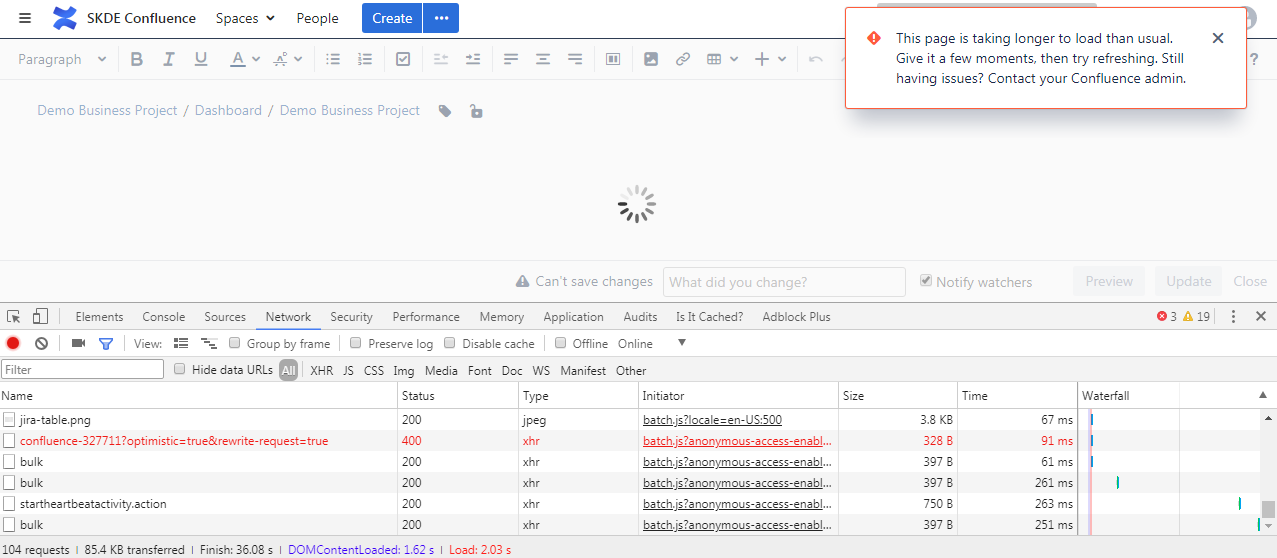
As you can see ("confluence-327711"), there is a faulty (Status/Error Code 400) AJAX call to the "/synchrony" location.
When I open that call in a new browser tab, I will receive the following JSON error:
{"type":"missing-token","message":"Missing token"}The error mentioned above is misleading! Here is the correct error... When opened within a new tab, Synchony will always reply with the error message above. The error message below is the correct one captured with Wireshark.
{"type":"server-error","message":"server error","id":"WUeTwdxxQ5UQyVu-tQglYw"}Within the error logs this showed up:
2018-03-07 10:07:04,606 DEBUG [135:StdOutHandler [/srv/atlassian/confluence-6.7.2/jre/bin/java]] {"synchrony":{"message":"synchrony.http.entity-api [warn] Error in put-entity","entity":"/Synchrony-591e1f19-3563-3f2c-8d61-4ecb6bc8cf41/confluence-1015819","id":"WUeTwdxxQ5UQyVu-tQglYw","ns":"synchrony.http.entity-api","throwable":"clojure.lang.ExceptionInfo: Could not initialize class org.xerial.snappy.Snappy {:type :server-error, :source :server}\n\tat clojure.core$ex_info.invokeStatic(core.clj:4725)\n\tat synchrony.sync.messages$ex_info_from_error_message.invokeStatic(messages.cljc:29)\n\tat synchrony.sync.connection$request_BANG_$fn__31266.invoke(connection.cljc:92)\n\tat synchrony.http.entity-api.(take?)(entity_api.clj:493)\n\tat synchrony.http.entity_api$content_reconciliation$fn__48540.invoke(entity_api.clj:472)\n\tat synchrony.http.entity-api.(take?)(entity_api.clj:536)\n\tat synchrony.http.entity_api$put_revision_handler$fn__48739.invoke(entity_api.clj:518)\n\tat clojure.lang.AFn.run(AFn.java:22)\n\tat java.util.concurrent.ThreadPoolExecutor.runWorker(ThreadPoolExecutor.java:1149)\n\tat java.util.concurrent.ThreadPoolExecutor$Worker.run(ThreadPoolExecutor.java:624)\n\tat java.lang.Thread.run(Thread.java:748)\n","level":"warn"}}Synchony is complaining about "Could not initialize class org.xerial.snappy.Snappy".
How to configure nginx and Confluence in order to get it work completely?

