Monday, 9:10. A customer writes "any news?" on a request that says In progress. You open it. The assignee is stuck on a firewall rule. The firewall task belongs to another team, and nobody has asked them anything for a week.
That request isn't slow. It's waiting, and nothing on the screen says on whom. Plenty of late requests are like this one. So here's what Jira Service Management gives you out of the box, what a few small tweaks add, and the spot where it runs out.
Give waiting its own status
If your space has Waiting for customer and Waiting for support, you're halfway there. In the default setup, Waiting for customer means "an agent acted, now it's the customer's turn", and the customer sees it as "Requester Action Needed".
Most teams add a small Automation flow on Work item commented: an agent's public comment moves the request to Waiting for customer, and the customer's reply moves it back. Then nobody has to remember to change the status.
One gotcha that eats an afternoon: if the agent is also the reporter, a participant, or sits in a shared organization on that request, Jira treats them as a customer and the status doesn't move. Test with a real customer account, not your own.
Stop the clock while the customer thinks
Open your space, go to Request management > SLAs, hit Edit on the SLA and scroll to Conditions. Pause counting time when is optional, and Waiting for customer is the classic thing to put there.
It only looks at statuses, though. If the request is really waiting on another team but the status still says In progress, the clock keeps running against you. Hold that thought.
Let Automation do the nagging
There's no "follow up with the customer" switch, but Atlassian's own follow-up recipe shows the idea: a scheduled flow that looks for status = "Waiting for Customer" AND NOT status changed after startOfDay("-5"), adds a comment, and a second flow that closes what stays quiet.
A few things you learn the hard way:
- Make the comment public. An internal reminder is a very polite way of talking to yourself.
- A reminder resets "Updated". Count from the status change or your own date field, or your five days turn into never.
- Weekends count. Atlassian says the example has no business-day logic.
- Mind the meter. Automation is billed in steps, pooled per month, and a condition that comes out false still counts. Extra usage starts being billed on 3 December 2026, so a flow that wakes up daily to find nothing is worth checking. One scheduled search also tops out at 999 work items per run.
Link the other team's work
For the firewall request, link their task: open the request, choose Link work item, pick is blocked by and select their task. The request now carries the link, and you can open it to see where their work stands.
Then ask on their task, not on the customer's request. That lands in their queue, where they work. In a service space, make it an internal comment so it can't slip out to the customer by one wrong click.
Where it stops
This setup works, and for one or two spaces it's plenty. What it can't do:
- Answer "who has it right now?" in one place. The status says one thing, the link another, an approval sits in a third. You piece it together request by request.
- Do the chasing for you. Reminders are flows you build and maintain. Asking an approver or a team is a comment you write.
- Show where the waiting went. The SLA says met or breached. It doesn't say how many hours went to the customer, an approver, another team or a vendor.
Where RequestOps fits
Disclosure: I make this app. RequestOps works from the Jira data you already have and runs on Atlassian.
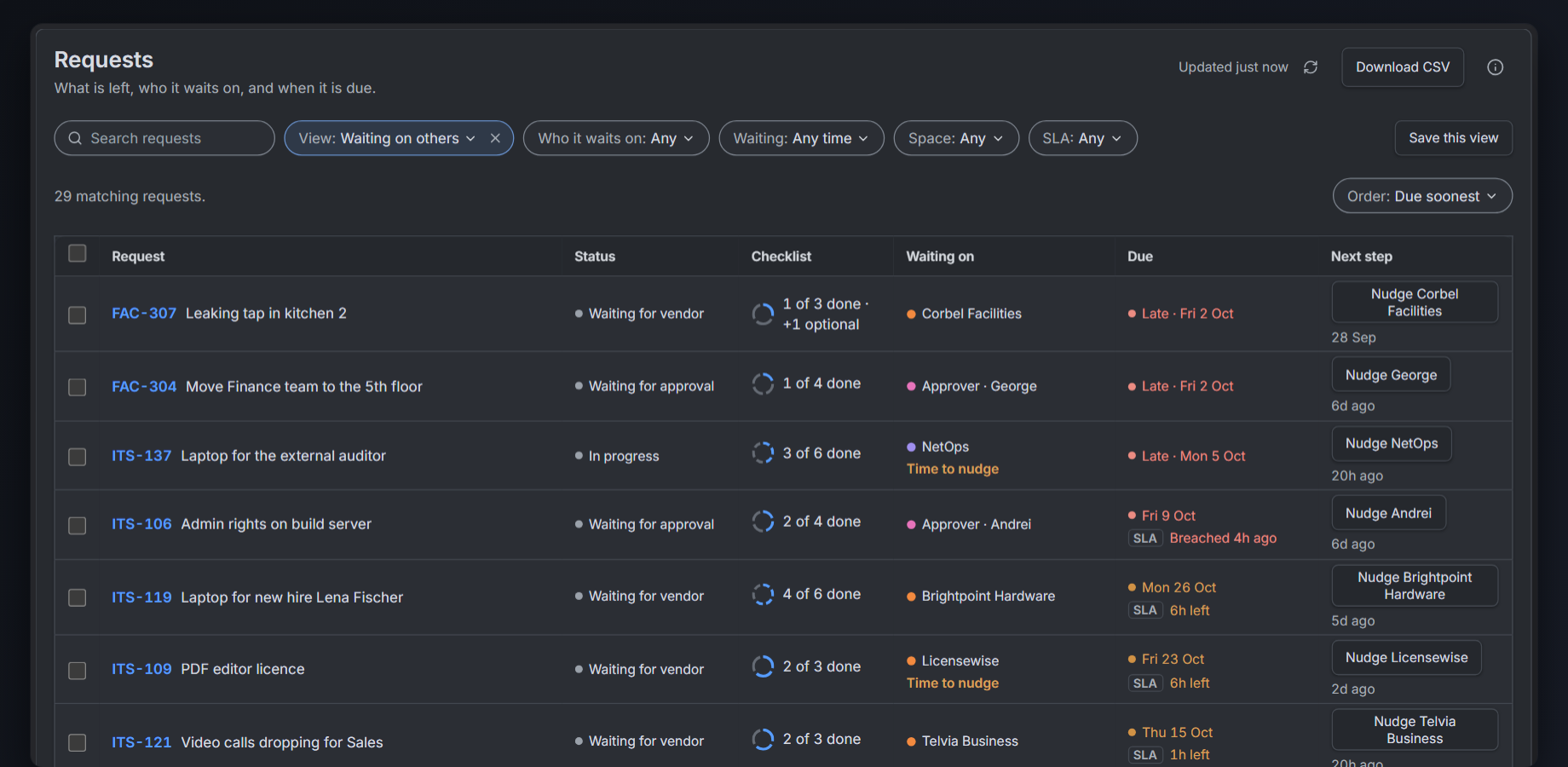
The Requests list: what's left, who each request waits on and when it's due. Sample data.
Every request shows what's left and who it's waiting on (a customer, an approver, another team or a vendor) and since when. You see it on the request, in your queues and on one Waiting on page.
From there you Ask the customer for exactly what's missing, or Nudge the team or approver who has it. You read the message first, and you get about 10 seconds to Undo.
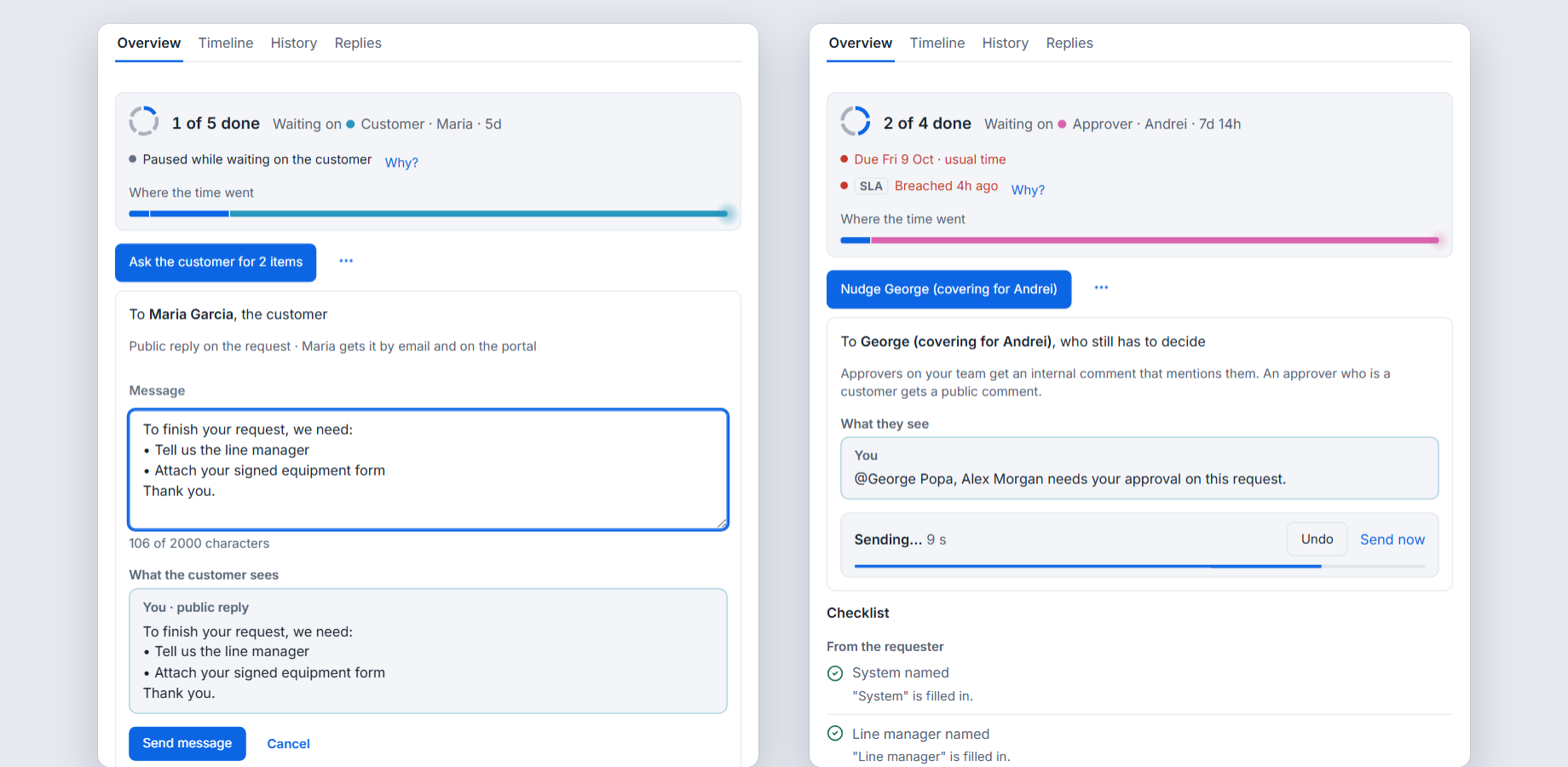
Ask the customer or Nudge an approver: read it, send it, undo within about 10 seconds. Sample data.
If you want reminders and auto-close on your asks, an admin switches them on. They stay off until then. And the first time you open it, it reads your Jira history and shows your last 90 days of waiting, so you see the pattern before you change anything.
It doesn't replace your statuses or your SLA setup. It sits on top and tells you who to talk to next.
Before you switch anything on
☐ Waiting for customer is a real status, and a customer reply moves it on
☐ The SLA pauses on that status
☐ Reminders are public, limited in number and stop when the customer replies
☐ Auto-close waits longer than the last reminder, and the note says how to reopen
☐ Work for other teams is linked, with an owner and a date on their task
☐ You know how many Automation steps your flows use each month
