Quick disclosure first: I'm a Marketplace Partner, and I build an app in this space. Most of this post is about the problem and a method you can build with native Jira automation and no app at all — that's the long section in the middle. There's one short mention of my app near the end, clearly marked. If the DIY method is all you take away, that's a good outcome.
Something I keep running into, and I'd like to know how other admins handle it.
An automation rule stops running. Nothing breaks loudly. No error appears. Nobody is notified. The work the rule was doing simply stops happening, and you find out days or weeks later when someone asks why the escalations stopped, or the reports never arrived, or a customer never got a response.
This is different from a rule that errors. A rule that errors leaves a trace. The failures that actually hurt are the ones that leave nothing behind at all.
If you spend time in the public Jira issue tracker you'll find this described over and over. A few examples, in the words of the people who filed them:
- AUTO-2212 — "A rule that had been working for months suddenly stopped. Troubleshooting it, the audit log showed no entry at all for the failed run."
- AUTO-2080 — "It occurs randomly. There is no warning or error message, there is no trace of this error anywhere."
- AUTO-1218 — "It is not acceptable for an automation rule, which cannot guarantee a reliable result, to be marked as 'Successful.'"
- AUTO-65 — "We had a rule fail after someone updated it and forgot what they changed. It resulted in our system being throttled for hours."
That last one is the shape of the real cost. Not the failure itself — the time between the failure and the moment someone noticed.
Four ways a rule goes quiet
Worth separating these, because they need different responses:
1. The rule was disabled. Sometimes deliberately, sometimes as a side effect — imports, restores, and bulk configuration changes can leave rules switched off. Nobody gets told.
2. The trigger stopped matching. A field was renamed, a status was retired, a project moved to a different scheme. The rule is enabled and healthy; its trigger just never fires. A trigger that doesn't fire writes nothing to the audit log, which is why this one is so hard to spot.
3. The rule ran but did nothing useful. A condition silently excluded everything, a branch matched zero work items, or an action failed inside a branch while the overall run still reported success. Worth knowing: a JQL search that matches nothing is recorded as "No actions performed" — a success status, not an error.
4. Someone edited it. The rule still runs, but not the way you think. Audit entries for edits are often just "automation rule was edited" — as AUTO-65 puts it, "This is absolutely useless to me."
Why the audit log doesn't rescue you
The automation audit log is the obvious place to look, and it's genuinely useful for debugging a rule you already suspect. It's much weaker as a detection tool, for three reasons.
It can't record an absence. If a rule never triggered, there's no entry to find. You cannot search your way to a run that never happened.
It doesn't scale to browsing. From AUTO-28: "I just had to click through 15 pages to find the one rule run that threw an error." From AUTO-36: "Hours of time wasted over the last 3-4 years having to manually click and scroll through the entire historical set of audit logs to find one failure." Finding a problem in the audit log requires already knowing there is one.
Notification is narrow. From AUTO-109: "Error notifications from automations are only sent to the rule owner — a significant operational risk. Automations are often business-critical, and failures can go unnoticed." If the rule owner has left the company, changed teams, or filtered those emails, nobody is watching.
There's a long-standing request for programmatic access to the audit log (AUTO-51, one of the most-voted requests in that project) which would help a lot. It isn't fully there yet.
The pattern that works: a dead man's switch
Borrowed from cron monitoring, and it inverts the problem.
Instead of watching for a failure signal — which may never arrive — you have the rule prove it is alive on a schedule. If the proof stops arriving, that absence is the alert.
This works precisely because it doesn't depend on the rule reporting its own failure. A rule that is disabled, whose trigger stopped matching, or that silently did nothing, all produce the same observable outcome: the check-in didn't happen.
Building it natively, with no app
Three pieces: a heartbeat action added to the rule you want to watch, a watchdog rule, and a cleanup rule. No custom fields, no branching, no screen configuration.
Tested on the newer flow-based automation builder in a company-managed project. Menu labels differ slightly on the classic builder.
Step 1 — Create a heartbeat project
Create one project to hold heartbeat records — call it HB. Nothing else lives here, so it stays out of your real boards and searches.
Step 2 — Add a heartbeat action to the rule you're monitoring
This is not a new rule. Open the existing rule you want to watch, and as its last action add Create work item:
- Project:
HB - Work type: Task
- Summary:
Heartbeat: Nightly SLA escalation (name it after the rule) - Labels:
hb-nightly-sla — one unique label per monitored rule. This is what the watchdog keys off, so it must be distinct.
That's the entire change to your monitored rule. Nothing else about it moves.
Step 3 — Build the watchdog
This is the piece that needs care, because you're detecting an absence, and Jira automation doesn't alert on an empty JQL result by default. A scheduled rule with "Run a JQL search" checked simply does nothing when the search returns zero rows — which is exactly the case you want to catch.
The fix is to run the search as an action and then test the result count.
Trigger: Scheduled. Set your interval — hourly is a reasonable default. Leave "Run a JQL search and execute actions for each work item" UNCHECKED. With it checked, everything downstream runs once per matching item, which is the opposite of what you want here.
Action: Lookup work items. JQL:
project = HB AND labels = hb-nightly-sla AND created > -90m
Set -90m to roughly 1.5× the interval of the rule you're monitoring.
Condition: {{smart values}} condition.
- First value:
{{lookupIssues.size}} - Condition:
equals - Second value:
0
Action: Create work item (in your triage or ops project) or Send email. This only runs when the lookup found nothing — i.e. the monitored rule hasn't checked in.
Step 4 — Clean up old heartbeats
Heartbeat items accumulate — one per run of every monitored rule. A daily scheduled rule keeps it bounded:
- Trigger: Scheduled, daily. "Run a JQL search" CHECKED this time — you do want per-item execution here.
- JQL:
project = HB AND created < -7d - Action: Delete work item
Test it properly
Getting a "rule is alive" pass proves almost nothing. Disable the monitored rule, wait past the window, and confirm the alert actually fires. The absence path is the whole point, and it's the one that's easy to leave broken without noticing.
Where this approach gets awkward, in fairness:
- One watchdog rule per monitored rule, since each needs its own label and its own staleness window
- Heartbeat work items are created on every run, so a rule firing every 5 minutes produces a lot of churn — the cleanup rule handles volume, but it's still real activity in your instance
- Scheduled rules and created items both consume automation executions, which matters on some plans
- The watchdog rule is itself unmonitored — the classic "who watches the watchmen" problem
- Team-managed and business projects have narrower automation capabilities; I originally built this with a JQL branch writing to a custom field and could not get the branch to execute at all in a business space. The version above avoids branching entirely, which is partly why I settled on it.
For three or four critical rules this is completely reasonable, and I'd recommend it over installing anything. It's the per-rule setup that grows.
A few other habits worth adopting
Name rules so ownership is obvious. [Support] Escalate P1 after 2h beats Copy of Copy of rule 3. When something breaks at 4pm on a Friday, the name is the first thing anyone reads.
Don't let one person own every rule. Given that error notifications go to the rule owner, an owner who leaves means those alerts go nowhere.
Turn off "Delay execution until we've received a response" on web request actions unless you actually need the response. Useful while testing, unnecessary overhead afterwards.
Review your rule list quarterly. Sort by last-run date. Anything that hasn't fired in months is either broken or no longer needed, and both are worth knowing.
The packaged version
(Vendor mention — this is the app I disclosed at the top. Skip this section if you're not interested.)
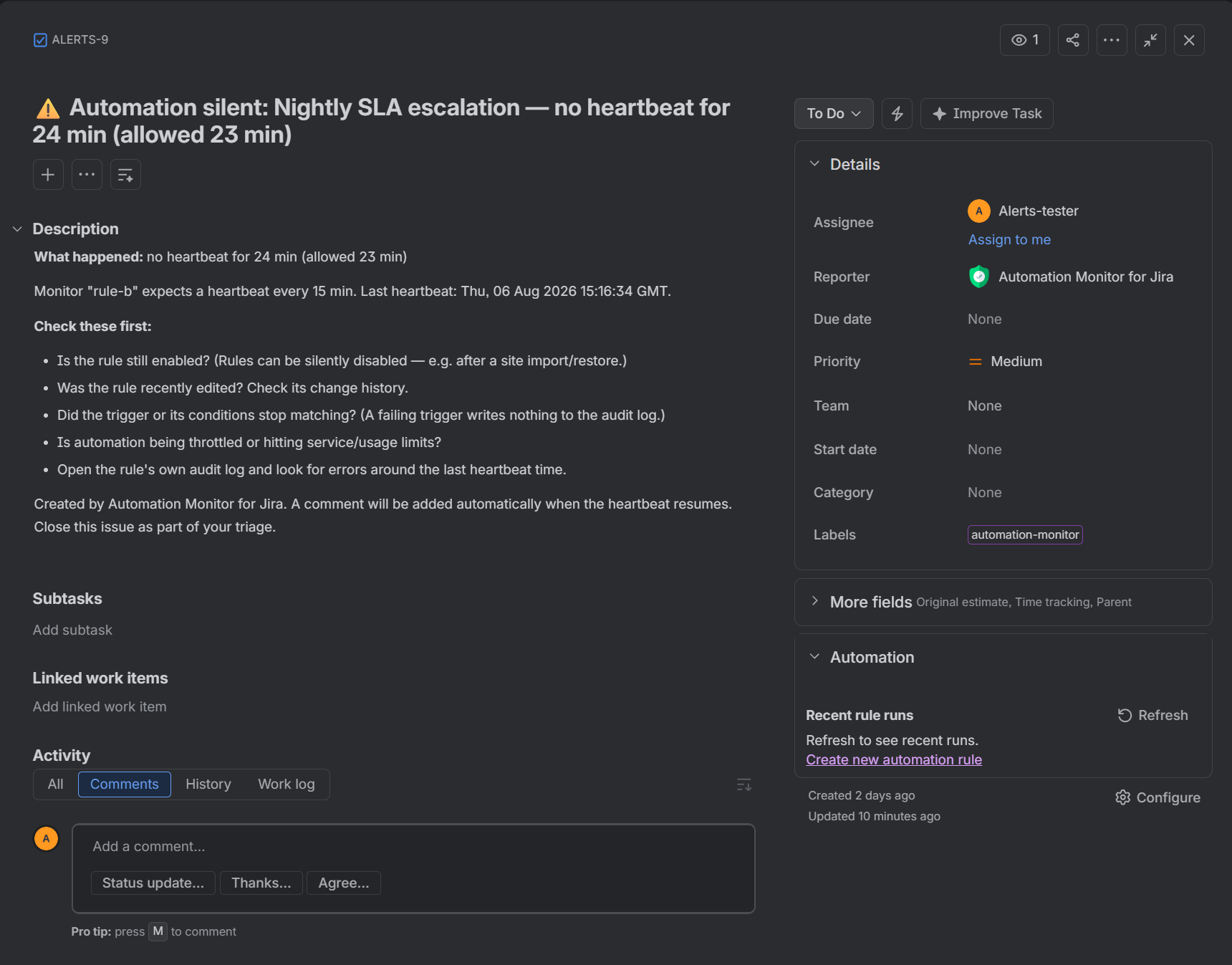
I built Automation Monitor for Jira because maintaining a watchdog rule and a label per monitored rule doesn't scale past a handful. It's the same dead man's switch pattern with the bookkeeping removed: you create a monitor, paste its URL into your rule as a Send web request action, and if that rule stops checking in you get a Jira issue in a project you choose — with how long it's been silent and a triage checklist.
Free for up to 10 monitors per site, and it runs entirely on Atlassian infrastructure with no external requests, so nothing leaves your site.
The DIY method above genuinely works. Use whichever fits.
What I'm actually curious about
Automation quietly doing nothing is worse than automation visibly failing, because visible failures get fixed the same day. The fix isn't better dashboards or more diligent audit-log reading — it's making silence itself detectable.
So: has this happened to you, how did you find out, and how long did it take? That gap is usually the expensive part, and I'd like to know whether other admins have found something better.


