If you're part of the Jira Cloud admin community, you've probably heard that field configuration schemes are being retired. Beginning in June 2026, the new Jira Field Schemes model starts rolling out, offering a more modular setup. Most migrations will happen on their own — but "automatic" is exactly the catch: Atlassian will transfer your current setup along with any technical debt straight into the new system.
This article is for admins who know the real work starts after the migration — teams who added a custom field every time someone asked "can we track that?", now sit on 600+ fields, and want to stop the cycle rather than carry it into Field Schemes.

Part 1: What's Actually Changing, and Why Admins Are Concerned
The old Jira setup had three moving parts: Field Configuration (rules for each field), Field Configuration Scheme (links those rules to work item types), and the project's link to a scheme. If that already sounds confusing, you can see why Atlassian wants to replace it.
The new Field Schemes model links each field directly to the project or work type it belongs to. Instead of one big scheme shared by many projects with a pile of exceptions, each space gets its own simpler setup — easier to manage and govern.
📅 Timeline to know
Limits land first: 700 fields per space and 150 work types per scheme, starting February 2026. The full Field Schemes migration starts in June 2026. Atlassian's migration tool will create new Field Schemes to match your current setup — but it won't fix any existing problems.
The migration concerns worth taking seriously
1. "Automatic" doesn't mean "clean." The tool copies your current setup and creates matching Field Schemes. It helpfully finds unused fields in each space and removes those links — but it only removes unused associations, not the fields themselves. Fields you created and no longer need stay in your instance and still count toward your total.
2. You may end up with more schemes than you started with. Because the new model is more granular, projects that used to share a scheme may each get their own. Better isolation — but also more items to name, manage, and update as processes change.
3. Naming and ownership are on you. The tool reuses your current configuration names for the new schemes. If those names are vague ("Default Field Configuration", "IT Config v2"), the new setup will be just as confusing. Set clear naming conventions before migration.
4. Apps and custom fields may behave differently afterward. Test any app that relies on field configurations. In particular, confirm that tools which map data to Jira fields — like forms apps — still connect to the right fields after the change.
Admin quick tips before migration
Start by auditing your fields: go to Admin → Fields and try to describe each one in a single sentence. If you can't, mark it for possible deletion. Test changes in a sandbox first, as Atlassian recommends. Note which field configuration schemes are shared across projects — those will spawn the most new schemes. And warn project leads that their field configuration may look different after migration, even when field visibility stays the same.
Part 2: The Deeper Problem Migration Doesn't Solve
Here's the reality: Field Schemes migration changes the structure, not your team's habits. After migration, people will still ask for new fields. IT wants "Vendor Contact Name," HR wants "Employee Start Date," Marketing wants "Campaign Tag." Keep saying yes and you'll be back to hundreds of fields by year-end.
The question the migration really exposes is: which data actually needs to be a Jira field?
Use a Jira field when… | Use a form instead when… |
|---|
The data drives cross-team reporting or JQL filters | The data is intake context for a specific request type |
Automation or SLA rules depend on it | The data collection is temporary or project-scoped |
The value must survive if the issue moves projects | You need 10+ questions but only 2 need to be queryable |
Rovo or AI needs to query it across the instance | The data is a checklist, approval record, or audit trail |
It's used in board filters or dashboard gadgets | You're collecting feedback, survey results, or NPS scores |
(For the full decision framework, see Designing Jira Intake in 2026: When to Use a Field vs. a Form.)
The idea sounds simple — until you hit the catch: native Jira forms require every question to be tied to a Jira field. Add a question, create a field. A 17-question form means 17 fields. That's not governance, it's just extra work — and it's exactly how field sprawl happens in most Jira instances.
That's the problem Smart Forms for Jira, built by our team at SaaSJet, is designed to solve.
Part 3: How Smart Forms Changes the Field Equation
Map anything to anything — or nothing
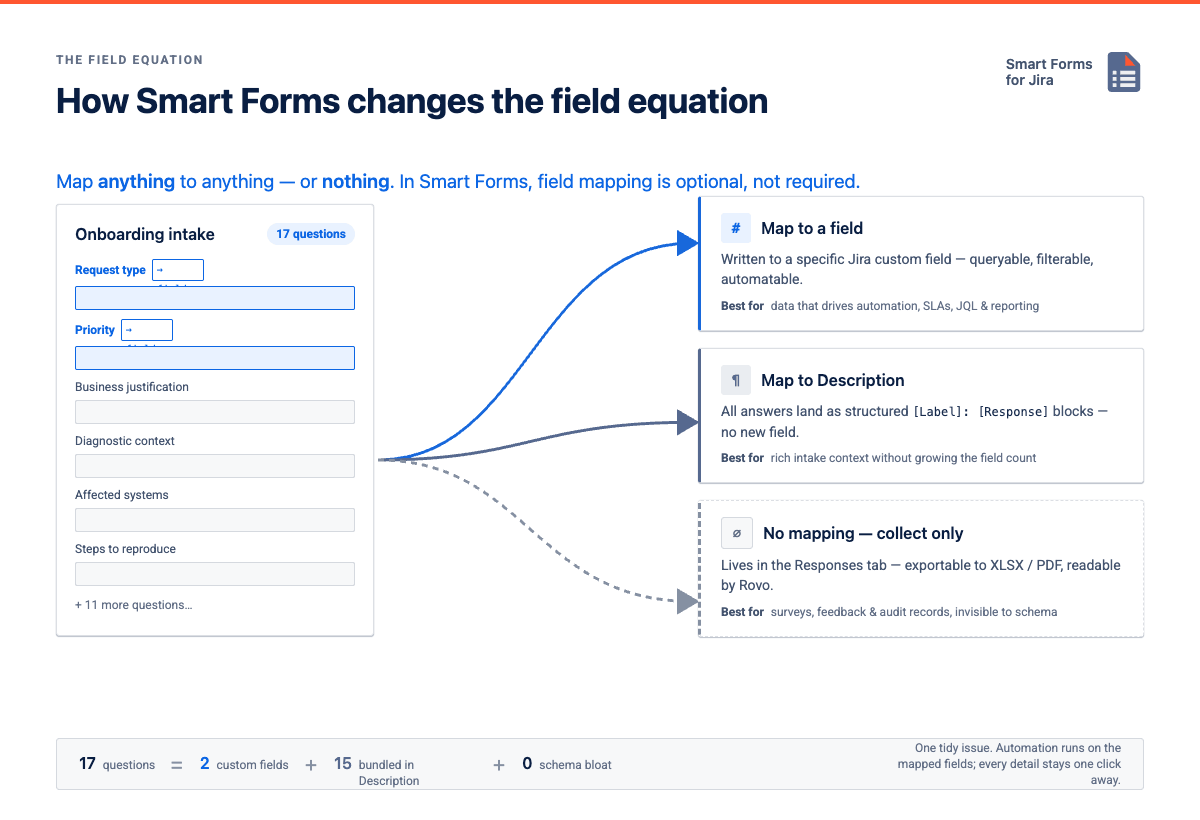
The core difference between Smart Forms and native Jira forms: field mapping is optional, not required. When a team submits a form, Smart Forms can handle the response three ways:
Mapping mode | What happens | Best for |
|---|
Map to any field / custom field | Response is written to a specific Jira field — queryable, filterable, automatable | Data that drives automation, SLAs, JQL, or reporting |
Map to Description | All responses appear as structured [Label]: [Response] blocks in the Description — no new field required | Rich intake context without adding to the field count |
No mapping (collect only) | Response lives in the Smart Forms Responses tab — exportable to XLSX/PDF, analyzable by Rovo, invisible to the Jira schema | Surveys, feedback, or audit records where Jira tracking isn't the goal |
So a 17-question intake form can create a well-organized Jira issue using just 2 custom fields. The other 15 answers — diagnostic context, business justification — sit in the Description as a tidy bundle. Everyone sees the full detail, automation runs on the mapped fields, and your field count stays flat.
Pre-fill and hidden values: keep forms smart, not busy
Smart Forms can pre-fill values from Jira fields or use default responses, so people don't re-enter what Jira already knows — default Priority to Medium, pre-fill issue type options, or pull from Components, Labels, Versions, or User Pickers.
Hidden fields handle internal routing and reporting: a form can silently pass Intake Source = HR Portal, Region = EMEA, or Category = Hardware Request without showing them to the submitter. Fewer visible fields, same structured data for mapping, automation, and reporting.
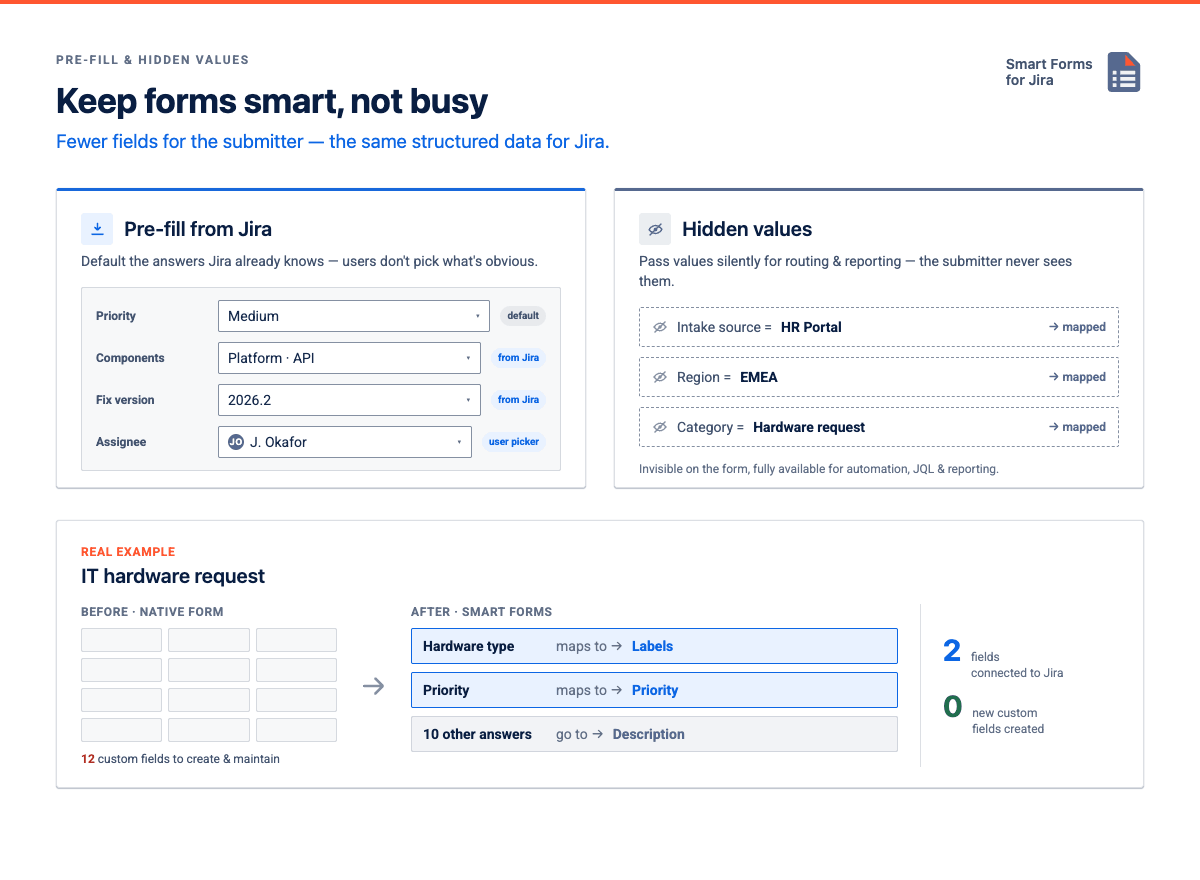
Real example — IT hardware request. Before Smart Forms, this form needed 12 custom fields. With Smart Forms, only 2 connect to Jira (Hardware Type → Labels, Priority → Priority). The other 10 questions — shipping address, device specs — go to the Description. No new fields, all context in the ticket, automation on Priority and Labels.
Required fields and validation: better intake without more Jira fields
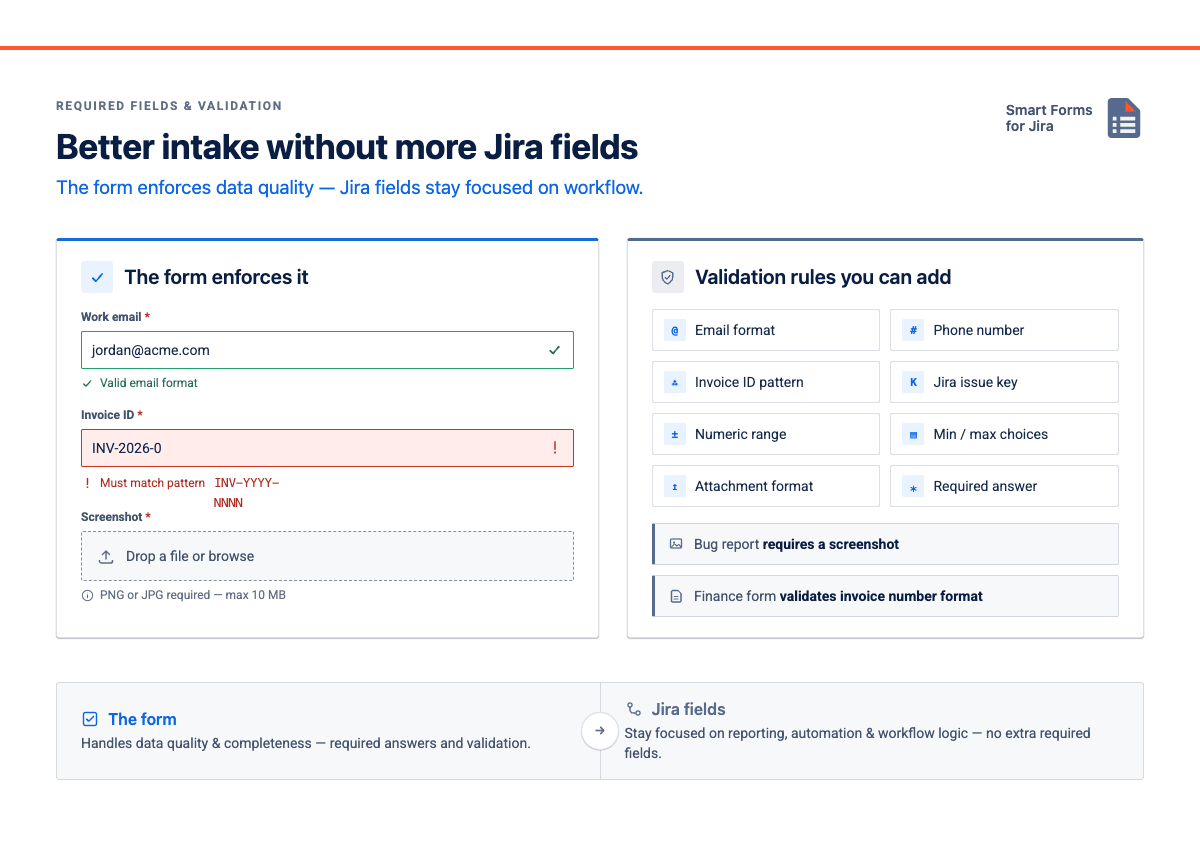
Not every required answer needs to become a required Jira field. Smart Forms lets you make questions mandatory and add validation rules and even live calculated fields — emails, phone numbers, invoice IDs, issue keys, numeric ranges, min/max choices, attachment formats. A bug report can require a screenshot; a finance form can validate an invoice-number format. Jira fields stay focused on reporting and workflow logic, while the form handles data quality.
One form. Any project. No rebuilding.
Field configuration schemes have always been tied to a project or shared across several — the exact thing causing complications. Smart Forms aren't bound to the project where they're built: create a form once and reuse it in any Jira project — JSW, JWM, JSM, or even for JPD ideas — without rebuilding.
That matters even more after the migration. As projects get their own Field Schemes, it's tempting to build separate field sets per team. With Smart Forms you build once and reuse across every team that shares a process, while still creating issues in the right project with the right mapped fields.
Shared process | Smart Forms reuse pattern |
|---|
IT hardware & software access | One intake form shared across IT, Operations, and HR projects |
Bug reporting | One bug form on every software project — same fields, same structure |
Employee onboarding | One HR onboarding form creates issues in both HR and IT from a single submission |
Vendor & partner intake | One external form shared via public URL, creating issues in whichever project owns vendor management |
Repeatable casework | One case-management intake form reused across teams that run the same process |
CSAT / NPS post-resolution | One feedback form reused across every support project — no per-project setup |
The automation chain
As soon as a response is mapped to a Jira field, it's ready for automation:
Form submission → field mapping → Jira field value → automation trigger → next action
Build a 15-question form and map nothing, and your rules see a new issue with no detail to act on. The fix: map only the responses that need to trigger routing, assignment, SLA, or status changes, and put the rest in the Description or Responses tab. A neat trick — use a hidden field with a default value to tag every issue from a form with a Label like Q3-IT-Intake, so automation can route it without the submitter seeing how.
Status transition after submission
Smart Forms can automatically transition an issue after submission, as long as the transition exists in the workflow — submitting a checklist moves the issue to Done, submitting an approval form moves it to Waiting for Approval. For simple "form submitted → status changed" flows, the form itself becomes the trigger — no extra Jira rule or helper field needed.
Part 4: What to Actually Do Right Now
Before the migration hits your instance
- Review your custom fields. Flag any field you can't explain in one sentence, or that isn't used in JQL, automation, or dashboards.
- Find intake fields. If a field exists only to answer a form question, plan to remove it after migration and use a Smart Form instead.
- Check shared schemes. The field configuration schemes shared across multiple projects will create the most new schemes — and are where reusable Smart Forms help most.
- Test field-mapping apps in a sandbox before go-live.
Rovo: analyze form responses without turning everything into fields
Some form data must become Jira fields because it drives JQL, reporting, automation, or SLAs. Most doesn't. With Rovo and Smart Forms, teams keep detailed answers inside the form and still analyze them later — Rovo can find forms, summarize responses, surface common themes, and suggest improvements. So instead of a custom field per survey answer or checklist item, Jira stays clean and the form data stays useful.
After the migration
- Set a field-creation policy. Use the Part 2 framework: if the answer is "no" to all five questions on the left, use a form, not a new field.
- Build your key intake forms in Smart Forms. Start with the request types that usually trigger new field requests — IT hardware, access management, onboarding, support intake.
- Map only what matters. Pick the 1–3 fields automation/SLA/JQL will use; map those, leave the rest in the Description or the form.
- Share and reuse. Pin a form to the Jira board sidebar, embed it in Confluence, or share it by public URL — all without touching the field configuration.
Final thought
The Field Schemes migration is Atlassian's cleanup of their data model. The field-sprawl problem is ours — and it predates the migration by years. The transition is a rare chance for a clean break with a clear reason to say "we're doing this differently now."
Smart Forms for Jira helps you make it stick: build intake forms without adding fields, collect 15 questions while mapping only 2, and reuse forms across any project. Automation runs on the fields that matter; everything else stays as readable context on the issue.
Going through the migration and want to pressure-test your field model — or try any of the techniques above (Description mapping, hidden-field labeling, cross-project reuse)? Try Smart Forms for Jira or drop a question below — happy to help you find the right setup.
Related reading:
Designing Jira Intake in 2026: When to Use a Field vs. a Form
FAQ & Reference Guide: Transitioning to the New Field Schemes — Atlassian Community
Say goodbye to field configuration schemes and hello to the future of Jira — Atlassian Community
