Estimated time to read: 6 minutes
TL;DR: To automate changing the Data Classification level of a Jira/JSM work item in Automation for Jira you can use the Send Web Request action with the Jira Platform REST API "issue" endpoint.
Topic Prerequisites:
- Atlassian Guard Premium is included in your environment.
- Data Classification Levels have been created and published for your Organization.
Context:
With Atlassian Guard Premium the Data Classification feature becomes available.
Data Classification enables you to set a Data Classification level (similar to the concept of an Issue Security Level) for Jira/JSM work Items.
Data Classification can be used as a Coverage option for Data Protection Security policies to apply rules such as Block Anonymous Access and Block Data Export to your Jira/JSM work items.
What problem are we solving?
With Automation for Jira currently the Data Classification field can't be directly edited with the Edit Work Item action or a dedicated Data Classification action.
- There is no Action specifically for updating the Data Classification level for a work item.
- The Data Classification Level field is not selectable from the Choose fields to set option in the Edit Work Item action.
- The Data Classification field is not recognized as a valid field in the Additional Fields option in the Edit Work Item action using either its friendly name ("Classification Level") or its internal field name ("dataclassification"). Both result in the error message shown below:
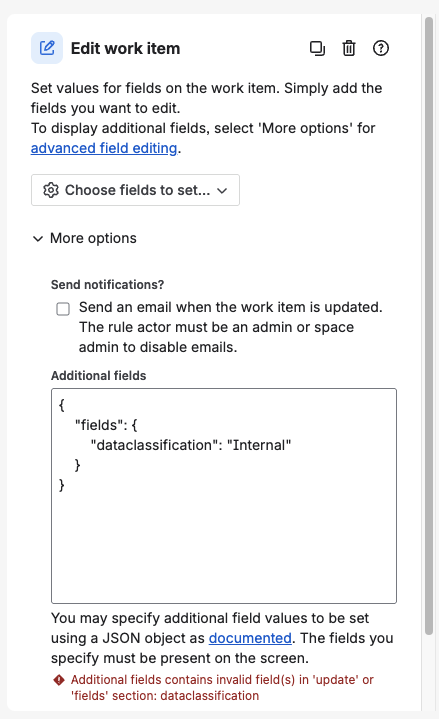
The only method currently available for modifying the Data Classification Level of a work item through Automation is to use the Jira REST API via the Send Web Request action.
What is Atlassian doing to help?
Within JAC, there is an open suggestion to add to Jira/JSM Cloud an Update Data Classification action comparable to the one that is already available in Confluence Cloud;
Providing option to update Data Classification for Automation rules in Jira and JSM: ACCESS-2342
Solution Methodology:
The REST API endpoint we will use is the Issue endpoint with the PUT method.
We will access this endpoint through the Send Web Request action.
Solution Prerequisites:
1. API Token: You will need a base64-encoded API Token generated for a user that has access to Edit the work item that needs to be changed.
2. Data Classification Level ID: You will need the alphanumeric ID for the Data Classification value to which you want to set the field. You can get that in either of two ways:
- Looking at the output for an issue that has that value currently set as its Data Classification level. Use this URL in your browser, substituting appropriate values for <yourinstanceurl> and <issuekey>.
https://<yourinstanceurl>/rest/api/2/issue/<issuekey>?expand=names
Find the "dataclassification" field and note the value for the "id" attribute.

- An Organization Administrator can obtain the ID by navigating to the Admin Hub > Security > Data Protection > Data Classifications.
From there click on the Actions button for the Data Classification Level of interest and select the View details option:
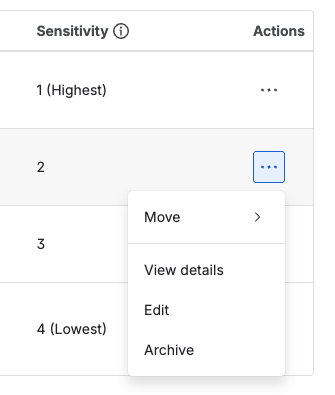
The ID will appear at the end of the URL of the new page: i.e.
classification-tag%2F8834884b-f6ef-4f33-a47f-4383a50fd868
Solution Implementation:
Assumptions: You have already selected an appropriate trigger for your rule, and the {{issue}} smart value references the work item you want to modify.
To modify the Data Classification Level for a work item, in your Automation Rule add the Send Web Request action.
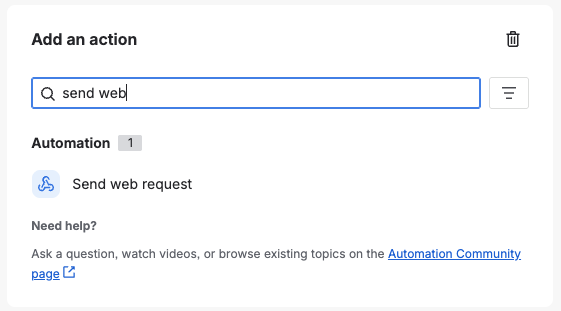
For the Send Web Request configuration enter the following:
Web request URL:
https://<yourinstanceurl>/rest/api/3/issue/{{issue.key.urlEncode}}?returnIssue=true
Replace <yourinstanceurl> with the actual URL for your Jira instance.
?returnIssue=true is optional. Use it if you want to get confirmation of the change by having the web request return the updated work item data as part of its response.
HTTP Method: PUT
Web request body: Custom Data
Custom data:
Replace <classification level id> with the value you obtained in the Solution Prerequisites.
{
  "fields": {
    "dataclassification": {
      "id":"<classification level id>"}
  }
}
Delay execution... / Continue running...:
The settings for these options depend on how you want to proceed with the remaining actions of your rule. If you want to ensure the web request completed and check if it was successful before proceeding, check the box for Delay execution.
Headers:
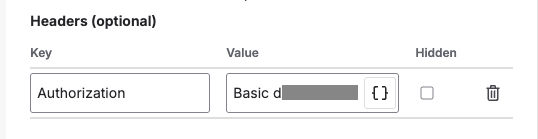
You will need to add an Authorization header as discussed in the Send Web Request article referenced earlier, providing the base64-encoded API Token obtained in the Solution Prerequisites.
Bonus tip:
Incorporate this action into an Automation Rule that uses the Content scanning for Jira trigger to automatically remediate Guard Detect alerts that identify Jira work items with sensitive content that should have a more restrictive Data Classification Level.
In Conclusion:
With the solution in this article you can use Automation Rules to adjust the Data Classification Level for your Jira/JSM work items.
As a bonus when you combine:
- Data Classification for flagging Jira/JSM work items that should not be exportable,
- Data Security Policies to block the export of data based on Data Classification,
- Guard Detect detection rules for content scanning to identify Jira/JSM work items with sensitive content, and
- Automation for Jira/JSM to automatically set the Data Classification level for work items identified by Guard Detect alerts
... you can reduce the risk of users exporting sensitive data from your Jira/JSM instance.


