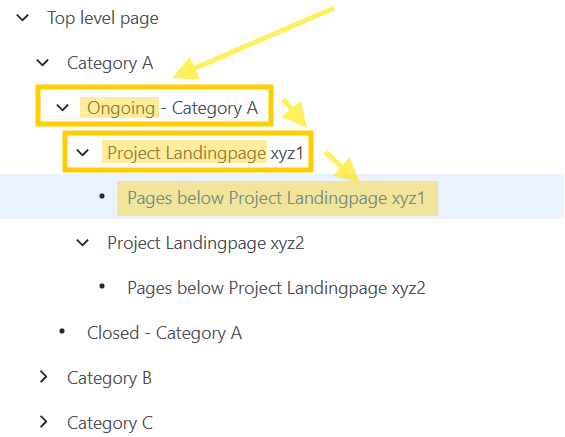
In the Confluence Cloud Automation Rule Details, there is a checkbox "Check to allow other rule actions to trigger this rule. Only enable this if you need this rule to execute in response to another rule." at the very bottom (see screenshot below). Is there a way to trigger a specific Confluence Cloud Automation Rule from another rule?
Background why I want to do this: There are no CQL sub-queries in Confluence and e.g. ancestor and parent only accept specific page ids (no "~" to take pages with a title containing some string). I want to build an automation which checks for pages with a parent with some title and then again for pages having one of the search results as an ancestor. In Confluence Cloud Automation, I can use the "Branch rule / related entities" branch to execute CQL, but in this branch, I can't execute a "sub-branch" using the previous CQL search results in another CQL.
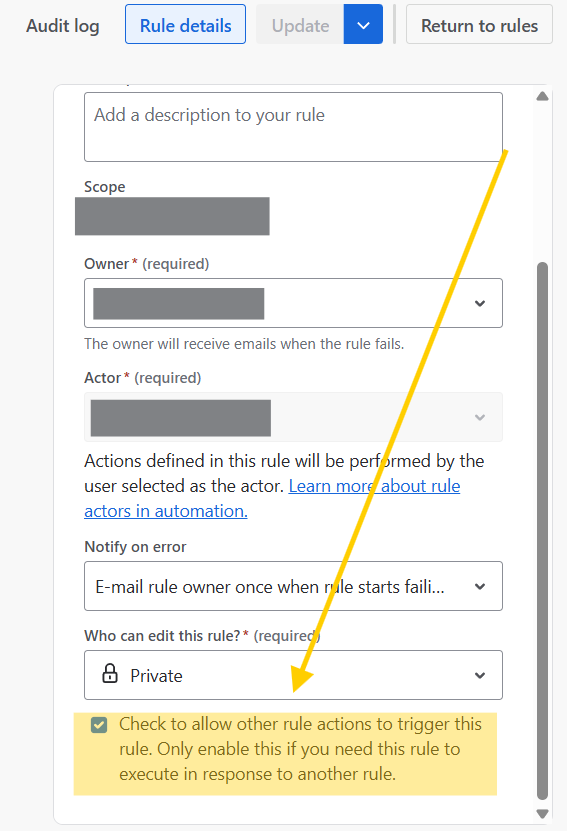
Please take a look at my example screenshot below: First, I want to get all pages which have "Ongoing" in its title. Then I want to get the pages with "Project Landingpage" in its title which have one of this "Ongoing" pages as a parent. Afterwards, I want to check for all the pages below each "Project Landingpage" page when they have been last modified to decide if an automation should execute some action, e.g. send an email to somebody (e.g. the page owner of the respective "Project Landingpage ..."). Now let's say we have around 100 categories and below each, there is a page tree like below Category A, with 0 to 20 "Project Landingpage ..." pages below the "Ongoing - Category ..." page. The check for last modified should be executed for all of the pages below these "Project Landingpage ..." pages, but not for the pages below "Project Landingpage ..." pages which might be already below "Closed - Category ..." pages (as the work on them is already completed but they should still be kept for documentation and reference).