EDIT: Solved! See below.
Hi everyone!
I'm very new to JSM and Automation, but since searching online didn't get me an answer, I thought I'd post here.
I would like to set up a request form for onboarding. I used the default template, modified that, all good so far. To make lives easier for IT I would like to modify the Summary field to be such:
Onboarding order - [Starting date] - [Name]
I got the name down, but instead of the starting date value, I'm getting a blank space (see the screenshot).
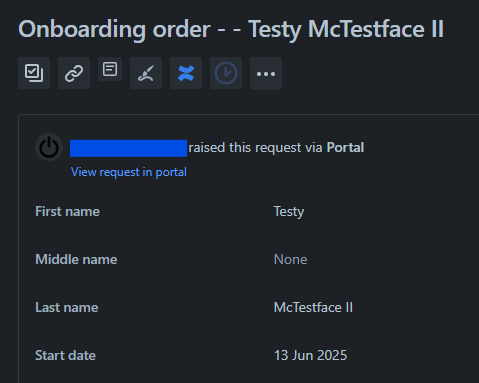
The Automation bit that sets the Summary is set up like that:
Step 1 - create variable
Variable name: onboardingSummary
Smart value: Onboarding order - {{issue.Start date}} - {{issue.First Name}} {{issue.Last Name}}Step 2 - edit issue fields
Summary equals {{onboardingSummary}}I thought I'd need to dig in to get the value of the field, but the API call returns just this:
"customfield_11159": "2025-03-20",
so I have nothing like .name or .value to grab.
I'm now assuming that I need to convert the date object into string, but I couldn't find any such method in the documentation.
Any help appreciated!
Solution
I just had a lightbulb moment - replaced the name of the custom field with it's, I don't know how to call it, "API name"? So that this:
{{issue.Start date}}became this:
{{customfield_11159 date}}and now everything works.
Would be cool, though, if the Community could tell me:
1. What's the proper name for the "customfield_11159"? So that in the future I can call it correctly and not get it confused with the display name on the form.
2. Is there a way to expand the custom field to have that user friendly name included? It would 100% help with readability when reviewing rules a year from now.


