I have a Notes attribute on an object. It is presumed that this field already contains text.
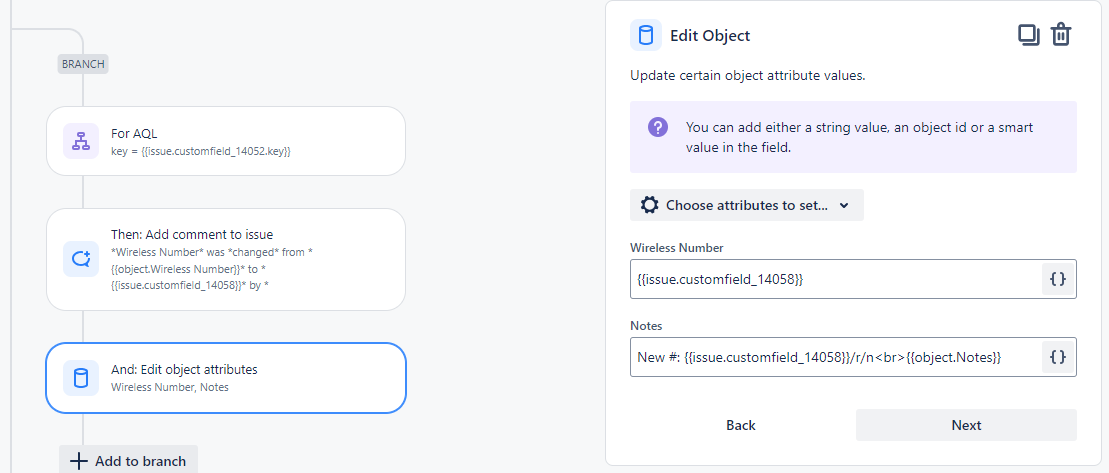
Via automation I'm using a For AQL branching node to select the object from Assets
Then for that object I'm using the Edit Object node to edit the Notes attribute.
I have it working to add the value of a custom field and the previous Notes value.
{{issue.customfield_99999}} {{object.Notes}}
But no matter what I do, I cannot create a line break between the two to create a visual separation between the two.
For Edit Issue, you have a multi-line component which allows you to insert the line break manually in the Edit Issue node.
For Edit Object, it's rendered as a text component, not a multi-line component.
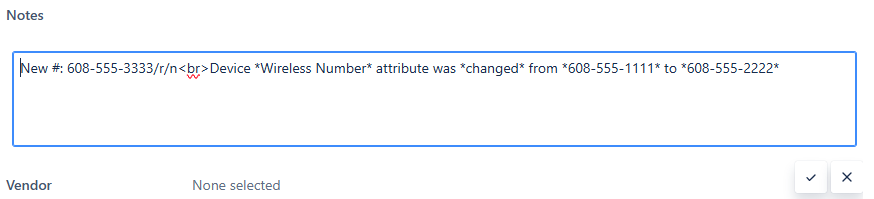
{{issue.customfield_99999}} /r/n {{object.Notes}} renders the /r/n literally
{{issue.customfield_99999}} <br> {{object.Notes}} renders as a space.