How can i pull time tracking feature on a dashboard to see how many hours a developer went over? Im unable to pull that info on the dashboard or burn down chart.
Hi @Sanobar Basha, I came across your question and wanted to share a suggestion on how to track how many hours a developer has gone over in Jira: you can use Jira's native time tracking along with JQL queries to create a custom dashboard that displays the information you'd want to see.
If you're still exploring time tracking apps on the marketplace, I recommend checking out 7pace Timetracker for Jira. We recently launched the app for Jira, but it's been trusted by thousands of teams on Azure DevOps and monday.com.
7pace Timetracker is deeply integrated with Jira so it fits seamlessly into your existing workflows. It makes time tracking easy (and painless), so team members are more likely to follow through, and you end up with better data You can get time-tracking insights, including exceeded time estimates with a breakdown by individual on any issue level, as well as in reports to monitor estimated vs. tracked time vs. exceeded time. If you have any questions or would like a demo, let me know!
Hi @Sanobar Basha
You can use Jira Rest API's to pull this data and build on your own custom solution. Or if you would be interested in a mktplace app , take a look at
Worklogs Time Tracking & Timesheets
You can easily view time entries for multiple issues day wise grouped by in a single view. The app allows to filter/Categorize/Group your worklogs data and a timesheet view too to track individual time spent. And what's more it can be easily added as a dashboard gadget.
You can view the "Workload Pie Chart" on the Jira dashboard to see worklogs. Here, you can select a project or a saved filter to view the total time for relevant worklogs.
If you need more detailed insights beyond the built-in features, there are various add-ons in the Atlassian Marketplace that provide enhanced time tracking and reporting capabilities. One such option is WorklogPRO. With its timesheet report gadget, you can customize grouping by selecting your preferred level in the report settings, allowing you to generate detailed, organized timesheet reports tailored to your needs on the dashboard.
Additionally, if you're interested in creating different types of charts, you can access the pivot report in the WorklogPRO timesheet feature in the Jira navigation bar to create various charts, such as bar chart and pie chart etc.Disclaimer: I am an employee of the vendor who developed this app.
You may consider using a third-party app like Clockwork PRO.
With Clockwork, you can view a comparison of the Original estimate and the time spent by the developer, as shown:
I have also explained more about your use case here. If you would like to explore this option further, please reach out here.
Hi @Sanobar Basha,
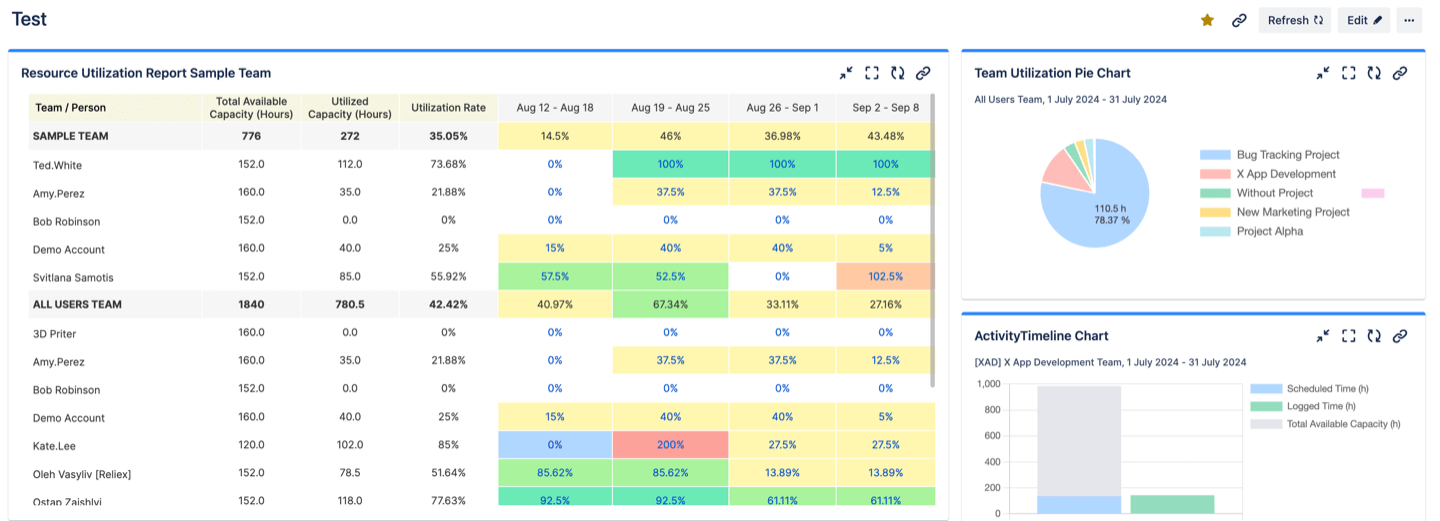
Thank you for your question! ActivityTimeline plugin can help you with that. This tool provides custom reports and timesheets that can be added to Jira Dashboard as gadgets.
It synchronizes with Jira worklogs and provides insights on resource and team utilization, detailed worklog reports, planned with actual time spent on tasks, skills availability, and project progress. The reports and charts are customizable and refresh automatically. Here's a detailed breakdown on how to add the gadget you need on your dashboard.
Hope this helps.
Can i get on a call with you so you can show me around? Please and TY
Can i get on a call with you?
Sounds like what i want, can i get on a call with you?
This sounds like developers have to go in and enter the time, they wont do it. I as a scrum master add the time on standup depending on how much time they spent on teh ticket. CAn we chat real quick?
If you'd like a more automated way of getting time & effort info logged (with no dev effort) you may be interested in Capacity Insights, the latest app by Tempo. It's free to try: https://marketplace.atlassian.com/apps/1233735/capacity-insights-ai-capacity-management-for-jira-tempo?tab=overview&hosting=cloud
Sure, please set up a call here. It will help me understand your requirements better.
Hi Sanobar, choose any convenient time slot: https://activitytimeline.com/schedule-demo
Hi @Sanobar Basha ,could you please create a ticket on the starware portal to arrange a meeting for demonstrating WorklogPRO?
If you are looking for an agile solution that covers your requirements and yet is reasonably priced, I recommend the Worklogs - Time Tracking and Time Reports app. The app has been developed by SolDevelo, the company I'm representing.
With the app, you can display several worklog gadgets on your dashboard. In the example below I displayed users, projects, and Jira issues to which they logged time in the specific period. Please take a look:
They are many possibilities how you can adjust your worklogs gadget:
I would be happy to meet with you to discuss your needs and to show you a demo of our application. You can schedule a meeting through the Calendly platform.
Let me know if you have any questions.
Kind regards,MichałSolDevelo Team
I’d love to connect. Can we set up sometime for tom afternoon or next week? I want to know if there is a way to see how long tickets have been in progress. Our company doesn’t really want to use time tracking tool and it’s appears to come across as micro managing. I’m happy to chat with you further on your ideas.
To track time in status, if you would be interested to try out a mktplace app do take a look at
Time in Status Reports
With this app you generate time in each workflow status for multiple issues with multiple filter and grouping options. You can also group your statuses to define your own resolution times.
More details here.
Disclaimer : I am part of the app team for this add-on
Hi @Sanobar Basha Absolutely! 7pace Timetracker is an app from the Atlassian marketplace, but it's built with the everyday user at heart -- making it very easy to track time, with more flexibility than what Jira offers out of the box. We find that most individuals track time more regularly/accurately so it leads to better data. Additionaly the app provides time tracking insights not only for managers, but for individual team members so they can spot trends, gaps, and improve their own processes with the data. To schedule some time to discuss more, please use this link! Let me know if you have any other questions I can answer here as well!
Hi!
If you're looking to track how many hours a developer went over, you might want to consider using a time tracking plugin like TMetric, which is available on the Atlassian Marketplace. It seamlessly integrates with Jira, allowing you to monitor logged hours, compare estimates vs. actuals, and get detailed reports on time spent across tasks and projects.
I hope this is useful! If you have any questions, please feel free to reach out to me.
Best,Kate
It looks like you're new here. Sign in or register to get started.