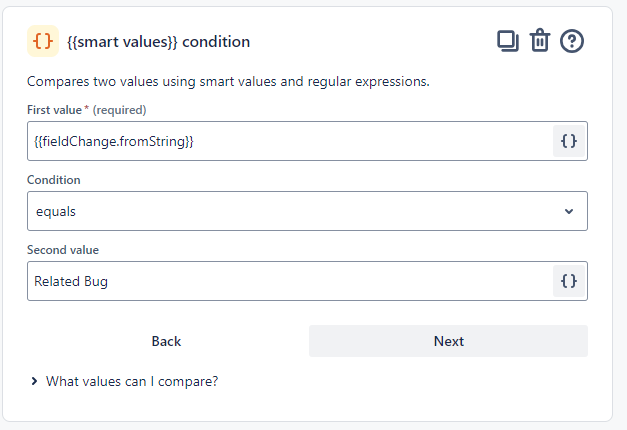
I'm facing an issue with a Jira Automation rule that's intended to trigger when an issue's type changes from "Bug" to "Related Bug." However, the automation isn't functioning as expected, and I'm encountering multiple issues:
Smart Values Not Working: The automation rule uses smart values to check the previous issue type ({{fieldChange.fromString}}). This smart value condition is supposed to match when the issue type changes from "Related Bug" To "Bug". However, the rule fails to recognize this condition, even though it appears correct.
Issue Type Change Not Triggering: Despite configuring the rule to trigger on changes to the issue type field, the automation rule does not trigger when I convert an issue type from "Bug" to "Related Bug." This is blocking the execution of the rest of the automation steps.
Here’s a breakdown of the rule:
- Trigger: Value changes for the issue type field.
- Condition:
- The smart value
{{fieldChange.fromString}} is expected to equal "Bug".
- Action: Send an email notification when the condition is met.
I have verified that the issue type change is correctly happening from "Bug" to "Related Bug" on the issues, but the rule is not being triggered or logging the correct smart value in the audit log.
Questions:
- Is there a known issue with using smart values like
{{fieldChange.fromString}} for the issue type field in automation rules? - Are there any workarounds or alternative approaches to reliably detect when an issue type changes from "Bug" to "Related Bug"?
- Could the problem be related to how the issue type field is handled in automation rules, especially when it’s a custom field?
Any insights or suggestions on resolving this would be greatly appreciated!