I am trying to assign a ticket automatically based on a issue transition trigger. The first two steps work no problem, however I am having problems with the "Add comment to issue" action.
The desired action I would like is whoever is chosen in step 2, receives a tag in a comment in step 3. However, the automation is not using this newly assigned person in the comment but rather whoever was the assignee before the issue transitioned. I tried using a delay between assigning the issue and posting the comment but this does not help.
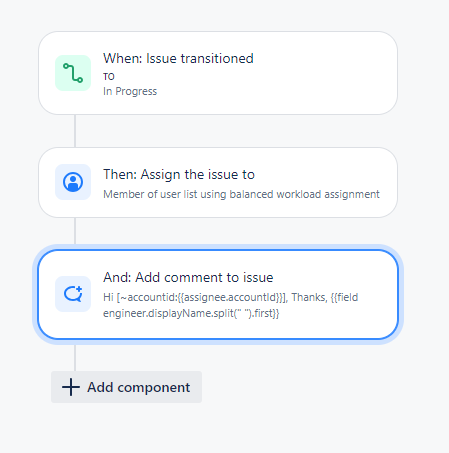
I tried if the assignee is unknown before this automation happens then the account id in {{assignee.accountId}} is not filled in and thus, there is no tagging in the comment. --> 1st comment below
Then when there is someone assigned (myself in this case) before the automation is executed then the person who was the assignee is tagged in the comment. --> 2nd comment below
![2024-08-14 15_34_14-[CPD-728] Ticket to test automation - Jira and 48 more pages - Work - Microsoft.png](https://us.v-cdn.net/6038660/uploads/images/341767i7176F455462EB021/2024-08-14%2015_34_14-%5BCPD-728%5D%20Ticket%20to%20test%20automation%20-%20Jira%20and%2048%20more%20pages%20-%20Work%20-%20Microsoft%E2%80%8B.png "2024-08-14 15_34_14-[CPD-728] Ticket to test automation - Jira and 48 more pages - Work - Microsoft.png")
Is there another smart user value I should be using or need to adjust the automation rule in some way to get the newly assigned person in step 2 to be mentioned in the comment and not the previous assignee?


