My automation's end goal is this:
- Issue has Field X updated
- Update Field Y (user picker) based on Field X's value
- If Field Y had a previous value (user), email old value and new value
Bullet Point 1 and 2 working great.
Things aren't working at the email step (bullet point 3)
As part of Bullet Point 1, I'm creating two custom variable to record the current Field Y's value (display name and email). Then, in Bullet Point 3, I'm trying to email the old value and the new value. This is working, however the values for my custom vairaibles and Field Y are the same. It's as if Field Y's new value isn't available at the time of the rule.
I'm using an If Else branch to accomplish Bullet Point 2 because we have 5 possible Field Y users and ~30+ Field X values (If field X equals one of these, update Field Y to User 1, else if field X equals one of these, upate Field Y to user 2 etc)
I can't figure out if I need a new custom variable that's set after each If Else... and then I use that? But that's a very manual process and seems wrong.
I've wondered if I needed to just move the email step to the end after each If Else as well, but that seems manual too (I'll have to write in the users email directly.. seems not correct?)
So I'm wondering if I'm just missing something obvious?
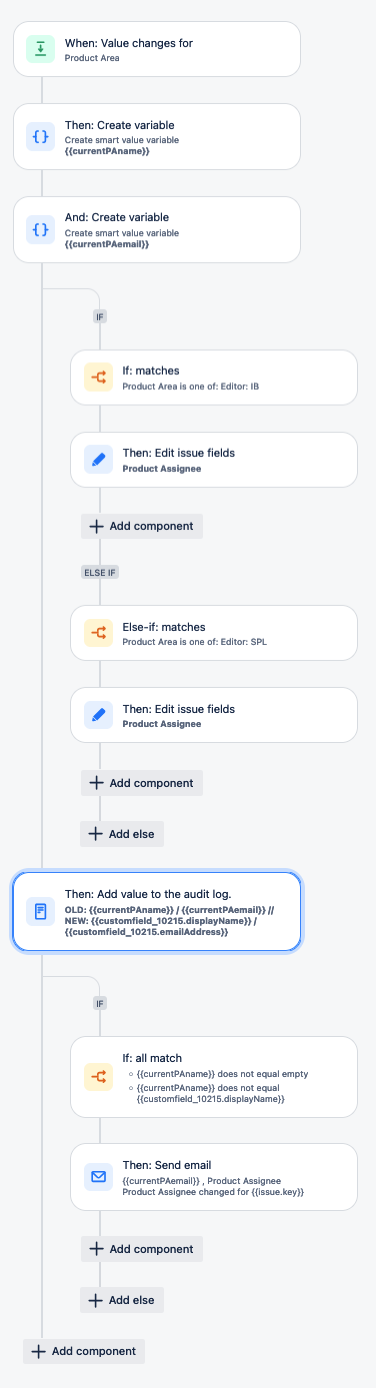
In the log step, I've also tried these fields to no avail:
{{issue.customfield_10215.displayName.fieldChange.toString}}
{{issue.customfield_10215.fieldChange.toString}}
{{customfield_10215.toString}}
{{#changelog.customfield_10215.displayName}}{{toString}}{{/}}
{{#changelog.customfield_10215}}{{toString}}{{/}}
{{fieldChange.toString}} did result in something, but it was showing me the changed value of Field X, when I need to access Field Y (customfield_10215)


