Hi Team,
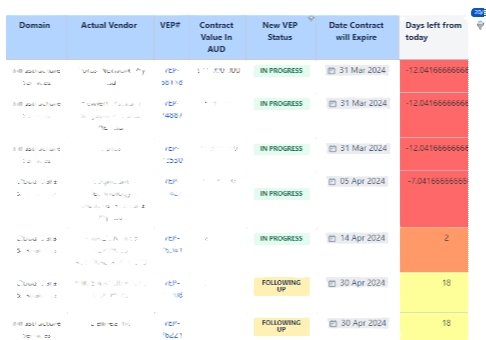
I work with a team to keep track of engagements. To produce the required calculated coloumn, I've used table transformer sql that calculates the date difference between the date 'contract will expire' and 'Today's' date (calculation query in internal transformer) and it's colour coded (another external transformer). The issue is, it's showing teh calculated values in decimals instead of whole numbers. It only shows for some rows, not all though. Below yellow there is green as well, and some rows there also show in decimals.
.
Here are my queries:
Internal transformer for date calculation:
SELECT *,
DATEDIFF(day,"today",'Date Contract will Expire')
AS 'Days left from today'
From T1
External transformer for colour code:
SELECT *,
CASE
WHEN ('Days left from today') IS "No dates" OR ('Days left from today') IS "No Date of completion"
THEN FORMATWIKI("{cell:bgColor=#CCCCFF|align=center}" + 'Days left from today' + "{cell}")
WHEN ('Days left from today') <=-1 AND ('Days left from today') >=-10000
THEN
FORMATWIKI("{cell:bgColor=#FF6666|align=center}" + 'Days left from today' + "{cell}")
WHEN ('Days left from today') >=0 AND ('Days left from today') <=14
THEN
FORMATWIKI("{cell:bgColor=#FF9966|align=center}" + 'Days left from today' + "{cell}")
WHEN ('Days left from today') >=15 AND ('Days left from today') <=42
THEN
FORMATWIKI("{cell:bgColor=#FFFF99|align=center}" + 'Days left from today' + "{cell}")
ELSE
FORMATWIKI("{cell:bgColor=#99FF99|align=center}" + 'Days left from today' + "{cell}")
END
AS 'Days left from today'
FROM T*
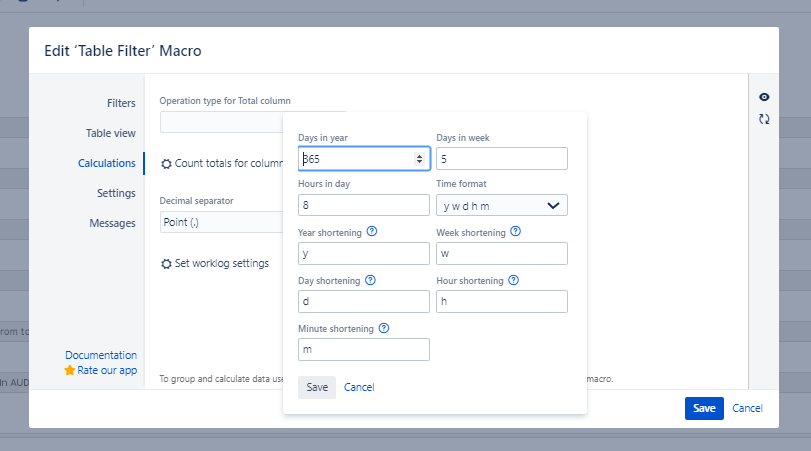
Both are wrapped in a Table filter macro and here is the internal settings. I am not sure if this is what is causing it.