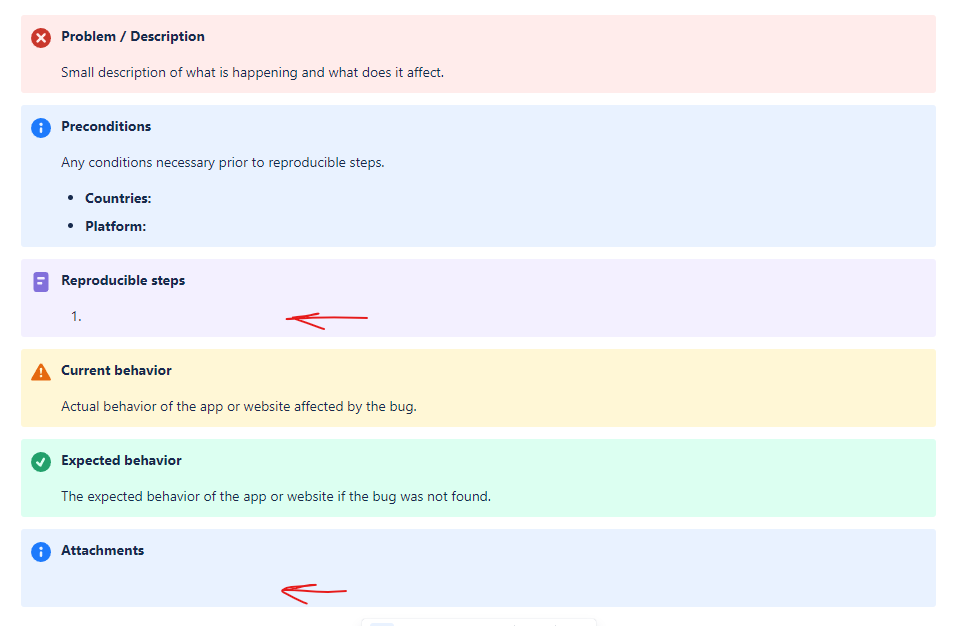
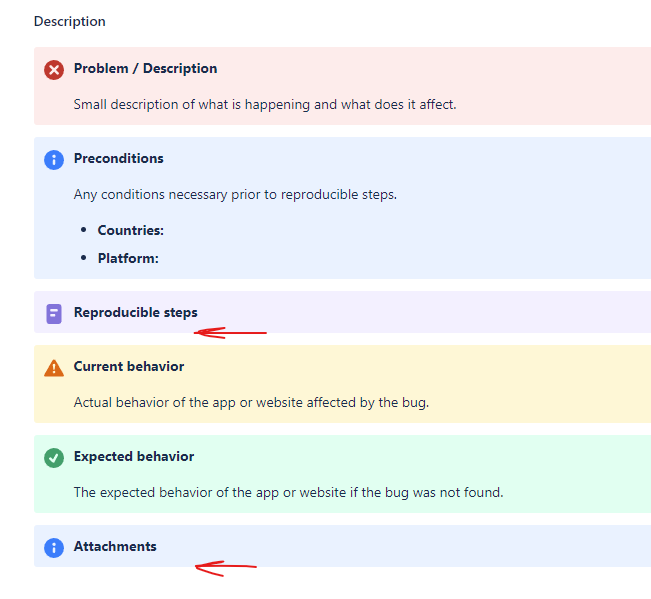
When editing the description field via Jira Automation, blank lines appear to be ignored. I've using the normal field editing and the JSON payload and both result with the extra lines ignored. It could be related to using panels, but the JSON was pulled directly from another issue that was created manually. Is there any way to force the issue?
Expected results:
Actual results:
JSON Payload:
{
"fields": {
"description": "{panel:bgColor=#ffebe6}\n*Problem / Description*\n\nSmall description of what is happening and what does it affect.\n{panel}\n\n{panel:bgColor=#deebff}\n*Preconditions*\n\nAny conditions necessary prior to reproducible steps.\n\n* *Countries:* \n* *Platform:* \n{panel}\n\n{panel:bgColor=#eae6ff}\n*Reproducible steps*\n\n# \n{panel}\n\n{panel:bgColor=#fffae6}\n*Current behavior*\n\nActual behavior of the app or website affected by the bug.\n{panel}\n\n{panel:bgColor=#e3fcef}\n*Expected behavior*\n\nThe expected behavior of the app or website if the bug was not found.\n{panel}\n\n{panel:bgColor=#deebff}\n*Attachments*\n\n\n{panel}"
}
}

