Hi,
I'm running an automation in Jira Cloud.
This automation summarizes the Original Estimate, the Time Spent and the Remaining Estimate of an EPIC, it's children and their descendants and puts it in a table in a multi-line text field.
Currently the output looks like this.

Now I want to format the output a bit more.
1) as number with 2 decimals the 19.583333333332 should be shown as 19.58
2) as time, where the 65.25 should be shown as 2d 17h 15m
Here's the automation setup:
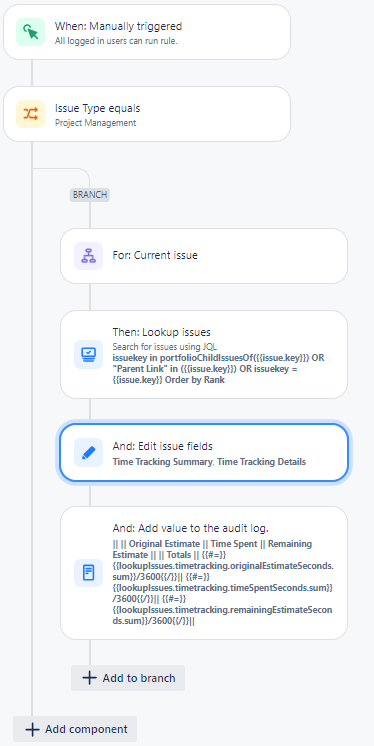
And here's the edit issue.
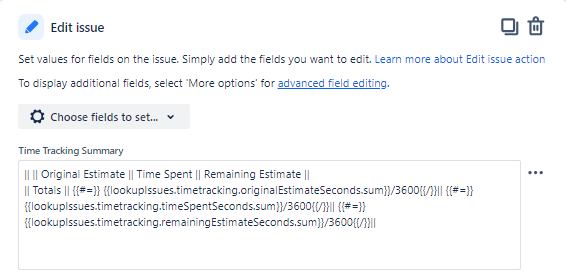
Here's the edit issue in text:
|| || Original Estimate || Time Spent || Remaining Estimate ||
|| Totals || {{#=}} {{lookupIssues.timetracking.originalEstimateSeconds.sum}}/3600{{/}}|| {{#=}} {{lookupIssues.timetracking.timeSpentSeconds.sum}}/3600{{/}}|| {{#=}}{{lookupIssues.timetracking.remainingEstimateSeconds.sum}}/3600{{/}}||
Don't mind the "||" characters here, these are used to format a table in the output to the multi-line text field in a wiki-renderer field configuration.
Now I tried things like:
{{lookupIssues.timetracking.originalEstimateSeconds.sum.divide(3600).format(".##"}}
and
{{lookupIssues.timetracking.originalEstimateSeconds.sum.divide(3600).format("###.##"}}
and this gave me a number output without any decimals.
Then I found the solution using the ROUND function:
{{#=}} ROUND(({{lookupIssues.timetracking.originalEstimateSeconds.sum}}/3600),2){{/}}
{{#=}} ROUND(({{lookupIssues.timetracking.timeSpentSeconds.sum}}/3600),2){{/}}
{{#=}} ROUND(({{lookupIssues.timetracking.remainingEstimateSeconds.sum}}/3600),2){{/}}
This gave me what I wanted in the first option:

But what can I do to get a "Time-formatted" output like 2d 17h 15m ?
Thank you for your insights, I hope that my input also helps others trying to format their outputs.
@Bill Sheboy I hope the pictures and documentation in this question are sufficient. Thanks! 😉

