Since Jira Cloud automation for team-managed projects currently does not support the “People” custom field, you may want to vote for / watch the following issue in the public backlog to see progress on that suggestion: Add Automation support for the emailAddress value of a People field in team-managed projects.
I have created a custom field called "Accountable", internally known as "customfield_10568", which allows me to assign a user to an issue. I am trying to use Jira automation to send an email to the user selected in this custom field. To test the automation rule, I am using my own user account.
I have verified that I have the "browse users and groups" permission in Jira, and I can view and select users from the user picker. However, when I try to access the email address of the user using the smart value {{issue.customfield_10568.emailAddress}} it is empty.
When I use "Log action" to print the content of {{issue.customfield_10568}} the email address is missing:
{
  self=https://<my company's jira instance>/rest/api/2/user?accountId=6..4,
  accountId=6..4,
  avatarUrls={
    48x48=https://../48,
    24x24=https://../24,
    16x16=https://../16,
    32x32=https://../32
  },
  displayName=Matthias Miehl,
  active=true,
  timeZone=Europe/Berlin,
  accountType=atlassian
}To confirm that the user's email address is available in Jira, I accessed the Jira REST API via <my company's jira instance>/rest/api/2/issue/AB-1234?expand=names, and I can see the user's email address as part of the "customfield_10568":
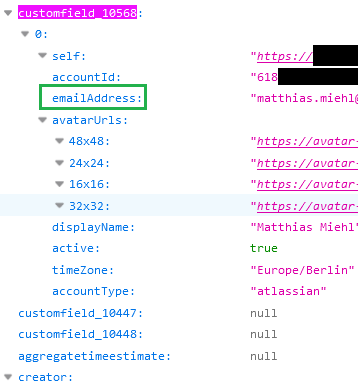
I have tried using the smart value {{#issue.customfield_10568}}{{emailAddress}}{{/}} as well, but the issue persists, and the email address remains inaccessible in the automation rule.
Is there a specific way to access a user's email address from a custom field in Jira automation? Are there any additional configurations or steps required to enable this functionality? Any insights or guidance on this matter would be greatly appreciated.


