This would be the logic. My plan is to trigger this rule by schedule, just at the end of the PI Planning. The idea would be:
- If for the issue, the start/due date is empty and sprint field is not empty, then
- If the issue has any active sprint, then get the information from there. If there is no active sprint, then take the information from future sprint. For example the one with the earlier start and end dates (the following sprint scheduled to start). Since Jira allows to assign more than one sprint, we need to consider this I would say.
- Get the start date and end date from the selected sprint
- Assign it to start/due date fields respectively from the issue
Jira REST API in the JSON file provides information about the sprints:
https://<yourinstanceurl>/rest/api/2/issue/<issuekey>?expand=names
here is the JSON portion where the sprint information is provided for a given issue. For my jira instance the sprint information is represented by custom field 10020:
"customfield_10020": [
{
"id": 787,
"name": "Devas - Sprint 3",
"state": "active",
"boardId": 304,
"goal": "",
"startDate": "2023-02-15T05:00:39.637Z",
"endDate": "2023-03-01T04:59:00.000Z"
},
{
"id": 772,
"name": "Zeus - Sprint 8",
"state": "closed",
"boardId": 304,
"goal": "",
"startDate": "2023-01-05T05:00:00.000Z",
"endDate": "2023-01-13T22:00:00.000Z",
"completeDate": "2023-01-13T23:57:56.313Z"
},
{
"id": 765,
"name": "Devas - Sprint 1",
"state": "closed",
"boardId": 304,
"goal": "",
"startDate": "2023-01-18T05:00:53.634Z",
"endDate": "2023-01-31T23:00:00.000Z",
"completeDate": "2023-01-31T22:44:37.056Z"
},
{
"id": 766,
"name": "Devas - Sprint 2",
"state": "closed",
"boardId": 304,
"goal": "",
"startDate": "2023-02-01T05:00:20.418Z",
"endDate": "2023-02-15T04:59:00.000Z",
"completeDate": "2023-02-15T14:08:18.664Z"
}
],
so there should be a way to iterate over all the sprints select only active or future if no active sprint and compare the dates and pick the earliest one.
Context: Why I would need this rule? I have the sprint name assigned to my issues. The Roadmap view for Scrum board, shows the planning for issues based on the sprint start/end dates (if start/due date from the issue was not assigned). For a Kanban board the Roadmap shows the information based on start/due date from the issues. I have a Kanban project that has several boards (2-scrum, 1-kanban), because it is a Kanban project the Roadmaps shows the information based on start/due dates, even some issues from the scrum board are assigned to a given sprint (I guess this is by design for Kanban projects even though they can define Scrum boards). For epics I have populated start/due dates using date sync feature from Easy Agile Program, so I can visualize the planning at epic level, but not at issue level. That is why I am wondering if I can use Automation to populate start/due dates based on Sprint information for all the issues that have non-empty the sprint field.
Here is my attempt to build a rule:
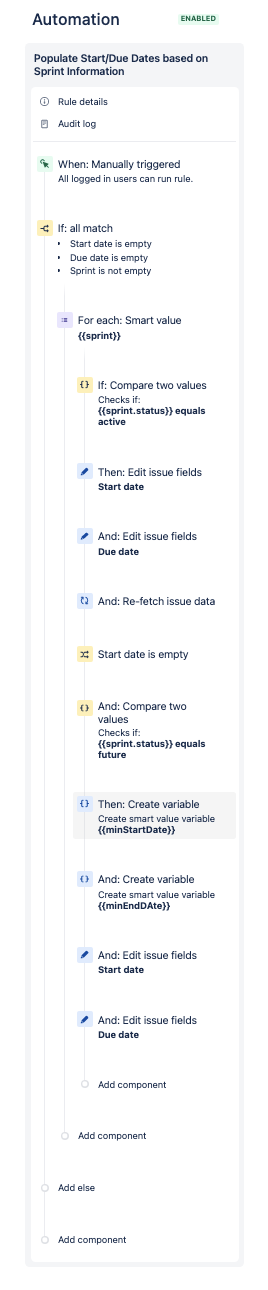
sprint is defined as follows:
- Smart Value. {{customfield_10020}}
- Variable name: sprint
minStartDate is defined as follows:
- Smart Value: {{#customfield_10020}}{{ if(equals(status, "future")) }}{{/}}.startDate.split(",").min
I got some ideas, on similar situation. What I pretend with the above formula (but I am a beginner with automation) is:
- From the list of customfield_10020 which is the custom field where the Sprint information is stored in my Jira instance. I am using an if condition to filter the list by status equal to "future" only.
- For the filtered list, I am going to get the startDate and use split to find the minimum.
and similarly minEndDate is defined as follows:
- Smart Value: {{#customfield_10020}}{{ if(equals(status, "future")) }}{{/}}.endDate.split(",").min
I tested the rule with an issue that doesn't have an active sprint assigned and only one future sprint. Here is the log result:
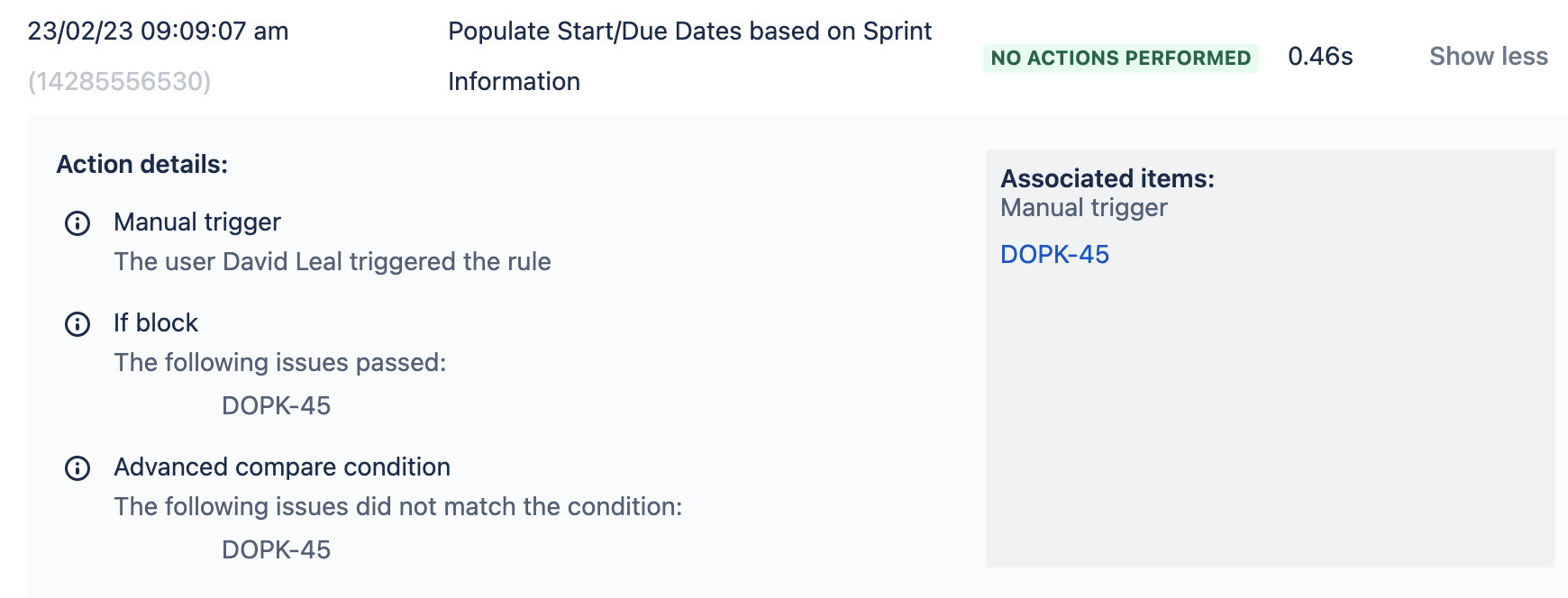
The advanced compare condition, doesn't match
Thanks for any help,
David


