Hi,
Having issues with if statements.
Goal: I've got a custom field with checkboxes, so imagine the custom field is "Technologies". There are 3 checkboxes and the user can select any of the 3 and also more than 1 if they want. This field is found in a task issue. When the user creates the task issue, I want to automatically create a subtask issue for each of the ones that were selected. Also, I've got another custom field, let's say "Number of times that we want to repeat it". If this value is set to "2", I want to create 2 of each subtasks for X technology. So let's say all technologies were selected, we would get two subtasks of technology 1, two subtasks of technology 2, and two of technology 3.
What's working?: For loop is working, no issues here.
Problem: With the automation, if the user selects all 3 technologies that exist, there are no problems and all subtasks are properly created. If the user selects only the first one, there are no problems and all subtasks are properly created. If the user selects the first and second option, there are no problems and all subtasks are properly created. If the user selects the first option and the third option, only subtasks for the first option are created. If the user only selects the second and third option, no subtasks are created.
Assumption: During automation, when going through the if statements, it seems that as soon as it reaches an if statement that is not true, then it breaks from the loop instead of continuing to the next if statement.
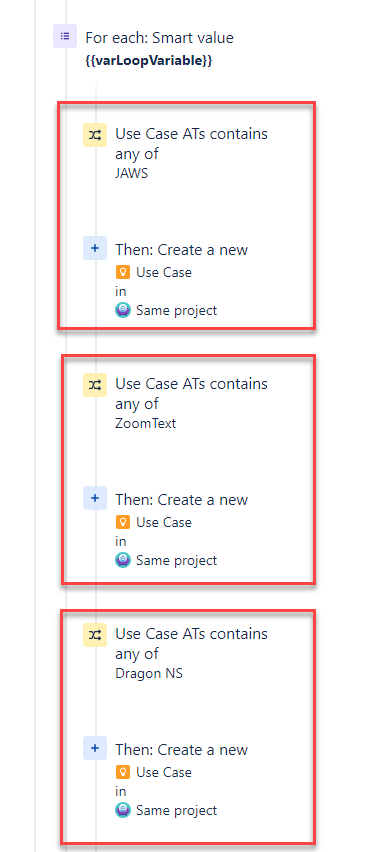
Structure: Currently, I've got the following structure (pseudo):
When creating an issue
   {if the issue type is task}
       {then for each value X field (e.g. Number of times that we want to repeat it = 2)}
          {if technology 1 is selected}
          {then create subtask for technology 1}

          {if technology 2 is selected}
          {then create subtask for technology 2}

          {if technology 3 is selected}
          {then create subtask for technology 3}
Technically, I think the "then" in the "if" statements should be indented, but I don't think automation is allowing me to create another layer, or I'm not sure which action to use for the if statement but the current one is not allowing me to place the "then" inside of the "if", and even then I'm not sure if that would work.
Attached is a screenshot. Also, if the issue is the amount of nesting allowed, can you please provide me with a different approach with automation to achieve the same goal? I'm in a rush with this and can't let this go out with bugs