Hi,
Using Jira Automation, I'm trying to update the summary field with a custom field [Target] (field type = date time picker).
I have two automation rules. 1. Creates a standard issue type at a point in time. 2. Is triggered by the first and creates a list of sub-tasks. The problem is with the second part and the following information sheds some light below.
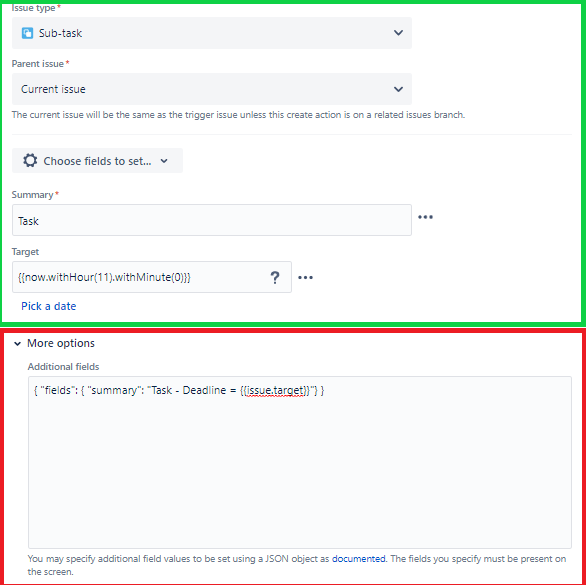
Part of the automation rules runs as expected where it creates a list of sub-task with a summary and adds a value to the custom field [Target]. It seems the JSON is failing to input the custom field and append it to the summary despite the Audit logs showing as successful.
- Expected outcome is Summary "Task = Deadline = 2021-11-25 11:00"
- Actual outcome is Summary "Task = Deadline ="
Automation rule (green is working / red is failing):
Output:

I've also tried to run the script with the custom field id but to no success - {{issue.customfield_00000}}. Furthermore I've been able to test the rule with {{issue.created}} and it's working as expected. Not sure if the problem lies with the custom field type I am using.
Reason for automation rule
The 'Additional Fields' JSON to update the summary is being used as a workaround as in Jira Cloud it seems that updating the system setting 'jira.table.cols.subtasks' does not work.
Ideally don't want users to click onto the sub-task to see the deadline for each task and would rather see run order of the sub-tasks on the standard issue, hence my direction of travel with this script.
Eventually I'd like to use {{issue.target.shortTime}} smart value to just produce the target deadline in time format only (11:00).
Any help would greatly appreciated.
Thanks,
Sean.


