Dear Admins,
Recently, we announced that all Confluence users will now receive a personal space, over the coming weeks after they are active on Confluence.
We believe this is an amazing opportunity for admins to help users get the most out of their Confluence site. We see that sites that have personal spaces today have higher creation activity and engagement. With personal spaces, users are able to:
-
learn the ins and outs of how to use Confluence in the safety of their own space
-
create more content that wouldn’t otherwise have a natural place on Confluence
-
be much more engaged on their site
However, we understand that not all admins may want this functionality. We hear your feedback and understand where you are coming from. We believe this feature will deliver significant value to our customers while respecting the choices of admins who do need more control.
If you have already disabled personal spaces for your user groups, then we will respect that choice, and we won’t enable this feature for your users. (Check out the original announcement here to learn more about the change and how to use your personal space.)
FAQs
I still do not want this feature. What can I do?
No worries. Feel free to disable it by heading over to your Site Settings > Global permissions and editing the personal space setting for any and all user groups that you do not want to receive it. With this setting, your end-users will not be able to create a personal space on their own.
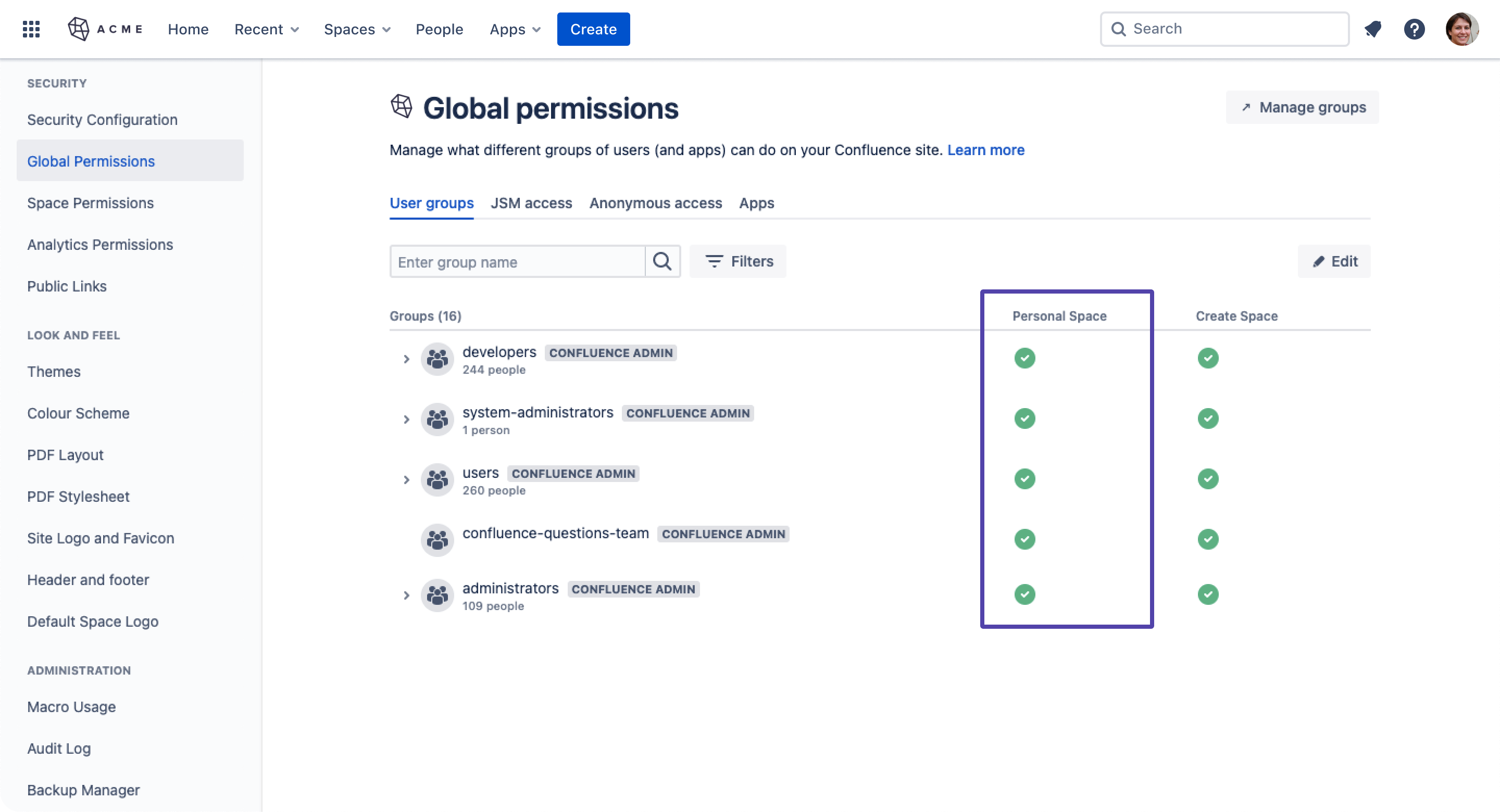
How will my users be made aware that they now have a personal space?
If the user does not already know that they have a personal space, we will be notifying them in-product where to access it and how to use it.
Who gets a personal space?
If a user has permission to receive a personal space, then they are eligible for a personal space. Once a user becomes active on Confluence and views a page, we will automatically generate one for them.
What happens if the user is simply unlicensed or inactive?
If a user is unlicensed or inactive, we will never give them a personal space.
What additional admin effort or maintenance does this bring?
There is ZERO additional effort or maintenance necessary as we will be respecting current admin permissions. If you already have personal spaces disabled for your user groups, then there will be no change to your site, and we will respect all current permissions.
How can I sift through the noise of personal spaces if I am only interested in looking at team spaces? How do I stay organized?
Select Spaces in the global navigation bar and select View all spaces. Filter through your spaces by selecting the Communal category. This way you can view all team and project spaces without including personal spaces in the list.
How can a user delete their own personal space?
Any user can go ahead and delete their own personal space and we will never automatically generate a For more information on how to delete your space, visit our documentation here.
How does this change fit into Atlassian’s model of maintaining a single source of truth for knowledge management & project collaboration?
Every team starts with the individual. We believe that providing a place for a user to call their own is extremely important to help empower our users to build confidence in our product and eventually share more of their work with their team. By supporting more jobs and use cases, Confluence can continue to be an indispensable knowledge and collaboration layer for every team within your organization.
Will this change affect the price or cost of my site?
Nope! No matter how many users you have, the number of personal spaces generated will not affect your bill or license size.
Will this change impact the performance of my site?
No, there will be no impact.


