
Let's consider some common cases for searches with dates:
- You don’t know the exact date an issue was created or resolved – just the relative date period.
- You know the specific date range.
- You know the exact date, but not the exact time regarding an issue.
Solution 1: Find all the issues with help of Jira basic or JQL searches.
Case #1. Issues that were created between two relative dates (1-2 weeks ago)
- How you filter with basic search:
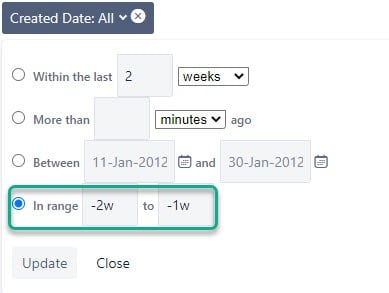
- How you filter with advanced search (JQL):
created >=-2w AND created <=-1w
Case #2. Issues that were resolved between two specific dates (12th of May – 20th of May)
- How you filter with basic search:
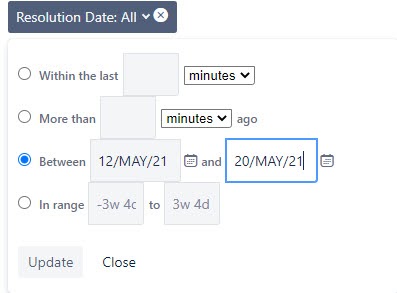
- How you filter with advanced search (JQL):
resolved >= 2021-05-12 AND resolved <= 2021-05-20
* Use the correct JQL syntax → yyyy-mm-dd (to set date) or yyyy-mm-dd hh:mm (to set date and time)
Case #3. Issues that were updated on a specific date (12th of May). If you don’t specify a time (hh:mm), you’ll get a list of issues updated at midnight (00-00). So, you need to choose a Between option to set a query (12th of May – 13th of May). Thus, you’ll get issues updated between 12 a.m. on the 12th of May and 12 a.m. on the 13th of May.
- How you filter with basic search:
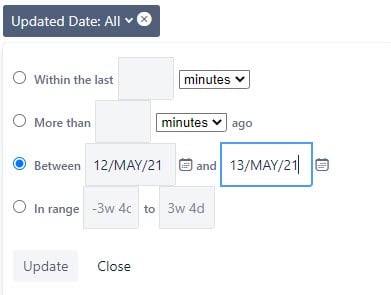
- How you filter with advanced search (JQL):
updated >= 2021-05-12 AND updated <2021-05-13
The other option you can use for these queries or while working with dates is Dynamic Filter: JQL Replacer and Gadgets. It will help if you’re new to JQL syntax or want to speed up the process of filtering. You can build queries with the aid of a visual composer. It’s equipped with a drop-down calendar for choosing dates.
2 clicks – and you’re set:
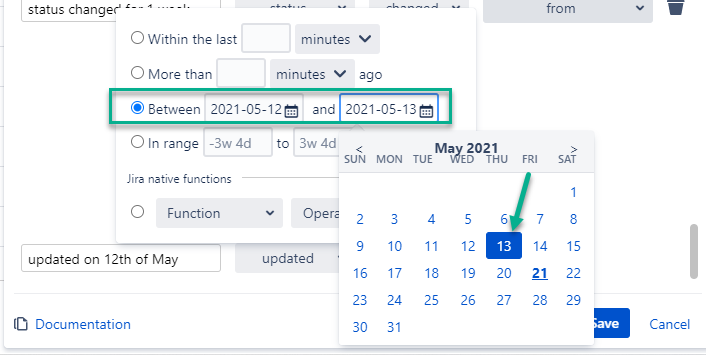
Hope this info will make your work with dates in Jira simpler. Share your cases to find a solution for them.
