Hi all,
Next week we will be running an advanced automation webinar called ‘How to supercharge your automation in Jira Cloud’. This is the second in our series and this time round, we will focus on 3 powerful use cases. Andreas, who co-built the automation engine and loves sardines, will walk through the 3 use cases below, explaining how it all works in detail. For those who want to examine the rules at their own pace, I will post the 3 rules here also.
Before I do here are other resources that might help:
The rules we will cover in the webinar
Rule 1: Send Slack message notifying about all open issues in Sprint
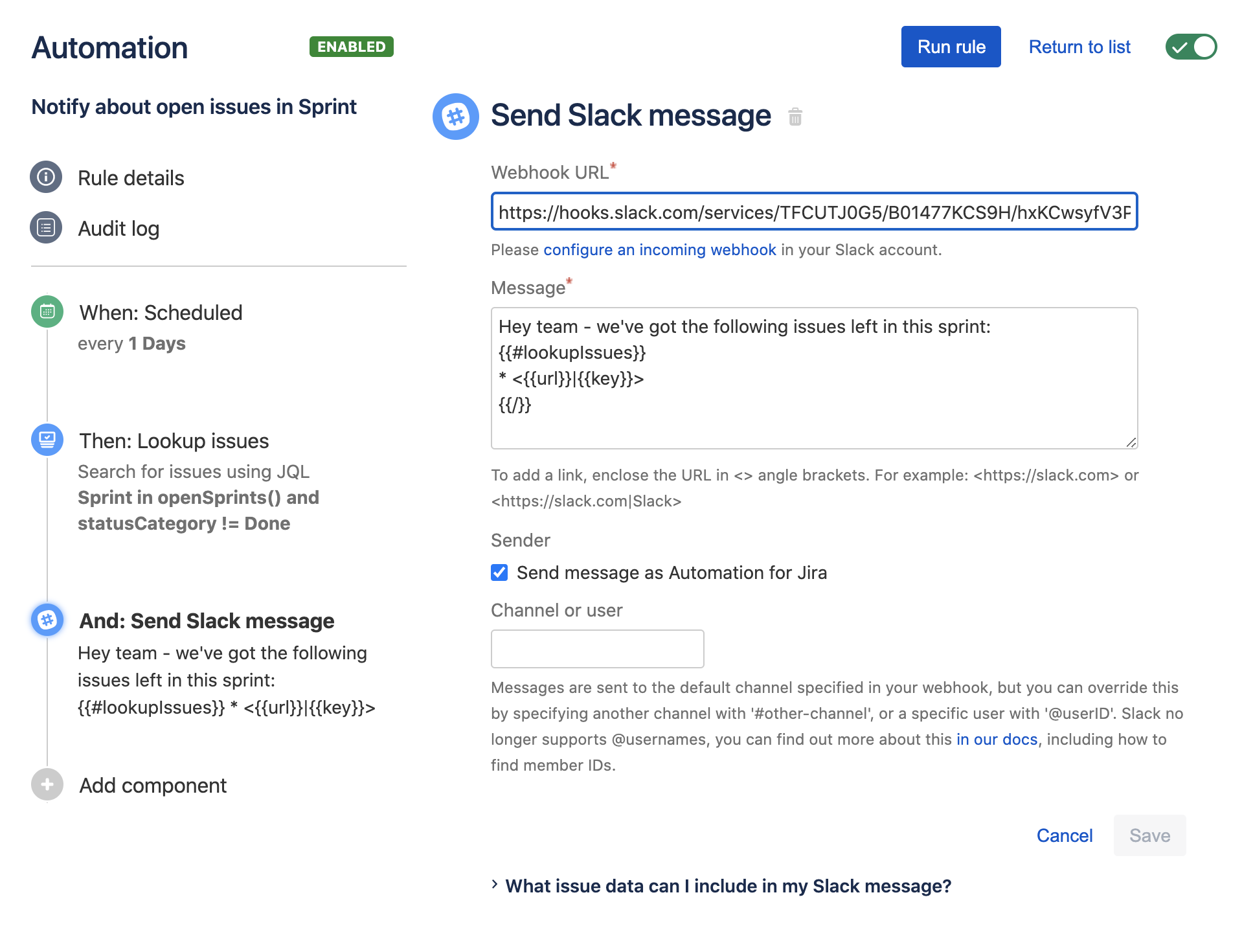
In this rule, we are going to use automation to send a Slack message showing all of the open issues left in the sprint. We will be using our brand new ‘Lookup issues’ action that allows you to create reports and notifications for a number of issues.
It can send a daily report of outstanding issues in the current active sprint to Slack. We will also get into the nitty gritty and show you how to use list iteration syntax in smart-values to iterate over a collection of issues (e.g. {{#lookupIssues}} {{key}} {{/}})
Rule 2: Sum up story points and keep parent and sub-task in sync
This is a new twist on a familiar and common automation rule. Again, we are showing off some new functionality - the ability to aggregate math functions in smart-values. In this instance we show you how you can sum up story points of all sub-tasks and update the parent issue with this value whenever a sub-task's story point value changes
This rule uses a related issue branch to navigate up to the parent issue of a sub-task, and then uses the following smart-value to sum up story points from all sub-tasks: {{issue.subtasks.Story Points.sum}}
Rule 3: Notify dev team on PR merge
The feedback from our first webinar was ‘give me more juicy and complex use cases’. Well, Andreas has taken you at your word and this powerful rule is the result!
Again, we will showcase a new feature - our new DevOps triggers, which you can use with BitBucket, GitHub or GitLab. Even if you don’t use a git provider, this this rule will teach some valuable lessons. You can just change the components in and out as suits best.
In this rule, we will react to PR merged events and then notify the Dev team. We will then take this a step further and show you how to build a custom integration with a Jenkins build server using our 'Send web-request' action.
Lastly, this rule showcases that you can even use responses from a third party service (like Jenkins) to perform further actions in Jira! Told you we would dive deep!
It may look intimidating but we will break everything down into bite sizes during the webinar so it is all clear.
We look forward to seeing you all at the webinar! If you haven't already registered, do so now!
John & Andreas
Automation team


