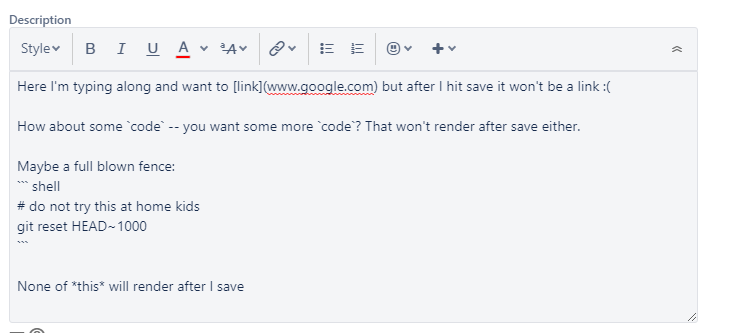
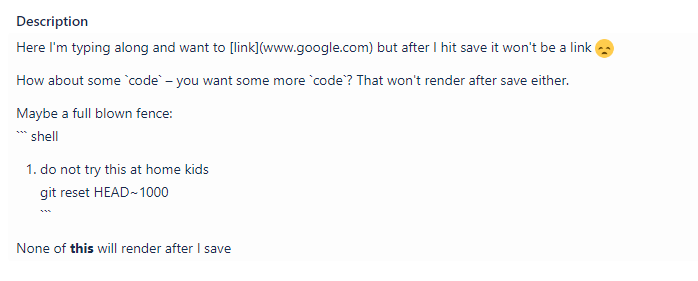
This is bizarre. When creating a new story markdown never works. I naturally type in markdown, so I end up typing up my story description and creating the issue, but then I go to look at the issue and it's all just plain text not being rendered as markdown. For my short code segments (single backtick syntax), I need to go to each one, delete the last backtick and then type a new backtick and voila, it's real-time mark-down-ifier kicks in and renders it properly. It's worse with code blocks (triple backtick fence). I need to copy the contents of the codeblock, type my fence, the real-time markdowner kicks in and then I can paste into the special code fence section.
Is this normal behavior? Is there a setting to let me just type markdown w/out having the view update to show rendered markdown in real-time? Is there a way to create new issues using markdown and not have to edit EVERY single issue I create?
After creating my screenshots I realized that _some_ markdown works, such as bold and a numbered list was created due to the `#` character (but it was inside a code fence). Luckily the emoticon rendered! It's also worth mentioning that if I use the buttons at the top to generate stuff, for example, a fenced code block, that *does* work... but not when just typing away like a markdown maniac.
Here's a related issue, someone seeking to disable the real-time markdown rendering (which would be AWESOME!).
https://community.atlassian.com/t5/Jira-Software-questions/How-to-turn-off-new-Jira-issue-editor-markdown-rendering/qaq-p/1009547
I'm actually wondering if the little markdown I've provided in this post will render... we shall see!
Screen shots (I was *wrong* about none the markdown rendering):