We’ve all been there. You’ve just wrapped up an energetic brainstorming session, and the team is buzzing with excitement. Sticky notes, docs, and chat threads are brimming with potential, and it feels like you’re on the verge of something big.
But fast forward a week, and half of those ideas have vanished into the ether. The rest? They’re spread across tools, buried in chat threads, or stuck in documents no one’s revisited. There’s no clear ownership, no actionable next steps, and the progress fizzles – not because the ideas weren’t great, but because the path from brainstorming to execution is broken.
Here’s the thing: this isn’t just your team’s problem. Teams everywhere – whether scrappy startups or sprawling global companies – face the same challenge. Turning scattered ideas into clear, actionable plans isn’t easy. Bridging the gap between brainstorming and execution is a universal struggle, and that’s exactly what the Teamwork Collection is here to solve.
It’s not just about having the right tools; it’s about having a seamlessly connected knowledge management system that can take your brainstorming sessions and transform them into real, trackable progress. With the Teamwork Collection, your team can do more than just plan and document. You can brainstorm, align, and execute with clarity and purpose – turning great ideas into meaningful action, every single time.
The Teamwork Collection advantage: Connected, contextual, and actionable collaboration
When planning gets tough, the instinct is often to add more tools – one for whiteboarding, another for notes, a third for tracking tasks. But this usually leads to even more silos, not fewer.
The Teamwork Collection takes a different approach. It’s not about adding more apps or features; it’s about solving real problems. Teamwork Collection brings together Jira, Confluence, Loom, and Rovo into a single, deeply integrated system. It changes the game by making collaboration:
-
Unified: Unlike siloed tools that force you to context-switch, Teamwork Collection combines whiteboards, documentation, project management, and AI-powered insights into one workspace. Every app in the collection is deeply connected, so your team can focus on the work – not the tools.
-
Context-Aware: Your organization’s collective knowledge – whether it lives in Jira, Confluence, Loom, or through third-party connections – is accessible across Teamwork Collection apps. AI-first capabilities surface key insights, relevant data, and past work directly into your brainstorming sessions, eliminating the hunt for information.
-
Traceable by design: Ideas don’t lose context as they move from brainstorming to execution. Every decision and work item stays connected—across real-time collaboration and async handoffs—so nothing gets lost along the way.
Let’s see how this works in practice. Next, we’re going to walk through a step-by-step workflow on how you can use the Teamwork Collection to improve your planning processes.
Step-by-step workflow: How teams use Teamwork Collection to plan and execute
Planning and executing projects can often feel chaotic, but Teamwork Collection streamlines the process from brainstorming to delivery. By combining powerful tools like Confluence Whiteboards, Jira, and Rovo, teams can collaborate seamlessly, stay aligned, and turn ideas into actionable outcomes. Here’s how each step in the workflow comes together to supercharge your team’s productivity.
Step 1: Spark ideas with a digital whiteboard
Confluence Whiteboards is your digital space for capturing fresh ideas and sparking team creativity. Jumpstart sessions with built-in templates for retros, planning, or brainstorming – or prompt Rovo to quickly generate a custom board for you.
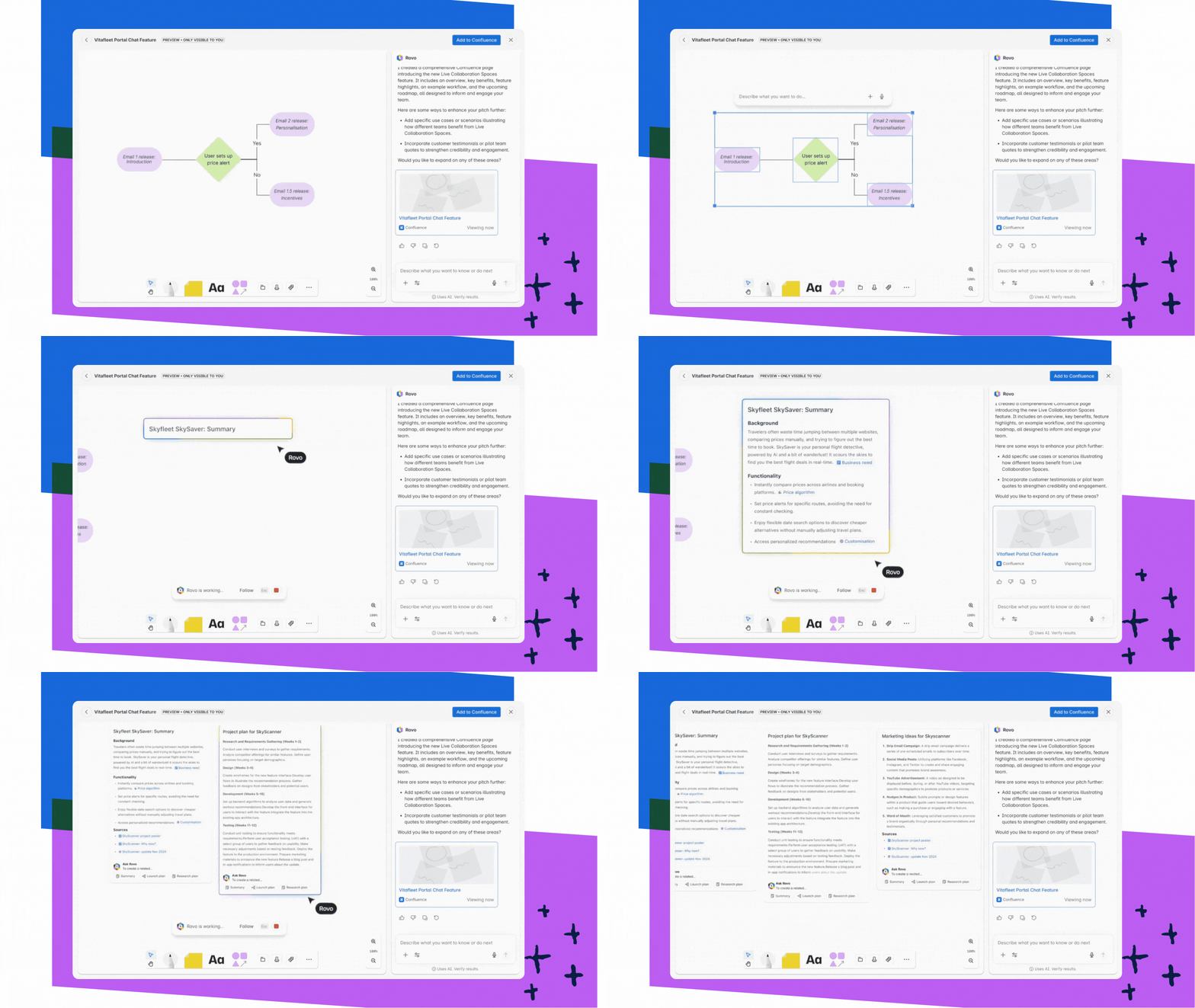
With real-time co-editing in Confluence Whiteboards, everyone can contribute simultaneously, whether remote or onsite. Unlike standalone whiteboard apps, these boards are natively linked to your actual work. You’re working with live data (like pulling in Jira work items to visualize dependencies and referencing Confluence pages), so your brainstorming is always grounded in real project context.
Step 2: Convert ideas into trackable work with a project management system
The most common stumbling block in planning is the handoff – when ideas must be manually moved from whiteboards to project management tools. This often leads to errors, wasted time, and lost momentum. Teamwork Collection helps reduce that friction. That’s because you can instantly convert sticky notes or shapes on your whiteboard into Jira work items.
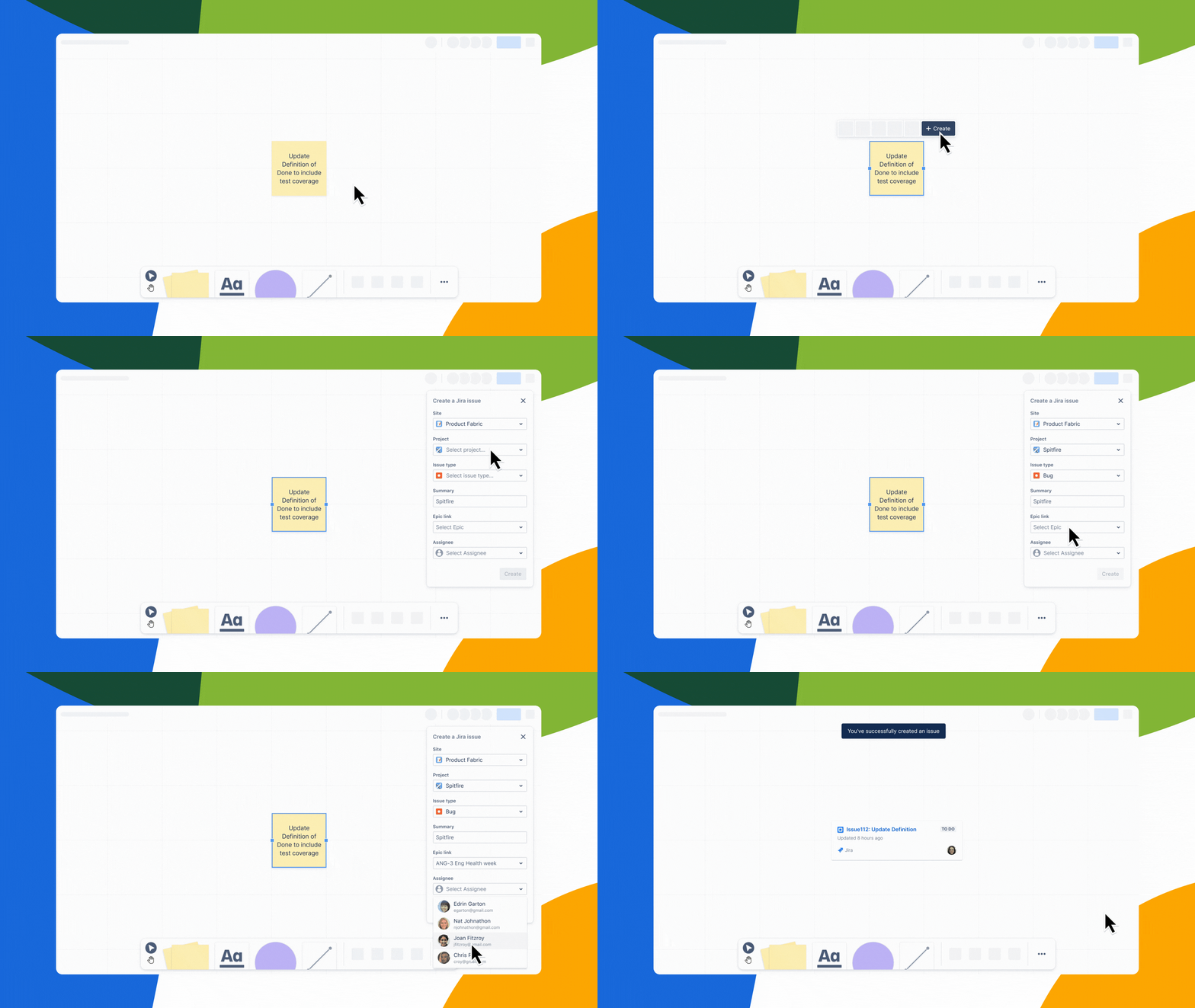
With just a few clicks, you can convert grouped sticky notes directly into Jira Workstreams or tasks. Use Smart Sections and Connectors to organize, prioritize, and visualize dependencies on the whiteboard, streamlining your workflow.
No other platform offers this level of native, bidirectional sync – updates in Jira reflect instantly on the whiteboard and vice versa. This closes the gap between brainstorming and structured work, keeping everyone aligned.
Step 3: Document decisions in Confluence
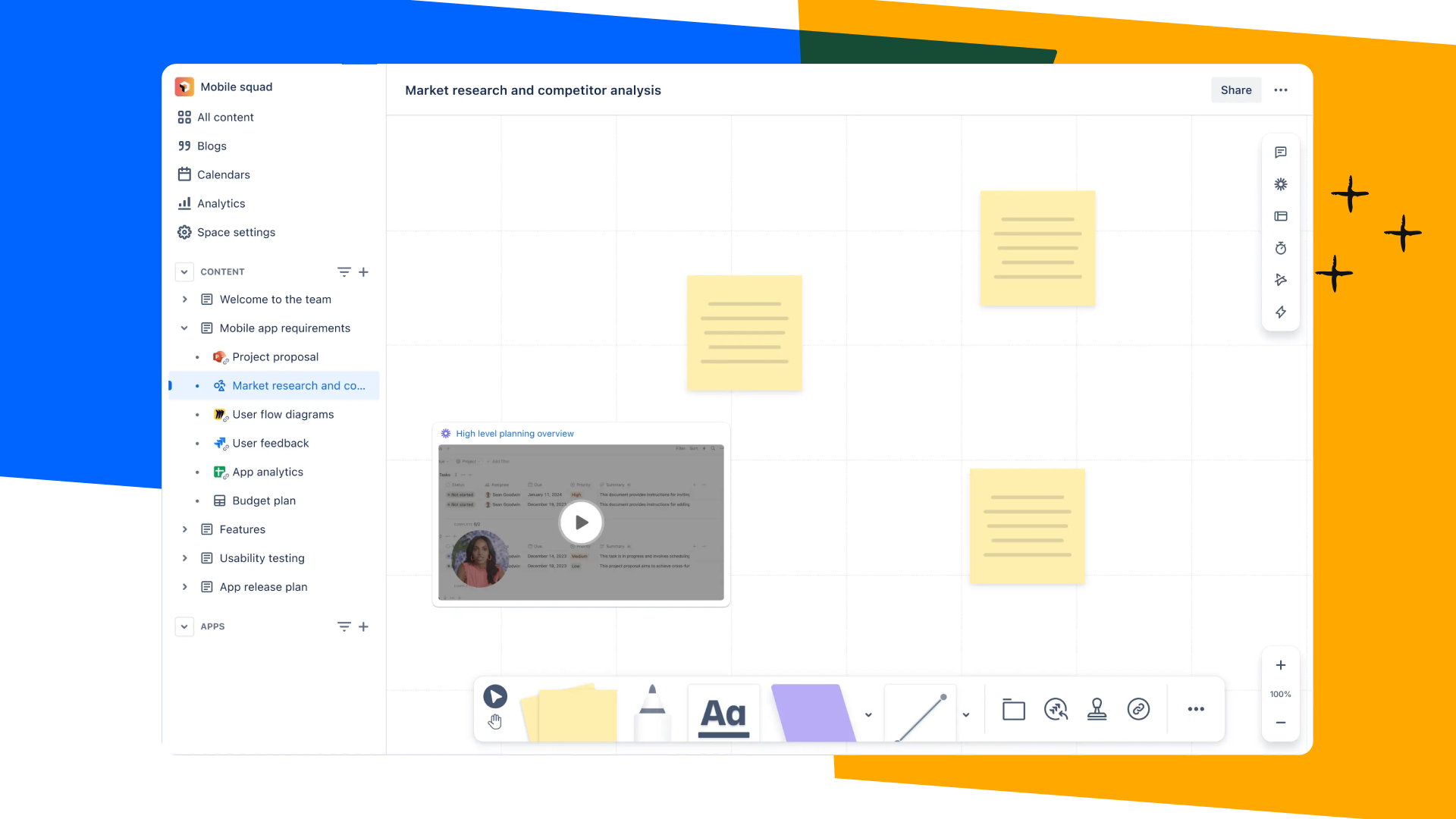
After capturing ideas and creating tasks, you need a central hub to keep everything connected. That’s where Confluence project pages shine. A Confluence page in Teamwork Collection isn't just a static text document; it’s a living project hub. You can embed your Confluence Whiteboard, paste your Loom video walkthroughs, and display live Jira plans directly on the page.
This creates a single source of truth because stakeholders always know where to find the latest plans and decisions. Live docs hold requirements, key updates, and all major project actions in one accessible place.
Because these pages are built for cross-functional collaboration, they deeply integrate with Jira and make it possible to check work item status and project context instantly, all within a single workspace.
Step 4: Supercharge planning with AI workflows
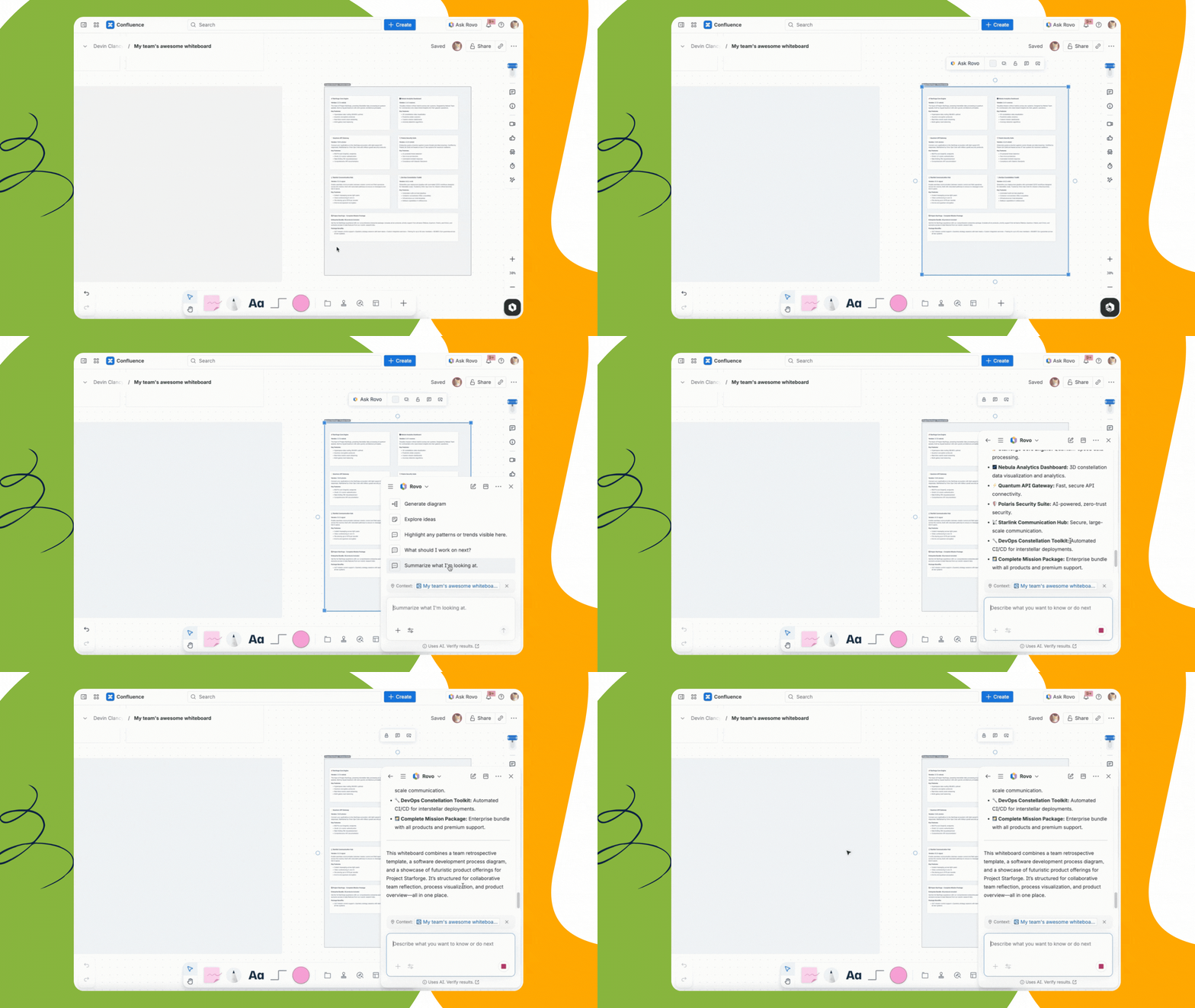
With Rovo, planning becomes smarter, faster, and more efficient. By leveraging the Teamwork Graph to understand your organization’s unique data and context, Rovo acts as a force multiplier. Here’s how Rovo transforms planning:
-
Summarization: Rovo can summarize a complex whiteboard session, extracting key themes and action items automatically.
-
Risk Detection: Because Rovo has access to your broader documentation, it can surface risks, dependencies, or potential duplicate work before they become blockers. It might flag that "Team B is already working on a similar API integration," saving you weeks of wasted effort.
-
Automation: You can use Rovo to automate the repetitive administrative tasks that drain energy from planning – like generating follow-ups and status reporting.
Looking ahead, agentic workflows mean AI acts as an active teammate that brainstorms with you, suggests insights, and leverages past data to drive smarter planning.
Step 5: Stay in sync with embedded video communication
Coordinating across schedules to find time to meet live can slow down planning. With Loom, teams can communicate and share context asynchronously, accelerating planning and making collaboration more efficient.
Record a quick Loom video to walk through the whiteboard or demo ideas before the planning session or meeting so everyone starts with context and can jump right into the discussion.
Loom's Meeting Recordings automatically captures planning sessions and takes AI-powered meeting notes in a structured summary with key takeaways and action items. Teams can quickly turn those action items into Jira work items, helping them stay accountable while keeping meeting content searchable and actionable within Teamwork Collection.
Bringing it all together: A real-world scenario
For some, the steps we’ve covered might feel like a foreign language. Let’s bring them to life with a scenario of how this flows for a cross-functional team launching a new marketing campaign:
-
Kickoff: The Product Marketing Manager records a 3-minute Loom video outlining the campaign goals and embeds it on a blank Confluence Whiteboard planning template. They share the link with the team.
-
Brainstorming: The team watches the video asynchronously. Over the next 24 hours, they add sticky notes to the whiteboard with ideas for content, ads, and events. Rovo adds additional ideas based on the whiteboard context and organizational knowledge, then helps group these ideas into themes.
-
Planning: The team meets live for 30 minutes to vote on the best ideas. They convert the winning sticky notes directly into Jira tasks, assigning owners and due dates right from the whiteboard.
-
Documentation: The PMM prompts Rovo to create a Confluence page, embedding the whiteboard and the Jira list. Rovo drafts the initial project summary based on the whiteboard content.
-
Launch and Retrospective: As the team works, they update Jira work items. The Confluence page automatically reflects these changes. Weekly updates are recorded as Loom videos, shared in the team's chat and embedded at the top of the Confluence page. At the end, the team reviews the campaign’s success by revisiting decisions and progress, all connected through Jira and the whiteboard.
Every decision between planning and execution is connected. Need to revisit why an ad format was chosen? Just click the Jira work item – it links directly back to the original whiteboard and voting details.
Why Teamwork Collection is different
Teamwork Collection transforms how teams bring projects to life – from kickoff to brainstorming, planning, execution, and retrospectives. Each component plays a critical role, with tools like Rovo and Loom enhancing every step of the journey. Feedback, decisions, and progress are always visible and actionable, ensuring no detail is overlooked.
Here’s what sets Teamwork Collection apart in practice:
-
Traceability: Every idea, decision, and action is linked through native, bidirectional sync. Brainstorming, documentation, and structured work flow seamlessly together, so nothing gets lost.
-
Scalability: Whether you’re a nimble startup squad or a massive enterprise release train, Teamwork Collection adapts to your team size and workflow.
-
Tool Consolidation: Say goodbye to app sprawl. The Teamwork Collection consolidates best-in-class tools into one seamless system, eliminating the friction of mismatched apps and enabling smarter, more transparent planning.
By leveraging the Teamwork Graph, your tools understand your work, making AI-powered insights relevant and accurate. This flexibility and intelligence empower teams to move from ideas to impact faster and with less chaos.
Transform the way your team plans and executes with Teamwork Collection
Tell us, how does your team turn ideas into action? Have you tried the Confluence Whiteboard and Jira integration yet?
Share your workflows or questions in the comments below – we’d love to learn from you!
