Update (2/5/2026) — Claude Opus 4.6 now available on Rovo Dev Standard
Hey everyone!
We've added four new AI models to Rovo Dev: Claude Haiku 4.5 (a cost-efficient option), Claude Opus 4.5 (the most capable model), GPT-5.2, and GPT-5.2-Codex. We're also introducing model-based credit multipliers—different models now use different amounts of Rovo Dev credits based on their size and capabilities.
If you're using Auto model selection (recommended), you don't need to change anything to enjoy the benefits of the new models. It will use the default model for the best balance of performance and cost per task.
What’s new:
Understanding Rovo Dev credit multipliers
Large language models come in different shapes and sizes, and what used to be the frontier just a few months ago is now cheaper and faster. With model-based credit multipliers, we’re bringing the cost benefits of using smaller models to developers, while also giving you access to new, state-of-the-art models representing the current frontier.
🪄 Quick model selection guide:
|
Model*
|
Credit multiplier**
|
Best for
|
When to use
|
|---|
|
Claude Haiku 4.5
|
0.4x
|
Documentation, code reviews, simple refactoring, writing tests
|
Routine tasks where speed matters more than complexity
|
|
Claude Sonnet 4.5
|
1.0x
|
General development, feature implementation, bug fixes
|
Most everyday coding tasks
|
|
Claude Opus 4.5
|
2.0x
|
Complex architecture, difficult debugging, system design
|
Challenging problems requiring maximum capability
|
|
GPT-5.2 & GPT-5.2-Codex
|
1.0x
|
General development, code generation
|
Alternative to Sonnet for balanced tasks
|
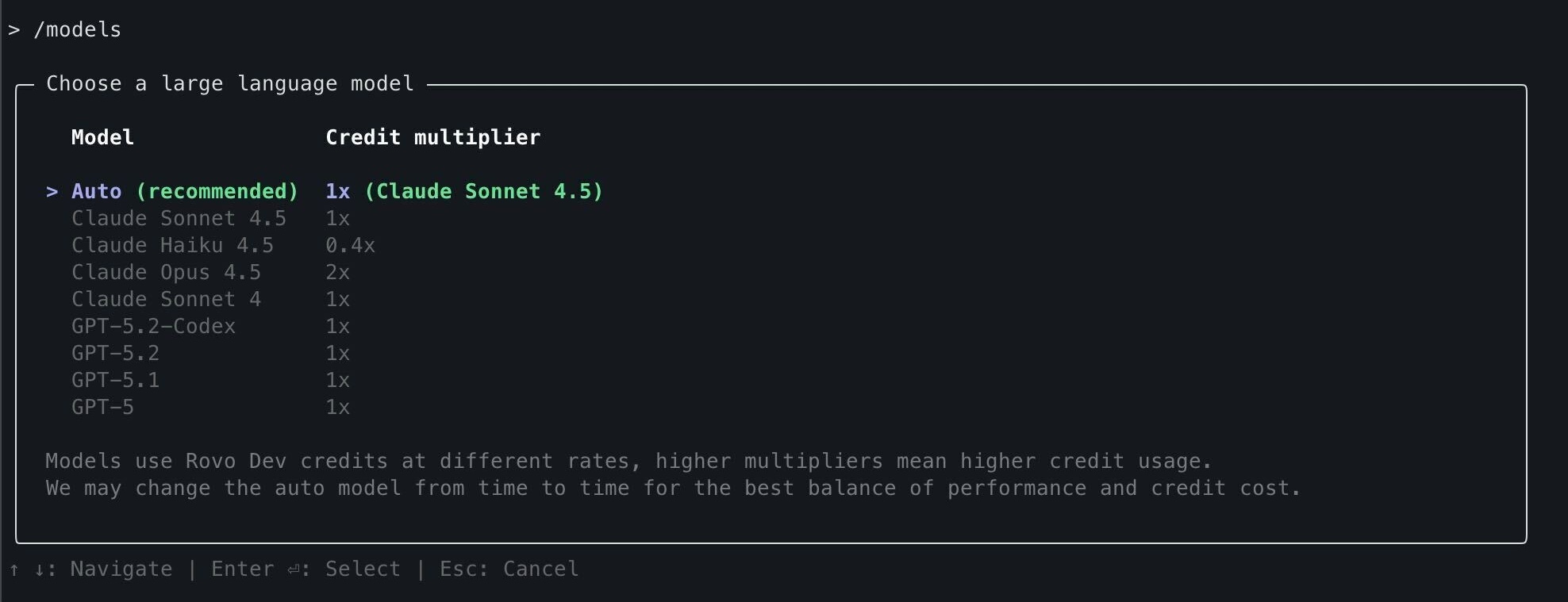
* Additional models available via /models command
** Credit multipliers and model availability are subject to change over time
Credit usage example
A task that requires 50 credits with a 1.0x multiplier would consume only 20 credits with a 0.4x multiplier for a smaller model. The same task would consume 100 Rovo Dev credits (2.0x) for a more advanced model.
Auto mode is already enabled by default and selects the default model for the best combination of performance and cost per task.
Model selection in Rovo Dev CLI
Use the /models slash command to switch between available AI models and view their credit multipliers. This way, you can select less complex models for everyday tasks like documentation, and more advanced ones for complex code generation.
Learn more about Rovo Dev credit multipliers, read the documentation.
New models now available in Rovo Dev CLI
🚀 Get involved and shape what’s next for Rovo Dev
As we’re working on the roadmap for Rovo Dev with more and more organizations using agentic AI for developers, we’d love to hear what’s top of mind for you!
To raise feedback in Rovo Dev, use /feedback directly in the terminal and IDE to let us know what you think.
Have any feedback or questions about this launch? Please comment below to share your thoughts.
New to Rovo Dev? Get started here.


