Community resources
Community resources
Community resources
- Community
- Q&A
- Jira Product Discovery
- Questions
- Create Idea Form: Unable to Clear Pre-Selected Items on Form
Create Idea Form: Unable to Clear Pre-Selected Items on Form

I've set up a JPD space and getting to roll out across my team. However, I'm trying to establish some baseline information for my team members to input when creating a new "idea" in our JPD space.
I can see through help text that configuration for the Idea Create Form is limited but there is a "configure" button in the Create modal and when I select it, it shows some weird configurations.
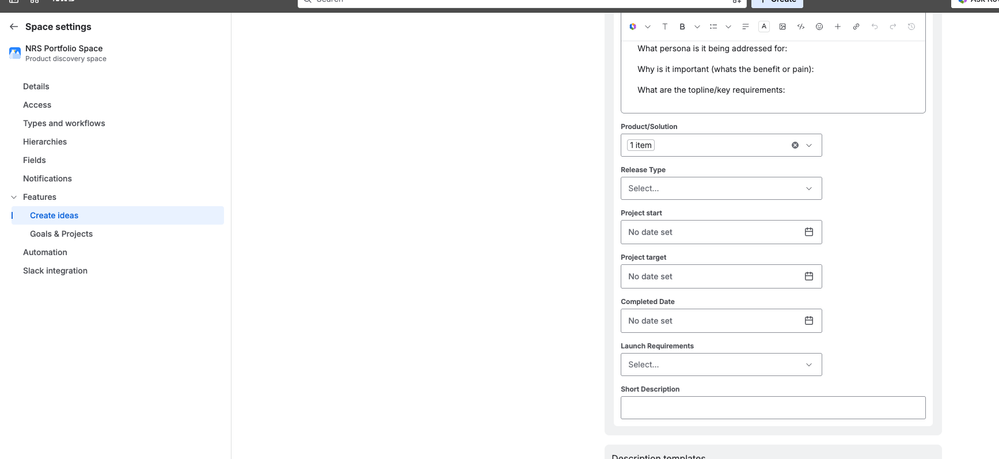
In the screenshot below, you'll see:
- Product/Solutions: there is actually a preselected product showing ("1 item") that despite the "x" on the drop down, it can't be deselected. I definitely do NOT want to have every idea created pre-selected for one of our products. How do I remove that?
- Completed Date: this is a custom field I've created to capture the actual deploy date for an idea and it will never be known when the idea is first created. So I'm trying to figure out how to remove that field. And I'm wondering why the form decided to include it in the first place.
- I guess based on the randomness of the inclusion of that Completed Date, I'm wondering more broadly how/why the other fields were selected on the form in the first place and how I can have some control over this.
Thank you!!!
1 answer
1 accepted

Hi @Andy Fieweger
The Create idea form isn't configured field-by-field. Instead, it's driven by a view. When you go to + Create → Configure form and pick your idea type, you'll see it's tied to one of the views in your space. Whatever fields are present in that view become the fields on the Create form — which is exactly why "Completed Date" (and any other field that felt random) got pulled in. It wasn't chosen deliberately; it's just riding along from the view.
The cleanest fix is to create a dedicated view — name it something like "Idea Creation Form" — add only the fields you actually want people to fill in at creation time, and then point the Create form at that view.
If you ever want better beedback intake from or intake outside the JPD space
If you want fully customizeble form, with flexible field mapping or want to collect ideas or requests from people who aren't in the JPD space (stakeholders, customers, other departments) and map their answers into structured Jira work items, another approach some teams use is Smart Forms for Jira (a tool my team at SaaSJet builds) — it supports conditional logic, external form sharing, and form-to-idea field mapping so responses land as properly structured items.
With this app you can customize form input, predefine the answers, remove unnessesary fields, use hidden fields, and map multiple respondes to one or multiple jpd item fields.
Also it works across any project like JSM or Software so it might be usefull for any other intake case. And this up doent require Creator licence in JPD, so anyone can create ideas without paying for this licence.
You must be a registered user to add a comment. If you've already registered, sign in. Otherwise, register and sign in.

You must be a registered user to add a comment. If you've already registered, sign in. Otherwise, register and sign in.