Create
Turn on suggestions
Auto-suggest helps you quickly narrow down your search results by suggesting possible matches as you type.
Showing results for
Community resources
Community resources
Community resources
- Community
- Q&A
- Jira Product Discovery
- Articles
- 📣 The tree view is now available in early access (Premium only) + updates on hierarchies
📣 The tree view is now available in early access (Premium only) + updates on hierarchies
April 1, 2026 edited
Hi all,
Introducing the tree view
Good news! One of the most awaited features in the history of JPD is finally available in early access: the tree view. This view helps you visualise your hierarchy with more levels.

Example use cases:
- Work with opportunity/solution trees
- Show how product work ladders up to strategic objectives
- Get a better view of how things connect at different levels to prioritize
- Get more visual ways to discuss outcome-based roadmaps with stakeholders
Here's a demo:
Current features:
- Configure n-levels of the hierarchy (max 10)
- Define filters for all ideas on the view, and for each level of the hierarchy
- Define fields for each level of the hierarchy
- Sort based on a field (all levels)
Current limitations that we're working on addressing:
- You can't reorder ideas manually yet
- If an idea at a level is connected to multiple ideas of the prior level, it will appear multiple times (vs one card with multiple lines). We're working on it.
- It only supports one type per level (under considerations)
- You can't yet connect ideas directly inline from the view (you need to open ideas for that)
To gain access to this feature in early access, see bottom of this post.
Updates on hierarchies
This is part of a larger effort around improving the hierarchies feature. What we're currently working on:
- The new tree view (this post)
- Support for one more level of hierarchy in the timeline view
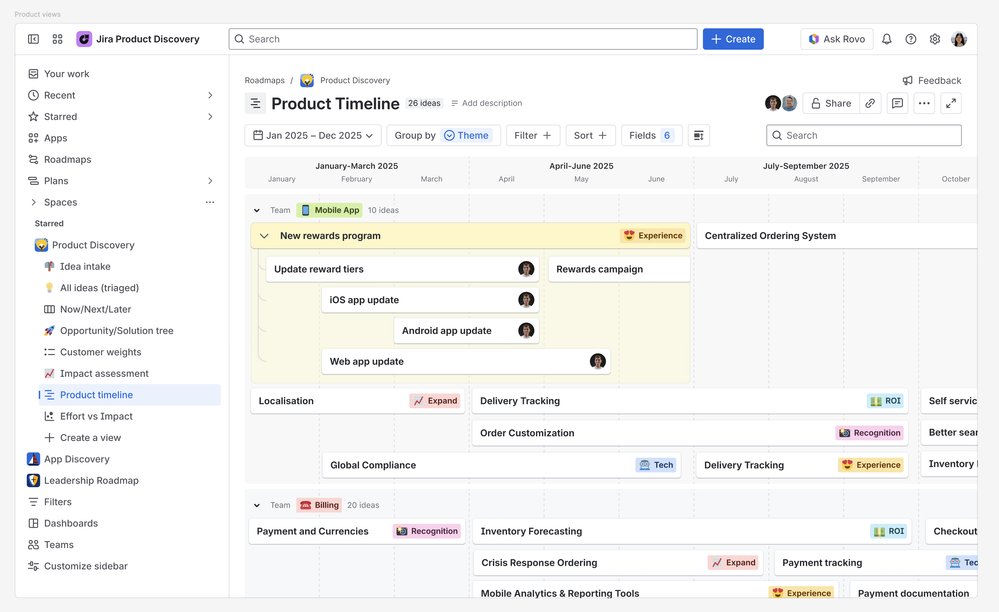
- Support for one more level of hierarchy in the list view
- Roll-up fields so you can roll-up the value of "effort" from "children" to their "parents"
- Ability to filter for things like "hide bets that do not have solutions"
Getting access to the tree view
If you'd like access, please drop a comment below!
- Please explain your use case
- Tell us your site URL (xyz.atlassian.net)
- Note: you need to be on the Premium plan or a Premium trial to be able to use this view (it's part of the hierarchy feature).
All we'd ask is for feedback so we can make this feature better (as comments on this post or the in-app Feedback button).
Hope you like it!
Was this helpful?
Thanks!

Tanguy Crusson
Atlassian Team

Atlassian Team
Atlassian Team members are employees working across the company in a wide variety of roles.
Atlassian Community Events
Copyright © 2026 Atlassian
13 comments