Hello Jira Align community,
I’m Andrew Zhang, Product Manager for Jira Align, and I’m excited to share an important evolution of the Dependency object. This update significantly improves how you model dependency relationships.
Jira Align exists to connect strategy to execution. Dependencies are one of the most important mechanisms that ensure teams are working on the right things, at the right time, in the right order.
With this update, dependencies become much more flexible and better aligned with how large organizations actually plan and deliver work.
🎯 Why this matters
In enterprise environments, dependency relationships rarely live at just one level of your work hierarchy.
-
A capability may depend on work spanning multiple features.
-
A feature may require coordination across other features, not just stories.
-
Epics often involve multiple programs contributing in parallel.
When dependency modeling cannot reflect that structure, visibility weakens. When visibility weakens, risk increases.
Many of you told us that the existing model did not fully match how your cross-portfolio work is structured.
This update addresses that gap.
🤔 Where we were before
Dependencies in Align follow a simple structure:
Previously, what you could assign depended on the type of impacted item:
-
If the impacted item was a feature, you could assign stories.
-
If the impacted item was a capability or portfolio epic, nothing could be assigned.
This meant:
-
Dependency fulfillment could only be modeled at the story level.
-
Higher-level work such as features or capabilities could not be directly associated as the unblocking work.
-
Cross-program relationships were harder to represent at their natural level in the hierarchy.
For organizations managing portfolio-level planning, this created a disconnect between how dependency work was structured and how it could be modeled in Align.
✨ What’s new
We have expanded the dependency object to support more realistic cross-portfolio relationships.
✅ When the impacted item is a feature
You can now assign:
-
0 to many stories
-
0 to many features
This allows fulfillment work to be tracked at the feature level, instead of forcing everything to roll down to stories.
✅ When the impacted item is a capability or epic
You can now assign:
-
0 to many features
-
0 to many capabilities
Previously, no assigned work could be attached in these cases.
Now, dependency fulfillment can be tracked directly at the feature and capability levels. This makes cross-program and portfolio-level coordination much clearer.
🔄 What this unlocks for cross-portfolio planning
This evolution enables:
-
Clear modeling of program-to-program dependencies
-
Visibility into how multiple features contribute to resolving a blocked capability
-
Better representation of strategic initiatives that span multiple teams
-
Reduced risk of missing fulfillment work tied to higher-level dependencies
Dependencies can now be represented at the same level where strategic decisions are made.
That is critical for aligning execution to strategy.
🧩 What’s changed across Align
To support this expanded model, we have updated several key views.
🔎 Dependency slide-out
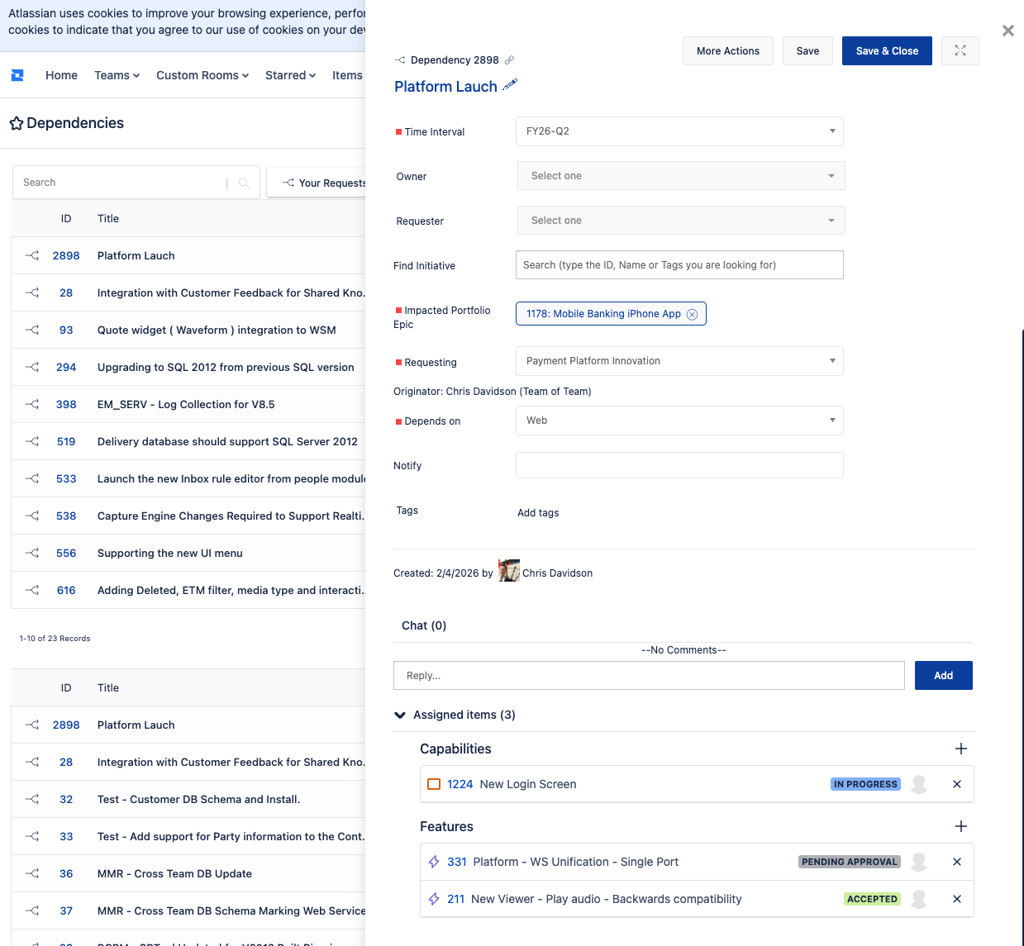
The Dependency slide-out is the central place to manage assigned work.
You can now:
-
Assign features
-
Assign capabilities when applicable
-
Continue assigning stories when applicable
-
View all assigned work items together
This provides a consolidated view of how a dependency is being fulfilled across the hierarchy.
📌 Work item details panels: Impacted vs Assigned dependencies
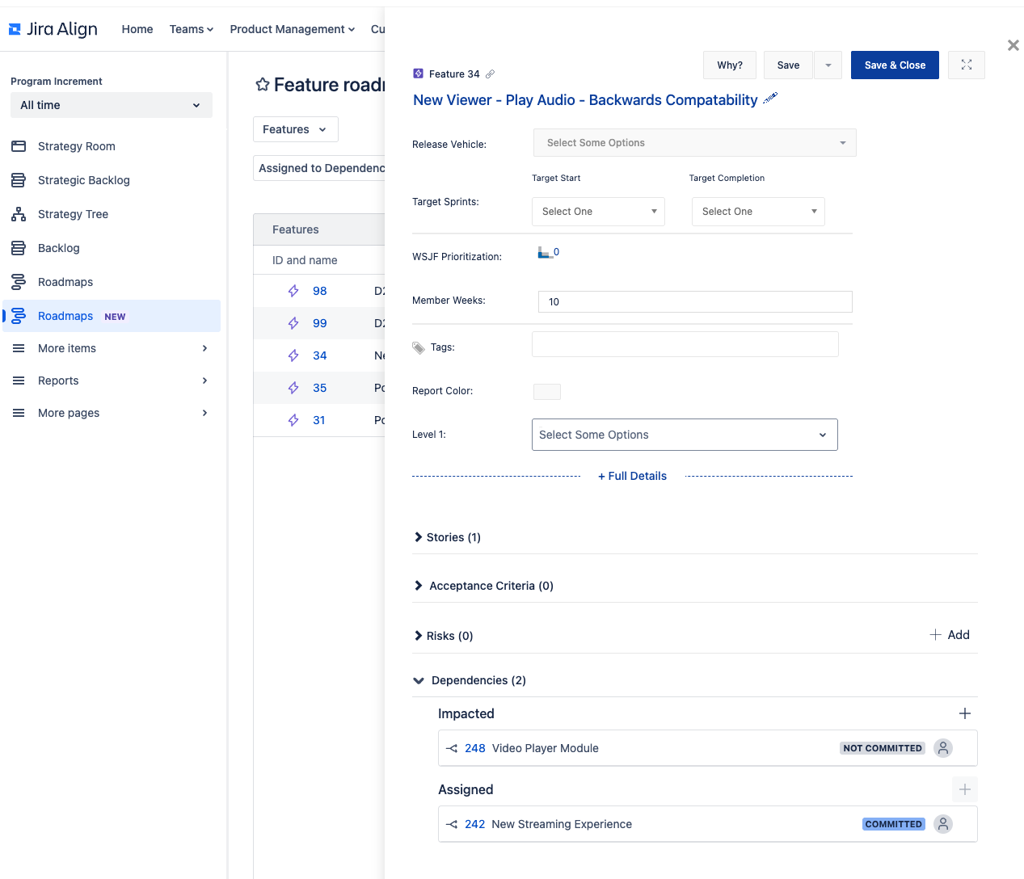
On a feature or capability details panel, dependency relationships are now separated into two sections:
-
Impacted dependencies, which indicate where this work item is blocked
-
Assigned dependencies, where this work item is contributing work to unblock something else
You can also add the feature or capability as the impacted item for a dependency directly from the details panel.
This makes it easier for teams to understand whether they are waiting on work or actively fulfilling a dependency for others.
📊 Dependencies grid page
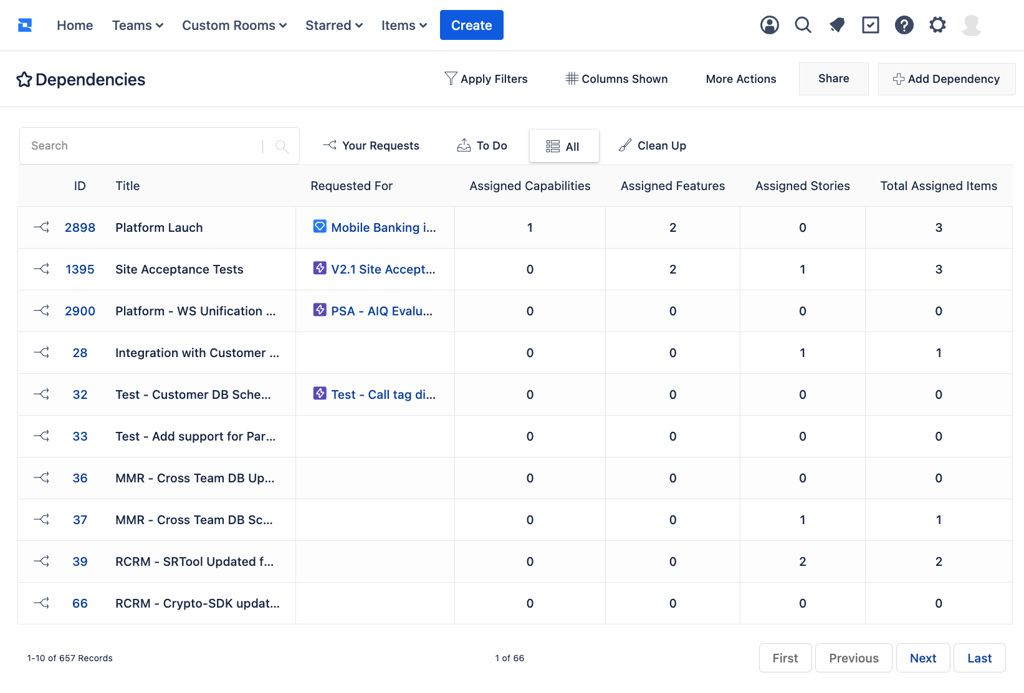
The dependencies page now includes four new columns:
This gives portfolio and program leaders immediate visibility into how much work is tied to each dependency and at what level.
🔁 Dependency Matrix
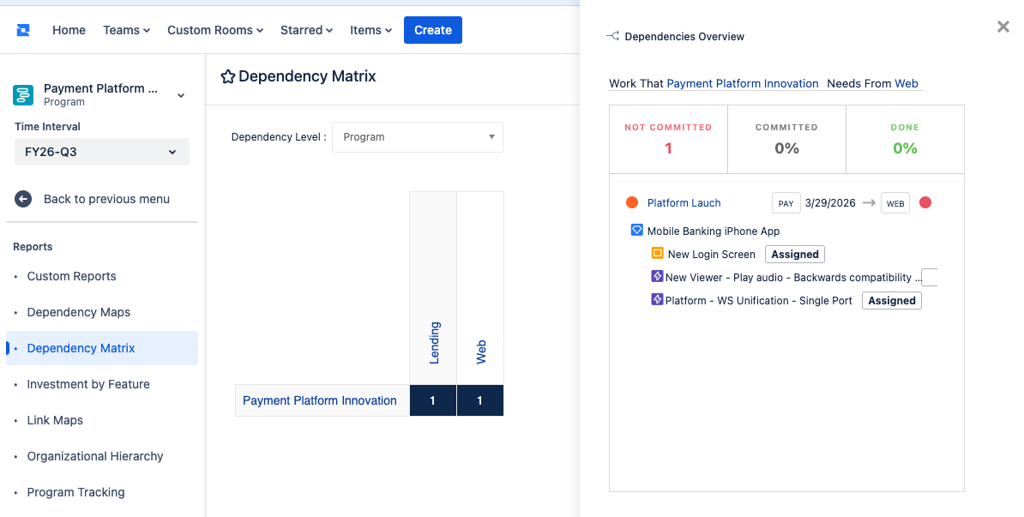
The slide-out in the dependency matrix report now displays:
-
Assigned stories
-
Assigned features
-
Assigned capabilities
This makes it easier to understand how dependency fulfillment is distributed across teams and programs.
🧭 Program Board: Dependency Quick View
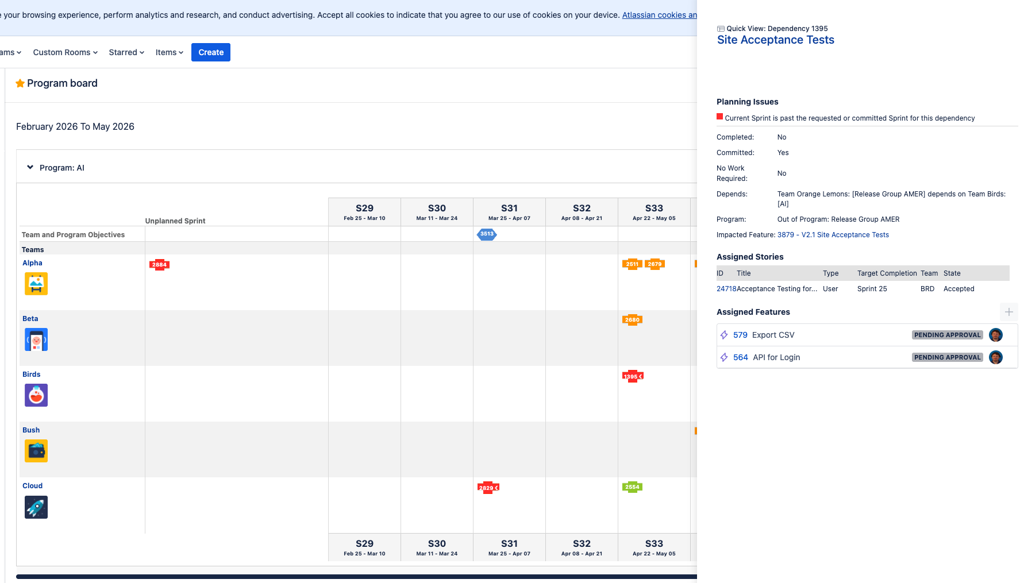
When viewing team-based dependencies on the program board, the quick view panel now shows assigned features in addition to assigned stories.
This provides better context during planning sessions, especially when dependency work spans multiple features.
🗺️ New Roadmaps
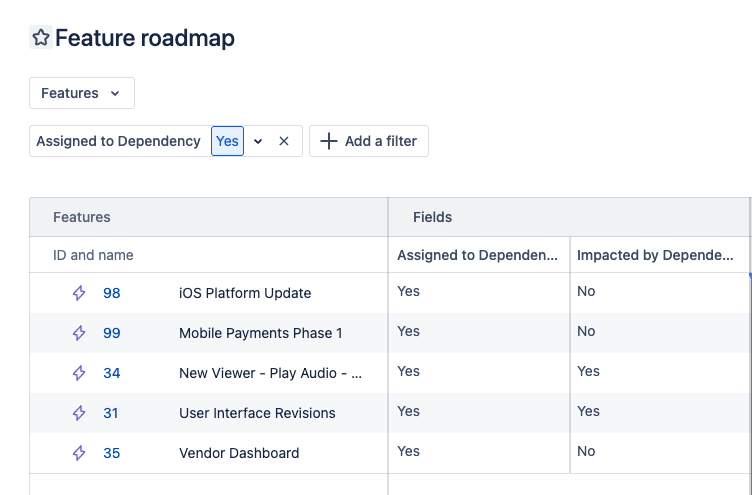
Dependency visibility now extends directly into the new roadmaps page.
You can add two new columns:
-
Impacted by Dependency is supported for epics, capabilities, and features. Displays Yes if the work item is currently blocked by a dependency.
-
Assigned to Dependency is supported for capabilities and features. Displays Yes if the work item is assigned to fulfill a dependency.
For UI consistency, these columns can be selected at all levels. Dependency data is populated only for capabilities and features.
Both fields are filterable, allowing you to isolate blocked work or fulfillment work directly within your roadmap views.
🔌 API & Enterprise Insights
The expanded dependency relationships are fully reflected in:
-
Align APIs
-
Enterprise Insights
This ensures reporting, integrations, and analytics accurately reflect the new assignment capabilities.
🚀 Release timeline & availability
This functionality was rolled out across multiple releases:
-
11.20: Assign multiple features to a dependency
-
11.21: Assign multiple capabilities to a dependency
-
11.22: New roadmaps dependency columns and filters
For full details on what shipped in each release, please refer to the corresponding release notes.
📈 Why this improves strategy-to-execution alignment
When dependency fulfillment is visible at the right level:
-
Portfolio leaders can see how strategic initiatives are being unblocked
-
Program leaders can coordinate cross-feature work more effectively
-
Teams can better understand not just what they are delivering, but why
This reduces the likelihood that important dependency work gets buried or overlooked.
Dependencies do more than connect work. They connect strategy to delivery.
Now, the model better supports that reality.
💬 We’d love your feedback
As always, this enhancement was driven directly by your feedback.
Please share your thoughts in the comments below.
Andrew


