Community resources
Community resources
Community resources
- Community
- Q&A
- Confluence
- Questions
- Map Jira fields to confluence
Map Jira fields to confluence

Hello !
Is there any native feature to map a jira field to confluence?
Use case :
I update few info from the Jira to confluence manually, instead if this can be linked so they fields in jira can auto populate and reflect in my confluence.
If the above can be achived, please also let me know if that suits for the custom fields.
3 answers

Hi @Sathish Kumar you can do it with Jira Automation. You need to go to your Space Settings, access Automation, and create a Rule. Here is an example of an automation I created to automatically edit a Confluence page when the task gets its status changed.
The drawback is an output - raw unformatted text unless you spend time on adding CSS formatting, and you have to carefully design the automation rules to cover every use case. But it is doable natively.

If you're open to install an app, I recommend giving AutoPage a try. It also works with automation rules but they're easy to set up, and fields are mapped using macros.
Here is an example of a Confluence page created from a Jira ticket with AutoPage. If a ticket is updated, the page is updated too, in real time. All the fields you can see: a description, fields in the table, and a linked work item come directly from Jira, there was no manual content creation.


I am affiliated with the team behind AutoPage, so if you have any questions, feel free to reach out :)

As an alternative to the native macro which can be limited (only a table but not a proper way to insert fields in your page), I can suggest trying our app Elements Publish to insert Jira work items into a Confluence page and keep them in sync.
It's very simple to set up:
- Install the app on your instance (you can try it for free for 30 days)
- Create a new recipe
- Select the source space and work item
- Select the target Confluence page (from scratch or use a Confluence template)
- Insert the Jira work item fields you need on the page and define how the recipe will be triggered (post-function, automation or manual action)
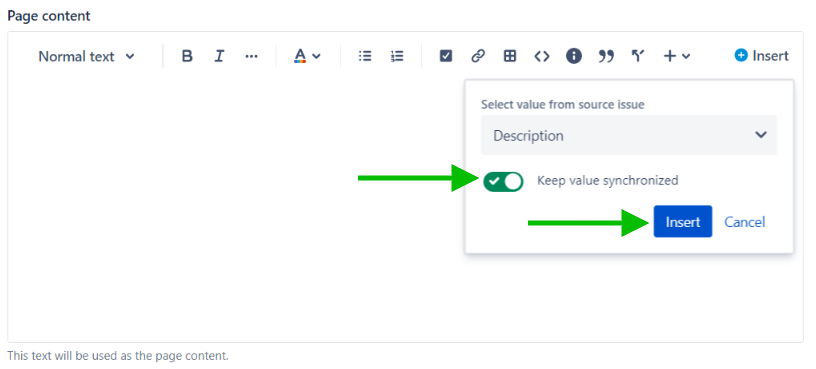
This recipe will allow you to insert data from Jira work items directly into a Confluence page and to update the page automatically.
Don't hesitate to have a try and see if it can fit your use case :)
You must be a registered user to add a comment. If you've already registered, sign in. Otherwise, register and sign in.


You must be a registered user to add a comment. If you've already registered, sign in. Otherwise, register and sign in.
Thanks for the quick reply.
let me explain my use case.
I will add a jira to that confluence - this issue type is Incident.
I want the fields releated to this Jira to be displayed how that validation works?
i have 5 confluence - each has unique jira associated.
You must be a registered user to add a comment. If you've already registered, sign in. Otherwise, register and sign in.

You must be a registered user to add a comment. If you've already registered, sign in. Otherwise, register and sign in.