Hi Bitbucket Community!
It's a busy few weeks for Bitbucket Pipelines and we've still got more news to share: We're excited to introduce final steps in Bitbucket Pipelines - a straightforward yet powerful mechanism to guarantee that your most important end-of-pipeline tasks execute regardless of earlier step outcomes.
From engineer Bharath Kandula himself:
A final step is a specialised step that:
-
Executes as the last step in a pipeline
-
Executes irrespective of whether preceding steps passed, failed, were skipped, or were stopped
-
Is executed again during reruns, resumes, and redeploys
-
Is intended for tasks such as cleanup, log collection, analytics, and notifications
Getting started with final steps
To define a final step, include a final: section in your bitbucket-pipelines.yml file. It is automatically appended as the final step of the pipeline.
pipelines:
   default:
     - step:
       name: Build
       script:
          - ./build.sh
     - step:
       name: Test
       script:
          - ./test.sh
     - final:
       name: Sending Analytics
       script:
          - ./analytics.sh
A new property final has been introduced with this feature. This property can be defined similarly to step, however, certain child properties, such as deployment, trigger, fail-fast are not supported under the final property. For more details, please refer to the Final step documentation.
UI changes
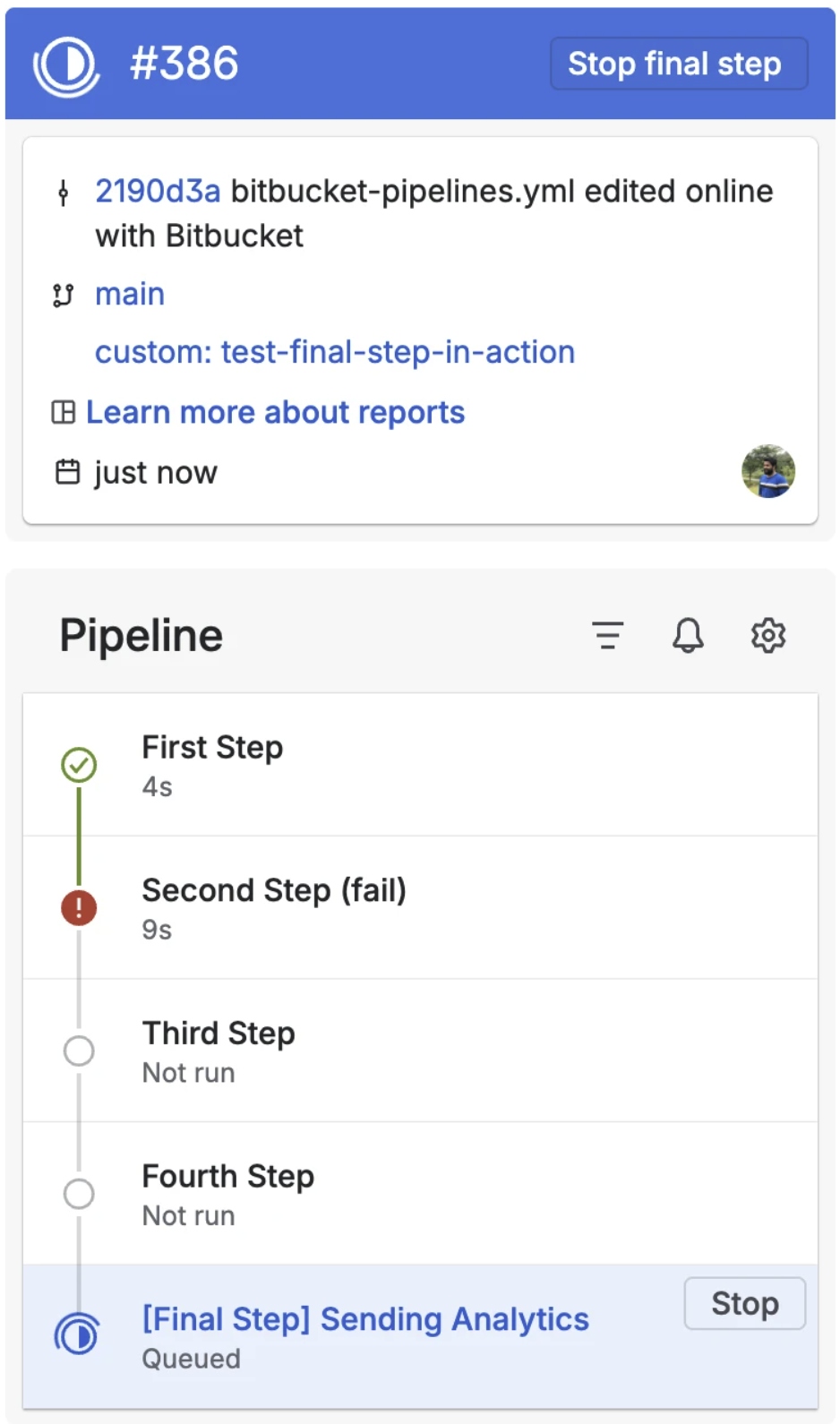
e have also updated the Pipelines UI to provide a clearer representation of, and enhanced control over, the final step:
-
The final step is visually distinguished from standard steps (as illustrated in the screenshots).
-
Once all standard steps have completed and only the final step is running, the primary pipeline action changes to "Stop final step" rather than the default "Stop".
-
The active final step includes an independent Stop button to allow discrete termination of that step.
-
A final step is prefixed with [Final Step] in its name.
Supported functionality and limitations
In most cases, a final step functions as a standard step however, several important rules govern its behaviour to ensure predictable operation.
Supported
Final steps:
Run again with every new pipeline execution, including reruns, resumes, or redeployments.
-
Are supported in parent and child pipelines:
-
Support:
-
script
-
type (for example: inline)
-
on-fail strategies (default: ignore; may be set to, for example, retry)
condition, configured in the same manner as standard steps (see: Condition options)
Limitations
To enforce consistent behaviour, the following are not supported:
Only one final step is allowed per pipeline definition. Parent and child pipelines are treated independently, so each may define its own final step.
-
The final: section must be defined last – it may not appear in the middle of a pipeline.
-
A pipeline cannot contain only a final step; at least one regular step is required.
-
Final steps cannot:
-
Run in a parallel group
-
Be configured within a stage
-
Have a deployment property.
-
Use fail-fast
-
Trigger child pipelines
-
Be manual triggers (trigger: manual)
If any of these validations fail, the pipeline trigger will fail and present a clear error message.
Try out Final Steps today and let us know what you think!
