When a new feature lands in my hands, my first instinct is to run exploratory tests—clicking around, trying edge cases, seeing how things behave. Once I'm happy with the feature, I want to capture that test flow as a manual test case in Xray so others on my team can repeat it.
Here's the problem: writing those test steps down is tedious. Describing each action and expected result in detail? It's the kind of work that makes you procrastinate.
I found an easier way. Instead of writing detailed prompts for an AI to generate test steps, I record myself running through the test in Loom and let automation handle the rest.
The Workflow
The approach chains together several tools:
- Loom records your test execution and generates a Confluence page with suggested QA steps
- A Rovo agent transforms those steps into a structured format with actions and expected results
- An automation rule triggers the agent and pushes the test case to X-ray via its REST API
The result? A manual test case in Xray, created from a video recording, with minimal manual effort.
Step 1: Record Your Test in Loom
This is the easy part. When you're testing a feature, hit record in Loom and walk through your test flow. Talk through what you're doing—Loom's transcription will capture it.
Once you've finished recording, Loom can generate suggested QA steps from your video. Press the "Take action" button and select the option to create QA steps in Confluence.
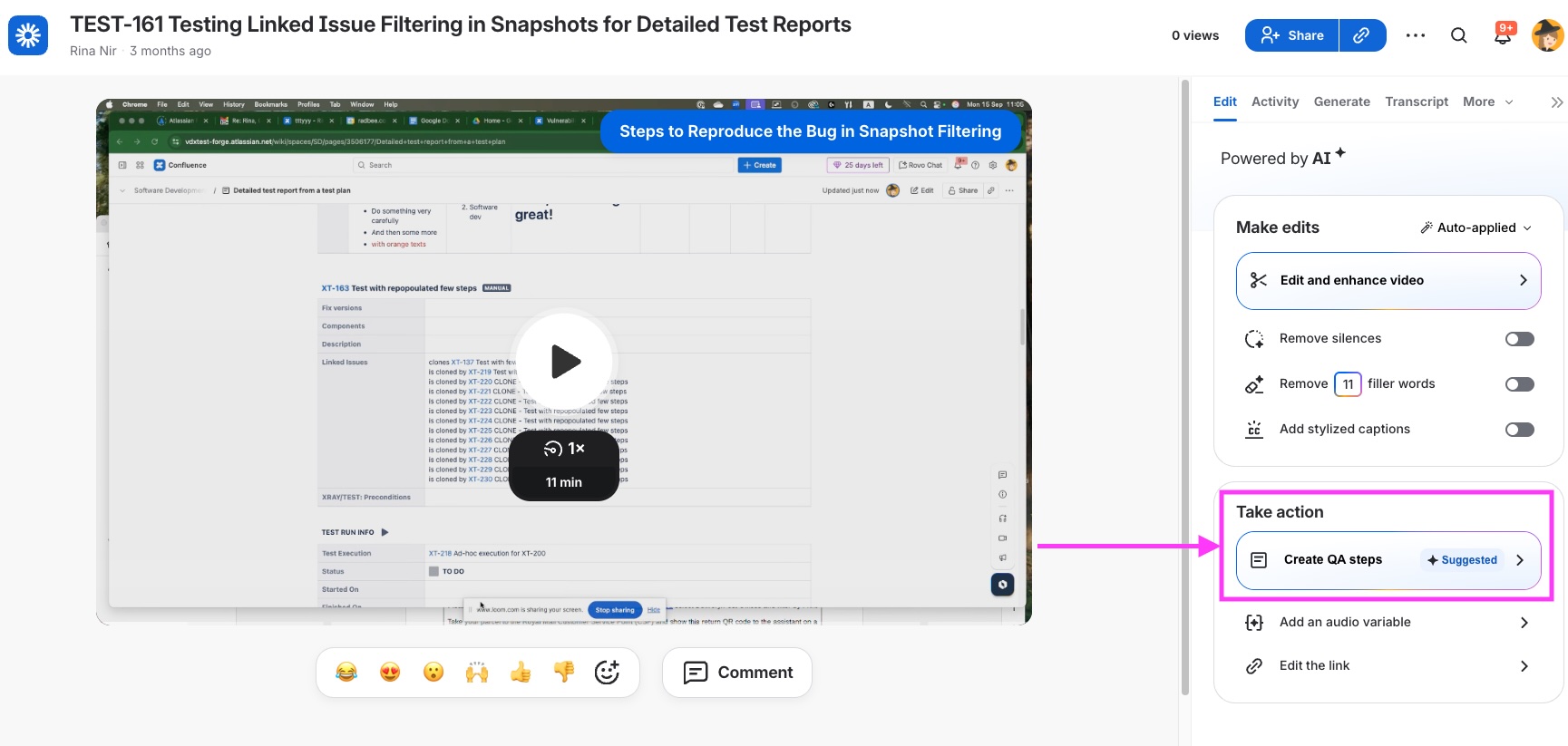
Loom will create a Confluence page with a structured breakdown of what you did during the recording. It's not perfect, but it's a solid starting point.
Step 2: Create the Rovo Agent
Next, create a Rovo agent that reads a Confluence page and transforms it into a proper test case structure.
I called mine ManualTestCaseGenerator. The agent needs to:
- Read the Confluence page content
- Extract a title and description
- Break down the content into sequential test steps
- For each step, identify the action and the expected result
- Output the result in JSON format compatible with X-ray's REST API
The JSON Structure
Xray expects test data in a specific format when you use their REST API. The agent needs to generate JSON that matches this structure: the test title, description, and an array of steps, where each step includes an action and an expected result.
Here's an example of what the agent produces:
json
<span>{
</span><span>  "testtype": "Manual",
</span><span>  "fields": {
</span><span>    "summary": "Test Case Title",
</span><span>    "description": "Test case description"
</span><span>  },
</span><span>  "steps": [
</span><span>    {
</span><span>      "action": "Navigate to the login page",
</span><span>      "result": "Login page is displayed"
</span><span>    },
</span><span>    {
</span><span>      "action": "Enter valid credentials and click Submit",
</span><span>      "result": "User is redirected to the dashboard"
</span><span>    }
</span><span>  ]
</span><span>}</span>
When building the agent, you can test it interactively. Feed it a Confluence page and ask it to convert the content to the Xray JSON format. Iterate on the prompt until the output is consistently correct.
Here is the prompt that generates the JSON
=== START OF PROMPT
You are an assistant that parses Confluence pages and generates from them a single manual test case definition in a json string. For the test case, generate:
- Summary: Create a short, clear summary of the test case.
- Description: Write one paragraph describing the scope of the test.
- Test Steps: Provide a sequence of steps, each with:
1. Action (mandatory): Clearly and concisely state what the tester needs to do. Be practical and brief, assuming testers are familiar with the software.
2. Result (mandatory): Clearly and concisely explain what should happen if the action is successful.
You structure your response as a json string, that follows this example:
{"query": "mutation { createTest( testType: { name: \"Manual\" }, steps: [ { action: \"Open the detailed test report snapshot and go to the snapshot macro settings.\", result: \"Snapshot macro settings are visible.\" }, { action: \"Set the link type filters to include only 'Defect' and 'Blocks'. Save and update the snapshot.\", result: \"Snapshot updates and only 'Defect' and 'Blocks' links are shown. 'Clones' links are not displayed.\" }, { action: \"Move linked issues to 'In Progress' status in G-ROM. Make sure one is from the 'Hotel' project and another from a different project.\", result: \"Linked issues are in 'In Progress' status as required.\" }, { action: \"Set filters to show only linked issues from the 'Hotel' project and only work item types 'Bug' or 'Story'. Update the snapshot.\", result: \"Snapshot updates and only 'Bug' or 'Story' links from the 'Hotel' project are displayed.\" }, { action: \"Create a link to an 'Epic' in the 'Hotel' project. Update the snapshot.\", result: \"The 'Epic' link does not appear in the snapshot.\" }, { action: \"Change the settings to allow 'Epic' as a link type. Update the snapshot.\", result: \"The 'Epic' link now appears in the snapshot.\" }, { action: \"Set a filter to only allow issues with 'Fixed Version 2'. Update the snapshot.\", result: \"Snapshot updates and only the 'Epic' with 'Fixed Version 2' is displayed.\" } ], jira: { fields: { summary: \"Verify snapshot macro filtering for linked issues in test report\", project: { key: \"TCP\" } } } ) { test { issueId testType { name } steps { action result } jira(fields: [\"key\"]) } warnings } }"}
In writing the test steps use an informal and direct tone. Stay job-focused and avoid being overly friendly or cheerful.
Also- in the string you generate special characters need to be escaped
Your response only includes the json string.
=== END OF PROMPT
Step 3: Create the Automation Rule
With the agent ready, create an automation rule in Confluence that ties everything together.
The Trigger
I chose to trigger the rule when a page is labeled. Specifically, when a Confluence page receives the label 'manualtest' it triggers the automation. You could also trigger on page creation. Whatever fits your workflow.
The Rule Structure
- Trigger: Page is labeled with
a specific label
- Action: Invoke the Rovo agent to read the page and generate the Xray JSON
- Action: Send a web request to Xray's authentication endpoint to get a bearer token
- Action: Send a second web request to Xray's GraphQL API with the bearer token and the JSON payload
- Logging: Add log actions between steps so you can debug when things go wrong
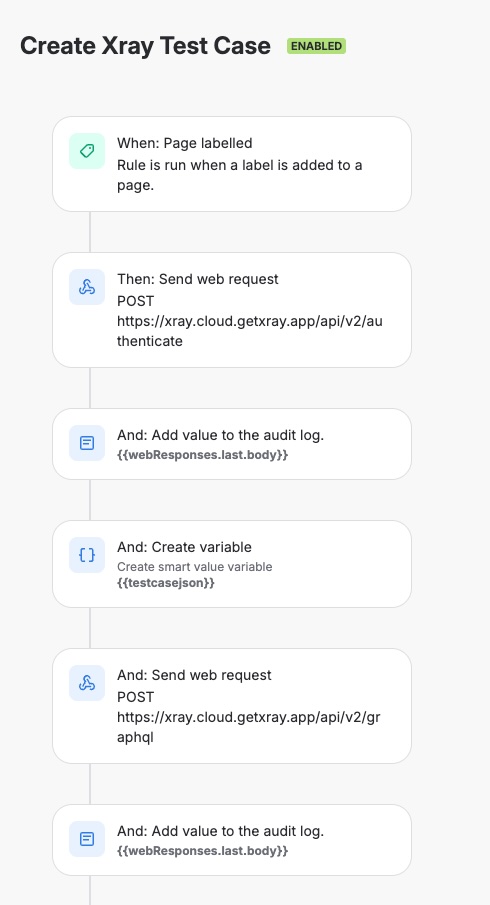
The Gotcha: Escape Characters
Here's something I ran into: the JSON generated by the Rovo agent sometimes has escape character issues when passed through the automation chain. In my testing, the rule occasionally failed because the response wasn't escaped correctly.
If you see errors in the audit log about invalid body content, try triggering the rule again. In my experience, it often works on the second attempt. This is something that needs further debugging and improving - if you solve it, I'd love to hear how.
Results
When everything works, labeling a Confluence page triggers the whole chain. Within moments, a new test case appears in Xray with:
- The test title was extracted from the page
- A description summarizing the test
- Sequential steps with actions and expected results
- The correct test type is set to Manual
The test case is created under the API user's account, and all the steps are drafted and ready for review and improvement by a human.
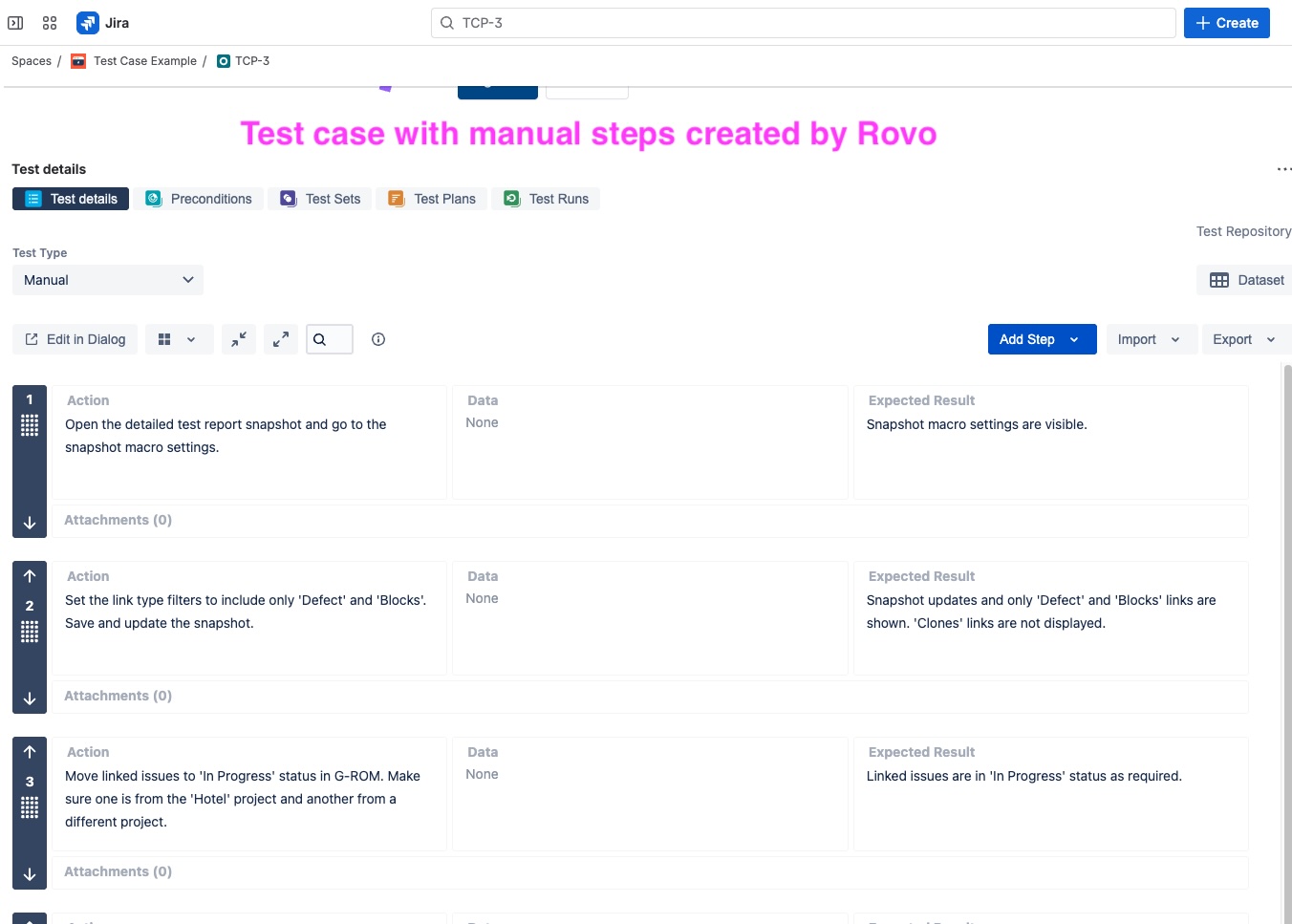
What Still Needs Work
This automation isn't 100% reliable yet:
- Escape character issues can cause occasional failures in the web request body
- Agent prompts may need tuning based on how Loom structures its QA suggestions
- Review is still required—AI won't get you 100% there, but it gives you an excellent starting point
The generated test cases should be reviewed and refined. But compared to writing everything from scratch, this approach saves significant time.
Summary
Recording a test flow in Loom can now generate an Xray manual test case through a chain of automation:
- Loom creates a Confluence page from your video
- A Rovo agent transforms the content into structured JSON
- An automation rule pushes the test case to Xray via API
Key takeaways:
- Use Loom's built-in QA step generation as your starting point
- Design your Rovo agent to output JSON that matches X-ray's API structure exactly
- Trigger automation on page labeling for easy manual control
- Add logging throughout the automation to help debug failures
- Expect to review and refine the generated test cases—AI gets you most of the way, but human review is still essential
I'm excited to use this automation in our system. It turns what would otherwise be a tedious documentation task into something I can complete in (almost) the time it takes to record a Loom video.


