We're moving! The community forums are migrating to a new platform on September 22. Learn more
×Community resources
Community resources
Community resources
How can we calculate Issue Age and Time in status field in JIRA Cloud in Scriptrunner

How can we calculate Issue Age and Time in status field in JIRA Cloud in Scriptrunner

Hello, @Divya Sudhakar _US - ADVS_
Create a gadget that calculates the age of issues (time since creation) and displays it as a chart with hours on the Y-axis and current status on the X-axis. Add a dropdown to filter by project.


Hey @Divya Sudhakar _US - ADVS_
While ScriptRunner is a powerful tool, calculating accurate time durations requires complex scripting to parse the change history log and account for working calendars (excluding weekends and holidays).
If you are open to using a marketplace app, Timepiece - Time in Status for Jira has a solution that calculates "Issue Age" and "Time in Status" instantly without a custom field or complex scripting.
You can use Timepiece’s Duration Between Statuses report to calculate Issue Age. It allows you to define a metric to measure the total time from the start of your workflow (Issue Creation) to the end (Done or Closed):

Additionally, it works retroactively for all your past issues from the very beginning.
For Time in Status:
You can use the Status Duration report. It lists each issue and calculates exactly how long it spent in every status, handling multiple visits and historical changes automatically.

You can check Timepiece on the Atlassian Marketplace. Hope this helps you track your Issue Age and Time in Status easily.
Full disclosure: I'm on the team that makes Timepiece - Time in Status for Jira.
You must be a registered user to add a comment. If you've already registered, sign in. Otherwise, register and sign in.

Hi @Divya Sudhakar _US - ADVS_
You can use Jira Rest API's to build your own custom solution or If you would like to try out a mktplace app for this requirement, you can try out
With this app you generate time in each workflow status for multiple issues with multiple filter and grouping options.
With Status grouping feature, can help you define your own issue age time and view the averages of the same. Also the app has 20+ reports to meet a variety of use cases.
Disclaimer : I am part of the app team for this add-on

You must be a registered user to add a comment. If you've already registered, sign in. Otherwise, register and sign in.

Hi @Divya Sudhakar _US - ADVS_,
Why do you need this? And do you need this as a Jira field, or as a report or gadget?
If you want these as a fields, you can take a look on this existing topic that describes how to add a scripted field in ScriptRunner to calculate the issue age: https://community.atlassian.com/forums/App-Central-questions/Age-of-issue-in-Days-using-Scriptrunner-Scripted-Field/qaq-p/1552535
Not sure how to configure such a field for time in status—it may be a bit more complex, since it requires using the issue history...
But if you need these for reporting purposes, and alternative would be to use an app (plugin) from Atlassian Marketplace that provides such reports. If you are willing to try such an app, our Great Gadgets app offers two gadget that can be of great help:
WIP Aging Chart gadget - calculates the age of the issues and display them as plot chart. The age can be calculated in many ways, including "time since creation" or "time since current status".

The gadget offers a Data tab, with a report that lists the issues and their age, which can be easily exported in CSV.

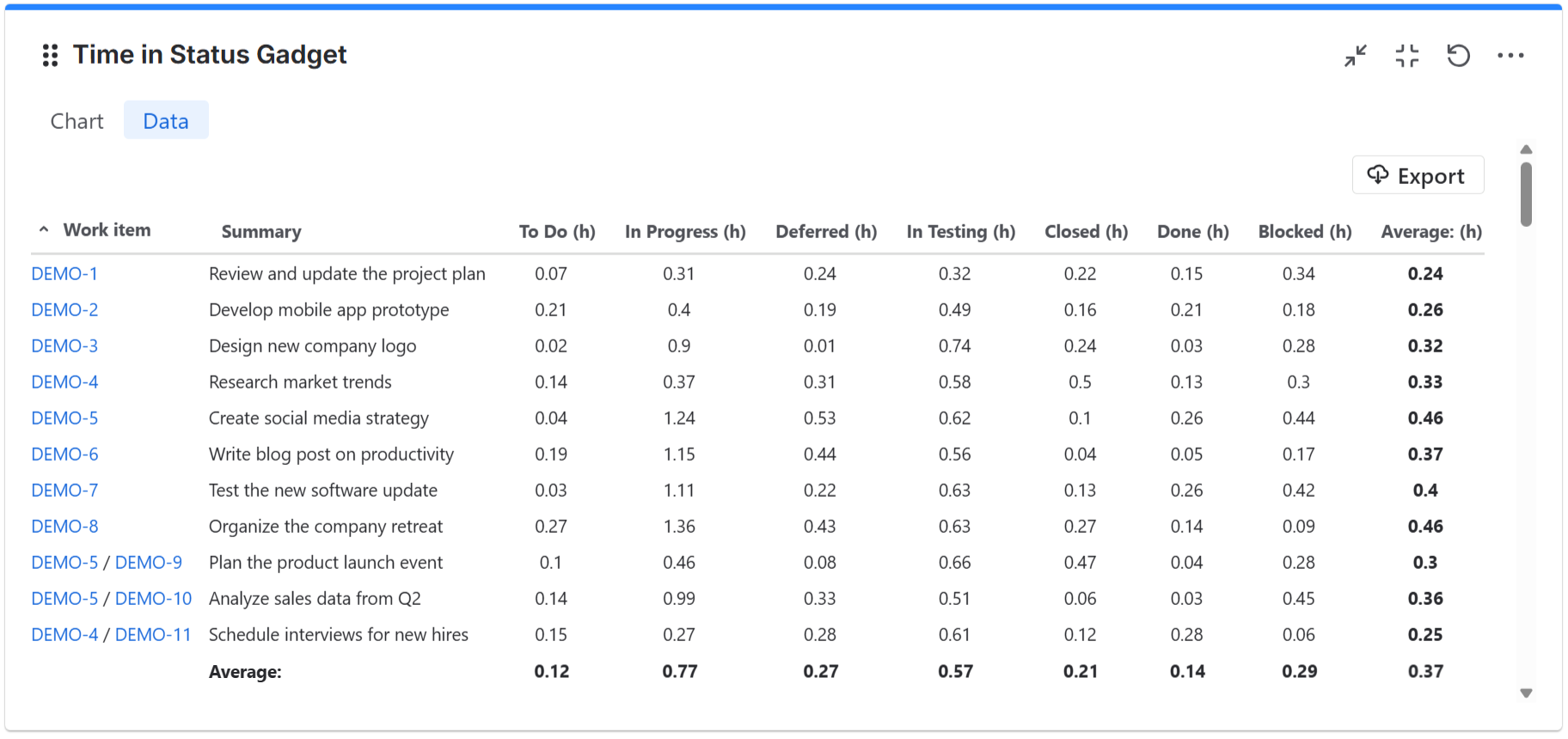
Time in Status gadget - Display the average or total time in status for the issue from a filter or board.
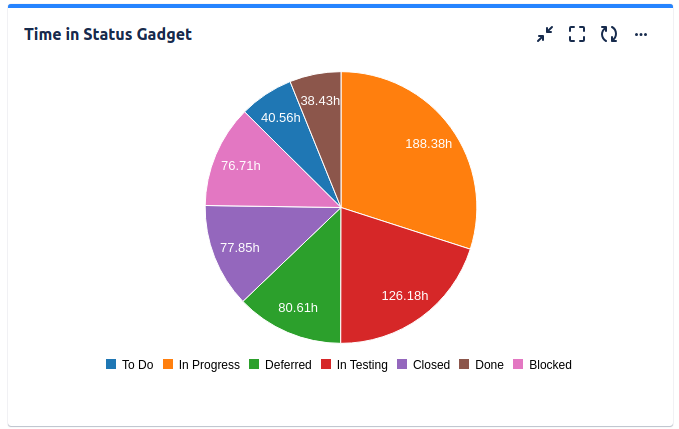
This also offers a Data tab with a report containing the issues and time in every status.
Danut
You must be a registered user to add a comment. If you've already registered, sign in. Otherwise, register and sign in.

Hi @Divya Sudhakar _US - ADVS_ ,
Just to set expectations: calculating metrics like Issue Age and Time in Status in Jira Cloud isn’t straightforward out-of-the-box. Jira’s default reporting doesn’t store these durations in fields you can simply pull with JQL or native automation. You’d need to track status transition timestamps in custom fields and then subtract them manually, or process issue history — both of which are really manual/fragile approaches.
Because of that complexity, many teams use a Marketplace reporting app to accurately compute these timelines — especially when you want it for all issues over time, or break it down by status, assignee, or workflow stage.
If you’re looking for an easier solution built specifically for this by our team , Time in Status Reporter for Jira provides detailed status-duration analytics based on real issue history:
-
📊 Time in Status for each status
-
📏 Times in Status (how often each status was entered)
-
📅 Status Entry Dates
-
📈 Cycle and Lead Time reports
-
👤 Time in Status per Assignee and Status Groups
-
📤 Full CSV export and interactive charts
It calculates all of these reliably from your Jira issue history so you don’t have to build and maintain custom automation rules or rely on hacks.
Using a tool like this lets you get Issue Age and other timeline metrics with much less manual work and more accurate results — ideal if you want to analyze across projects or workflows without scripting or external processing
Regards,
Petru
You must be a registered user to add a comment. If you've already registered, sign in. Otherwise, register and sign in.


For clarity, are you looking to have calculated fields:
- Issue Age - calculates number of days since issue creation
- Time in Status - calculates time (days, or Days & Hours) in current status
Other possibility is to have time in status report for each status, but I assume you're talking about calculated fields
You must be a registered user to add a comment. If you've already registered, sign in. Otherwise, register and sign in.

You must be a registered user to add a comment. If you've already registered, sign in. Otherwise, register and sign in.