Jira tracks a history of all activities in your projects: status changes, field changes, user activity, and logged time. However, looking only at the current state of work items, most teams miss the useful information contained in their historical data.
Transforming Jira work item data into reports allows the teams to gain a deeper insight into who worked on what, how work flowed, and what changes took place throughout the project lifecycle.
In this article, we will discuss three helpful reports you can create with Jira work item information to enhance tracking, transparency, and audit preparedness.
Why Jira Work Item Data Is Valuable for Reporting
All the activities done in Jira generate a record of historical data. This includes:
- status transitions
- assignee changes
- field updates
- priority modifications
- workflow progress
- work item deletions
This historical data is incredibly useful when teams must:
- be ready to have internal or external audits.
- identify unforeseen project delays.
- track workflow bottlenecks
- make sure that they adhere to the governance rules
- maintain data transparency
Converting this raw data to organized reports can help organizations gain a better insight into how work flows through Jira.
How to Generate Work Item History Reports in Jira
In case you need to examine Jira work item history, you have two primary options to create a report: either with the help of the JQL (Jira Query Language) or with the help of a specific reporting app, such as Issue History for Jira (Work Item History), provided by SaaSJet.
Both options have advantages depending on the level of detail required in your reporting.
Option 1: Using JQL
JQL is Jira’s built-in query language that lets you search for work items based on specific historical changes.
Examples of JQL you can use:
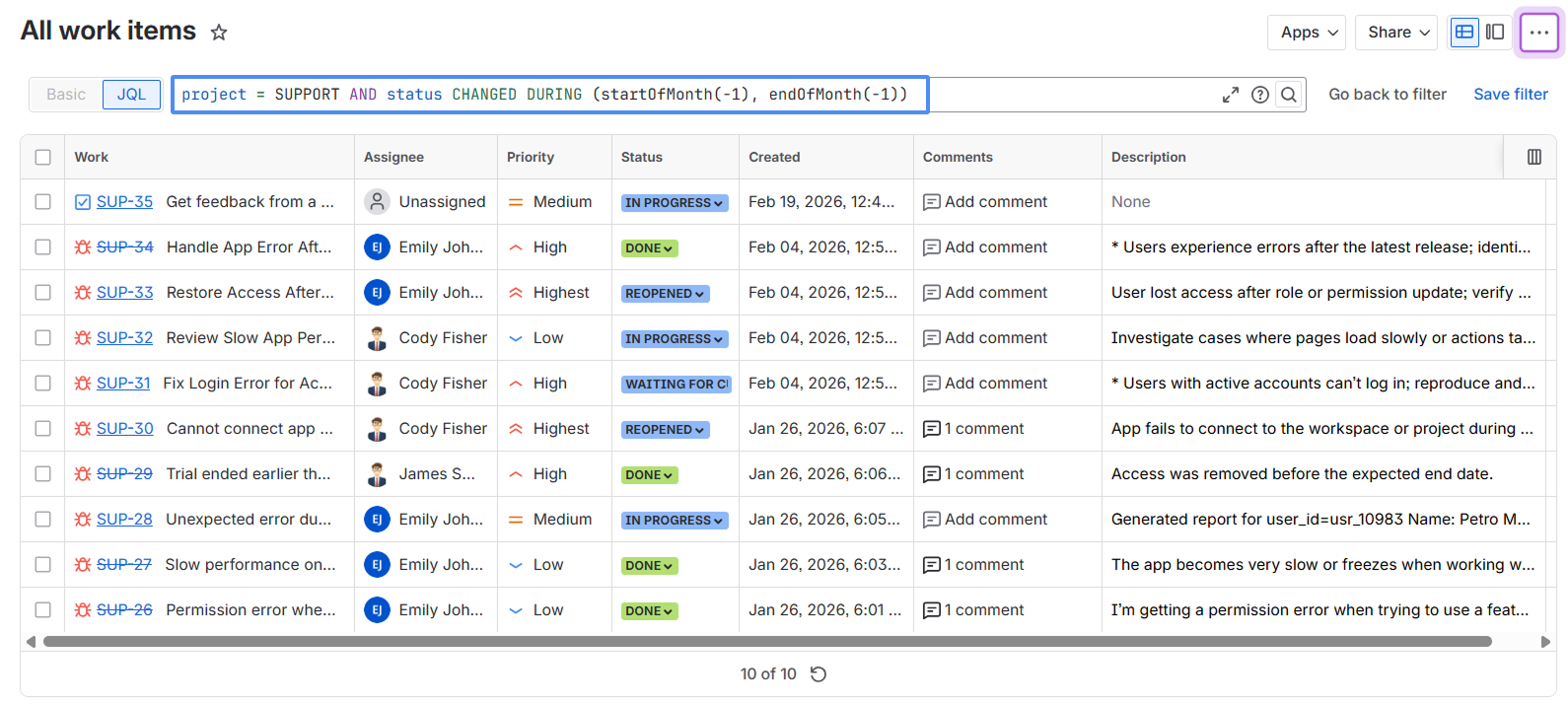
- to search the work items in the SUPPORT project, where the status changed last month:
project = SUPPORT AND status CHANGED DURING (startOfMonth(-1), endOfMonth(-1)))
- to search the work items moved to Done during a specific time period:
status CHANGED TO Done DURING ("2026/01/01","2026/01/31"))
- to search the work items changed by a specific user last week:
updated >= startOfWeek(-1) AND updated <= endOfWeek(-1) AND updatedBy = username)
Using JQL you can do the following:
✅ filter work items based on field changes
✅ track status transitions
✅ export filtered results
However, JQL has limitations when we talk about historical reporting:
❌ no full timeline of work items changes
❌ no audit-style reports
❌ no export to readable Excel reports
❌ no visibility of deleted work items
❌ no tracking of comment changes
❌ can’t track all updates by a specific user
Option 2: Using Issue History for Jira (Work Item History) App
To have more advanced reports, most teams use the apps such as Issue History for Jira (Work Item History) by SaaSJet.
The app allows you to:
✅ generate detailed work item history reports in a few clicks
✅ track all work item field changes
✅ monitor user activity and logged time
✅ track and restore deleted work items
✅ export reports in Excel, CSV or PDF formats
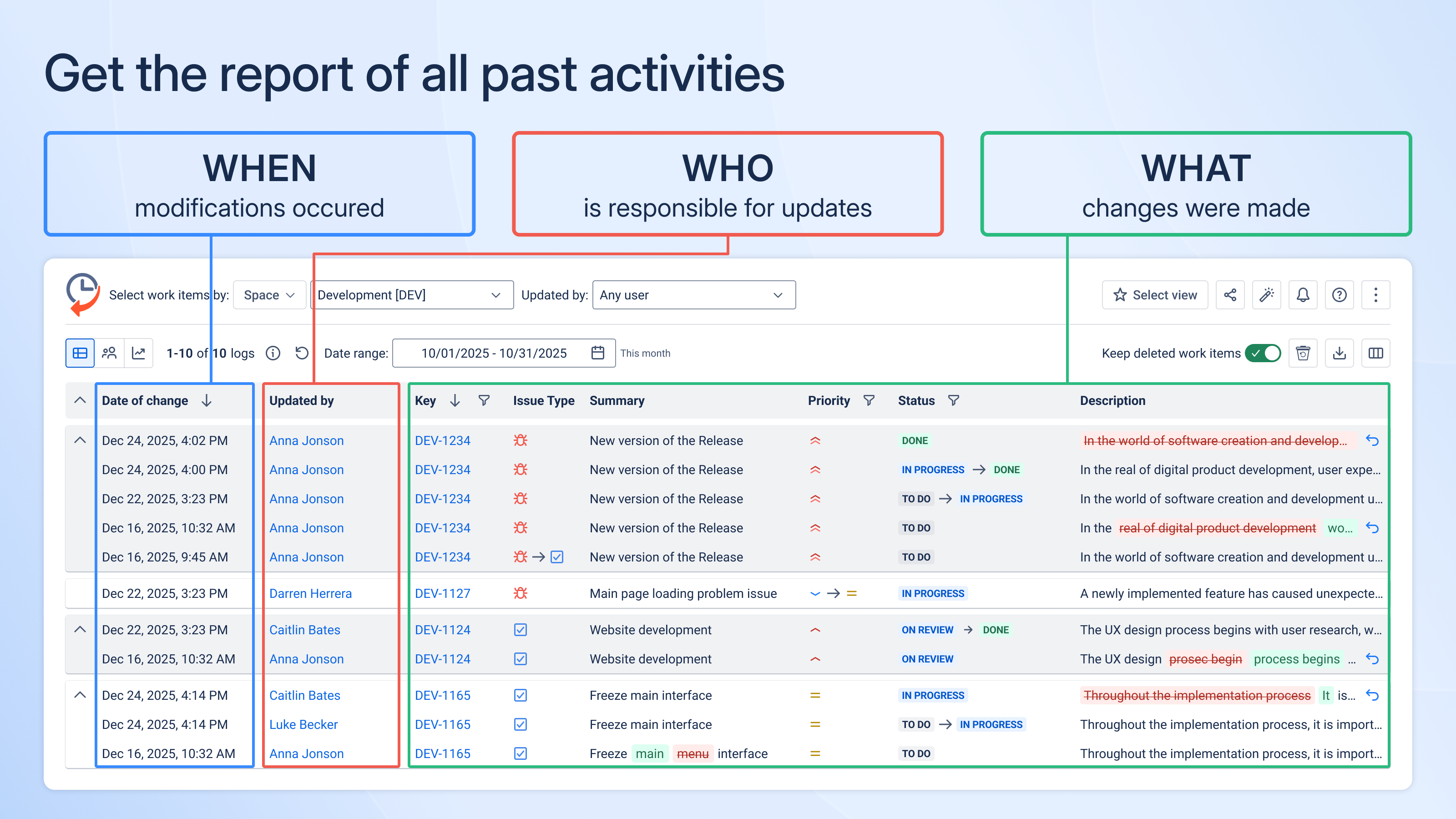
The app eliminates the need to check the change history of each Jira work item individually. It combines historical data into clear and structured reports, which is much simpler to examine Jira activity and create audit-ready documentation.
Now, let’s explore what kind of reports you can generate using the Issue History for Jira app and how they can help you better understand workflows, team activity, and project changes.
Report #1: Status Transition and Workflow Tracking Report
This report allows teams to understand work item movement across the Jira workflow and identify the problems quickly.
Using the Issue History for Jira app, you can monitor:
- the status transitions a work item has had
- who changed the status
- when the transition happened
A workflow tracking report can also assist your team in quickly identifying situations that might signal process difficulties, such as when work items are reopened after being marked as Done. Using the Status field filter in the app, it is possible to receive such a report:
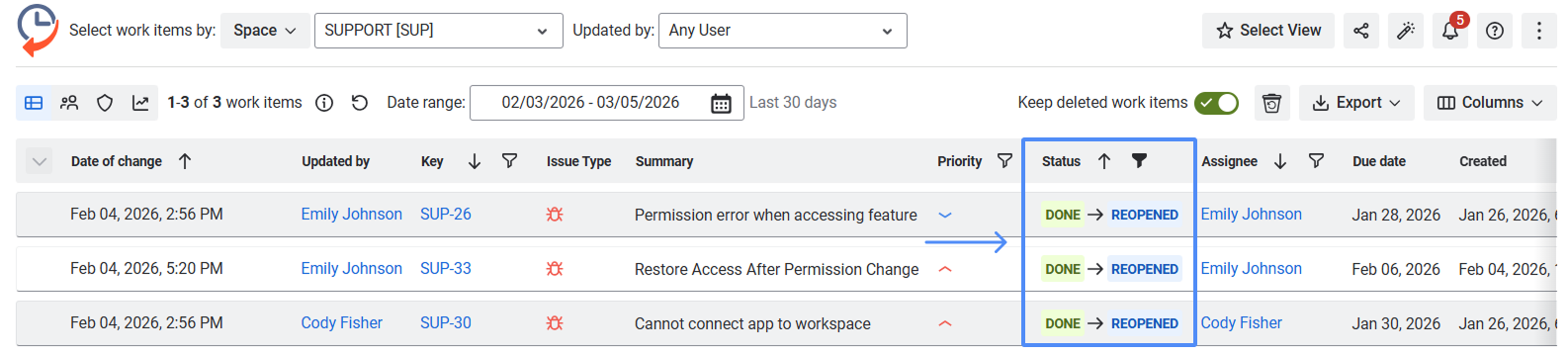
The recognition of these cases assists teams in identifying the bottlenecks and enhancing the efficiency of the workflow.
Report #2: User Activity and Logged Time Report
The report can help teams in knowing who worked on particular work items and how long they worked on them. It gives the transparency into user activity and worklogs, and in particular project tracking, workload analysis.
Using the Issue History for Jira app, you can monitor:
- time logged on each work item
- who logged the time
- activity of the user on multiple work items and projects
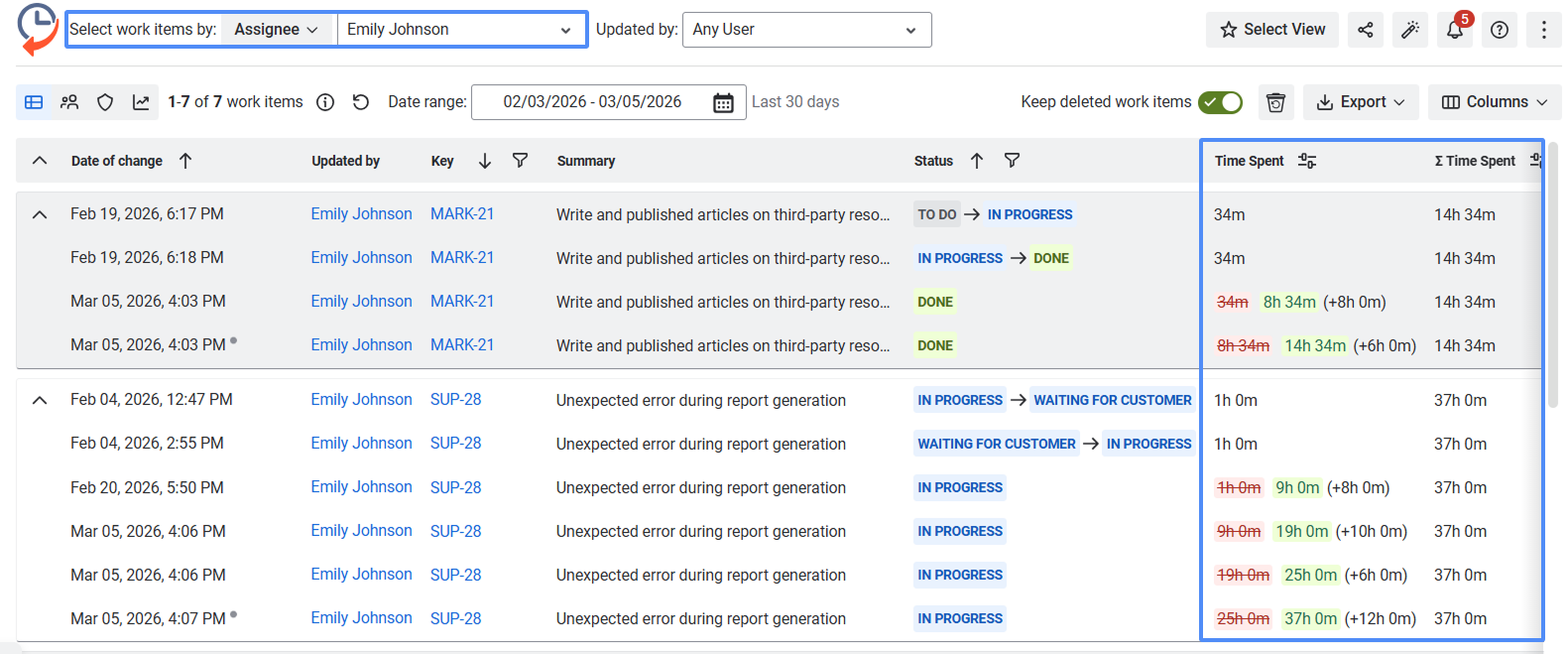
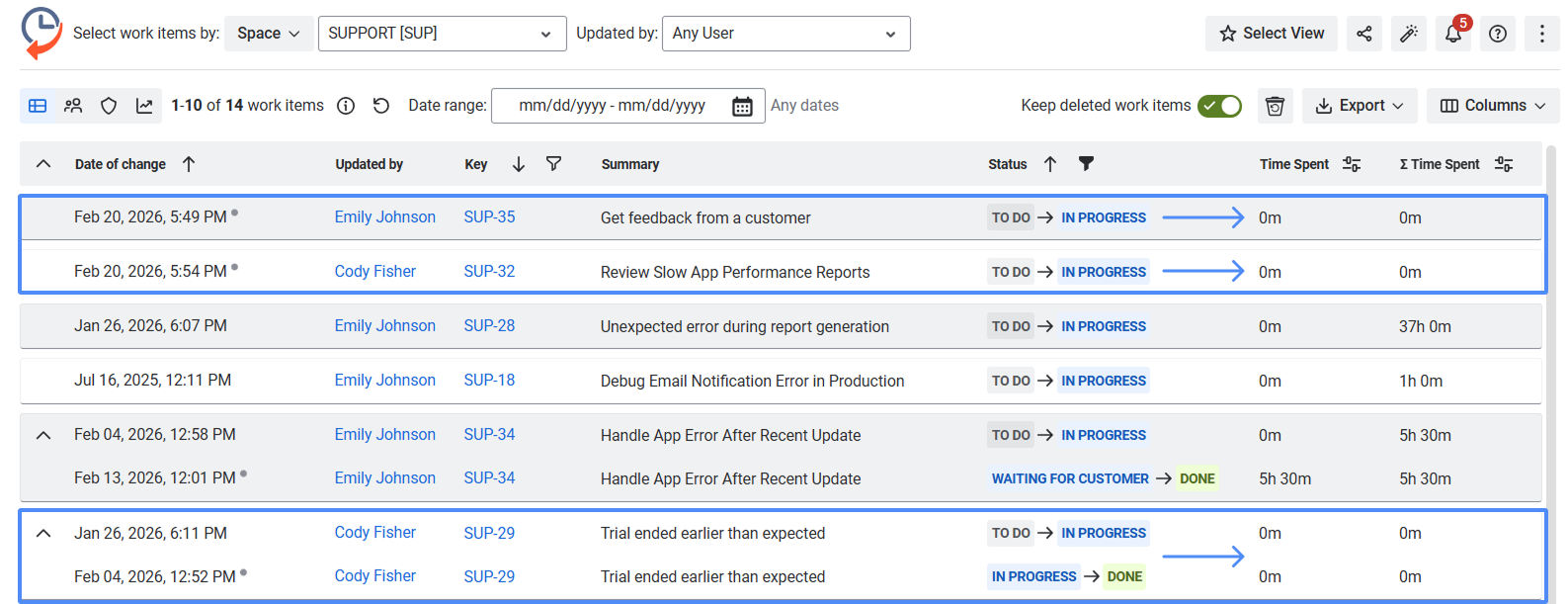
Generating such a report, teams are able to easily and rapidly recognize significant patterns of work distribution and activity, such as:
- team members spent a considerable number of hours on a single work item. For example:
- there are work items with no logged time even when they are in progress or done. For example:
- worklogs were added much later than the work was supposedly done.
These insights enable teams to enhance workload visibility and proper time tracking.
Report #3: Deleted Work Items Report
Having such a report, teams can monitor work items that have been removed in Jira and can offer some insight into activities that are otherwise hard to track.
Using the Issue History for Jira app, you can view:
- which work items were removed
- who deleted them
- when the deletion happened
- important details of the work item that was deleted (e.g., summary, project, comments)
It is significant to monitor deleted Jira work items in order to ensure transparency and accountability.
As an example, this report assists in recognizing the cases when:
- one of the work items was deleted by mistake
- a work item was deleted in a process of investigation or audit
- critical tasks were removed from the project without notice
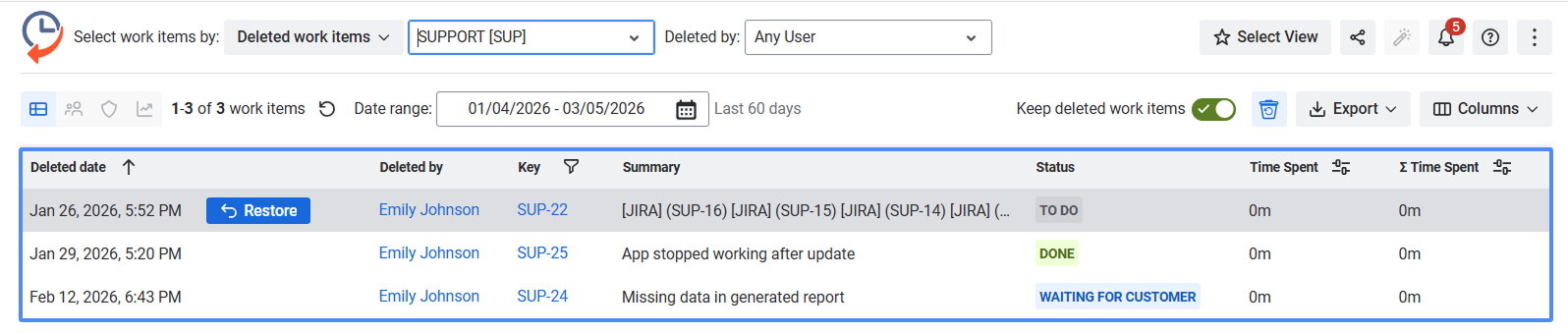
Availability to such information assists the teams in protecting the integrity of the data and keeping up with the audit or governance demands.
📊 Turn your Jira history into insightful reports with Issue History for Jira (Work Item History) app
Summing Up
Jira has a rich history of project activity, which can be difficult to access and analyze in structured form. Work item history reports assists the teams in monitoring workflow progress, user activity, and keeping transparency among projects.
Using such apps as Issue History for Jira (Work Item History), teams are able to easily create reports on status transitions, time logged, and work items deleted which can assist them in determining the bottlenecks, researching the changes, and creating audit-ready documents.
