The Problem: The High Cost of Transparency
In a recent B2B integration project I managed, we hit a wall that every Jira Admin and PM knows too well: External Collaboration vs. Security & Licensing. (Disclaimer: I’m part of the Apportunity team, and this project was the perfect "battlefield" to test our Forge-based approach to transparency).
The stakeholders needed to track progress, but:
- Licensing overkill: Paying for 30+ seats just for "status checkers" was a budget no-go.
- Permission Fatigue: Creating Guest accounts and meticulously auditing Permission Schemes for every new project is an administrative burden and a security risk.
- Manual Overhead: As a PM, I was spending hours syncing data to spreadsheets. It was inefficient, prone to human error, and the data was stale by the time of the meeting.
The Requirements: Minimal Surface Area, Maximum Control
We didn't need a "fancy" portal. We needed a secure, read-only window into specific Jira work items that met three technical criteria:
- Zero External Data Tunneling: Data must stay within the Atlassian perimeter.
- Granular Field Control: The ability to whitelist specific fields (Status, Summary) while blacklisting others (Internal Comments, Budgets).
- Identity-lite Access: Secure access for stakeholders without forcing them through the Jira onboarding process.
The Solution: A Controlled "Forge-Based" Window
We decided to bridge the gap using Apportunity: External Share & Public Links. Since I’m close to the development of this tool, I wanted to see if its Forge-native architecture would actually pass our internal "paranoid" security review. Here is the technical breakdown of the setup:
- Scope-Limited JQL: We didn't share a project, we shared a filtered view of an integration board. Only specific tickets relevant to the partner were visible.
- The Security Layer (Forge + Password): Since the app is built on the Atlassian Forge platform, the data is processed within Atlassian’s infrastructure - no external backend was involved. To prevent "link leaks", we enforced Password Protection on the shared board.
- Mobile Efficiency (QR Code): For "on-the-go" updates, we generated a QR code. This allowed executives to verify the "Done" column during stand-ups by simply scanning it - straight to a mobile-optimized view, bypassing the need for a desktop login.
- Admin Oversight: One of the best parts from an admin perspective is the ability to see all active shares in one place and revoke them instantly once the contract ends.
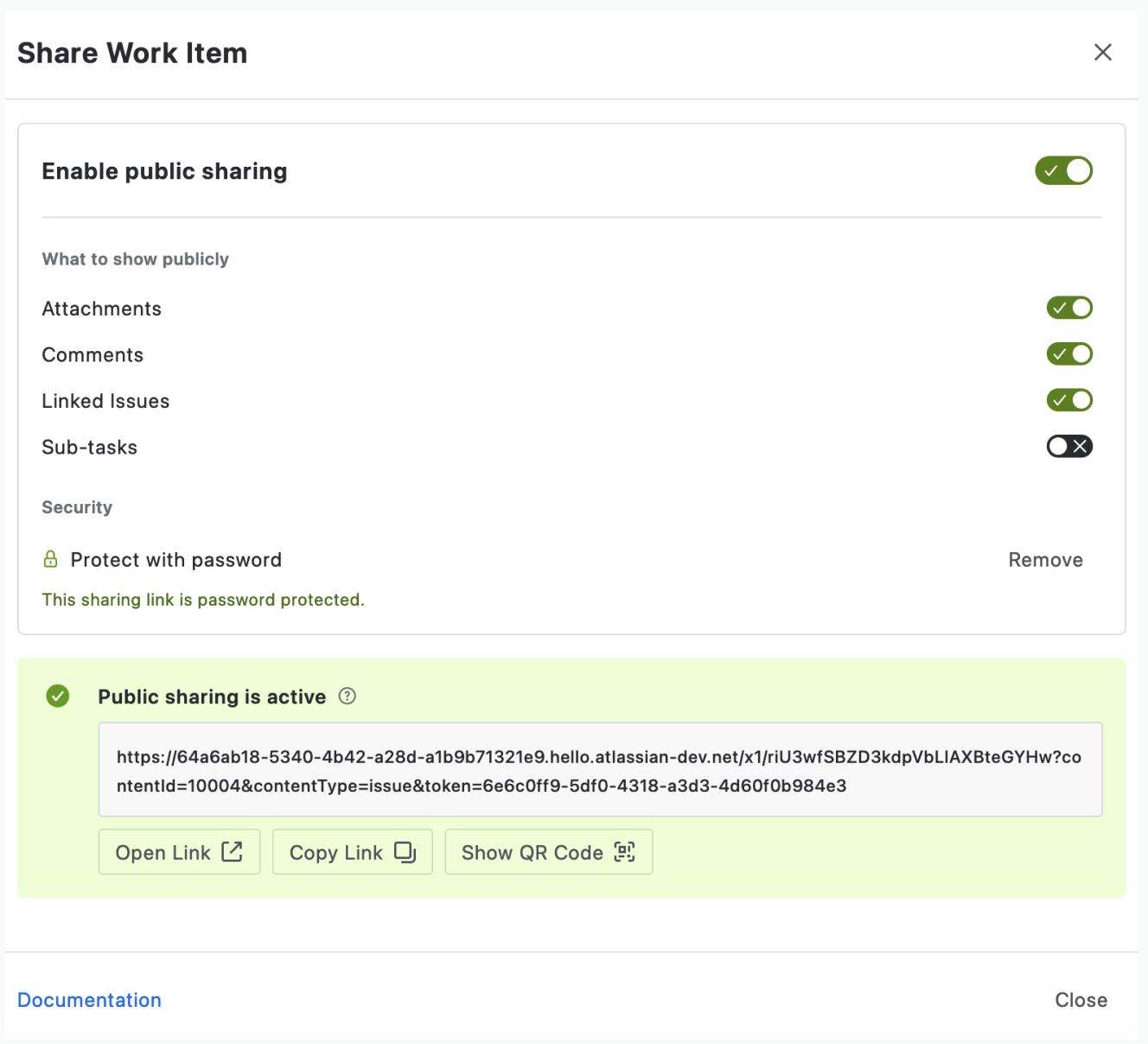
The sharing interface in action: Notice the password protection and the ability to hide internal details like comments or linked items.
The Reality Check: Results
This didn't magically stop people from using Slack, but it changed the nature of the questions. Instead of "What's the status of AN-101?", we started having actual technical discussions.
- Reporting reduction: Status updates shifted from 90 minutes of "reading the board" to 15 minutes of "addressing blockers".
- Security peace of mind: We didn't have to manage 30 extra accounts or worry about an external user wandering into the wrong project.
- Audit-friendly: The setup passed our internal security review because the data residency stayed within Jira Cloud.
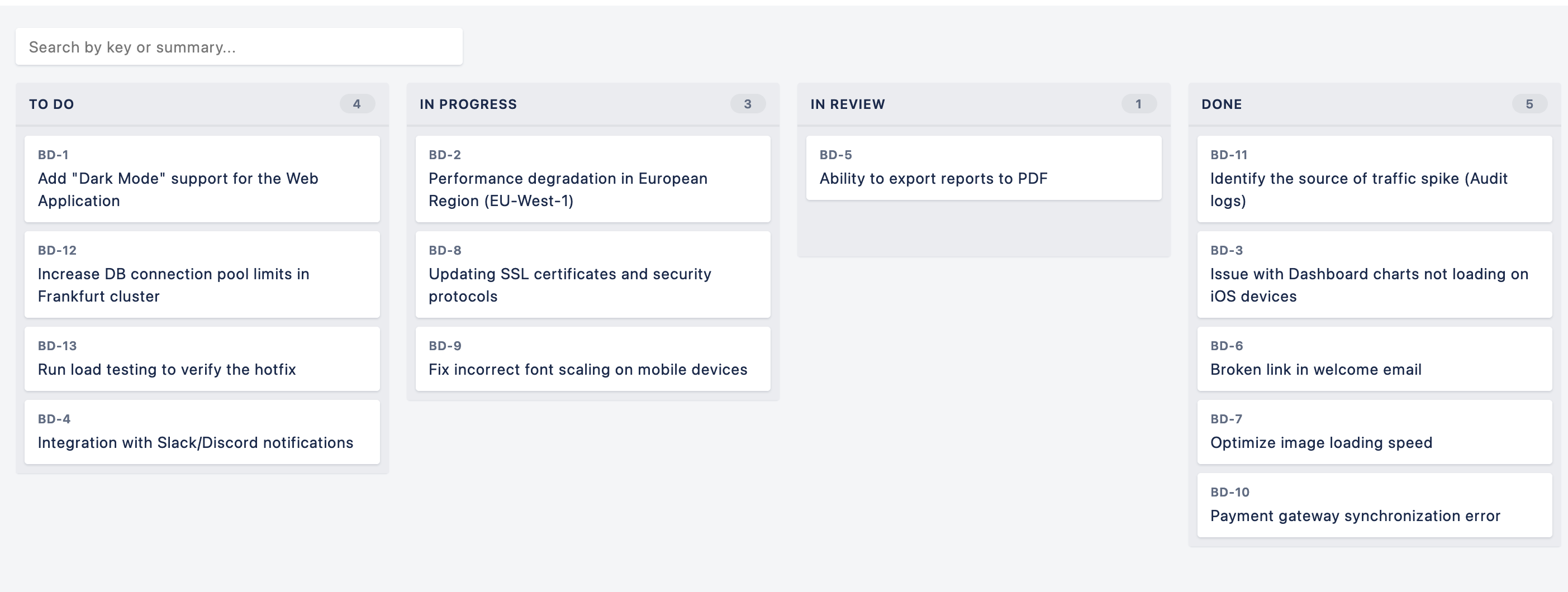
Scalable transparency: This board can be accessed by an unlimited number of stakeholders without consuming additional Jira licenses or complicating user management.
Final Thoughts for Admins and PMs
If you’re tired of "Screenshot-driven development" but aren't ready to open the floodgates of your Jira instance, a Forge-based public link might be the middle ground you need. It’s about giving stakeholders exactly what they need - no more, no less.
How are you handling external visibility? Guest access, manual exports, or something else? Let's discuss the pros and cons in the comments.
As a member of the Apportunity team, I’ve seen this setup work for many complex B2B cases. You can find our Forge-based sharing tool Apportunity: External Share & Public Links on the Atlassian Marketplace.
