We all love ScriptRunner. It's been part of every Jira instance I've worked with for over a decade. The flexibility it gives administrators is unmatched, and there's a reason it's the most installed scripting app on the Marketplace. HAPI made Cloud scripting genuinely enjoyable.
If you're migrating from Data Center, Adaptavist's own ScriptRunner Migration Suite (SMS) is a powerhouse. We've tested it: the Analyse & Assess tool, the AI migration agent, the deployment pipeline. It's a serious, full-featured toolset for getting your DC scripts to Cloud. If that's your primary goal, SMS deserves a close look.
So why build Alchemist?
Because migration is one chapter. What happens after every script has been converted? What about Cloud-native admins who never had DC scripts but want to use ScriptRunner without learning Groovy first? What about the admin who needs a new post-function next Tuesday and doesn't want to start from a blank editor?
That's the gap Alchemist fills. It's a Forge app that lives inside your Jira instance (not a separate web app) and it does three things: Convert legacy scripts, Build new ones visually, and Generate complex scripts with AI. The Marketplace listing calls it "your ScriptRunner companion," and that's exactly what it is.
Convert: 1,300+ Patterns, Zero Hallucination
Alchemist's core is a deterministic conversion engine. No AI guesswork. Regex-based pattern matching that translates Groovy, SIL, ScriptRunner, and Behaviour scripts to Cloud format using 1,300+ transformation rules.
The conversions are HAPI-first. If you've seen other tools that produce verbose REST API calls for everything, you know how painful that output is to maintain. HAPI (the Adaptavist scripting layer for Cloud) produces code that's roughly 70% shorter than equivalent REST output. Alchemist targets HAPI by default because that's what you'll actually want to work with in Cloud.
Every script goes through the same pipeline: language detection (Groovy vs. SIL, auto-detected from content), risk assessment with a Cloud Readiness Score from 0 to 100, conversion preview before you commit, and a deploy helper that tells you exactly where to put the converted script in Cloud.
For Solution Partners running migrations at scale, there's bulk upload and a Migration Wizard that walks through the full Input → Analyze → Convert → Deploy cycle. Export as JSON or PDF for migration documentation.
What it covers:
- ScriptRunner Groovy: Java API to Cloud Groovy (HAPI/REST), 630+ patterns
- Power Scripts (SIL): SIL's core language functions are nearly identical between DC and Cloud, though certain script types (conditions, validators, Live Fields, JQL functions) require reworking for Cloud architecture.
- Behaviours: Server Behaviours to ScriptRunner Behaviours Cloud
- Jira Expressions: 260+ condition/validator templates
Build: Visual Script Assembly for Cloud
Here's the thing I didn't expect when I launched Alchemist: most of the interest didn't come from migration teams. It came from Cloud-native admins who wanted to use ScriptRunner but didn't know Groovy.
They're Jira admins, not developers. They know what they need but writing HAPI code from scratch is a barrier. ScriptRunner's documentation assumes coding fluency.
So I built the Script Builder.
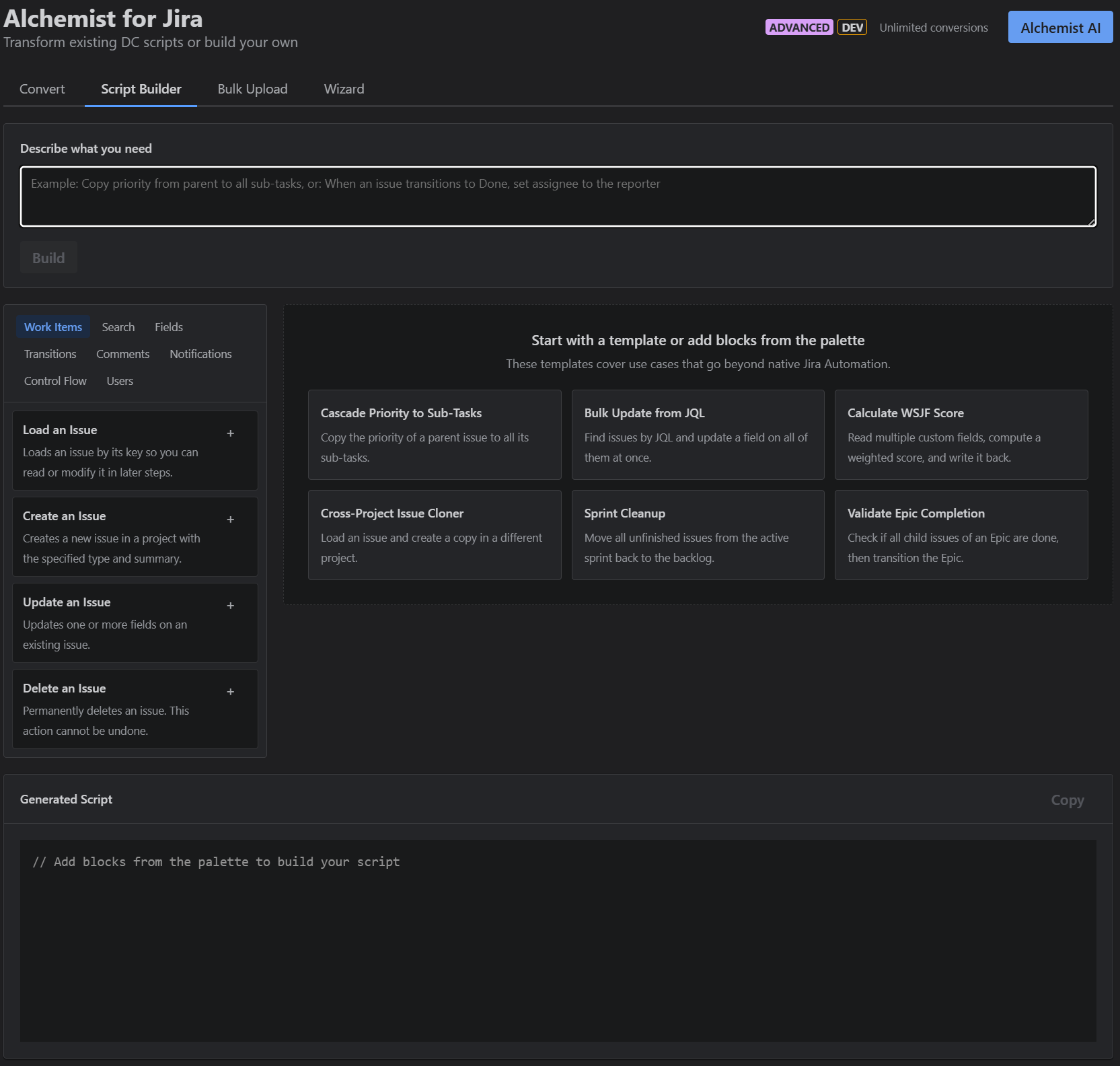
It's a visual drag-and-drop interface with 26 blocks across 8 categories: Work Items, Search, Fields, Transitions, Comments, Notifications, Control Flow, and Users. You assemble a script by stacking blocks. Each block maps to a HAPI operation. As you build, you see a live code preview: the actual Groovy that will run in ScriptRunner Cloud.
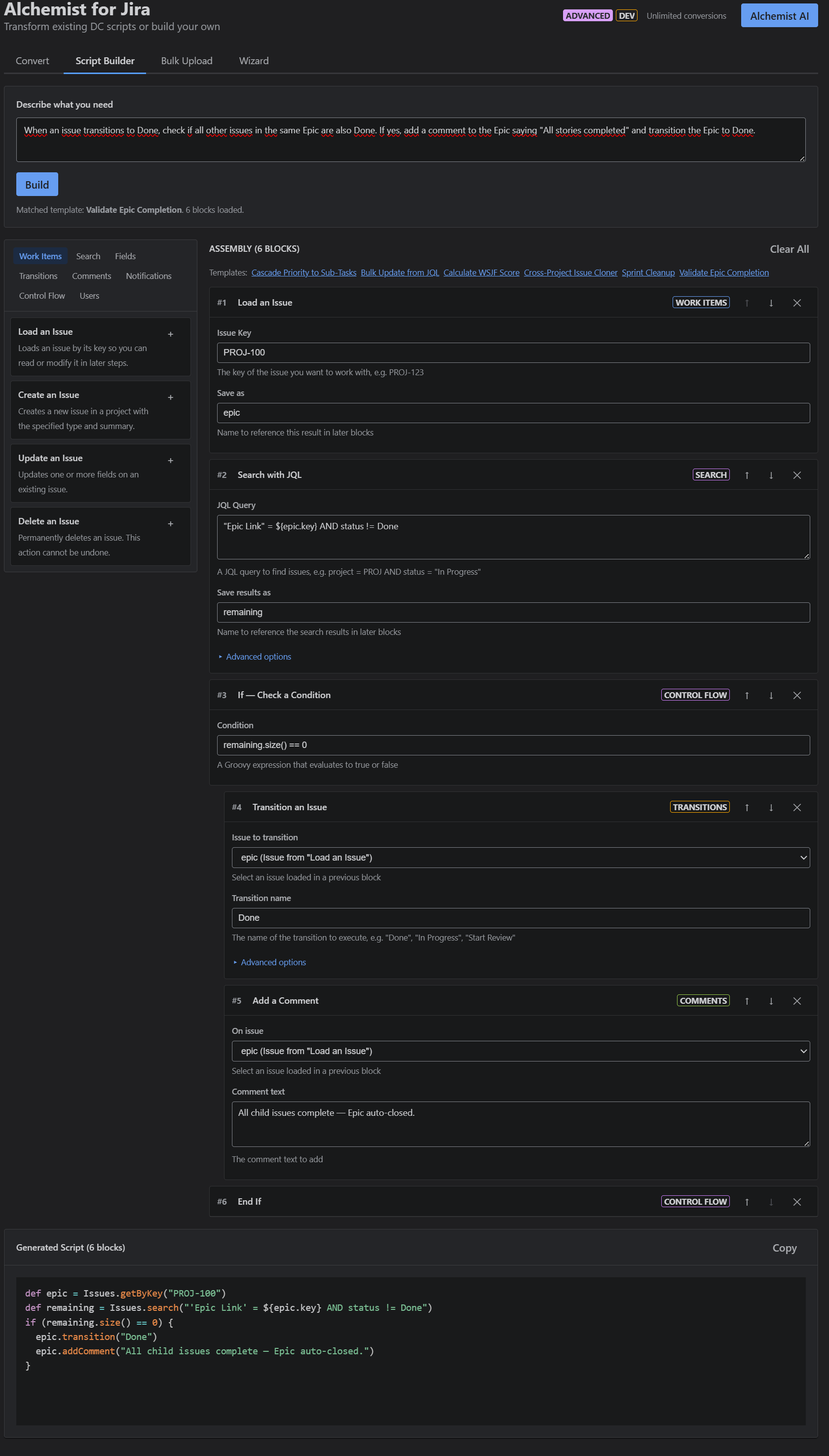
There are 6 pre-built templates for common workflows: Cascade Priority to Sub-Tasks, Bulk Field Update, WSJF Score Calculation, Cross-Project Clone, Sprint Cleanup, and Epic Completion Check. One click loads the full block assembly with the generated script.
Or you skip the blocks entirely and just type what you need in plain text: "Calculate the WSJF score from linked issues." Alchemist figures out the blocks and generates the code.
The Script Builder ships with Standard edition. No Advanced license needed.
Generate: AI That Knows When to Say No
This is the part I'm most proud of.
When you describe what you need in the Script Builder, Alchemist doesn't immediately fire up an AI model. It runs your request through a three-stage routing pipeline:
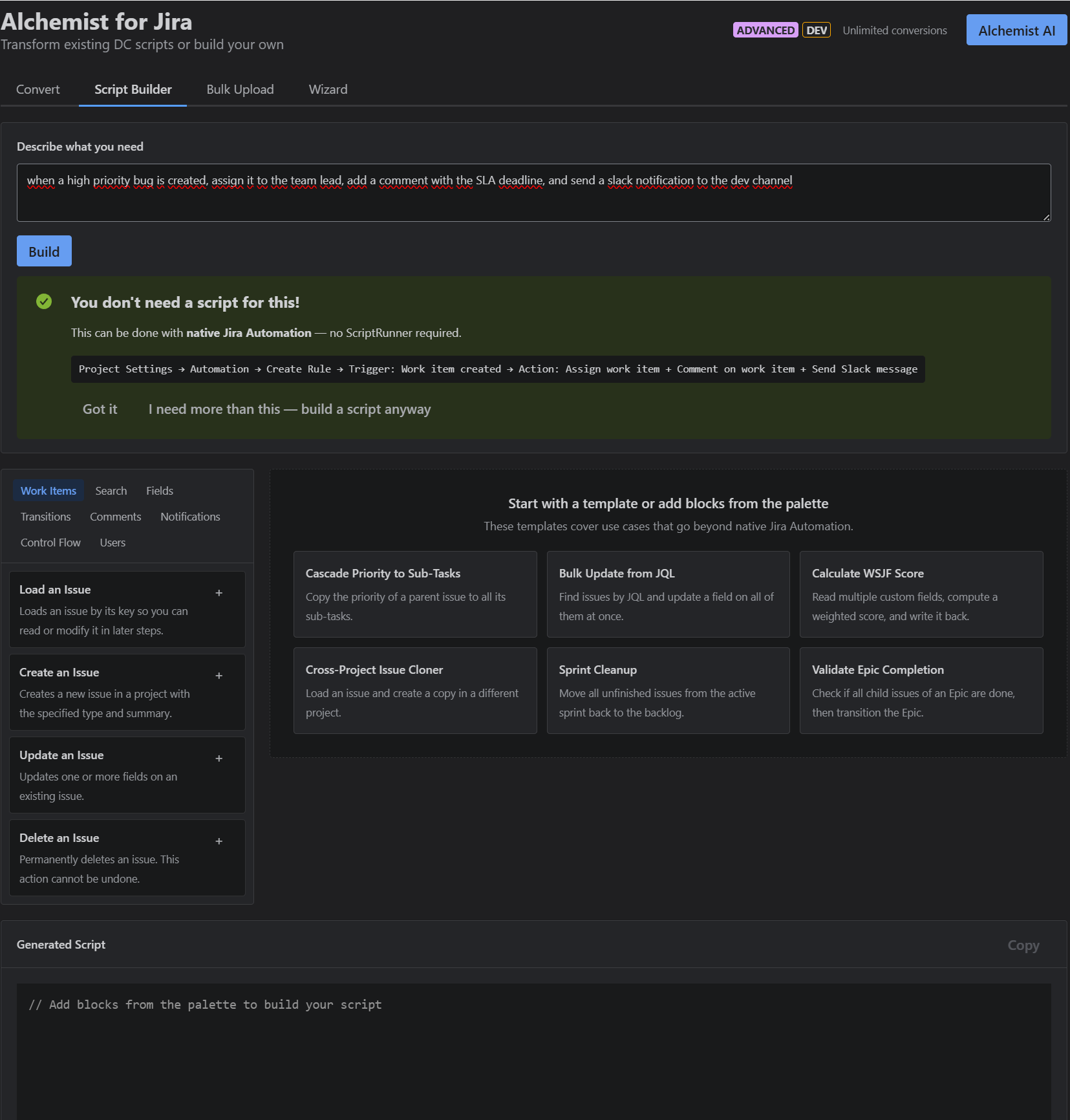
Stage 1: Native Automation Detection. Alchemist checks whether your use case can be solved with Jira's built-in Automation engine. "Send an email when an issue moves to Done"? You don't need ScriptRunner for that. Alchemist tells you so, shows you the exact path in Jira settings, and lets you decide whether to proceed with a script anyway. It recognizes common patterns (status transitions, email notifications, auto-assignment, sub-task operations, field updates, comments) including synonyms like "ticket," "task," or "moves to."
Stage 2: Template Matching. If native automation isn't enough, Alchemist checks against its template library and block patterns. Many requests match existing workflows and can be assembled without AI.
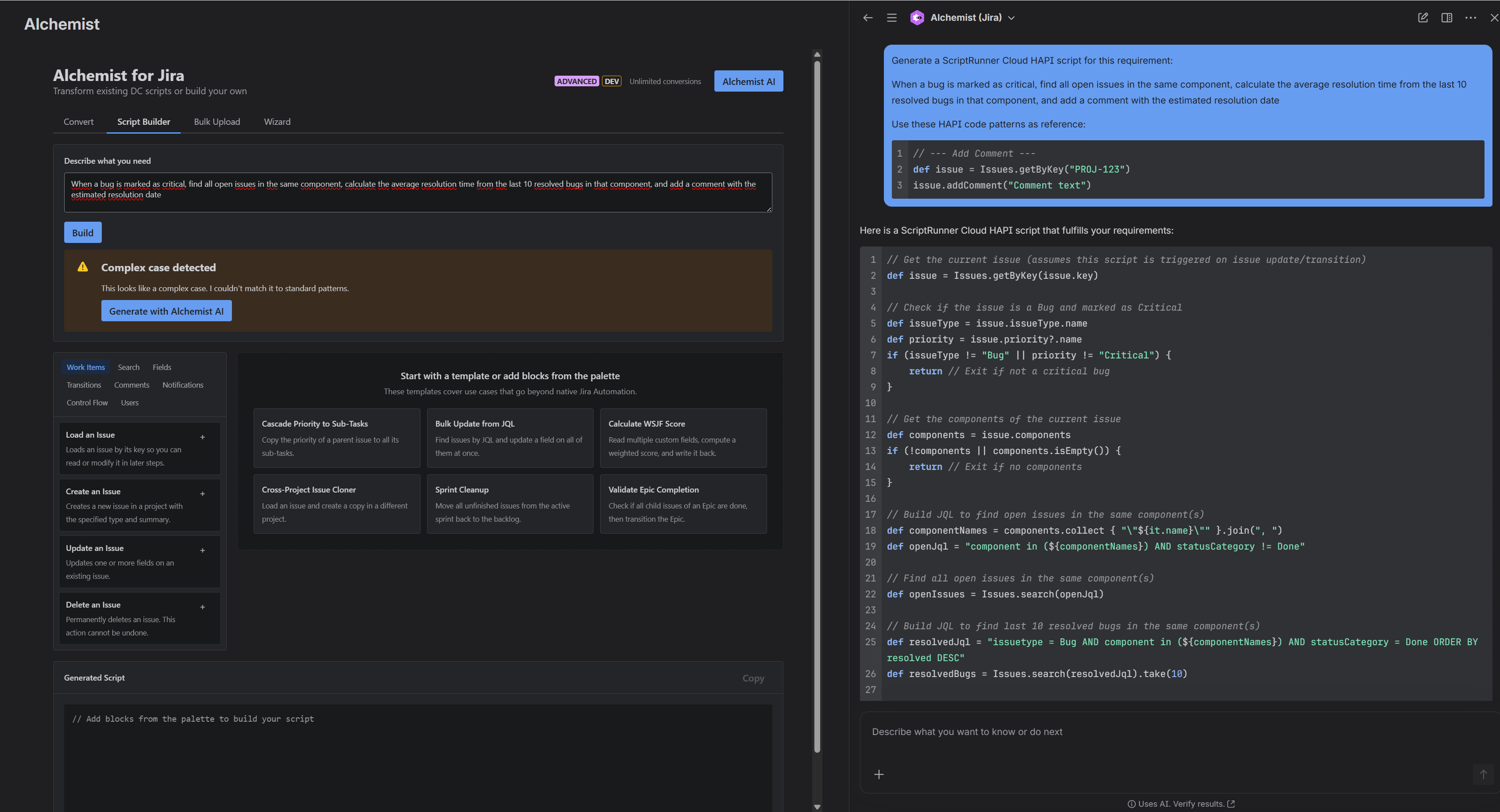
Stage 3: Alchemist AI. Only when patterns and templates can't handle the request does Alchemist escalate to its Rovo-powered AI agent for complex script generation. This is the Advanced edition feature, covering conversational migration assistance and script generation for edge cases.
Why does this matter? Because the most useful thing a scripting tool can do is tell you when you don't need a script. Every unnecessary script is future maintenance debt. Native Jira Automation is supported, documented, and maintained by Atlassian. If it can do the job, it should.
Builder and Runner
ScriptRunner is the engine that executes your scripts. Alchemist helps you create them.
ScriptRunner's example script library covers the most common patterns well, and it's a fantastic resource for getting started. But every instance is different. Your workflows, your field setup, your automation needs are unique. The Script Builder generates exactly the script your situation calls for, and ScriptRunner runs it.
That's the idea: Builder and Runner. Two apps, one workflow.
Who This Is For
Migration teams and Solution Partners moving clients from DC to Cloud. Bulk conversion, risk scoring, export documentation. The Advanced edition is built for this.
Cloud-native Jira admins who want ScriptRunner capabilities but don't write Groovy. The Script Builder lets them build automation visually and learn the patterns as they go.
Experienced ScriptRunner users who want to prototype faster. Describe what you need, get the HAPI code, refine from there.
Before You Touch Any Tool
Regardless of which tool you use (SMS, Alchemist, or manual rewriting), here's a checklist that saves time on every script migration:
- Does this script still need to exist? Many DC scripts were workarounds for limitations that Cloud no longer has. Check if native Jira Automation or a built-in feature covers it now.
- Is it HAPI or REST? If you're rewriting manually, target HAPI first. Adaptavist's HAPI documentation is excellent and will cut your code in half compared to raw REST calls.
- What's the blast radius? Before converting, understand what depends on the script: which workflows, which projects, which teams. A converted script that breaks a transition nobody told you about is worse than no script at all.
Try It
Alchemist for Jira is available on the Atlassian Marketplace. Three editions: Free (analysis + preview), Standard (conversion + Script Builder), Advanced (AI + bulk tools).
Built on Atlassian Forge. Runs on Atlassian infrastructure. Your scripts stay on the platform.
If you're a Cloud admin who's been meaning to learn Groovy for months, the Script Builder alone might change how you think about Jira automation. And if you're sitting on a migration backlog but SMS isn't an option for your situation, Alchemist's conversion engine with 1,300+ patterns has you covered too.
C. Faysal — CFcon, Atlassian Marketplace Partner
