Scrum teams usually have plenty of data in Jira, but it is not always easy to turn that data into a clear view of sprint health.
A Scrum Master or Product Owner may need to answer questions like:
- Is the current sprint plan realistic?
- Are we likely to meet the Sprint Goal?
- Which work items are still unfinished?
- Are there unresolved bugs or blockers?
- Is the work balanced across assignees?
- Are estimates and time tracking complete enough to support planning?
- What should we inspect before the next retrospective or Sprint Planning?
Jira already provides useful agile reports, boards, filters, and work item details. The challenge is that sprint health is often spread across many places. Teams may need to move between the board, reports, work items, comments, estimates, time logs, and exports before they can form a practical view.
I work for the team behind Sprint Reviewer Pro. In this post, I will share a practical way to review sprint health in Jira using sprint metrics and the new Sprint Health Analyst Rovo Agent.
Who this is for
This article is for Scrum Masters, Product Owners, delivery leads, engineering managers, and Jira admins who support Scrum teams in Jira.
It is especially useful for teams that want to:
- Review recent sprint performance
- Compare planned work with recent velocity
- Understand workload by assignee
- Find unfinished or unestimated work items faster
- Spot blockers, unresolved bugs, and delivery risks earlier
- Prepare better inputs for retrospectives and Sprint Planning
What Jira gives you today
Jira already gives Scrum teams important information:
- Scrum boards show current work and status
- Reports help teams inspect progress and velocity
- Work item details contain estimates, assignees, descriptions, comments, and time tracking
- Filters and JQL can help answer specific questions
These are strong foundations. For many teams, they are enough for day-to-day execution.
Where it becomes harder is when a team wants one joined-up view of sprint health. For example, a Scrum Master may want to look at delivery progress, goal clarity, velocity, bugs, blockers, workload, estimation coverage, and team communication signals together.
That usually requires manual checking.
Where teams often get stuck
In practice, sprint health questions are rarely isolated.
If a sprint has low completion, the next question is usually why. Was the plan too large compared with recent velocity? Were many work items missing estimates? Were bugs created during the sprint? Was one assignee overloaded? Were blockers visible early enough?
If a sprint is still active, the team may want to know whether the current progress is reasonable for the elapsed time.
If a sprint is future, the team may care less about completion and more about plan readiness, workload balance, estimation coverage, and whether the Sprint Goal is clear.
These questions are useful, but answering them manually can take time.
A practical sprint health workflow
Sprint Reviewer Pro helps teams review sprint metrics from the Apps menu or directly inside a Jira software space. Teams can select a Scrum board, review recent sprints, and open deeper analysis without building custom reports or exports.
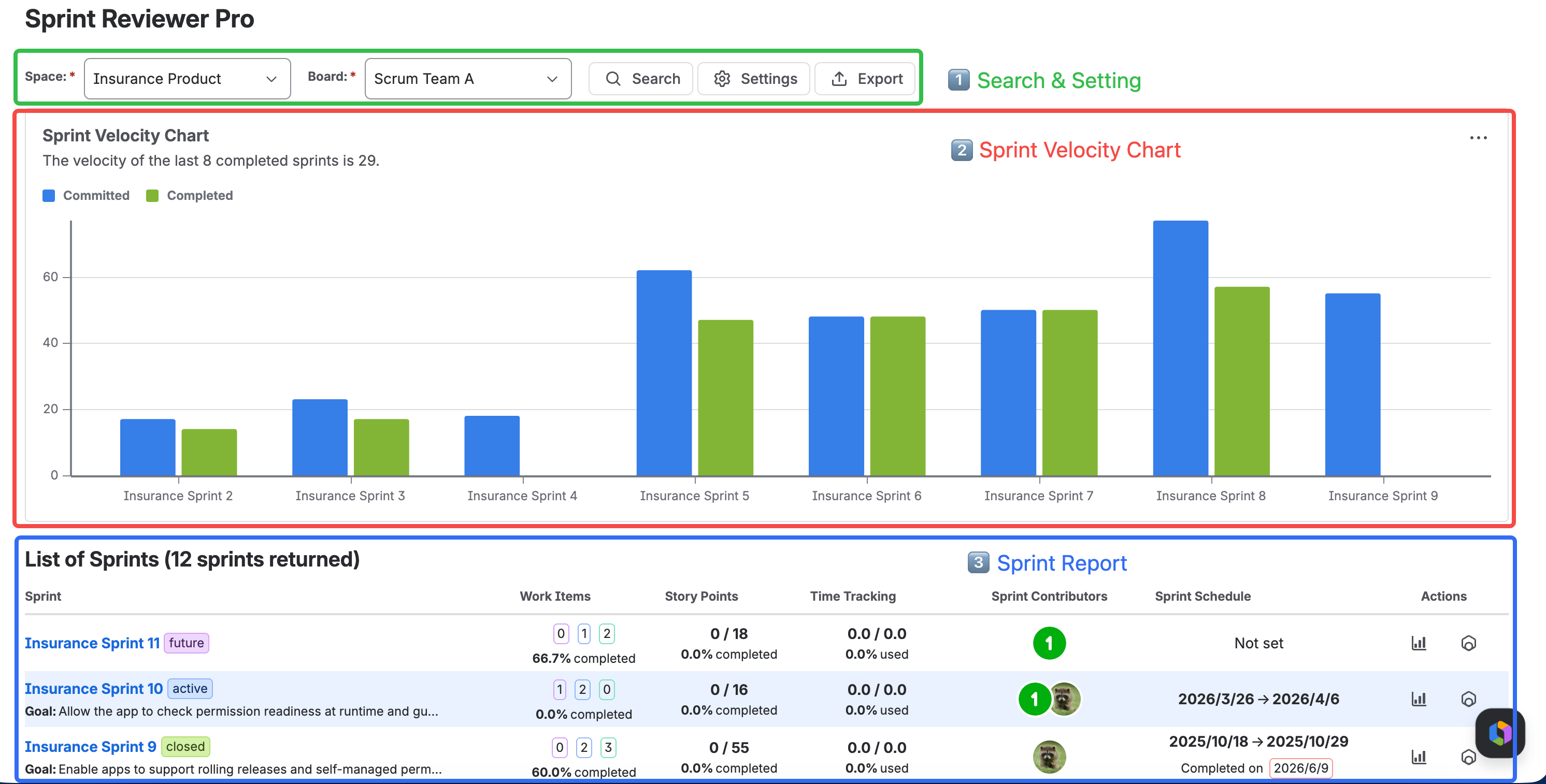
The List of Sprints view gives a compact overview of recent sprints, including:
- Sprint status
- Work item completion
- Story points completion
- Time tracking progress
- Contributors
- Schedule
- Sprint Goal
- Actions for deeper analysis
Compare the plan with recent velocity
One useful planning signal is whether the planned story points are reasonable compared with recent completed sprints.
Sprint Reviewer Pro compares the current plan with the velocity of the last 8 completed sprints. This is not meant to tell the team exactly what to commit to. It is a conversation starter.
For example:
- If planned story points are far above recent velocity, the team may need to inspect capacity, scope, or risk.
- If planned story points are far below recent velocity, the team may need to check whether capacity changed or whether the sprint is under-planned.
- If the plan is close to recent velocity, the team still needs to consider holidays, dependencies, complexity, and team availability.
Velocity is not a target. It is historical evidence that can help the team plan more responsibly.
Review workload by assignee
A sprint can look healthy at the total level while still having an unhealthy workload distribution.
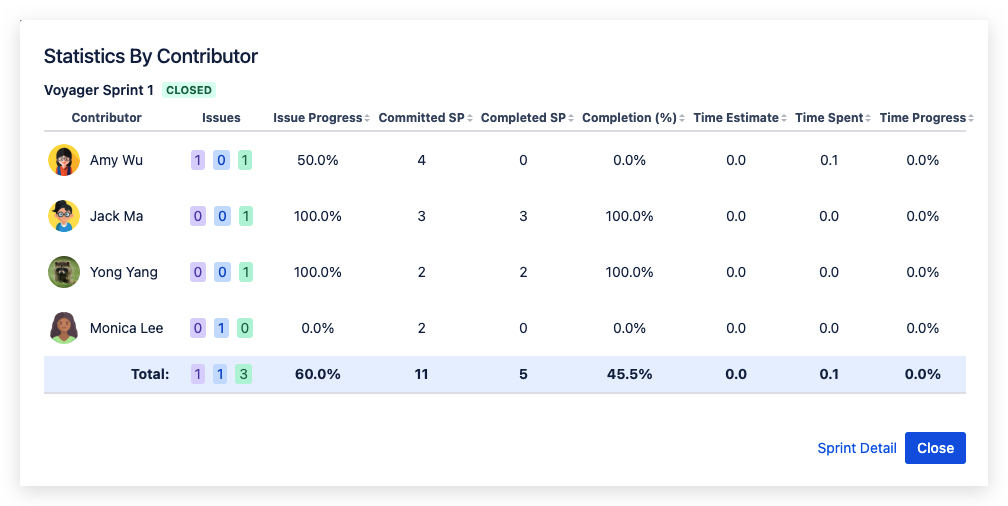
Sprint Reviewer Pro helps teams inspect planned and completed work by assignee, including story points, time estimates, and time spent. This can help Scrum Masters and team members notice overloaded assignees, unassigned work, or uneven delivery patterns.
The goal is not to measure individual performance. The goal is to make workload visible so the team can collaborate earlier.
Use the Sprint Health Analyst Rovo Agent
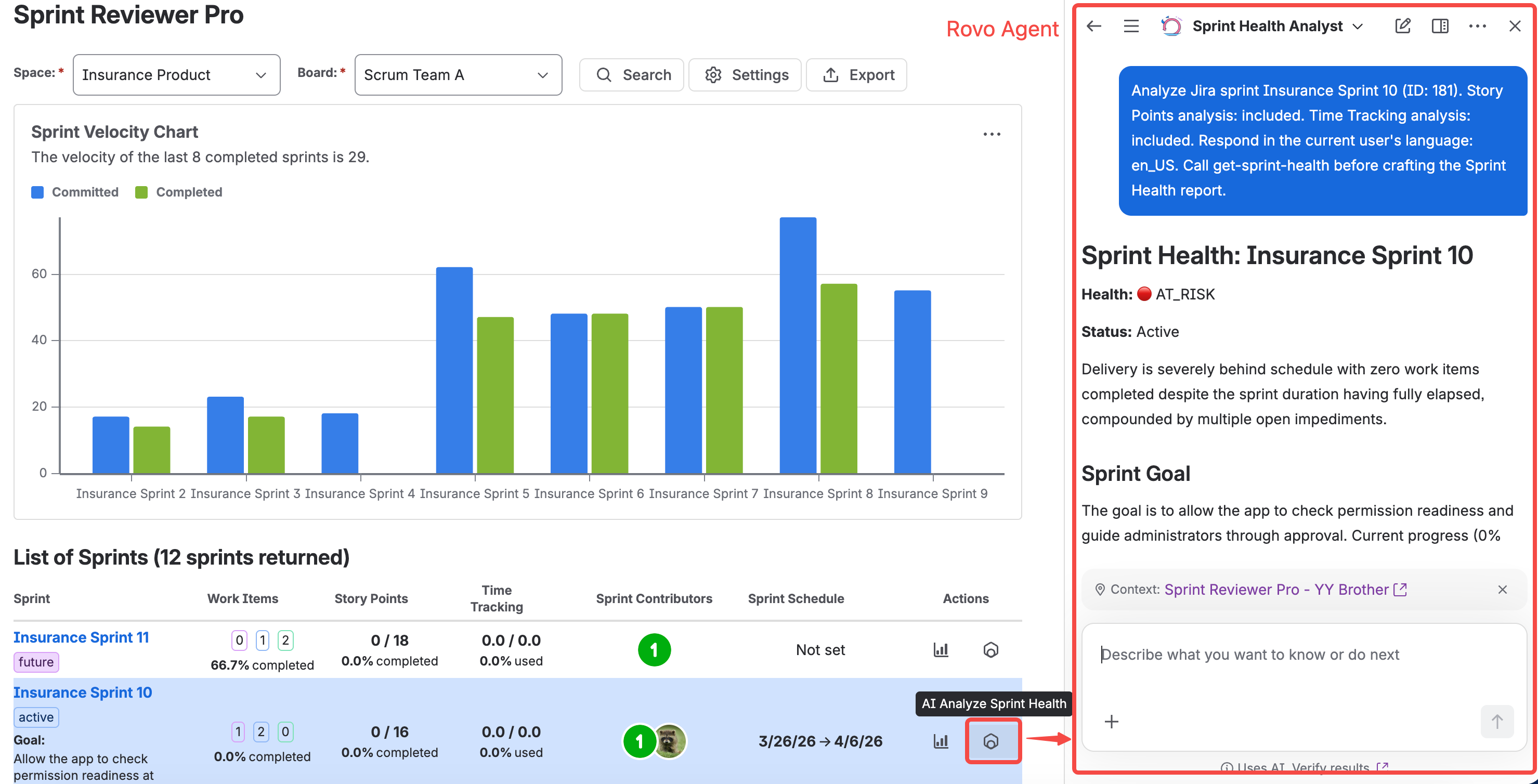
The new Sprint Health Analyst Rovo Agent adds an AI-assisted layer on top of the sprint data.
It can help summarize:
- Delivery progress
- Sprint status: future, active, or closed
- Sprint Goal clarity
- Schedule performance
- Story points and time tracking metrics
- Work item completion
- Estimation coverage
- Quality signals, such as unresolved bugs
- Open blockers or impediments
- Workload distribution
- Collaboration signals from Jira work item descriptions and comments
The agent is designed to use sprint data from Jira and Sprint Reviewer Pro actions. It should not guess sprint metrics.
Ask follow-up questions in plain language
After the first sprint health report, teams can ask follow-up questions such as:
- Which work items are unfinished?
- Which work items have no story points?
- Which work items have no assignee?
- Which work items have no original estimate?
- Which work items have no time spent logged?
- Which bugs are still unresolved?
- Which work items are flagged as impeded?
- Which assignees have the highest workload?
- Which work items have the most time spent?
- What are the main risks for this sprint?
For each relevant work item, the agent can provide details such as key, summary, type, current Jira status, priority, assignee, story points, original estimate, time spent, impediment status, description, and comments when available.
This makes the analysis easier to inspect and verify.
Different sprint states need different interpretation
A future sprint should not be evaluated the same way as a closed sprint.
For a future sprint, completion is not the right question yet. The more useful questions are:
- Is the Sprint Goal clear?
- Is the planned work realistic compared with recent velocity?
- Are important work items estimated?
- Is the workload balanced?
- Are there already blockers or unresolved risks?
For an active sprint, the team may care about progress relative to elapsed time, open blockers, unresolved bugs, and whether unfinished work is becoming risky.
For a closed sprint, the team can inspect what was completed, what was not completed, how the plan compared with actual delivery, and what patterns should be discussed in the retrospective.
This distinction matters. A sprint health report should support the right conversation for the sprint’s current state.
Things to watch out for
Sprint health analysis is only as good as the data available in Jira.
If work items have no estimates, no assignees, empty descriptions, missing time logs, or limited comments, the analysis should make that visible instead of pretending the data is complete.
Also, AI-assisted analysis should support Scrum conversations, not replace them. The Scrum Team still owns the inspection, discussion, and adaptation.
The most useful outcome is not a score. It is a clearer conversation.
Try it
Sprint Reviewer Pro is available on Atlassian Marketplace: Sprint Reviewer Pro: Scrum Sprint Metrics for Jira
If your team is already reviewing sprint health in Jira, I would be interested to hear which questions take the most time to answer today: unfinished work, estimation gaps, blockers, workload, bugs, or Sprint Goal clarity.
More from Forge5
Forge5 builds apps for Jira and Confluence that help teams turn work data into clearer insights and better collaboration.


