Not long ago, we ran into a familiar challenge.
We wanted to collect feedback from different groups in a team — engineers, designers, and managers. At first, it seemed simple: create a Survey with our app - Multivote & Enterprise Survey for Confluence, send it out, gather responses.
But as the questions took shape, a mismatch started to appear. Some questions were clearly meant for engineers, others for designers, and some only made sense for managers. Still, we put everything into a single Survey, hoping it would work for everyone.
It didn’t.
The Survey quickly became a mix of relevant and irrelevant questions, depending on who was answering. For some, it felt useful. For others, it felt confusing and unnecessarily long. Naturally, the next idea was to split things up.
Instead of one Survey, we created separate ones — one for each group. This made the experience more relevant, but introduced a different kind of friction.
Most questions were still shared across all Surveys, which meant duplicating the same content multiple times. Updating even a small detail required repeating the same change in several places, and keeping everything consistent became harder over time.
At that point, it became clear that neither approach was quite right. One Survey felt too broad. Multiple Surveys felt repetitive.
What we really needed was a way to keep a single Survey — without forcing everyone through the same experience.
Finding the Middle Ground - Letting the Survey Adapt
Somewhere between these two approaches — one big Survey and many smaller ones — it became clear that what we actually needed wasn’t more Surveys. It was a smarter way to show questions.
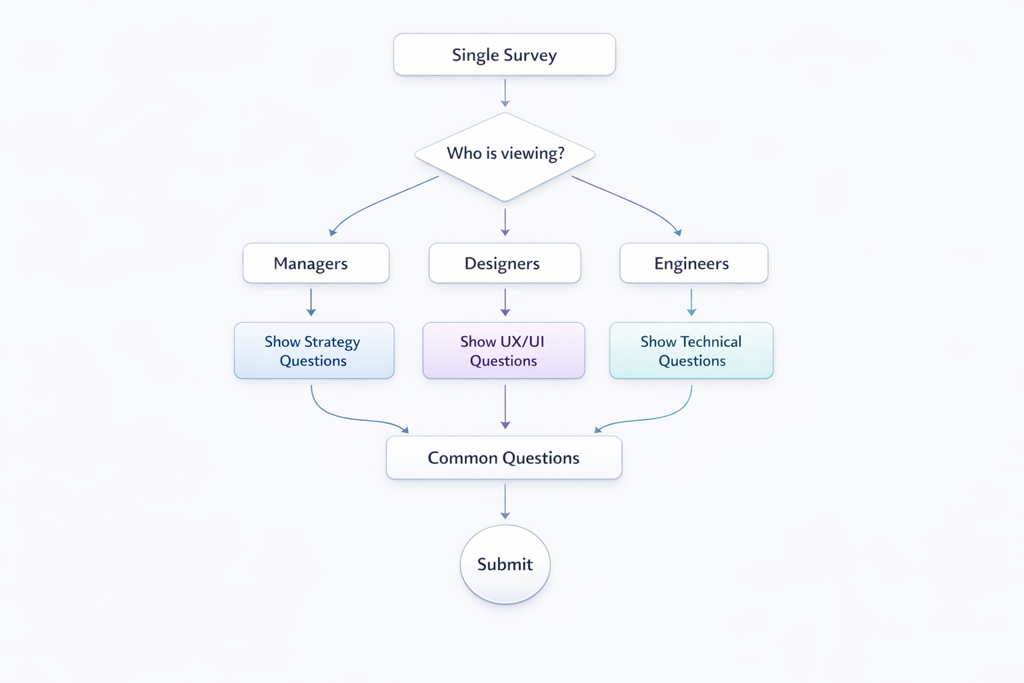
The idea was simple — keep a single Survey, but let it adapt depending on who is answering. That way, the structure stays unified, while the experience becomes more personal. Some questions remain visible to everyone. Others are shown only when they’re relevant — only to users who belong to a specific Confluence group.
In practice, this means that engineers, could be part of an engineering Confluence group, and they will see engineering-related questions, designers see design-focused ones, and managers see questions tailored to their perspective — all within the same Survey.
Behind the scenes, this can be expressed with a simple condition. But from the user’s perspective, there’s nothing technical about it. They simply experience a Survey that feels more focused, more natural, and easier to complete.
Making It Work in Practice
What we found especially useful is how lightweight this actually is to set up. When creating or editing a question, you can open its settings in expert mode and define a condition for when it should be visible. That’s where this logic comes in.
For example, if you want a question to be visible only to the engineer Confluence group, you can simply add:
isInGroup('engineering-group')<br>
Once that’s in place, the Survey takes care of the rest. There’s no need to create separate versions, no duplication, and no extra maintenance.
You’re still working with a single Survey — it just behaves differently depending on who’s answering.
What Changed for Us?
This small shift had a noticeable impact. From a Survey creator’s point of view, things became much simpler. There was only one Survey to maintain, common questions lived in one place, and updates no longer required repeating the same change multiple times.
At the same time, the experience for respondents improved as well. The Survey felt shorter — not because it had fewer questions overall, but because each person only saw what was relevant to them. And when questions feel relevant, people tend to engage more thoughtfully.
Why It Matters?
Surveys are meant to help us understand people. But that only works if the questions we ask actually make sense to the person answering them. When a Survey feels disconnected from someone’s role or experience, it quietly loses its effectiveness.
On the other hand, when it feels even slightly tailored, it becomes easier to engage with — and the answers start to reflect reality more accurately.
A Small Change with a Big Effect
Looking back, the solution wasn’t about adding more structure or creating more Surveys. It was about removing unnecessary friction.
By keeping a single Survey and letting it adapt, we found a balance between simplicity and relevance — for both the people creating the Survey and the ones responding to it. Sometimes, improving something doesn’t require making it bigger or more complex. Sometimes, it’s just about asking the right questions — and making sure they reach the right people.
If this resonates with you, it might be worth taking a closer look at Multivote & Enterprise Survey for Confluence on the Atlassian Marketplace today!


