Community resources
Community resources
Community resources
Let Rovo Redirect Portal Users To The Right Request Form With Prefilled Fields! With Portal Guide!
Rovo is a powerhouse, but it occasionally stumbles on the details. We wanted Rovo to act like an expert on our Jira Service Management portals using the provided knowledge base, and when it can’t answer directly, smoothly redirect users to the correct request type without losing any context from the chat.
We struggled to set this up native, so we built ‘Portal Guide (JSM, Rovo)’ to make it effortless.
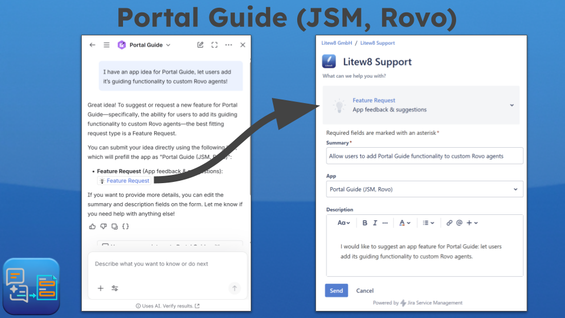
What ‘Portal Guide (JSM, Rovo)’ adds
Portal Guide comes with an out-of-the-box Rovo agent that already knows every request type across all your portals. It can:
- Recommend the best matching request type to help avoid misrouted tickets and unnecessary back-and-forth.
- Redirect users to the create form with fields automatically prefilled from the conversation, so no information is lost or needs to be entered twice.
If you use custom Rovo agents, you can enhance them with the provided Portal Guide Rovo skill.
With it, your Rovo agent gets the capabilities above, and you can further specify how they are used. You can let Rovo:
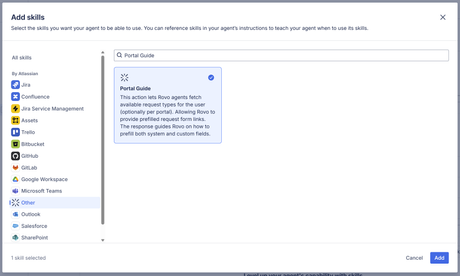
- Specialize in guiding users through an individual portal.
- Guide users through the (required) fields on a request form.
- Provide a prefilled request link as a footer to the most fitting request form at the end of each Rovo message.
Using Atlassian’s recently introduced floating chat widget, you can also surface your enhanced custom agent directly in the JSM portal. This allows licensed Atlassian users to get a native, in-portal Rovo experience with the capabilities mentioned above.
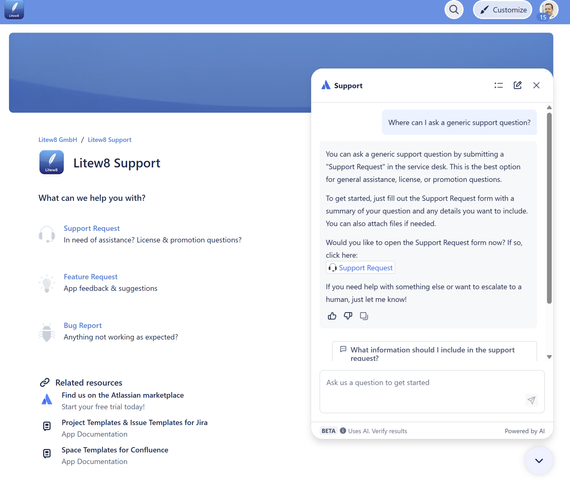
Step By Step Setup (~1 minute)
Prerequisites
- The Portal Guide (JSM, Rovo) app is installed.
- You have a custom Rovo agent (you can create one in Atlassian’s studio).
Add Portal Guide to your custom agent (~30 seconds)
- Add the Portal Guide skill to the default scenario.
- Add the template instruction that tells the agent when to use the skill (provided in the app documentation).
Add your custom 'Portal Guide' agent as widget to a JSM portal (~30 seconds)
- Add the template instruction to limit results to a specific portal.
- Insert the portal’s Service Portal ID.
- In JSM space settings, go to Portal → Rovo agent and select your custom agent.
- Enable the toggle to show it on the portal.
Secure By Design
- Built on Forge (Runs on Atlassian Badge)
- The app does not store any data
- Minimal app permission scopes (read-only)
- 24-hour response SLA
Note: At the moment, only licensed Atlassian users can interact with Rovo agents.
Start your free trial today, or let us know if you have any questions!
Was this helpful?
Thanks!

W_Diehl _Litew8 GmbH_
1 comment