A burndown chart for Jira answers one question every Agile team asks during a sprint: Are we going to finish on time? By plotting remaining work against time, it gives teams an early signal when scope or pace is drifting, before the end of the sprint makes it obvious.
This guide covers how Jira's built-in burndown chart works, where it's sufficient, and what to look for when your team needs more.
🔍 How Jira's native Burndown chart works
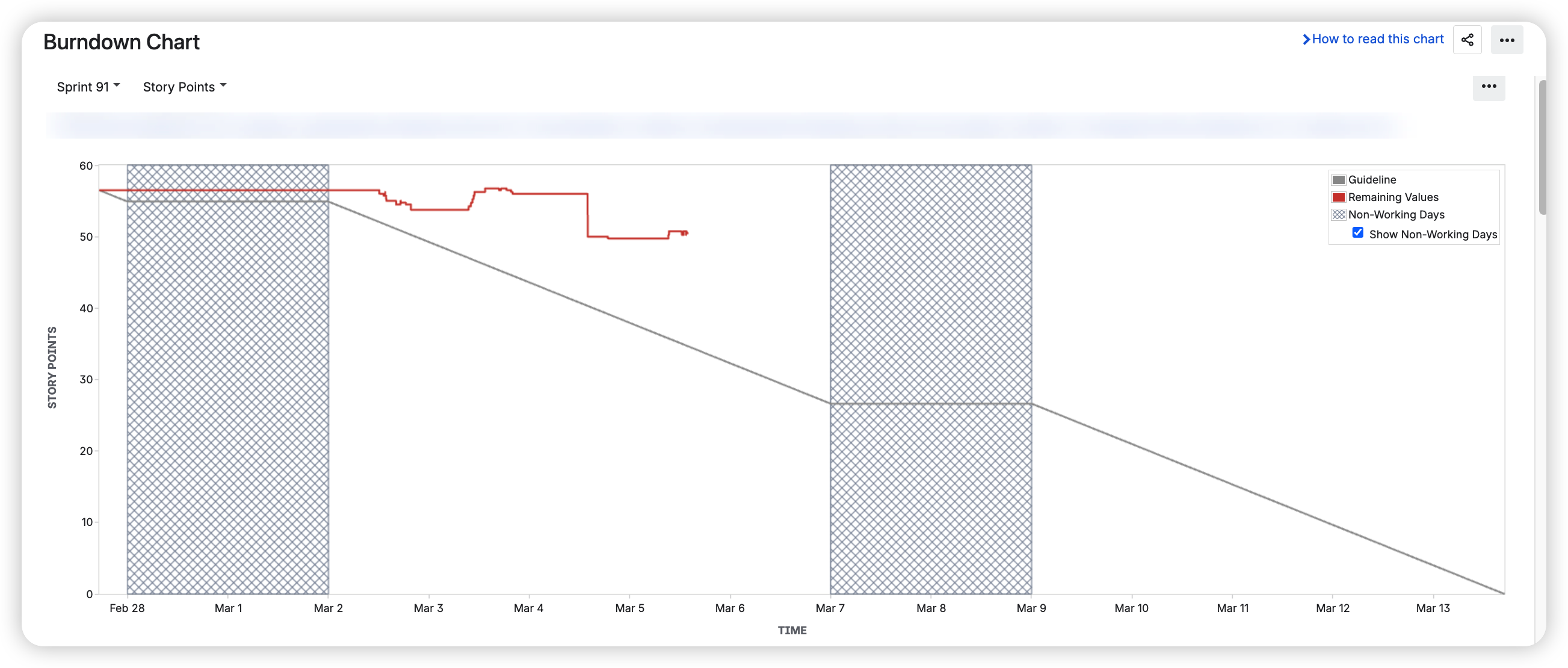
Jira includes a burndown chart in the Reports section of every Scrum board. It plots two lines:
-
Remaining work - updated as issues are completed or estimates change
-
Guideline - a straight line from the total sprint scope to zero, representing the ideal pace
The vertical axis reflects whichever estimation method your board uses - story points, issue count, or time. The chart updates as work is logged, giving a near-real-time picture of sprint progress.
✅ When the Native Jira Burndown chart is enough
For a single team running focused two-week sprints on one Scrum board, the native burndown chart covers the basics well. If your team consistently completes sprints with predictable scope and you mainly need a visual check-in during standups, you likely don't need anything more.
The guideline line gives a clear benchmark. If the remaining work line sits above it by mid-sprint, that's an early prompt to reassess scope or pace.
⚠️ Where it gets limiting
The native chart starts to show its constraints in a few common scenarios:
Tracking a release across multiple sprints. The built-in chart is sprint-scoped. There's no native view that aggregates remaining work toward a release or version across several sprints, making release-level forecasting difficult without manual consolidation.
Working across multiple teams or boards. Because the chart is tied to a single board's filter, there's no way to combine progress from two teams working toward the same goal.
Forecasting completion dates. The guideline shows an ideal pace, but the chart doesn't project when the team will actually finish based on historical velocity. There's no best-case or worst-case scenario - just actual vs. ideal.
Dashboard visibility. The chart lives in the Reports section of the board. It can't be pinned to a Jira dashboard, so there's no way to keep it visible alongside other metrics without navigating away.
Filtering by assignee or issue type. The native chart shows the full sprint scope. You can't isolate a subset of work - for example, just bugs, or just one team member's issues.
🧩 Extending Jira's burndown reporting
Teams that hit these limits typically go one of two routes: exporting data to spreadsheets (which works but requires manual upkeep) or adding a Marketplace app that renders burndown charts as dashboard gadgets.
Agile Burnup Burndown Charts by Broken Build is one option in this category. It adds burndown and burnup charts as Jira dashboard gadgets, with support for cross-project scope, release-level tracking, and velocity-based forecasting.
The Burndown chart shows how much work remains compared to the total scope, helping you see whether the team is on track to finish on time. It helps you answer questions such as:
-
How much work still remains to be done?
-
Are we reducing the remaining work quickly enough to finish on time?
-
How is the remaining work affected by scope increases or decreases?
-
When is the remaining work likely to reach zero?
📊 How to read the Burndown chart for Jira by Broken Build
In the example below, the chart shows burndown for the last six sprints (1️⃣). During this period, the remaining work increased from 137 to 273.25 story points (2️⃣), even though 101.75 story points were delivered (3️⃣). This rise is explained by a scope increase of 228 story points, averaging 38 story points per sprint (4️⃣). In addition, 342 issues in the backlog are unestimated and therefore counted as 0 by default (5️⃣).

⚡ The main differences from the native Jira burndown chart
🟣 Forecast lines
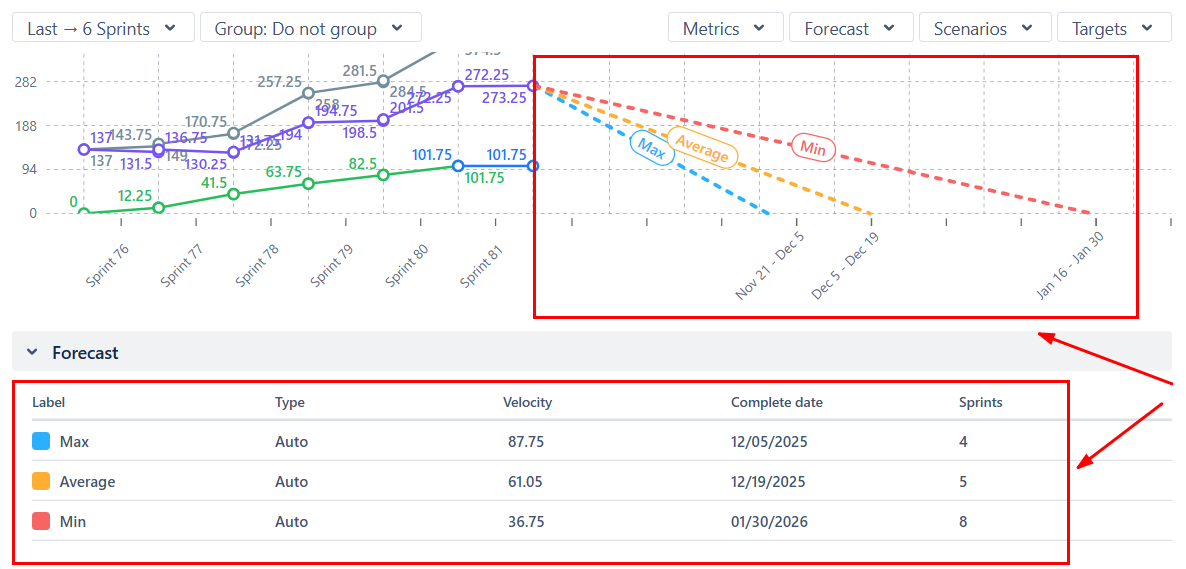
Rather than a single ideal line, the chart calculates three completion projections - based on minimum, average, and maximum historical velocity. This gives a range of likely outcomes instead of a single benchmark.
🟣 Target date overlays
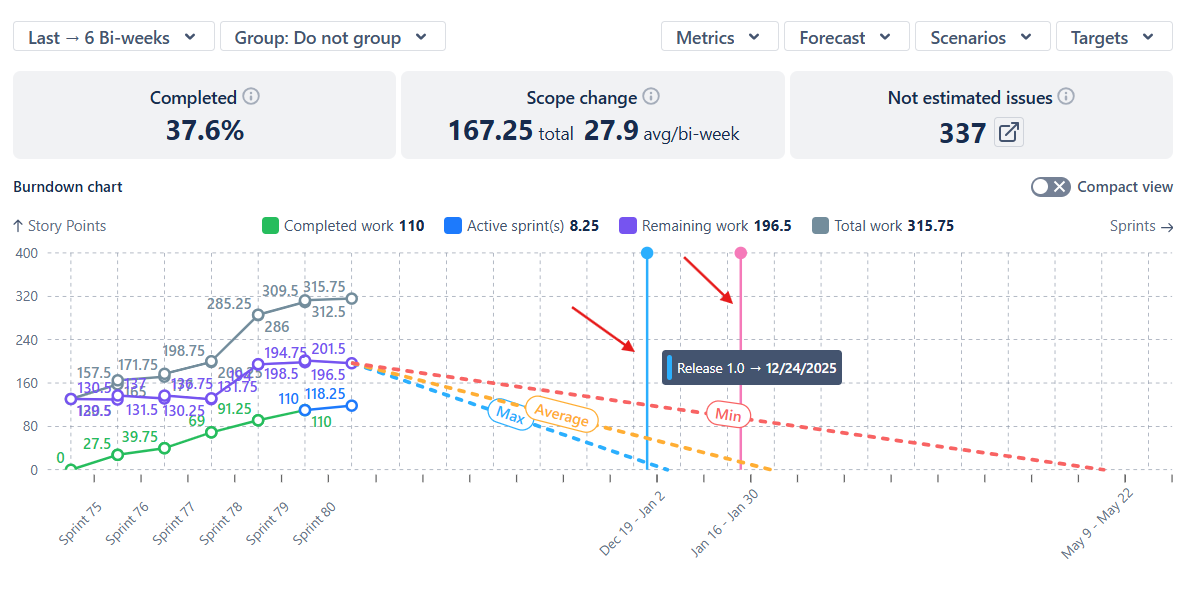
Fixed milestones like release dates or PI objectives can be overlaid on the chart, making it easy to see whether the current pace supports the deadline.
🟣 Scenario modeling
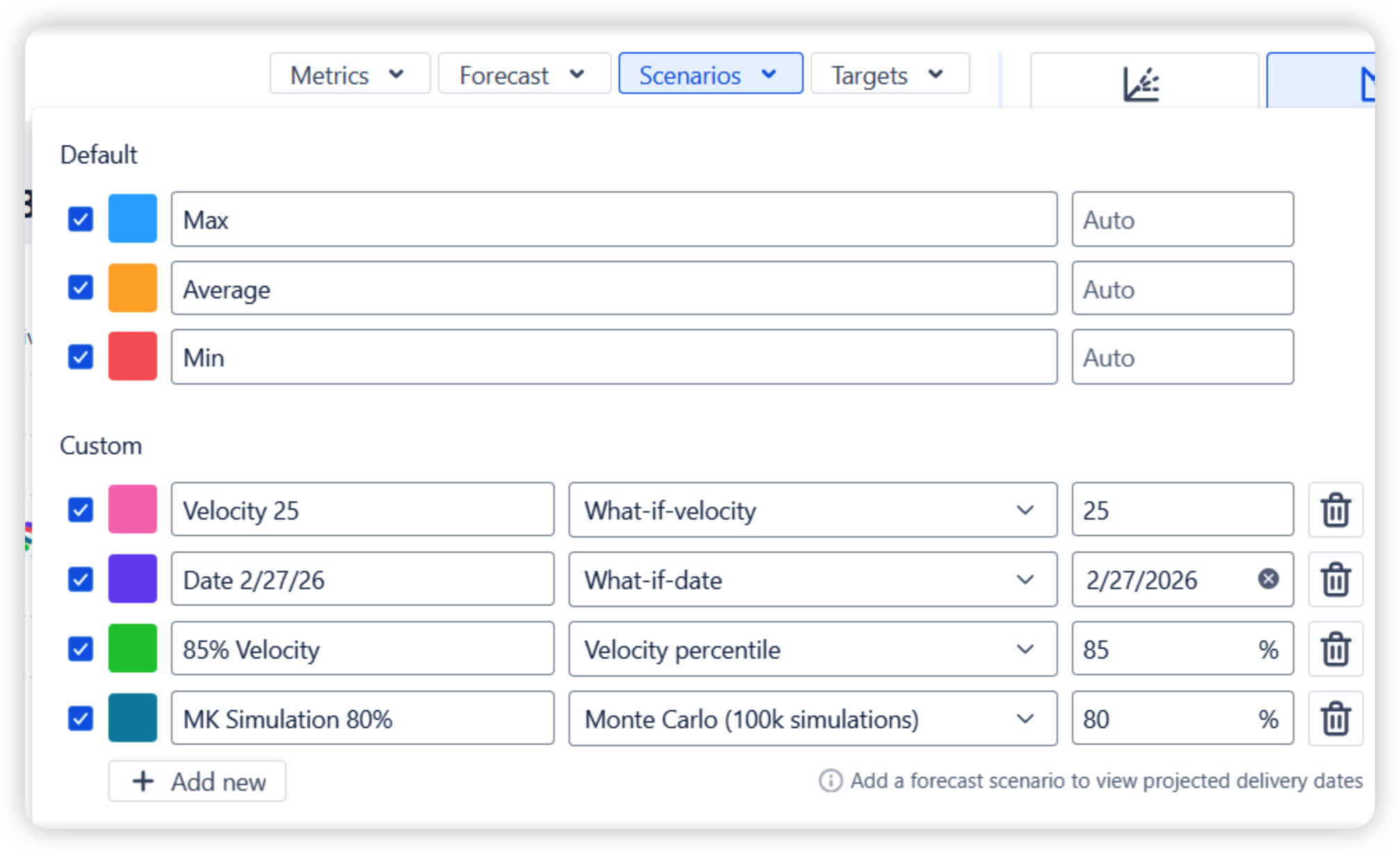
Teams can define custom forecast scenarios to explore different planning assumptions directly in the chart configuration.
In the example below, teams can configure multiple scenario types - including min / average / max velocity baselines, custom “what-if” velocity or date scenarios, velocity percentiles, and Monte Carlo probability simulations. Each scenario appears as a separate projection, helping teams compare possible delivery outcomes and support proactive planning discussions rather than after-the-fact analysis.
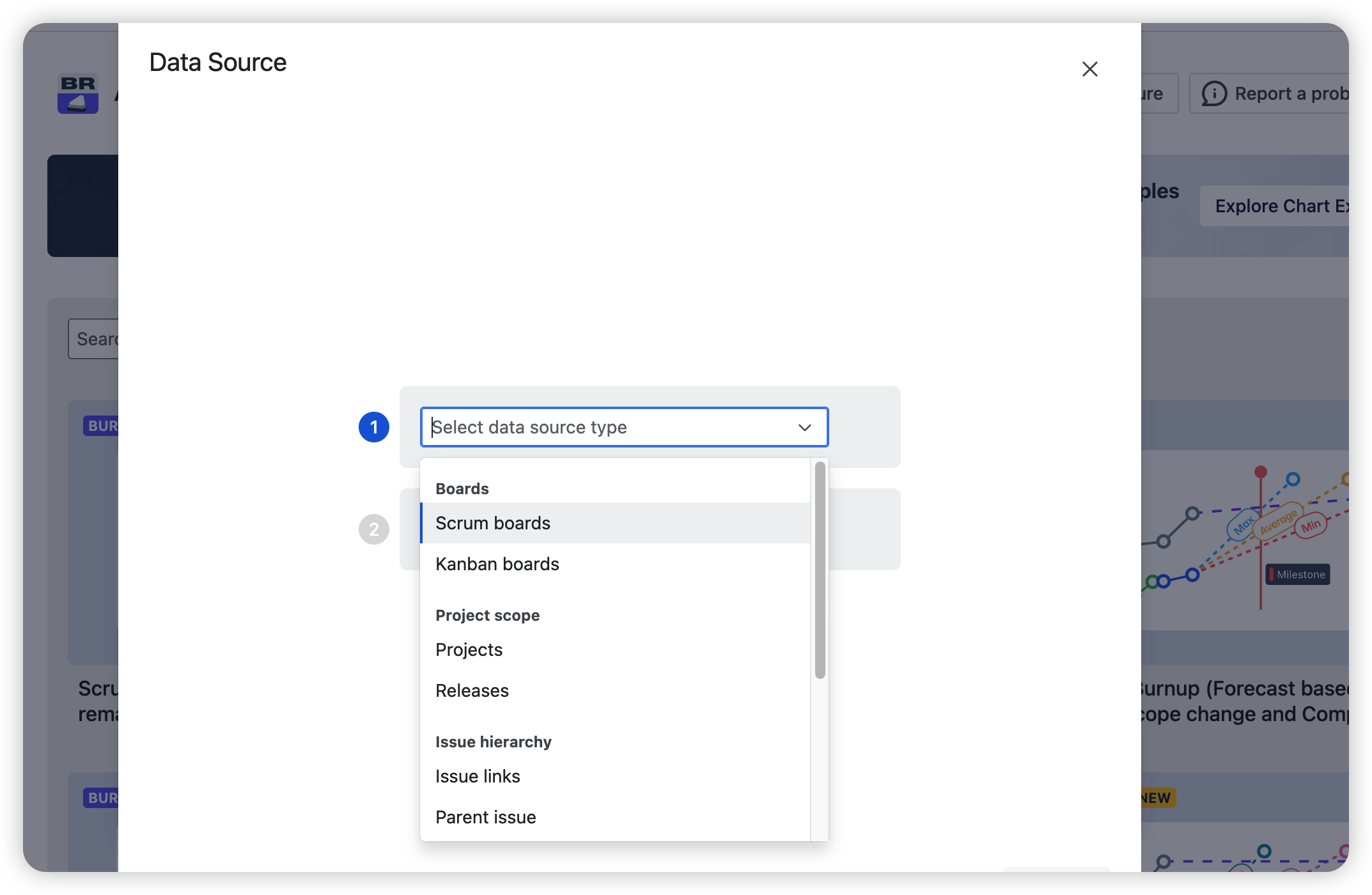
🟣 Flexible data sources
Charts can be built from projects, releases, custom JQL, or parent-level issues like epics and initiatives - not just a single board's filter.
🟣 Assignee-level Jira burndown chart
It helps you monitor individual delivery trends and throughput across Jira boards, empowering team leads, developers, and product managers to conduct data-informed reviews, give performance feedback, and make accurate delivery forecasts.

🟣 Health metrics
Health indicators above the chart display completion percentage, scope change, and not estimated issues - giving you an instant status summary without navigating away from the dashboard:

🟣 Progress metrics
Progress metrics are the main Burndown metrics shown on the chart. They help you analyze trends, delivery pace, and scope stability over time.
Hover over any sprint or interval to see how the progress metrics changed during that period:

🎯 Choosing the right approach
Before looking at any tool, it's worth being clear on what question you're actually trying to answer. If it's "are we on track this sprint?" - the native chart is likely enough. If it's "will we hit our release date?" or "what does our delivery trend look like across teams?" - that's where the native chart runs out and additional tooling starts to make sense.
For teams in the second category, the Agile Burnup Burndown Charts app is worth evaluating. It works as a standalone app or as part of Agile Reports and Gadgets - a bundle that also includes velocity, cycle time, cumulative flow, throughput, and Monte Carlo charts for teams that want a more complete reporting setup in one place.
Happy tooling,
The Broken Build Team

