Community resources
Community resources
Community resources
Jira Automation: The Practical Guide for Project Managers
Do you feel like you're constantly managing repetitive tasks in Jira?
You're not alone. Whether it's auto‑assigning tasks, sending reminders, or transitioning issues through workflows, these are all things you can automate. This guide is here to help you understand how Jira automation can make your life easier, save you time, and ensure that your teams are more productive.
Why automation matters in Jira
Imagine spending less time on administrative tasks and more on strategic decisions. That's the core benefit of Jira automation. For project managers, this means freeing up your time. For your team, it means fewer manual steps and more focus on impactful work.
Core concepts: how Jira automation works
Automation in Jira might seem daunting at first. But the beauty of it is you don’t need to be a developer. Anyone can leverage automation, even if you’re just starting out. Ready? Let’s dive in.
Before you start automating, let’s break down the core components.
- Triggers — these kick off the automation. For example, when an issue is created or when a status changes.
- Conditions — this helps narrow down when automation should run. For instance, a task that’s high‑priority or assigned to a specific person.
- Actions — what happens when the trigger and condition are met. Like changing the issue status or sending an email.
How to get started: step‑by‑step for newbies
Now, let’s get you set up with your first automation rule. Don’t worry — it’s easier than you think.
- Go to automation settings
- Navigate to Project Settings > Automation or fine the Automation icon on the right side of the screen.
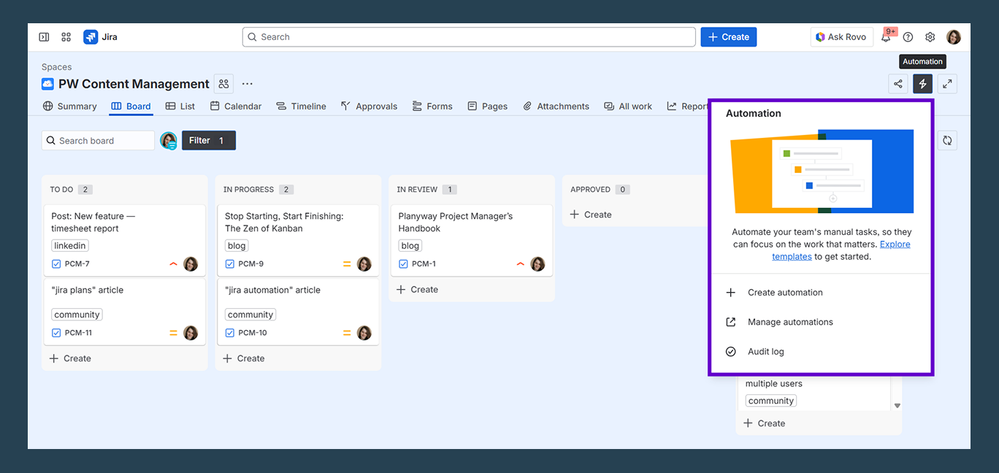
- Create your first rule
- Pick a trigger (e.g. when an issue is created).
- Add a condition (e.g. if the priority is ‘High’).
- Choose an action (e.g. assign the task to a team member).
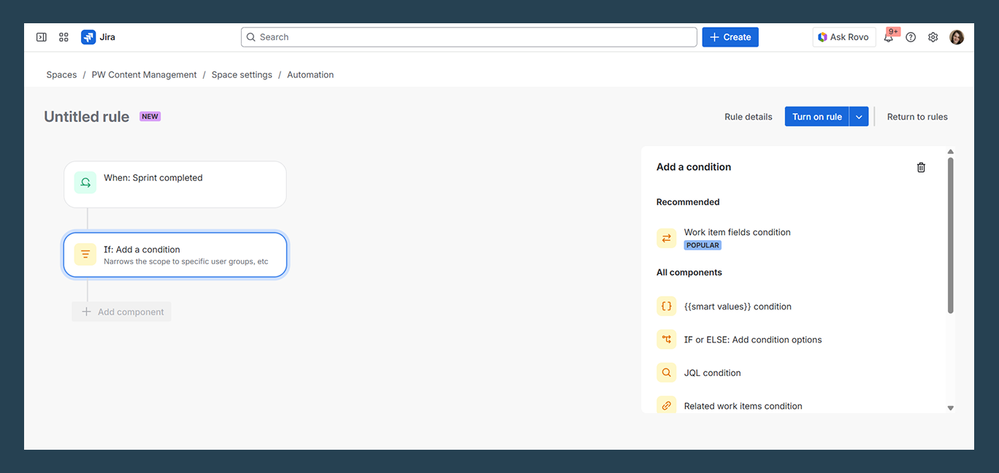
- Test & tweak
- Start small with one or two simple automations.
- Check logs and fine‑tune as you go to avoid overcomplicating things.
Common (and most useful) automation scenarios for PM teams
Let’s get practical. Here are some automations you’ll want to set up ASAP:
- Auto‑assigning tasks
When a new issue is created, automatically assign it to the right person based on the issue type or priority. It helps you prevent bottlenecks and ensures no tasks are left behind. - Auto‑closing parent tasks
When all sub‑tasks are complete, automatically close the parent task. It keeps your board clean and ensures nothing is overlooked. - Setting reminders and notifications
Need a reminder for a task nearing its deadline? Set it up in Jira to avoid the panic of last-minute rushes. - Workflow transitions
Automatically transition issues when a specific condition is met (e.g. when a code review is done, move the task to ‘Ready for QA’). It keeps everyone on track without manual intervention.
Advanced concepts & best practices
You’ve got the basics down — now let’s take it to the next level.
- Use smart values
These allow you to insert dynamic data into your automation for Jira (e.g. assignee’s name, issue priority) to make your rules much more flexible and personalized. - Branching and related issues
Want to update parent tasks when child tasks change? That’s branching in Jira. - Set up global rules carefully
Global rules apply to all projects, so be strategic about them. Too many rules can slow down your system, so use global rules sparingly.
How Planyway for Jira fits the automation story
Planyway helps you see the results of your Jira automation in real time — it’s your central dashboard, helping you answer the three hardest questions in project management:
- Who is doing what? (Resource Management)
- When will we ship? (Roadmap & Portfolio)
- Where is the time going? (Time Tracking & Reporting)
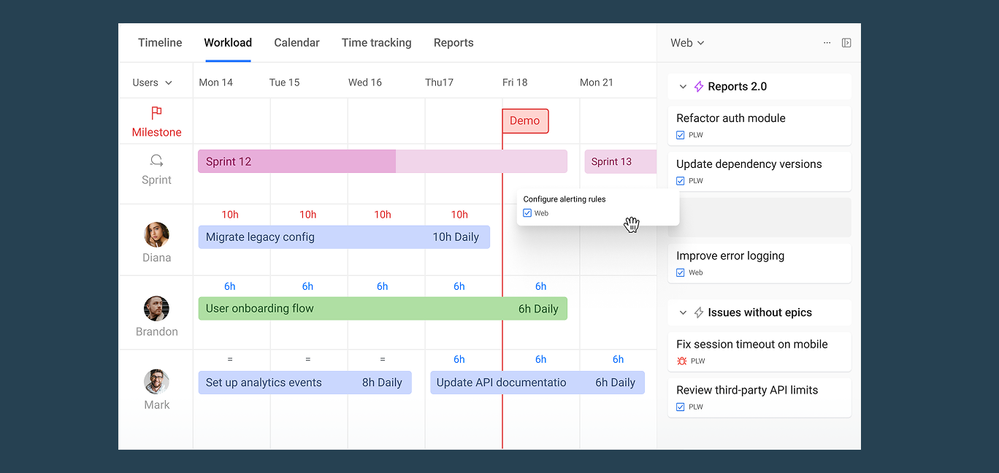
By integrating these elements, Planyway makes it easier to align your project’s plan with reality.
Conclusion
The key takeaway: automation isn’t just about saving time — it’s about giving you and your team the freedom to focus on higher-level work.
Embrace automation, start small, and keep refining your rules to build a smoother, more efficient process. Jira offers templates that make it easier to get started. Pair it with Planyway for the complete project management experience, and you’ll be on your way to running a lean, well-oiled machine.
Was this helpful?
Thanks!

Mary from Planyway
1 comment