Keeping Jira aligned across teams, projects, and tools is a constant challenge. As organizations grow, work rarely lives in a single Jira project, or even a single Jira instance. Support teams collaborate with development, product teams work across multiple spaces, and business stakeholders expect visibility without manual updates.
That’s where Jira sync capabilities become essential. In this article, we’ll explore how Elements Copy & Sync Cloud helps teams synchronize work items, fields and workflows in Jira, without custom scripts or fragile integrations.
1. Why Jira sync is essential for modern teams
Jira is incredibly flexible, but that flexibility often leads to fragmentation. Different teams configure their own projects, workflows, and custom fields to match how they work. Over time, this creates silos:
-
Issues need to be duplicated across projects
-
Status changes aren’t reflected everywhere
-
Field updates aren’t reflected everywhere
-
Teams rely on manual copy-paste or increasingly complex automation rules
Manual workarounds don’t scale, and native automation can quickly become hard to maintain. What teams really need is a reliable Jira sync solution: one that keeps data aligned automatically, while still respecting each team’s autonomy.
Elements Copy & Sync is designed specifically for this purpose. It allows teams to define clear synchronization rules between Jira issues, projects, and instances, ensuring the right data stays in sync at the right time.
2. Syncing Jira issue fields across teams
One of the most common Jira sync needs is keeping issue fields aligned across teams. A classic example in the ITSM space is issue escalation.
Use case: Issue escalation from support to development
A support team receives a request from a customer in their Jira Service Management project. The issue needs to be escalated to a development team working in a separate Jira project with a different configuration.
With Elements Copy & Sync, the support issue can be copied and synchronized to a development issue. From there:
-
Key fields (summary, description, priority, selected custom fields) stay in sync
-
Updates made by the development team are reflected back to the support issue
-
Sensitive or irrelevant fields can be excluded from synchronization
This approach avoids forcing both teams into a single shared project or workflow. Instead, each team continues working in their own space while Elements handles synchronization behind the scenes.
Field-level synchronization rules make it possible to control exactly how data flows, one-way or two-way, depending on the use case.
Discover more about the issue escalation use case.
3. Syncing Jira projects and instances at scale
As organizations mature, Jira sync requirements often extend beyond a single project or even a single Jira Cloud instance.
Elements Copy & Sync Cloud supports synchronization:
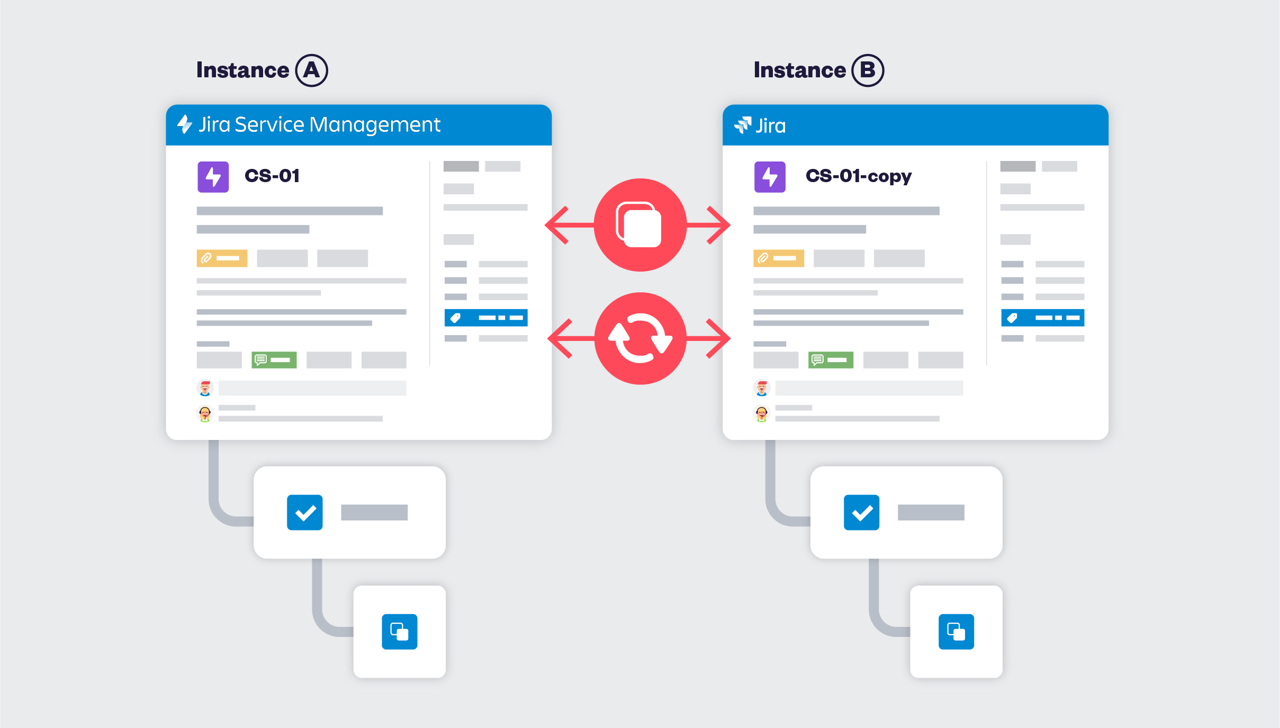
This is especially useful for:
-
Managed service providers working with multiple customers
-
Large enterprises with separate Jira instances per department
-
Mergers and acquisitions where Jira instances need to collaborate
Instead of migrating everything into one monolithic setup, teams can keep their existing structure and still share work through controlled synchronization. Issues are copied once and then kept aligned automatically, reducing the risk of data loss or inconsistencies.
4. Keeping workflows aligned in Jira
Different teams rarely use the same workflow and that’s a good thing. Support, development, and business teams all have different needs.
However, mismatched workflows can quickly become a blocker. If one issue moves to “In Progress” while its counterpart stays in “Open,” confusion soon follows.
Elements Copy & Sync allows teams to map workflows and statuses between projects. For example:
-
“Waiting for Support” can sync to “Blocked”
-
“Resolved” can sync to “Done”
-
Transitions can trigger updates on linked issues
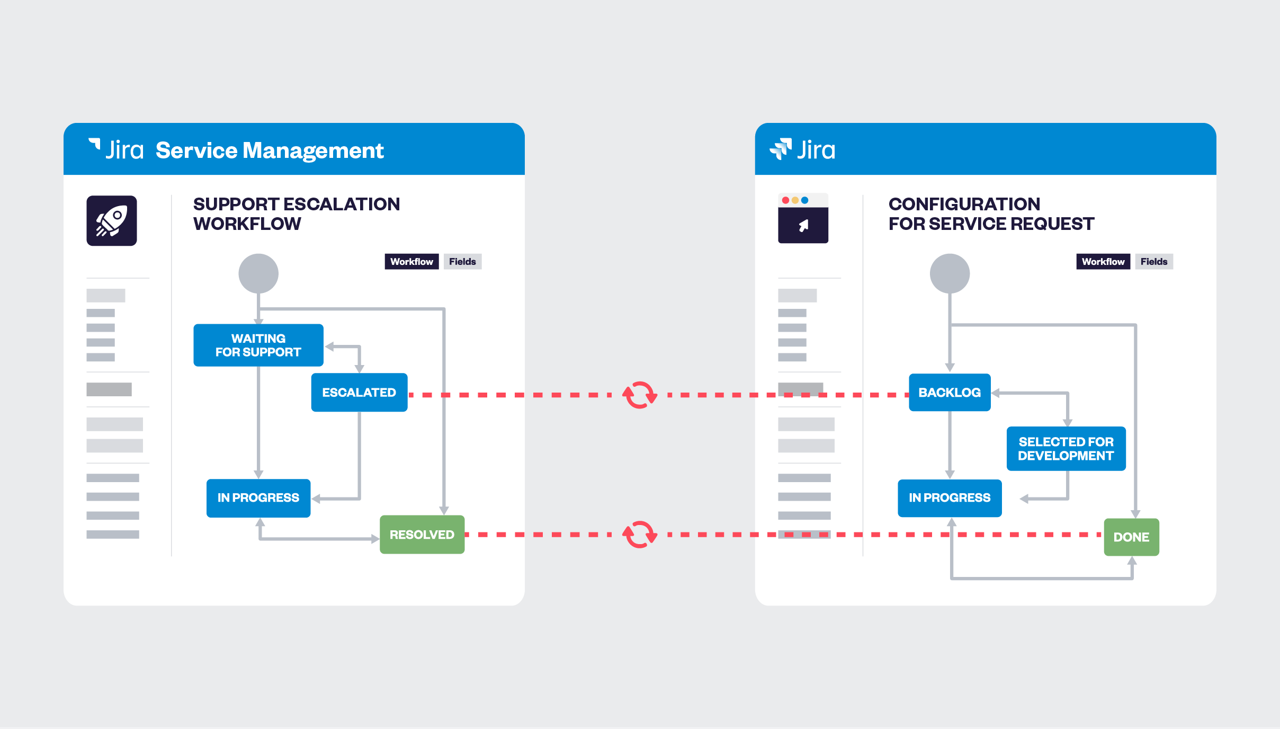
This ensures that, even with different workflows, issue progress remains visible and meaningful across teams. Workflow synchronization focuses on intent rather than forcing identical configurations.
5. Syncing linked Jira issues for full traceability
In many Jira setups, relationships between issues are just as important as the issues themselves. Parent-child links, dependencies, and custom issue links all provide critical context.
Elements Copy & Sync extends Jira sync to linked issues, making it possible to:
-
Automatically copy and sync linked issues
-
Preserve relationships between original and copied issues
-
Keep status and field updates aligned across linked work
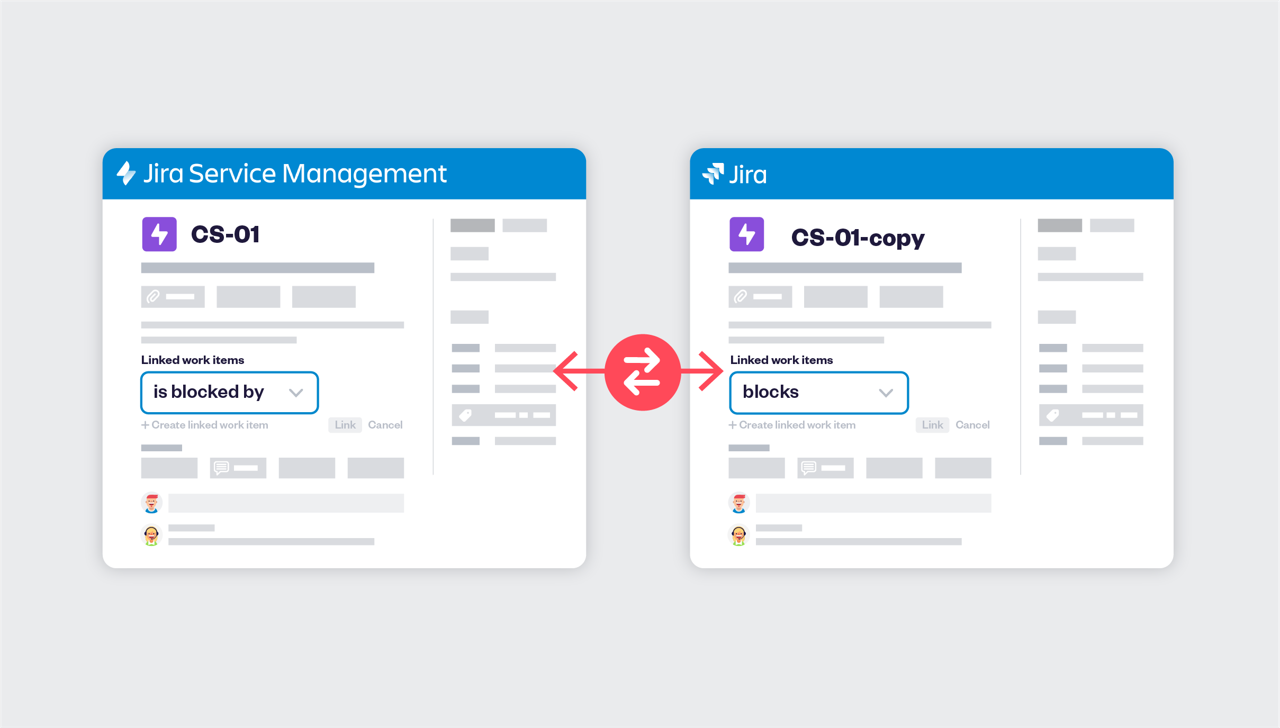
This is particularly valuable for complex delivery models, where a single customer request may result in multiple development tasks, bugs, or epics across projects.
By syncing linked issues, teams maintain end-to-end traceability without manually recreating relationships.
6. Extending Jira synchronization to Confluence with Elements Publish
Jira issues rarely exist in isolation. Status updates, release notes, and operational reports are often shared in Confluence.
With Elements Publish, teams can extend their Jira sync strategy beyond Jira itself by publishing Jira data directly to Confluence pages. This enables:
-
Automatic updates of Jira issue data in Confluence
-
Consistent reporting across teams
-
Reduced manual documentation effort

For example, a support escalation tracked through synced Jira issues can be automatically reflected in a Confluence status page used by stakeholders. As Jira issues are updated, the Confluence content stays current.
Bringing it all together
Effective Jira sync isn’t just about copying issues, it’s about enabling collaboration without forcing teams to change how they work.
Elements Copy & Sync provides a structured, scalable approach to synchronization in Jira Cloud:
-
Field-level control for precise data sharing
-
Project and instance sync for complex organizations
-
Workflow mapping that respects team autonomy
-
Linked issue synchronization for full traceability
-
Seamless Jira–Confluence publishing with Elements Publish
For teams struggling with manual updates, fragmented data, or brittle automation, a dedicated Jira sync solution can make all the difference, keeping work aligned, visible, and moving forward.
